
The Python List is one of the most useful sequences in real-time. A list is a sequence of multiple values in an ordered sequence. Unlike Strings, it allows us to store different types of data, such as integer, float, string, etc.
There are several ways to create a List in this programming language. The most straightforward way is to place the required items within a square bracket [ ].
Create an Empty List in Python
An object that contains no values or elements is empty, and placing a square bracket creates an empty list in this programming language.
ListName = []
How do you create a List of Different Data Types?
The first statement is an integer of five integer values or multiple elements within the square brackets. The second statement is a string that contains three String values or three words.
IntegerList = [1, 2, 3, 4, 5]
StringList = [‘apple’, ‘Orange’, ‘Grape’, ‘Mango’]
Python Lists allow placing different data types in a single. It is an example of a mixed type, which contains one integer, a float, and two integer values. For more object types, explore the Python tutorial.
MixedList = [‘apple’, 2, 3.50, ‘Mango’]
How to access Python List items?
Lists sequentially store data (ordered). So, we can access the elements with the help of indexes. Moreover, using indexes, we can access or alter/change each item present in it separately. The syntax to access the list items is
ListName([IndexNumber])
The index value starts at 0 and ends at n-1, where n is the size. For example, if the list stores 5 elements, the index starts at 0 and ends with 4. To access or alter the first list value, use list_name[0]; to access the fifth list item, use list_name[4]. Let’s see the list example for a better understanding:
x = [1, 2, 3, 4, 5, 6, 7, 8, 9]

# Positive Indexing
print(x[0])
print(x[4])
print(x[8])
print('=======\n')

# Negative
print(x[-2])
print(x[-4])
print(x[-8])
Elements output of Positive and Negative Indexes
1
5
9
=======

8
6
2
Please use Negative numbers as the index to access the elements from right to left. It means accessing Python list items in reverse order.
x = ['apple', 'Mango', 'banana', 'orange', 'cherry','kiwi']

# Using Positive
print("IP 0 = ", x[0])
print("IP 2 = ", x[2])
print("IP 4 = ", x[4])
print("IP 3 = ", x[3])
print('=======\n')

#Using Negative
print("Pos -1 = ", x[-1])
print("Pos -3 = ", x[-3])
print("Pos -5 = ", x[-5])
print("Pos -6 = ", x[-6])
Accessing elements using both the Positive and Negative Numbers
IP 0 =  apple
IP 2 =  banana
IP 4 =  cherry
IP 3 =  orange
=======

Pos -1 =  kiwi
Pos -3 =  orange
Pos -5 =  Mango
Pos -6 =  apple
Negative Index to access List Items in Python
In Python, if you use a negative index (negative numbers as the index), then it starts looking from right to left.
# Access List Items using Negative Index

numbers = [1, 2, 3, 4, 5]

# Use Negative Index
print("Item at Negative Index Position 1 = ", numbers[-1])
print("Item at Negative Index Position 2 = ", numbers[-2])
print("Item at Negative Index Position 3 = ", numbers[-3])
print("Item at Negative Index Position 4 = ", numbers[-4])
print("Item at Negative Index Position 5 = ", numbers[-5])
Item at Negative Index Position 1 =  5
Item at Negative Index Position 2 =  4
Item at Negative Index Position 3 =  3
Item at Negative Index Position 4 =  2
Item at Negative Index Position 5 =  1
How to access the first and last list elements?
As mentioned earlier, we can use positive index positions to access list items from first to last, where 0 represents the first list element. Negative indices allow accessing Python list elements from last to first, where -1 represents the last element.
food = ["Pizza", "Fries", "Pasta", "Burger"]
print("The First Element = ", food[0])
print("The Last Element  = ", food[-1])
The First Element =  Pizza
The Last Element  =  Burger
Alter or change Python list element
If we assign a value to an index position, this value replaces the existing value. For instance,
- num[1] = 99 means it replaces the number at the index position 1 with 99. So, 20 is replaced by 99 in the final list.
- num[-1] = 100 replaces the last list element, 50, with 100.
Since they are mutable, apart from accessing items, use these index positions to alter or replace the elements.

Adding list element using + and +=
The Python arithmetic operator (+) adds or combines two lists and stored in a separate list. For instance, if we want to create a new list by combining two existing lists, use the + operator.
food = ["Pizza", "Fries", "Burger"]
drinks = ["coffee", "coke"]

combo = food + drinks
print(combo)
['Pizza', 'Fries', 'Burger', 'coffee', 'coke']On the other hand, the Python assignment operator assigns the result to the left operand. It means the + operator joins two lists and stores the result in the first list.
In short, if the task is to create a new list, use the + operator, and if you want to modify the existing list, use the += operator.
food = ["Pizza", "Fries", "Burger"]
drinks = ["coffee", "coke"]

food += drinks
print(food)
['Pizza', 'Fries', 'Burger', 'coffee', 'coke']Python List length
Use the len function to find the length of an array in Python.
int_lst = [1, 2, 3, 4, 5, 6, 7, 8]
int_length = len(int_lst )
print("The length of an Integer list =  ", int_length)

# Declaring a String list and finding Length
string_lst = ['apple', 'banana', 'orange', 'kiwi']
string_length = len(string_lst )
print("The length of a string list =  ", string_length)
The length of an Integer list =   8
The length of a string list =   4
Iterate Python List items using for loop
A For Loop is the most common way to traverse the items, and it helps to iterate and print the items. This code works accurately to print items inside it. However, to alter the individual element, we need the index position.
To resolve this, we have to use the range function along with the Python for loop.
Fruits = ['Apple', 'Orange', 'Grape', 'Banana']
for Fruit in Fruits:
    print(Fruit)
It multiplies each item by 10. If we want to perform the calculation based on a condition, use the Python If Statement inside the for loop.
x = [1, 2, 3, 4, 5, 6, 7, 8, 9]

for Number in range(len(x)):
    x[Number] = x[Number] * 10
print(x)
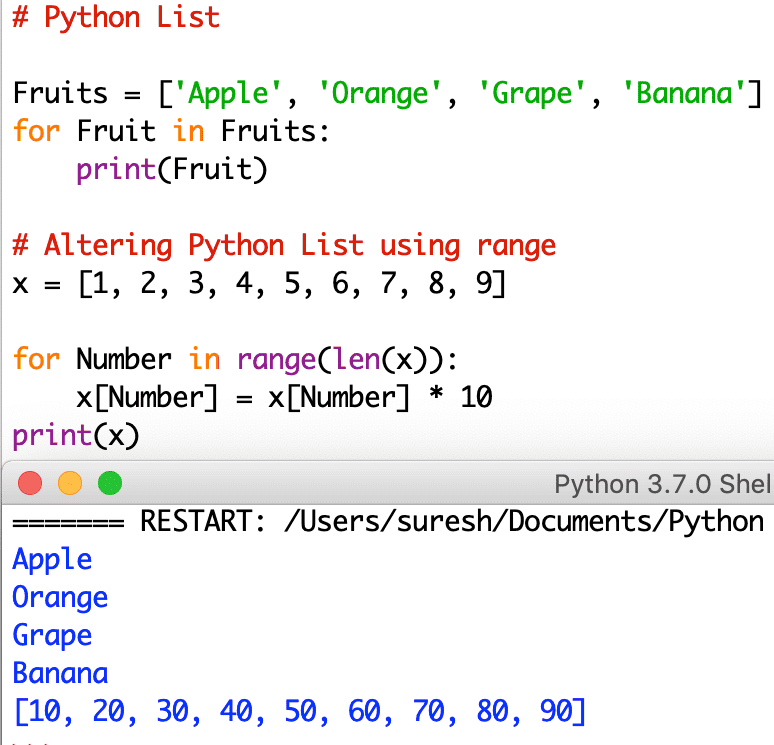
In this example, we declared a Python String. The first for loop is to iterate and print the items. And the second for loop, along with the range, to iterate each element using the position of an index. Let us see another example.
# Iterate Items

Fruits = ['apple', 'Mango', 'banana', 'orange', 'cherry','kiwi']

# Iterate Elements
for fruit in Fruits:
    print(fruit)

# Iterate Items using Index
for i in range(len(Fruits)):
    print("Item at ", i, " = ", Fruits[i])
Iterating the String items using for loop and for loop range output
apple
Mango
banana
orange
cherry
kiwi
Item at 0  =  apple
Item at 1  =  Mango
Item at 2  =  banana
Item at 3  =  orange
Item at 4  =  cherry
Item at 5  =  kiwi
TIP: I also suggest you refer to Python List Comprehensions for list traversal, Python map, and Python zip functions.
Using a while loop to iterate over a Python list
Similar to the for loop, we can use a while loop to iterate over list elements and perform updates or print items. Here, i is initialized to the first index position. Next, the while loop condition checks whether the index position is less than the actual list length. Within the loop, we must increment i by 1 to move forward.
food = ["Pizza", "Burgers", "Coke", "Fries", "Pasta"]

i = 0
while i < len(food):
    print(food[i])
    i += 1
Pizza
Burgers
Coke
Fries
Pasta
Using enumerate to iterate over a list
We can use enumerate to iterate over the Python list. It is helpful when we need both the index position and the actual list element.
holiday_place = ["Paris", "Leh", "Switzerland", "Bali"]

for index, name in enumerate(holiday_place):
    print(index, name)
0 Paris
1 Leh
2 Switzerland
3 Bali
Insert items into a List
The available built-in Python list functions to insert new items into an existing one.
- List append(x): The append method adds item x at the end.
- List insert(i, x): The insert method inserts the specified item x at position i.
- List extend(New_List): The extend method adds all the elements in New_List at the end.
Fruits = ['Apple', 'Orange', 'Grape', 'Banana']

# Adding items using append
Fruits.append('Blackberry')
print(Fruits)

# inserting items using insert
Fruits.insert(2, 'Kiwi')
print(Fruits)

# Extending using extend
Fruit_new = ['berry','Cherry']
Fruits.extend(Fruit_new)
print(Fruits)
['Apple', 'Orange', 'Grape', 'Banana', 'Blackberry']
['Apple', 'Orange', 'Kiwi', 'Grape', 'Banana', 'Blackberry']
['Apple', 'Orange', 'Kiwi', 'Grape', 'Banana', 'Blackberry', 'berry', 'Cherry']
Remove Python List element
There are multiple ways to remove an element from a list. In this example, we are using the remove function to remove items from a list. Remember, if you know the element, then you can use the list remove function.
# Remove an Item from a list

# Declaring a list
lst = [10, 20, 30, 40, 50, 60]
print("Old lst = ", lst)

# Remove 40 from the list
lst.remove(40)
print("\nUpdated list = ", lst)

# Remove 20 from the list
lst.remove(20)
print("Updated list = ", lst)
Old lst =  [10, 20, 30, 40, 50, 60]

Updated list =  [10, 20, 30, 50, 60]
Updated list =  [10, 30, 50, 60]
In this example, we are using the list pop function to remove list items. Use this pop() function to delete the list element at the user-specified index position.
# Declaring a list
num = [10, 20, 30, 40, 50, 60]
print("Old list = ", num)

# Remove index 4 from the list
x = num.pop(4)
print("\nRemoved Item  = ", x)
print("Updated list = ", num)

# Remove index 2 from the list
y = num.pop(2)
print("\nRemoved Item  = ", y)
print("Updated list = ", num)
Old list =  [10, 20, 30, 40, 50, 60]

Removed Item  =  50
Updated list =  [10, 20, 30, 40, 60]

Removed Item  =  30
Updated list =  [10, 20, 40, 60]
Python list slicing- Accessing multiple elements in a list
By default, when we use the index position, we can access one list item at a time. However, we can use the beautiful slicing technique to access multiple elements in a list.
In List Slice, the first integer value is the index position where the slicing starts and the second integer value is the index position where the slicing ends. The Slicing goes until the second integer value but does not include the value at this end index position. For instance, if we specify a [1:4], then slicing starts at index position one and ends at 3 (not 4)
x = [1, 2, 3, 4, 5, 6, 7, 8, 9]

# Slicing using two indexes
a = x[2:6]
print(a)

# Slicing using First
b = x[:6]
print(b)

# Slicing using Second
c = x[2:]
print(c)

# Slicing without using two
d = x[:]
print(d)
[3, 4, 5, 6]
[1, 2, 3, 4, 5, 6]
[3, 4, 5, 6, 7, 8, 9]
[1, 2, 3, 4, 5, 6, 7, 8, 9]
Use Negative numbers as the values to slice the elements.
x = [1, 2, 3, 4, 5, 6, 7, 8, 9]

# Slicing using Negative first
e = x[-3:]
print(e)

# Slicing using Negative Second
f = x[:-2]
print(f)

# Slicing using Negative first and second
g = x[-7:-2]
print(g)

# Assigning new values
x[1:3] = ['t','g']
print(x)
[7, 8, 9]
[1, 2, 3, 4, 5, 6, 7]
[3, 4, 5, 6, 7]
[1, 't', 'g', 4, 5, 6, 7, 8, 9]
From the above slicing
- Omitting the first index means the Slicing start from the beginning.
- Omit the second; slicing starts from the first index and continues to the last.
- Use the Negative values to Slice the elements from right to left.
TIP: Please refer to the Python set and Python Tuple articles.
Step in Python list slicing
In the above example, we used the start and stop of list slicing. However, one more argument (step) changes everything about the result.
Syntax: list_name[start:stop:step]
By default, slicing uses a step of 1, so it returns the list elements from the start position to the end position (excluding the end position). However, if we specify the step value as 2, it picks every other value from the list. For instance,
- n[::2] – starts from 0 and ends at the last position. Next, 2 means it skips one number. Starts at n[0] = 1, skips 2, returns 3, etc.
- n[1:7:2] – Starts from n[1] and ends at n[6] (exclude 7). Here, n[1] = 2, skip 3, return 4, skip 5, return 6, Skip 7, reaches end position.
- n[::-1] – As the step value is -1, it starts from the last to the first. Next, there are no start and stop index positions. So, it starts from the last position and moves to the first position. If we replace -1 with -2, then it returns alternative numbers from last to first.
n = [1, 2, 3, 4, 5, 6, 7, 8, 9, 10]
print(n[::2])
print(n[1:7:2])
print(n[1::2])
print(n[::-1])
[1, 3, 5, 7, 9]
[2, 4, 6]
[2, 4, 6, 8, 10]
[10, 9, 8, 7, 6, 5, 4, 3, 2, 1]
Changing multiple items in a list
We can use the index position to change a single value. However, to change multiple values, we must use Python list slicing. In the example below, we will replace the numbers from the 2nd index position to the 5th position.
n = [1, 2, 3, 4, 5, 6, 7, 8, 9, 10]

n[2:6] = [33, 44, 55, 66]
print(n)
[1, 2, 33, 44, 55, 66, 7, 8, 9, 10]Replace a range of elements in a list
In our earlier example, we have shown how to change multiple items in a Python list. Similarly, we can replace a range of list items with more or fewer items. For example, we can replace 5 list items with 2 or 7.
In the example below, there are five holiday destinations. Next, we used the list slicing technique to replace two holiday destinations (“Hawaii”, “Sydney”) with four different destinations from the USA and India (“Carolina”, “Arizona”, “California”, “Jaipur”).
destination = ["Bali", "Hawaii", "Sydney", "Leh", "Kerala"]

destination[1:3] = ["Carolina", "Arizona", "California", "Jaipur"]
print(destination)
['Bali', 'Carolina', 'Arizona', 'California', 'Jaipur', 'Leh', 'Kerala']In this example, we will replace the list of existing items with fewer elements. Here, we will replace the Hawaii and Sydney destinations with Goa.
destination = ["Bali", "Hawaii", "Sydney", "Leh", "Kerala"]

destination[1:3] = ["Goa"]
print(destination)
['Bali', 'Goa', 'Leh', 'Kerala']How to check if a list is empty?
Use the if-else statement with the not operator to check whether the given Python list is empty.
menu = []

if not menu:
    print("List is Empty")
else:
    print("List is full")
List is EmptyUsing in and not in to search and check list item
We can use the in and not in operators to check for list elements. We can use them to search and check list items.
- in: It checks whether the given element exists in a list.
- not in: It checks whether the item is not in the list.
The following program checks whether the user-given destination (“Leh”) is an element in the Python list (holiday_place). If true, it prints the “Enjoy the Holidays” message.
in list example
holiday_place = ["Paris", "Leh", "Switzerland", "Bali"]
destination = "Leh"

if destination in holiday_place:
    print("Enjoy the Holidays")
else:
    print("Sorry, pick other package")
Enjoy the Holidaysnot in list example
Similar to the above, if we replace in with not in
holiday_place = ["Paris", "Leh", "Switzerland", "Bali"]
destination = "Leh"

if destination not in holiday_place:
    print("Enjoy the Holidays")
else:
    print("Your choice is not in the top holiday destinations.")
Your choice is not in the top holiday destinations.Built-in Python list Functions
List sort
The array list sort function is to sort the array elements in ascending order.
# Declaring a list
lst = [100, 20, 60, 40, 10, 60, 120, 50, 30]
print("Old list = ", lst)

# Sort list
lst.sort()
print("Sorted list = ", lst)
Old list =  [100, 20, 60, 40, 10, 60, 120, 50, 30]
Sorted list =  [10, 20, 30, 40, 50, 60, 60, 100, 120]
List reverse
The List reverse function is to reverse the array elements.
# Declaring a list
lst = [100, 20, 60, 40, 10, 60, 120, 50, 30]
print("Old = ", lst)

# Reverse list
lst.reverse()
print("Reversed = ", lst)
Old =  [100, 20, 60, 40, 10, 60, 120, 50, 30]
Reversed =  [30, 50, 120, 60, 10, 40, 60, 20, 100]
List copy
The list copy function is to shallow copy the List items into a completely new list.
# Copy a list

# Declaring a list
lst = [100, 20, 60, 40, 10, 60, 120, 50, 30]
print("Old list = ", lst)

# Copying list
new_lst = lst.copy()
print("New list = ", new_lst)
Old list =  [100, 20, 60, 40, 10, 60, 120, 50, 30]
New list =  [100, 20, 60, 40, 10, 60, 120, 50, 30]
List clear
The list clear function is to remove or clear all the existing items from the given list.
# Clear List items

# Declaring a List
lst = [100, 20, 60, 40, 10, 60, 120, 50, 30]
print("Old = ", lst)

# Removing List items
lst.clear()
print("New = ", lst)
Old =  [100, 20, 60, 40, 10, 60, 120, 50, 30]
New =  []
In this list program, we apply all the built-in methods. Also, check the Python Dictionary object.
Fruits = ['Apple', 'Orange', 'Banana', 'Kiwi', 'Grape', 'Blackberry']
x = [9, 4, -5, 0, 22, -1, 2, 14]

#Copying using Copy() Method
New_Fruits = Fruits.copy()
print(New_Fruits)

#Removing all the items using Clear() Method
New_Fruits.clear()
print(New_Fruits)

# Sorting using Sort() Method
Fruits.sort()
x.sort()
print(Fruits)
print(x)

# Reverse using reverse() Method
Fruits.reverse()
x.reverse()
print(Fruits)
print(x)

# position of an item
print('The Index position of Banana = ', Fruits.index('Banana'))
print('The Index position of -1 = ', x.index(-1))

# Counting items using count() Method
y = [9, 4, 1, 4, 9, -1, 2, 4]
print('Number of Times 4 is repeated = ', y.count(4))
print('Number of Times 9 is repeated = ', y.count(9))
['Apple', 'Orange', 'Banana', 'Kiwi', 'Grape', 'Blackberry']
[]
['Apple', 'Banana', 'Blackberry', 'Grape', 'Kiwi', 'Orange']
[-5, -1, 0, 2, 4, 9, 14, 22]
['Orange', 'Kiwi', 'Grape', 'Blackberry', 'Banana', 'Apple']
[22, 14, 9, 4, 2, 0, -1, -5]
The Index position of Banana =  4
The Index position of -1 =  6
Number of Times 4 is repeated =  3
Number of Times 9 is repeated =  2
sum
The sum function finds the sum of all items.
a = [5, 10, 15, 20, 25]
print(a)

# sum of elements
total = sum(a)

print("\nThe sum = ", total)
[5, 10, 15, 20, 25]

The sum =  75
Python List Arithmetic Operations Example
Using the Python Arithmetic Operators to perform arithmetic operations.
- + operator is concatenating them.
- * operator repeats the element for a given number of times. Here it is three times.
x = [10, 20, 30, 40]
y = [15, 25, 35, 45]

# using + Operator
total = x + y
print("\nAddition : ", total)

# using * Operator
multi = x * 2
print("Multiplication : ", multi)

multi2 = y * 3
print("Multiplication of Y : ", multi2)
Performing arithmetic operations and return output.
Addition :  [10, 20, 30, 40, 15, 25, 35, 45]
Multiplication :  [10, 20, 30, 40, 10, 20, 30, 40]
Multiplication of Y :  [15, 25, 35, 45, 15, 25, 35, 45, 15, 25, 35, 45]
Python Nested List
You can create a multidimensional or nested list by nesting one list inside another.
Access nested list elements
Accessing the nested list elements involves the index position of the actual list and the index position of the number. For example, in the example below,
- lst[0][0]: Here, lst[0] = [10, 20], which is the first sub-list or nested list in a main list (lst). From that list, we want the first value; the index position is 0, and the final code is lst[0][0] = 10.
- lst[1][1]: Here, lst[1] = [30, 40]. From this list, we want the second list item, and its index position is 1. So, lst[1][1] = 40.
- lst[3][0]: Here, lst[3] = [70, 80]. From this list, we need the first nested list element, and its index position is 0. So, lst[3][0] = 70.
lst = [[10, 20], [30, 40], [50, 60], [70, 80], [90, 10]]
print("List Items= ", lst)

# Declaring a list
print(lst[0][0])
print(lst[1][1])
print(lst[2][1])
print(lst[3][0])
print(lst[4][1])
List Items=  [[10, 20], [30, 40], [50, 60], [70, 80], [90, 10]]
10
40
60
70
10
Iterate over nested lists
We need the nested for loop to iterate over the nested lists in Python. Here, the first for loop (outer) iterates over the main list. It considers every nested list as a single item. The inner for loop iterates over the nested list to extract the actual list item.
For example, on the first iteration of the outer loop, control enters [‘Pizza’, 10]. The inner loop iterates over them and prints Pizza and 10. After that, control moves to the outer loop to move to the second nested list. The following list shows the iteration-wise execution of the nested lists.
- Outer loop Iteration: [‘Pizza’, 10]
- Inner Loop = Pizza
- Inner Loop = 10
- Outer loop Iteration: [‘Burgers’, 20]
- Inner Loop = Burgers
- Inner Loop = 20
- Outer loop Iteration: [‘Coke’, 50]
- Inner Loop = Coke
- Inner Loop = 50
food = [["Pizza", 10], ["Burgers", 20], ["Coke", 50]]

for item in food:
    for drink in item:
        # print(item)
        print(drink)
Pizza
10
Burgers
20
Coke
50
Updating nested lists
To update the Python nested list, we must use the list element index position. For example, if a list has three nested lists, to update the first items, we must use the nested list index position and then the actual item index position. Here, food[1][1] means [1] accesses the [“Burgers”, 20] list, and then the next [1] means index position 1, which is 20. So, it replaces 20 Burgers with 33 Burgers.
food = [["Pizza", 10], ["Burgers", 20], ["Coke", 50]]

food[1][1] = 33
print(food)
[['Pizza', 10], ['Burgers', 33], ['Coke', 50]]To update all nested lists, we must use a for loop to iterate over the list items, then update them. Here, we used the Python range function because we need the index position of every item.
numbers = [[1, 2, 3], [4, 5, 6], [7, 8, 9]]

for i in range(len(numbers)):
    for j in range(len(numbers[i])):
        numbers[i][j] = numbers[i][j] * 3

print(numbers)
[[3, 6, 9], [12, 15, 18], [21, 24, 27]]Flatten nested list
We can use either a list comprehension or a for loop to iterate over the nested list items to flatten the nested list.
Flatten nested list using list comprehension
food = [["Pizza", "Burgers"], ["Coke", "Pepsi"]]

menu = [i for item in food for i in item]
print(menu)
['Pizza', 'Burgers', 'Coke', 'Pepsi']Flatten Python nested list using a for loop
food = [["Pizza", "Burgers"], ["Coke", "Pepsi"]]

menu = []

for items in food:
    for individual in items:
        menu.append(individual)
print(menu)
['Pizza', 'Burgers', 'Coke', 'Pepsi']