
The Python elif Statement is also called the Else If, and elseif is very useful when checking several conditions. Apart from this elif, we can also use the Nested If to achieve the same. However, as the number of conditions increases, the Nested If else complexity will also increase. Let us see the syntax of the same.
Python elif Syntax
The syntax of the elif or else if statement is
if (condition 1):
    statements 1
elif (condition 2):
    statements 2
    ...........
elif (condition n):
    statements n
else:
    default line
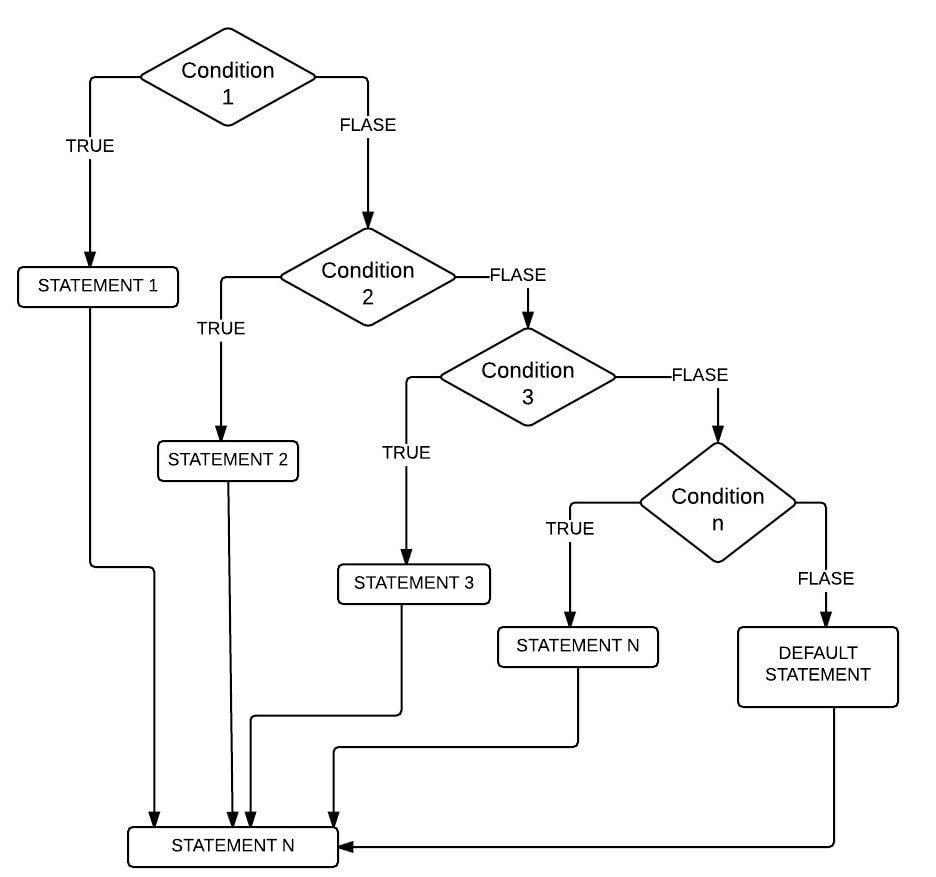
The elif or else if statement effectively handles multiple lines by executing them sequentially. This means the elif will check for the first condition; if the condition is TRUE, then it will execute the statements present in that block.
If the condition is FALSE, then Python elseif will check the Next one (Elif or else if conditional statement), and so on. There will be some situations where condition 1 and condition 2 is TRUE, for example:
x= 20, y=10
Condition 1: x > y # TRUE
Condition 2: x != y # TRUE
In these situations, a block of code under Condition 1 will execute because the elif conditions will only be executed if their previous if statement (else) fails.
Python elseif Flow Chart
The flow chart of this elif or elseif conditional statement is
Simple Python else if example
In the following example, we use a single elif statement to check whether the person is a Minor, Adult, or Senior Citizen.
- The control checks whether the age is below 18. If true, it prints Minor. Otherwise, it moves to the next condition.
- The elif condition checks whether the person’s age is below 60. If the condition is true, it prints Adult as output. If it is false, it moves to the else block.
- If the above two conditions fail, the program will display Senior Citizen as the result.
age = 30

if age < 18:
    print("Minor")
elif age < 60:
    print("Adult")
else:
    print("Senior Citizen")
AdultMultiple elif statements in Python
As there are different levels of scholarships, such as a full scholarship, 50% of the total, or 10% of the total, we need multiple elif statements. If the student meets the first condition, they can claim a 100% scholarship (similar to the ladder).
In this elseif program, the User will be asked to enter his total 6 subject marks. Using the Elif or else if statement, we check whether they are eligible for scholarships.
# Imagine you have 6 subjects and Grand total is 600
Totalmarks = int(input(" Please Enter Your Total Marks:  "))
if Totalmarks >= 540:
    print(" Congratulations! ")
    print(" You are eligible for Full Scholarship ")
elif Totalmarks >= 480:
    print(" Congratulations! ")
    print(" You are eligible for 50 Percent Scholarship ")
elif Totalmarks >= 400:
    print(" Congratulations! ")
    print(" You are eligible for 10 Percent Scholarship ")
else:
    print(" You are Not eligible for Scholarship ")
    print(" We are really Sorry for You ")
Once you complete it, please save the file. Once you save the file, Let us hit F5 to run the script. The shell will pop up with the message “Please Enter Your Total Marks:” .
OUTPUT 1: We are going to enter Totalmarks = 570. The first if condition is TRUE. So, the elseif output displays the print code inside the if statement. Visit the Python if-else statement for TRUE and FALSE messages from our Python tutorial page.
2nd Output: Let me test the Python elif or elseif statement this time. For this, we will enter Totalmarks to 490, which means the first IF expression will evaluate FALSE. It will check the (Totalmarks >= 480) condition, which is TRUE, so the program will print the code inside this block. Although the else if (Totalmarks >= 400) condition is TRUE, it won’t check this condition.
Output 3: This time we entered Totalmarks as 401 means the first IF condition, else if (Totalmarks >= 480) are FALSE. So, It will check the (Totalmarks >= 401), which is TRUE. So elseif or elif returns the block of code.
OUTPUT 4: We entered the Totalmarks as 380, which means all the IF conditions Fail. So, the elseif prints the else block.

TIP: Please refer to the Python Nested If statement article.
In this elif or elseif program, we first declared Totalmarks to enter any integer value.
Totalmarks = int(input(" Please Enter Your Total Marks: "))
If the person’s Total marks are greater than or equal to 540, then the following lines will display
print(" Congratulations! ")
print(" You are eligible for Full Scholarship ")
If the first elseif condition of the elif fails, then it will go to the second. When the person’s total mark is greater than or equal to 480, the following code will display:
print(" Congratulations! ")
print(" You are eligible for 50 Percent Scholarship ")
When the first and second conditions of the Python elif, elseif, or elseif fail, it goes to third. The following statements will be shown if the person’s Total marks are greater than or equal to 400.
print(" Congratulations! ")
print(" You are eligible for 10 Percent Scholarship ")
If all the above statements in the elseif statement fail, then it will go to the else block and print the following statements.
print(" You are Not eligible for Scholarship ")
print(" We are really Sorry for You ")
Python elif with multiple conditions
In the above two examples, we used the elif statement to evaluate a single expression at each level. However, we can use the elif statement to check multiple conditions at each level. To do so, we use the Python logical operators to combine multiple conditions.
In the example below, at each level, we used elif with multiple conditions combined by logical or and logical and operators.
food_item = "Pizza"
size = "large"
if food_item == "Pizza" and size == "large":
    print("It is enough for 2 Persons")
elif food_item == "Pizza" and size == "small":
    print("It is enough for 1 Person")
elif food_item == "burger" or food_item == "fries":
    print("Manageable for a single person")
else:
    print("Order Something!")
It is enough for 2 PersonsDifference between if and elif in Python
The main difference between if, else, and elif is:
- An if statement checks a single condition, and if it is true, it executes the statements inside the block.
- If-else has an extra else block. If the condition is false, the statements inside the else block run.
- The elif statement (else if) provides an extra opportunity to test a few more conditions sequentially.
Multiple if statements vs elif statement in Python
As the elif statement tests multiple conditions sequentially, you may be tempted to use the if statement multiple times. However, we must not do that, and the example below shows why we have to avoid this practice.
Multiple If conditions
In the example below, we used the same condition on two if statements, and both conditions are true. So, the control will execute the first if statement and then go to the next and print the message.
food_item = "Pizza"

if food_item == "Pizza":
    print("Its our favourite Pizza")

if food_item == "Pizza":
    print("A delicious Pizza is ready")
Its our favourite Pizza
A delicious Pizza is ready
Using Python elif statement
The elif statement works like a ladder; once a condition is met, it will execute statements inside that block and stop checking the other statements. Here, the first condition is true, so it prints the message inside that block and exits the lese if ladder.
food_item = "Pizza"

if food_item == "Pizza":
    print("Its our favourite Pizza")
elif food_item == "Pizza":
    print("A delicious Pizza is ready")
Its our favourite Pizza
A delicious Pizza is ready
Python elif Syntax Error : = vs ==
When working with the elif statement, we must use the Python comparison operator to evaluate the expression. However, if we use the assignment operator (=), Python raises a syntax error.
n = 124

if n > 100:
    print("n is greater than 100")
elif n = 124:
    print("n equal to 124")
SyntaxError: invalid syntax. Maybe you meant '==' or ':=' instead of '='?If we replace elif n = 124 with elif n == 124, it will return the result.
Using the wrong order in the elif statement
The order of the expressions plays a vital role in the Python elif statement. If we use the wrong order, the result becomes inaccurate.
In the example below, the control will test the first condition, and 8 is greater than or equal to 2, so it returns the message inside that block. It will never execute the next expression. So, the result is inaccurate.
food = "Large Pizza"
items = 8

if items >= 2:
    print("We have enough Pizzas for 2 Persons")
elif items >= 5:
    print("We have enough Pizzas for the entire Team")
We have enough Pizzas for 2 PersonsIn the example below, we changed the order of the elif conditions, and the result is accurate. We must always use the correct order when working with the elif ladder.
food = "Large Pizza"
items = 8

if items >= 5:
    print("We have enough Pizzas for the entire Team")
elif items >= 1:
    print("We have enough Pizzas for 2 Persons")
We have enough Pizzas for the entire Team