
Write a Python Program to find a String Length with or without using the built-in len() function, with practical examples. The Python programming language has a built-in function, len(), and it is the most powerful and efficient way to calculate the length of a string. Apart from this, you can also use the native for loop or the while loop to get the result.
The Python length of the string is simply the total number of characters, which includes letters, symbols, numbers, and white spaces it contains. To validate user inputs, such as username or password, we need the string length.
Python String Length using the len() function
Using a built-in common function, such as the string len() function, is one of the most effective and straightforward ways to find the length. This function accepts any object that includes a list, tuple, set, or string.
String len() function syntax
The syntax of the built-in string len() function to find the string length is
len(string)
As you see from the syntax, the string len() function accepts the string name as the parameter value. Next, the len() function counts the total number of characters in a string, including blank spaces and special characters.
TIP: The input string can be a series of characters or a combination of text, numbers, special characters, or symbols.
Return Value: The string len() function returns the length in integer format.
Python string len() function Example
In this program, we declared a string and assigned ‘hello’ to it. Next, we utilized the built-in string len() function to find the length of a string. As there are a total of five characters in a given string, the len() function returns 5.
s = 'hello'
print(len(s))
5Similarly, we used the built-in len() function to find the total number of characters, or Python string length, in the ‘tutorial gateway’ and ‘learn programming’ strings.
Remember, this Python len function counts blank space as a single character. It means the total number of characters in ‘I am’ is 4 (including space).
This example begins by defining a string (s), that contains the text that is “Tutorial Gateway”. Next, within the print statement, we use the len() function to find the length of the defined string (including spaces). However, you can define another variable to assign the length if you want.
TIP: Please refer to the Python String and the available Python String functions articles from our Learn Python page to understand everything about them.
s = 'Tutorial Gateway'
print(len(s))

s2 = 'Learn Programming'
print(len(s2))
16
17
Python Program to find the user-defined string length
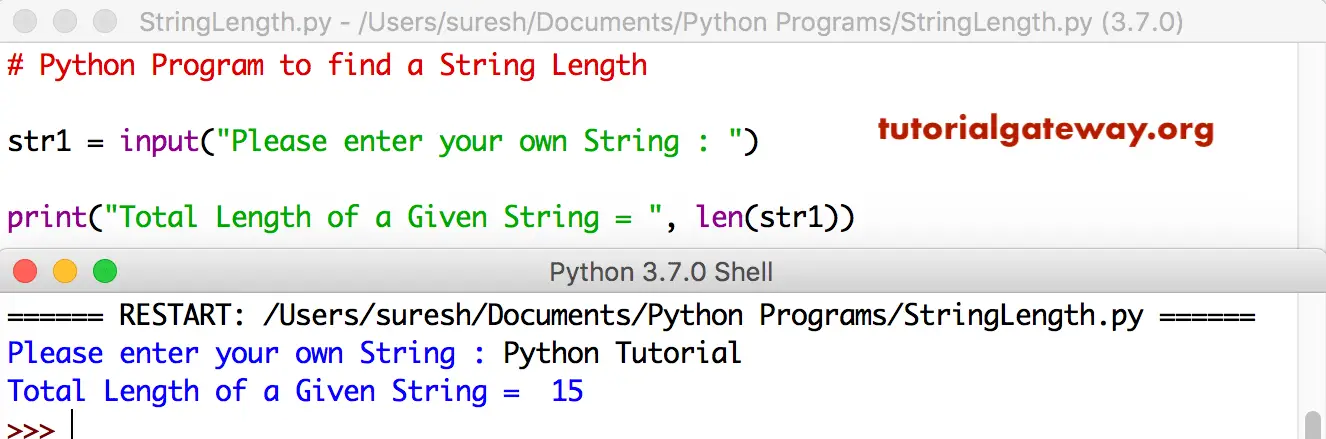
This Python program is identical to the first example. However, we allow users to enter their own words (string). Next, the built-in len() function is applied to the user-given string to find the character count or length.
str1 = input("Please enter your own String : ")

print("Total Length of a Given String = ", len(str1))
How to find the length of an empty string?
In this program, we declared an empty string. Next, we used the built-in string Python len() function to find the length of the empty string.
As we mentioned earlier, the string len() function counts the total number of characters in a given string. In an empty string, there are no characters to count, so it returns 0 as the output.
s = ''
print(len(s))
0Python len() function to find the length of a Unicode character string
When working with string data, it is common to see Unicode characters. The built-in len() function is very effective in dealing with Unicode characters. By default, the string len() function understands and considers each Unicode character as 1 (irrespective of its complexity).
s = "Café"
print(len(s))
4Python len() function to find the length of the special characters string
By default, we use the newline (\n) or tab (\t) inside a string to format it depending upon the required output. However, the string len() function considers (\n) or (\t) as a single character and includes them in the string length. The example below returns 8 as the output because there are six uppercase letters, one new line, and one tab.
s = "AB\nCD\tDE"
print(len(s))
8Escaping the special character from length
Along with the above mentioned new line or tab, we may use double quotes, single quotes, or forward and backslashes. When finding the Python string length, we may not need these to be counted. In such a case, we must use the escape character to skip them from counting. The following example skips the additional backslash from counting. One after the C: and another after the Users.
s = "C:\\Users\\Pictures"
print(len(s))
17Python Program to find the length of a string with emojis
The string len() function considers and counts emojis as a single character. To demonstrate it, we used the example below where we have included the coffee symbol inside the text. As you can see, the len() function returns 6 (4 letters, 1 space, and one coffee emoji).
s = "Café ☕";
print(len(s))
6NOTE: When you pass a None value to the Python string len() function, it will raise TypeError.
Python Program to find a String Length using a for loop
In all the above-specified examples, we used the built-in string len() function to find the string length. However, you can also find the length without using any built-in function. Interviews can test your coding skills. As for loop is the most popular one to iterate over the string characters, we can use it to find the string length.
In this program, we are using a Python for loop syntax to iterate over each character in a user-given sentence. Inside the Loop, we increment the counter variable for each character to count the total number of characters. Next, outside the loop, we use the print() statement for printing the final output.
text = "Information Technology"
counter = 0

for _ in text:
    counter += 1

print(counter)
22Python String Length using list comprehensions
Apart from the regular for loop, we can use list comprehensions to calculate the string length. In the example below, the Python list comprehension reads each character in the original list and creates a new list of 1’s. It means, for each string character, it creates a list item with a value of 1. Next, the sum() function finds the total of those 1’s to get the string length.
text = "The United States"

total = sum([1 for _ in text])
print(total)
17Python String Length using the generator and sum()
The following example is similar to the list comprehensions example. However, it uses the generator expression to create a sequence of 1s for each character in a string. Next, the sum() function finds the total to get the string length.
text = "The United States"

total = sum(1 for _ in text)
print(total)
17Python String Length using the enumerate()
As we all know, the enumerate() function helps read the string characters and their respective index positions. It reads each character in a string and assigns the total occurrence of that character. As it automatically updates the counter, we use the enumerate() function and use the pass keyword to iterate over the string characters. Next, the print() statement displays the counter value because it consists of the string length. Explore the Python print() statement.
By default, the counter value is set to 0. In the example below, we set the counter starting value to 1. Otherwise, it returns 17, which is one number less than the actual string length.
text = "The United Kingdom"

for c, _ in enumerate(text, 1):
    pass

print(c)
18Python Program to find a String Length using a while loop
Unlike the for loop, the while loop needs an end position to stop the iteration, and generally, we use the len() function to specify the last position. In the example below, we used an infinite while loop with a condition that is always true. Refer to the Python while loop and Python iteration articles.
On each iteration, the next() function reads one character from the iterator object, and the count value is incremented by 1. Once there are no characters in the iterator object, an error will be raised. So, the except will execute the Python break statement to exit from the loop. Finally, the count variable has the string length.
text = "The United States of America"

count = 0
char = iter(text)
while True:
    try:
        next(char)
        count += 1
    except StopIteration:
        break

print(count)
28Python Program to find a String Length using a function
If you don’t want to use any built-in function, you can try either a for loop or a while loop. This program uses the for loop to iterate over each character and increment the counter variable until it reaches the end of the string. Don’t forget to initialize the count variable to zero.
In this example, we use functions to separate the logic to find the length. Next, we are calling that function to find the characters in the user-entered sentence. Check out how to define Python functions.
def strLength(string):
    length = 0
    for i in string:
        length += 1
    return length


text = input("Please enter the text = ")
print("Characters = ", strLength(text))
Please enter the text = hello
Characters =  5
Let me re-run the program and enter a new word. It can help you understand it in more detail.
Please enter the text = Hello, Guys
Characters =  11
Python Program to find a String Length using recursion
In the example below, we declared a function that returns 0 for an empty string. Next, the return statement increments 1 value for each function call. Then the strlen(s[1:]) calls the original function recursively with the updated string (without the previous character(s)).
def strLength(s):
    if not s:
        return 0
    return 1 + strLength(s[1:])

text = "The United States of America"
print(strLength(text))
28Python string length using join() and count()
In the following example, we utilized the built-in string join() and count() functions to calculate the string length. Here, the count() function counts the total number of characters in a given string. As it adds an extra 1 in the length, we must subtract it. Refer to the Python string join article.
text = "House Under Fire"

tot = ''.join(text).count('') - 1
print(tot)
16Python string length using map() and lambda
In the example below, we used the map and the lambda expression to find the string length. Here, the lambda expression creates a sequence of 1’s for each string character. The map() is to iterate over the string characters and generate a map object. Next, the sum() function adds those lambda expressions generated 1’s to return the final total (String length). Learn more about Python map and the Python lambda expression
text = "The Navy Mumbai"

count = sum(map(lambda _: 1, text))
print(count)
15Python string length using functools.reduce() function
Apart from the built-in len() function, we can use the reduce() function available in the functools module to find the string length.
from functools import reduce
text = "The Navy Mumbai"

count = reduce(lambda ch, _: ch + 1, text, 0)
print(count)
15Using the str.__len__() method
Internally, the len() function calls this function to calculate the length of a string. However, it is not advisable to use it unless you are working with custom objects.
text = "The United States of America"
count = str.__len__(text)
print(count)
28Python string length using the count() function
As we all know, the Python count() function counts the total number of times a given character is repeated in the given string. However, if we pass “” as the argument, it will count the spaces between characters, which is the string length.
text = "House Under Fire"

tot = text.count("") - 1
print(tot)
16Python string length using collections.Counter() function
Similar to the count() function, the Counter() function in the collections library counts the total occurrence of each character in a given string. However, it does not return the string length. So, we must use the sum() function to find the total of the values.
from collections import Counter
text = "European Union"

c = Counter(text)
print(c)
print(sum(c.values()))
Counter({'n': 3, 'o': 2, 'E': 1, 'u': 1, 'r': 1, 'p': 1, 'e': 1, 'a': 1, ' ': 1, 'U': 1, 'i': 1})
14
Using Numpy module
We can use the NumPy module for the list length. However, for the string length, there is a workaround, but it is not the best approach.
import numpy as np

text = "House Under Fire"
a = np.array(text)
print(np.char.str_len(a))
16Using Pandas module
Similar to the NumPy module, we can use the pandas module by converting a string to a Python series. Next, apply the str len() function, and it is not the best approach.
import pandas as pd

text = "House Of Dragons"
a = pd.Series(text)
print(a.str.len())
0    16

dtype: int64
Python string length: Real-world applications
The following are the real-world scenarios of using the string legth.
Validating the User input: Username
Generally, we can use the string len() function to check whether the user input string is valid or not. For instance, if the username is less than 8 characters or greater than 20 characters, it is an invalid username. In such a case, we can use the len() function to find the length of the user-given string. Next, the Python If Else statement performs the validation.
username = input("Enter username: ")

if 8 <= len(username) <= 20:
    print("Login Successful")
else:
    print("Username must be between 8 and 20 characters")
Enter username: helloworld

Login Successful
Password: Minimum length required
Similar to the username example, we can enforce users to enter a minimum of eight characters for a valid password.
password = input("Enter Password: ")

if len(password) > 8:
    print("Login Successful")
else:
    print("Password needs at least 8 characters")
Enter Password: hi

Password needs at least 8 characters
Also Read
- Python Program to Total Occurrence of a Character in a string
- Python Program to Toggle Characters Case