
In Python, there is a built-in len() function to calculate the total number of list items (list length). Apart from len(), there is a native approach of using the for loop to iterate over the list items and updating the counter variable. Along with the for loop, there are other options to find the Python list length, and this article explores all options to find the length of a given list.
As we all know, lists are the most common data structures for storing different kinds of data within a list. When performing mathematical operations, knowing the length or total number of items in a list is very important.
Python list len() function to find length
The built-in list Python len() function is one of the list methods used to find the length of a given list. It is the most direct way of finding the total number of items in a list.
list len() syntax
The syntax of the list len() function to find the length of a list or to get the size is:
len(name)
From the above syntax, we must provide a list name as the parameter value to the len() function. The len() counts the total number of individual items in the given list and returns the integer as the output.
Python list len() function to find the length of an integer list
As we mentioned earlier, we can use the built-in list len() function to count the number of elements, length, or size of a list. In this example, we declared an integer list with seven distinct numeric items. Next, we used the list len() function to calculate the total number of elements in that integer list and return the output.
n = [12, 22, 33, 44, 55, 66, 77]
print(len(n))
7Python len function to find String List Length
When you use this list len function on String items, it returns the total number of words in a string. Or, say, it finds the total items or words in the string. This example shows the total number of string items or the total number of words in the string List.
s = ['Krishna', 'John', 'Yung', 'Ram', 'Steve']
print( len(s))
5How to find the length of an empty list?
The built-in Python list len() function correctly identifies the empty Python List and returns 0 as its length. As there are no list items to count, it returns 0.
n = []
print(len(n))
0Use the Python len() function to find the Length of a Mixed List
Apart from regular ones, you can also get the length of the mixed list. To demonstrate the same, we declared a list of integers, Python strings, and floating-point numbers. As you can see from the result, the len() function has no issues in finding the length of a list with mixed data types.
m = ['Krishna', 20, 'John', 40.5, 'Yung', 11.98, 'Ram', 22]
print(len(m))
8Apart from the mixed data types, what happens if we insert another object inside a list? To check it, we declared a Tuple inside a list. Next, use the Python len() function to calculate the list length or size (this includes tuples). Remember, Python len counts the complete Python Tuple as a single element.
m = ['Krishna', 20, 'John', (40, 50, 65), 'Yung', 11.98, 'Ram']
print(len(m))
7Python list len() function to find the length of a Boolean list
By default, the built-in len() function considers Boolean True or False values as individual entries and counts them as 1. To demonstrate, we declared a list of integers, Boolean true and false, and the None value. As you can see from the result set, the len() function treats True, False, and None as separate entries and adds them to the list length value.
NOTE: The len() function does not consider the data type inside a list; it counts the total number of items in a given list and displays the result.
n = [10, True, 20, None, False, True]
print(len(n))
6Use the Python len() function to find the length of a dynamic List
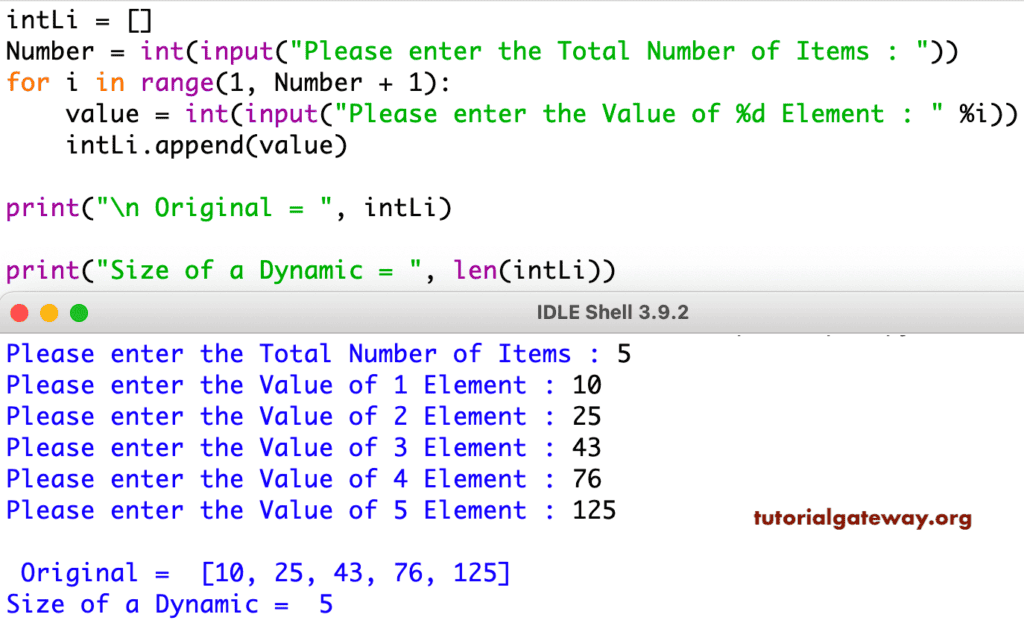
This program allows the user to enter the total number of elements. Next, using a for Loop iterates over each position and allows you to enter the individual list elements. Within the loop, we used the Python list append function to add items. Once we receive the items, we will calculate the size using this len() function.
intLi = []

Number = int(input("Please enter the Total Number of Items : "))

for i in range(1, Number + 1):
    value = int(input("Please enter the Value of %d Element : " %i))
    intLi.append(value)

print("\n Original = ", intLi)

print("Size of a Dynamic = ", len(intLi))
Python program to find the length of a list with duplicates
In real-time, there are many situations where duplicate items appear in a list. To deal with such a situation, if we utilize the len() function, it will return the total number of list items irrespective of their duplicity.
In the example below, we declared a numeric list with duplicate items. Next, applied the Python len() function to find the list length. As you can see from the result, it returns 8.
n = [10, 20, 10, 30, 20, 40, 10, 90]
print(len(n))
8If your job is to find the length of a unique item in a list, we can use the set( ) function to convert the list to a set. As we know, sets won’t allow any duplicates; all duplicate list items are automatically removed. Next, the len() function finds the length of a unique list of items. Refer to the Python set( ) function.
n = [10, 20, 10, 30, 20, 40, 10, 90]
print(len(set(n)))
5Python len function to find the length of a Nested List
Let us see how to find the length of a nested list input in this programming. For this, we declared a nested one with the combination of a few other items. By default, the len() function considers the nested lists (Sub-lists) as one item and calculates the length. If you want the complete length, then use the len() function to consider the nested object as one element.
n = ['Krishna', 20, 'John', [20, 40, 50, 65, 22], 'Yung', 11.98]
print(len(n))
6However, you can get the Nested size using the index value. For example, the code below finds the size of a nested list [20, 40, 50, 65, 22] or the length of a nested list in Python.
print(len(n[3]))
5How to find the length of nested lists?
In the example above, we used the index position to display the total number of items in the nested list. However, if the list consists of multiple nested lists, we must use the for loop.
In the following program, the first print() statement uses the len() function to find the length of top-level list elements. As there are three list items and the len() function does not count nested items, it returns 3. Refer to the Python print() statement.
The for loop iterates over the list items. As the main list consists of three nested lists, on each iteration, it will enter the nested list. So, the Python len() function finds the length of the first nested list. Similarly, it will calculate the length of the second and third nested lists.
The count variable adds those items to find the total number of elements in a list, including the nested list items.
n = [[20, 40], [50, 65, 22], [99, 11, 22, 3]]
print(len(n))

count = 0
for i in n:
    print("List =",i,"Length =",len(i))
    count += len(i)

print(count)
3

List = [20, 40] Length = 2
List = [50, 65, 22] Length = 3
List = [99, 11, 22, 3] Length = 4

9
Using the list len() function with looping
When iterating over list elements using a while loop or a for loop, the Python len() function helps find the last value (length). We can use the len() function as the iteration stop point.
n = [50, 65, 22]

for i in range(len(n)):
    print("Index =",i,"Value =",n[i])
Index = 0 Value = 50
Index = 1 Value = 65
Index = 2 Value = 22
Use the len() function to check list is empty
We can use the built-in Python list len() function inside the If Else statement to check whether the list is empty. Based on the result, we can perform other operations. For now, we will print the message.
cart = []

if len(cart) == 0:
    print("Cart is empty")
else:
    print("Shopping Value =",sum(cart))
Cart is emptyIf we change the list from cart = [] to [1000, 2000, 3000], the result becomes “Shopping Value = 6000”
Alternative Methods
Apart from the built-in len() function, there are multiple options to find the Python list length. It includes the built-in function in different libraries or the native approach using a for loop or list comprehension. This section covers all available alternative approaches to finding the list length. However, they may not be a great option in the production environment, but they are helpful for interview purposes.
Python list length using the __len__() special function
When we see the __len__() function, it looks like complex wording. However, both the built-in len() and length_hint() functions internally call a special __len__() function to determine the list length.
n = [10, 20, 11, 30, 40, 90]
print(n.__len__())
6Python list length using the length_hint() function
Apart from the traditional built-in list len() function, the operator module has the length_hint() function to calculate the list length. In general, the length_hint() function estimates the length of an object or iterable.
It accepts any iterable, such as a tuple, string, etc. To use this function, we must import the length_hint() function from the operator module.
from operator import length_hint

n = [10, 20, 11, 30, 40, 90]
print(length_hint(n))
6Python program to find the list length using a for loop
If your goal is not to use the built-in len() function, a for loop is the most fundamental (native) approach to finding the length of a list.
To demonstrate the list length using a for loop, we declared a counter variable and assigned 0 to it. The Python for loop example iterates over the list items from the starting position to the end of the list. On each for loop iteration (individual list item), we increment the counter variable by 1. Once the list items are finished, the for loop exits and prints the counter value. As we all know, the counter variable counts the total number of list items.
As we don’t need to access the list items, we placed the underscore (_) symbol in the for loop. To access the list items, replace _ with a and use print(a) to display the list items.
n = [25, 35, 45, 55]
counter = 0
for _ in n:
    counter += 1

print(counter)
4Python program to find the list length using a while loop
Similar to the for loop, we can use the while loop to iterate over the list items and find the list length. In the example below, we used the Python iter() function to convert the given list into an iteration object.
Here, while True means the condition is always true, and the loop executes infinite times. On each iteration of the Python while loop, the next() function reads the items in the iterator object one after the other. Next, the counter variable is incremented by 1 for each list item.
Once the items in the iteration object end, it will throw an error, and the except catches the error and executes the break statement. Here, the Python break statement will exits from while loop.
n = [35, 25, 45, 55]
counter = 0
i = iter(n)

while True:
    try:
        next(i)
        counter += 1
    except StopIteration:
        break

print(counter)
4Python list length program using list comprehensions and sum
As we all know, list comprehension is a powerful feature for working with lists, and it allows us to find the length of a list.
Here, the list comprehension (for loop) iterates over the list items and creates a new list. On each iteration, it will add 1 as a list item, and the process continues until it reaches the end of the original list.
The final list coming from the list comprehension is [1, 1, 1, 1, 1, 1, 1]. Next, the sum() function adds those numbers (in a new list coming from the Python list comprehension).
NOTE: As it involves creating a new list with 1’s, it is a waste of memory and time. On top of that, using the sum() function incurs an extra cost.
n = [5, 15, 25, 35, 45, 55, 65]

tot = sum([1 for _ in n])
print(tot)
7A better approach is using the sum() function and a generator.
n = [5, 15, 25, 35, 45, 55, 65]

tot = sum(1 for _ in n)
print(tot)
7Python list length program using a recursive function
Apart from the regular looping techniques, we can define a function and call it recursively with an updated value to find the length of a given list.
In the example below, we defined a custom findLength function. If the incoming list is empty, the function will return 0. On each iteration, it increments the value by one and moves to the list item. The recursive function calling process stops when it reaches the list end.
def findLength(n):
    if not n:
        return 0
    return 1 + findLength(n[1:])

a = [11, 22, 33, 44, 55, 66]
print(findLength(a))
6Python list length program using enumerate()
The enumerate() function allows accessing the list items in each iteration. Without manually incrementing the counter value, the enumerate() function automatically increments its value on each iteration.
In the example below, the count value automatically increments by 1 until the enumerate reads the last list item. If you want to replace the underscore symbol inside the for loop and add a variable to print the list item at that position.
n = [5, 15, 25, 35, 45, 55]
count = 0
for count, _ in enumerate(n, 1):
    pass

print(count)
6Python list length program using functools.reduce() function
In the following Python example, we use the reduce() function available in the functools module. To use it, we must import the reduce function from the functools.
Here, we utilized the Python lambda expression to increment the n value by 1 for each list item. Please don’t forget to initialize the counter variable to 0. If we set the last argument to something other than 0, the reduce() function returns the wrong value. For instance, replace 0 (last position) in the reduce() code with 2, the return value becomes 7 because the counter starts from 2.
from functools import reduce

names = ['Krishna', 'John', 'Yang', 'Ram', 'Steve']

total = reduce(lambda n, _: n + 1, names, 0)
print(total)
5Python list length using the map() and sum() functions
In the following example, we used the Python map() function that generates the map object. Here, the lambda expression helps to create a new list of items where each item is replaced by 1. Next, the sum() function adds all items (1’s) to return the list length.
n = [35, 11, 25, 45, 12, 55]

total = sum(map(lambda _: 1, n))
print(total)
6Python List length using the NumPy module
As we all know, the NumPy library is a powerful library, and it contains a dedicated size() function to calculate the total number of items in an array.
In the example below, we used the np.array() function to convert the given list into ndarray. Next, the size () function will return the total number of items in an array (list).
import numpy as np
n = [10, 90, 180, 140, 160, 88]
a = np.array(n)
print(a.size)
6TIP: To find the length of large datasets (lists), use the NumPy size() function. It is a faster and safer approach for large data.
Python List length using the Pandas module
Similar to the NumPy module, the pandas module has a size() function that can be used to find the length of a given list. In the example below, we used the Python pandas Series() function to convert the given list to a series. Next, the size operator will find the total number of items in a series (list length).
import pandas as pd
n = [10, 90, 180, 140, 160, 88]
a = pd.Series(n)
print(a.size)
6Python list length using collections.Counter() function
The collections library has a Counter() function that returns a collection object that looks like a dictionary. Each key points to the list item, and the value points to the total number of occurrences in a list. Here, we use the collections.Counter() function to find the list length.
from collections import Counter
n = [10, 90, 180, 140, 160, 88]
a = Counter(n)
print(a)

total = sum(a.values())
print(total)
If you observe the first output, it returns the counter object of each item as the key and their total occurrences as the value. To get the list length, we must use the sum() function on the counter object values.
Counter({10: 1, 90: 1, 180: 1, 140: 1, 160: 1, 88: 1})
6
Also Read