
The Python break statement is an important one used to alter the flow of a loop structure by terminating the current loop. The break statement is beneficial for exiting control from for loops, while loops, and nested Loops. While executing these code blocks, if the compiler encounters the break statement, it will stop running the code inside a loop and exit immediately to execute the next line after the loop.
Loops execute a specific code block for n number of times until the test condition is false. There will be situations where we must terminate the loop without executing all the lines or completing the total iterations. In these situations, we can use the Python break statement to terminate the for or while loop.
Python break statement syntax
The syntax of the break statement is straightforward. Placing a break keyword in a separate line inside a loop will do the trick.
break;
We must use the break statement inside a for loop or a while loop. If you use it outside a loop, it will throw a syntax error. The syntax of the Python break statement inside a for loop is
for value in iterator:
    if condition:
        break
    #more code
The syntax of the break statement inside a while loop is shown below.
while expression:
    if condition:
        break
    #more code
The break statement is usually used in combination with a decision-making statement, such as an if statement.
Why do we need a Python break Statement?
Imagine a list of 1000 products. We are looking for a Samsung phone, and it is the 9th item on the product list. If you use the for loop to iterate over the product list and search for the Samsung phone, after finding it in the 9th position, it will search the remaining 991 products to complete the for loop iterations. Explore Python fundamentals from our Python tutorial page.
It is a resource-waste approach. However, if we place a Python break statement in conjunction with the if condition. When the Samsung phone is found in the product list, the break statement terminates the loop. It saves those extra 991 iterations of the for loop.
How does the Python break statement work?
As we mentioned earlier, the break statement should be used within a for loop or while loop, so the starting point is the loop beginning. Inside a loop, you must use a condition that returns a Boolean true or false. Usually, we use the if statement.
- If the condition is true, then the control will encounter the break statement. Once the control encounters a break, it will terminate the loop immediately. Even though there are more statements after the Python break statement, the control will never look into them after executing the break.
- If the condition is false, the control won’t execute the break statement, and the loop iteration process continues to be normal.
In short, when the control encounters the break statement, the execution of the current loop stops, and the remaining iterations are skipped. Next, the control jumps out of the loop.
For example, we have 5 lines of code inside the loop, and we want to exit from it when a certain condition is True; otherwise, it must execute them. In these situations, we can place the Python break statement inside the if condition.
If the condition is True, then the control will execute this statement. It means the break statement will completely exit the controller from the iteration. Otherwise, it will run all blocks of code.
Basic example of the Python break statement
It is a basic example of the break statement for terminating the loop without finishing the iterations. In the example below, the for loop has to iterate over the range of numbers from 0 to 4. The print statement must print those numbers as 0, 1, 2, 3, and 4. However, when n becomes 3, the if condition is evaluated to True. So, the break statement terminates the loop without executing the print statement.
for n in range(5):
    if n == 3:
        break
    print(n, end = ' ')
0 1 2The following table explains the working functionality of the Python break statement.
| Iteration | n value | If condition | Action |
|---|---|---|---|
| 1 | 0 | False | Print 0 |
| 2 | 1 | False | Print 1 |
| 3 | 2 | False | Print 2 |
| 4 | 3 | True | Break or terminate the loop. |
We share a few examples to display the working functionality of the break statement in both the for loop and the While loop.
Python break statement in a for loop
As we already know, the for loop is to iterate over a collection, such as a string, list, tuple, set, dictionary, or range of numbers. The break statement exits the control from the for loop before completing all its iterations.
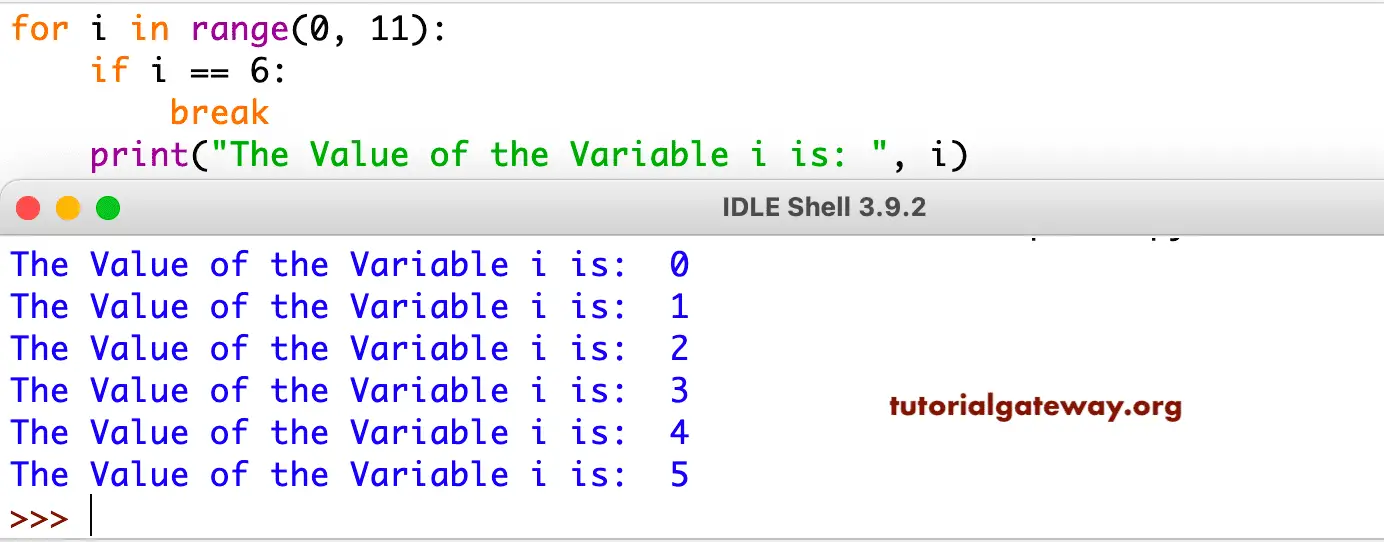
This program demonstrates how to use the break statement in a for Loop to exit from the block iteration. In this example, we used the for loop with a Python range function to iterate over the numbers from 0 to 10.
NOTE: The Python for loop article explains loop execution in iteration wise. So, we do not explain the iteration-wise execution here.
We placed the if condition inside the for loop to test whether i is equal to 6. If the condition is false, it will skip and print that number as output. In our case, 0, 1, 2, 3, 4, and 5 using the print function.
If this condition (i == 6) is true, then this Python break statement will execute, and the iteration will stop at that number without printing the following print function:
for i in range(0, 11):
    if i == 6:
        break
    print("The Value of the Variable i is: ", i)
Use break to search for a value in a list
One of the most common use cases of the Python break statement is in search algorithms. In a Python list of hundreds or thousands of items, to find an item or value at the third or tenth position, we don’t need to search the complete list. In this situation, we can search for the item and when it is found, use the break statement to terminate the loop.
In the example below, there are five users in a company, and the for loop iterates over those five users. The if statement checks whether the incoming user from the iteration is Tracy. If true, we found the required user; the break statement will terminate the for loop.
users = ["john", "mike", "tracy", "lucy", "william"]
for user in users:
    if user == "tracy":
        print("We found the user:", user)
        break
    print(f"Checking {user}")
Checking john
Checking mike
We found the user: tracy
Use break to Search for a product
Similar to the above example, we can use the Python break statement in a for loop to search for products. For instance, in the example below, we declare a list of Python dictionary items for four products, each of which has an ID, name, and price.
Imagine, they are looking for within the products. The for loop iterates over the products, and the if statement checks whether the product name is PC. If true, the print statement displays the product information (ID value and its price). Next, the break statement terminates the for loop without checking the other products.
products = [
    {"id": 1, "name": "Laptop", "price": 1000},
    {"id": 2, "name": "Mobile", "price": 799},
    {"id": 3, "name": "PC", "price": 2500},
    {"id": 4, "name": "Gaming Console", "price": 500}
]
lookup = "PC"
for prod in products:
    if prod["name"] == lookup:
        print("Product found:", prod)
        break
Product found: {'id': 2, 'name': 'Mobile', 'price': 799}TIP: When working with large datasets, the break statement reduces CPU wastage and improves performance.
Python break statement in a while loop
This program will use the break statement in the while loop to exit the loop iteration. In this example, we initialized the value of i as 0 at the beginning of the code. Then, within this, we check the condition (i <= 10), i is less than or equal to 10. Finally, inside the While loop, we placed the Python if condition to test whether i equals 4.
On each iteration, the Python print() function prints the i value, and the next line increments the value by 1. Next, the control checks the if condition.
- If the condition is false, the control won’t execute the Python break statement. So, it prints that number as output (In our case, 0, 1, 2, 3) using the following print function.
- If this condition (i == 4) is True, then the break statement will execute, and the iteration will stop at that number without printing the following print function.
TIP: We used the Python Arithmetic Operator + operator to increment the i value (i = i +1). If you forget this line, you will end up in infinite iterations. Please refer to the Python continue statement and the Python while loop.
i = 0
while i <= 10:
    print(" The Value of the Variable i =  ", i)
    i = i + 1
    if i == 4:
        break
The Value of the Variable i = 0
The Value of the Variable i = 1
The Value of the Variable i = 2
The Value of the Variable i = 3
This is a basic example to demonstrate the break in a while loop. However, the real power of the break statement comes when we use a while loop with an always-true condition.
Use break for user Input Validation
While loops are condition-based, and sometimes developers intentionally design them to run forever. In such a scenario, the Python break statement inside a while loop code block provides a safe exit mechanism. For instance, allowing users to insert the correct username or password.
In the example below, we used a while loop with a True condition (always True). As we all know, this condition returns true and runs infinitely. Within the while loop, the input() statement allows the user to enter the username.
If the user-entered username matches the existing name, the break statement exits the loop. So that it won’t ask the user to re-enter the username again.
while True:
    username = input("Enter your username: ")
    if username == "admin":
        print("Welcome admin")
        break
    print("Invalid username")
Enter your username: hello
Invalid username
Enter your username: admin
Welcome admin
User break in Login attempts
It is a classic example of the Python break statement in a while loop. Here, the while loop checks whether the user’s attempts are below three. Inside the loop, the if statement checks whether the user-entered password matches the original. If true, the break statement will terminate the loop.
maximum = 3
attempts = 0
original = "abcd123"

while attempts < maximum:
    password = input("Enter Password: ")
    if password == original:
        print("Login successful")
        break
    attempts += 1
    print("Incorrect password")
else:
    print("Account locked")
Enter Password: hi
Incorrect password
Enter Password: hello
Incorrect password
Enter Password: new
Incorrect password
Account locked
Let me run the same program again!
Enter Password: new
Incorrect password
Enter Password: abcd123
Login successful
Python break statement with an else clause in loops
We can also use the break statement in a for loop with an else clause and a while loop with an else clause.
Golden Rule: The else block runs only after the loop finishes naturally (completes all iterations) without hitting the Python break statement. If the control executes the break statement, the else block will never be executed because the control exits the loop (which also includes the else block).
In the example below, we declared a fruit list. However, the if statement is looking for a non-existent fruit, an orange. It means all for loop iterations are completed naturally, looking for orange. If it is not found, the message in the else block will return. However, if we replace orange with an existing fruit (apple), the break statement will terminate the loop without printing the else block message.
fruits = ['apple', 'banana', 'kiwi', 'cherry']

for fruit in fruits:
    if fruit == 'orange':
        print(f"Found {fruit}!")
        break
else:
    print('It is not in a fruit list')
It is not in a fruit listUsing Python break in nested loops
The break statement is bound to the existing mode. For instance, if you use a break statement in an inner or nested loop, it will apply to the nested loop itself, and it does not affect the iterations of the outer loop.
In the example below, the outer for loop iterates from 0 to 1, whereas the inner loop iterates from 0 to 4. For each iteration, the inner loop iterates from 0 to 4. However, we used the break statement inside a nested loop. When j becomes 2, the break statement exists the inner loop and control moves to the outer loop for the next row iteration.
for i in range(2):
    for j in range(5):
        if j == 2:
            break
        print(i, j)
0 0
0 1
1 0
1 1
This time, we used the Python break statement in the outer or main loop. When i become 2, the control executes the break statement and terminates the loop without executing the inner or nested loop.
for i in range(5):
    if i == 2:
        break
    for j in range(3):
        print(i, j)
0 0
0 1
0 2
1 0
1 1
1 2
How to break multiple loops in Python?
If you observe the above two examples, using the break statement in the nested loop, control only exits from the inner loop. However, there are situations where we need to find values in a multidimensional data source (matrix). In such a case, we can’t use the break statement in the outer loop to exit the control.
To break multiple loops, there are two options: using a flag and the functions. In the example below, we declared a matrix and set the flag to false. In the nested loop, we used the if condition to check the number (60) against each matrix value. If found, print the index position (row, column) and set the flag value to True, and apply the break statement.
Outside the nested loop and inside the main for loop, we used the if condition to check whether the flag value is True. If so, the Python break statement will exit the outer or main loop. Otherwise, the iterations continue.
matrix = [
    [10, 20, 30],
    [40, 50, 60],
    [70, 80, 90]
]
number = 60
flag = False

for i in range(len(matrix)):
    for j in range(len(matrix[i])):
        if matrix[i][j] == number:
            print(f"Found {number} at position ({i}, {j})")
            flag = True
            break
    if flag:
        break
Found 60 at position (1, 2)Better approach to exit from multiple loops
Instead of using multiple Python break statements to exit the control from nested loops, we can define a function. Within the function, we use multiple return statements that returns position of the search item. The outer return value returns None.
def search_value(mat, number):
    for i in range(len(mat)):
        for j in range(len(mat[i])):
            if mat[i][j] == number:
                return (i, j)
    return None

matrix = [
    [10, 20, 30],
    [40, 50, 60],
    [70, 80, 90]
]
position = search_value(matrix, 70)

if position:
    print(f"Found at position {position}")
else:
    print("Not found")
Found at position (2, 0)Python break vs continue vs pass
The following table differentiates between the break statement, continue statement, and pass statement.
| keyword | Action | Usage |
|---|---|---|
| break | Terminate the loop completely. | Search for an item. |
| continue | Skip the current iteration and starts new one. | Skip unwanted items or bad data. |
| pass | Does nothing. | To create a container. |
To show the difference, we use the same program in three examples and replace the break statement with continue and pass.
Example of a Python break statement
The for loop in the following program iterates from 0 to 6. The if statement checks whether the I value equals 4. If true, the break statement will exit the loop without executing the print statement.
for i in range(7):
    if i == 4:
        break
    print(i, end =" ")
0 1 2 3Example of a continue statement
When we use the continue statement, it simply skips the number 4 and prints the remaining numbers.
for i in range(7):
    if i == 4:
        continue
    print(i, end =" ")
0 1 2 3 5 6Example of a pass statement
As we said earlier, the pass statement does nothing, so it prints all numbers from 0 to 6.
for i in range(7):
    if i == 4:
        pass
    print(i, end =" ")
0 1 2 3 4 5 6