
The Python sqrt() function is a built-in math library function used to find the square root of a specified expression or a specific number. Finding the square root is crucial in solving mathematical equations, scientific calculations, and so on.
In Python, there are multiple approaches to calculating the square root, including math.sqrt(), the exponent operator, NumPy module, cmath, and other approaches. In this article, we show how to use the Python sqrt() function in detail, with syntax and real-time examples.
Example
import math
print(math.sqrt(100))
10.0Python sqrt() syntax
The syntax of this math function is:
math.sqrt(number);
The argument can be a number or a valid numerical expression. If the number argument is a positive integer, the math.sqrt function returns the square root of a given value.
- If the parameter value is 0, it returns 0.0 as output.
- If the given number is a negative integer, it returns ValueError.
- And if it is not a number, the sqrt() returns TypeError.
Return Value: The Python sqrt() function calculates the square root of a number, and always returns a floating-point number as output.
NOTE: To use the sqrt() function, we must import the math module (import math). Please refer to the Python Math functions article from our Python basics page to understand the remaining methods.
Python sqrt() function on positive numbers
In the example below, we declared a variable and assigned 36 to it. Next, we used the built-in math.sqrt() function to find the square root of a perfect square number. To display the result type, we used an extra print statement to show the return type (float).
import math
n = 36
res = math.sqrt(n)
print(res)
print(type(res))
6.0
<class 'float'>
Finding the square root of a Zero
In the following example, we pass parameter 0 to the sqrt() function to find the square root of zero.
import math
print(math.sqrt(0))
0.0Python square root 3
There are three approaches to calculating the square root of 3. We can use the built-in sqrt() function, the exponential operator (**), or math.pow() function.
import math

print(math.sqrt(3))
print(3 ** 0.5)
print(math.pow(3, 0.5))
1.7320508075688772
1.7320508075688772
1.7320508075688772
Using the Python sqrt() function with floating-point numbers
The sqrt() function also allows the use of a floating-point number (with decimals) as a parameter. The following example uses the sqrt() to find the square root of a floating-point number.
import math
n = 16.5
print(math.sqrt(n))
4.06201920231798To find the accuracy of the produced result, use the ** operator in Python.
print(4.06201920231798 ** 2)
16.500000000000004Python sqrt() function handling negative numbers
The built-in sqrt() function accepts only positive numbers. If you try to find the square root of negative numbers, the sqrt() function returns a ValueError.
In the following example, we declared a variable and assigned -16 as its value. Next, used the math.sqrt() on it.
import math
n = -16
print(math.sqrt(n))
Traceback (most recent call last):
  File "C:\....\.....\.....\.....\example.py", line 3, in <module>
    print(math.sqrt(n))
          ~~~~~~~~~^^^
ValueError: math domain error
To handle this error, we have two options.
Before sqrt: Checking if the number is greater than 0
We can use the Python if else statement to check whether the given number is greater than or equal to 0. If true, apply the math.sqrt() function. Otherwise, print a message.
import math
n = -16
if n >= 0:
    res = math.sqrt(n)
    print(res)
else:
    print("Positive Numbers only")
Positive Numbers onlyTIP: If you change n value to 16, it returns 4.0.
Using try and except in Python sqrt function
When working with user inputs or a large dataset, it is best to use try and except to catch those ValueError.
import math
n = -16
try:
    res = math.sqrt(n)
    print(res)
except ValueError:
    print("Invalid input")
Invalid inputTIP: Please refer to the Python pow() and Python log() functions.
Using the Python sqrt() function on a string
When you use the math sqrt() function on a string data type, it will throw a TypeError. However, if your data is numeric, we can convert the string to a floating-point number and apply the sqrt function.
For instance, the code below throws an error because n is a Python string data type.
import math
n = "25"
print(math.sqrt(n))
TypeError: must be real number, not strLet me use the float() function to convert the string to a floating-point number and apply the sqrt() function.
import math
n = "25"
print(math.sqrt(float(n)))
5.0Using the cmath module sqrt
There is a Python sqrt() function in the cmath module that supports negative numbers as a parameter and finds the square root. However, the cmath.sqrt() returns a complex number. Refer to the Python factorial.
import cmath
n = -25
print(cmath.sqrt(n))
5jWe can also use the cmath module’s sqrt() function to find the square root of a complex number.
import cmath
x = 3 + 4j
print(cmath.sqrt(x))
(2+1j)math.isqrt() function – Integer Square root
As we mentioned earlier, the Python sqrt() function returns a floating-point number. However, the math module has the isqrt() function, which calculates the square root of a given number and returns the integer as output.
NOTE: If you pass a floating-point number as the argument, the isqrt() method returns TypeError.
import math
print(math.isqrt(25))
5The above example is a perfect square. However, if you pass a non-perfect square number, the round will be the largest integer value less than or equal to the result. For example, if you pass any number between 25 and 35, the isqrt() method returns 5. If you pass 36, it returns 6, and that 6 number continues up to the parameter value of 49.
Find Square root using the exponentiation operator
If you don’t want to use the built-in sqrt() function, the exponentiation operator is the simplest way to calculate the square root of a number. This operator, denoted by **, allows one to raise a given number to a specific power. If we set the power to 0.5, it returns the square root.
n = 49
print(n ** 0.5)
7.0Python sqrt function on list and tuple
In all the above mentioned examples, we use the sqrt() function to calculate the square root of a single value. However, we can use it on the list or tuple items.
In this example, we will calculate the square root of different data types, including list items, tuple items, string data type, and numeric expressions, and display the output.
- Within the first two statements, we used both positive integers to calculate the Python square root.
- Next two statements, we used it on Python Tuple and Python List items. If you observe the following screenshot, this math method is working for them perfectly.
- Next statement, we tried the math sqrt function directly on multiple values (expression) to find the square root.
- Next, we tried on the string value, and it returned TypeError as output.
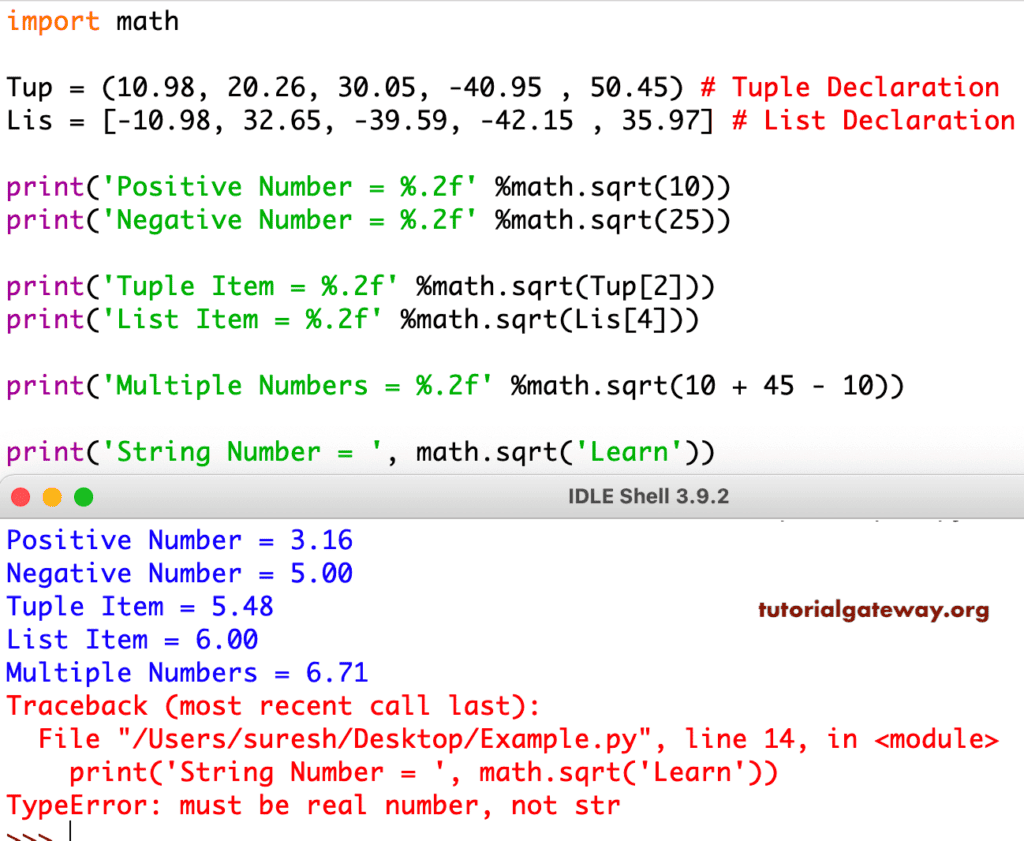
Python sqrt function list comprehension
In the previous example, we used the index position to find the square root of a single list or tuple item. Here, we use the for loop or list comprehension to apply sqrt() on all list and tuple items to calculate the square root. Please refer to the Python list comprehensions and Python for loop articles.
import math

n = [4, 9, 16, 25, 36, 49, 64, 81, 100]
s = [math.sqrt(i) for i in n]
print(s)
[2.0, 3.0, 4.0, 5.0, 6.0, 7.0, 8.0, 9.0, 10.0]sqrt using a for loop
To trim the extra decimal points, we used the Python round() function. Here, the for loop iterates over the list items, and the Python sqrt() function calculates the square root of each number. The Python list append adds items to a new list.
import math

n = [4, 9, 16, 25, 36, 49, 64, 81, 100]
s = []
for i in n:
    s.append(round(math.sqrt(i)))

print(s)
[2, 3, 4, 5, 6, 7, 8, 9, 10]Using Python numpy sqrt() function
The NumPy module has a built-in sqrt() function, which we can use to calculate the square root of an array, list, or large dataset. If there is already a dataset, using a for loop or list comprehension to iterate over each list item is not a viable option. Instead, convert the existing list to a numpy array and apply the sqrt() function on the complete array
import numpy as np

n = np.array([25, 36, 49, 64])
s = np.sqrt(n)
print(s)
[5. 6. 7. 8.]NumPy sqrt() function on a multidimensional array
The numpy module’s sqrt() function is not limited to a single array; we can use it on multidimensional arrays (matrices) of any size and shape.
import numpy as np

n = np.array([[25, 36, 49], [64, 81, 100]])
s = np.sqrt(n)
print(s)
[[ 5.  6.  7.]
[ 8.  9. 10.]]
How to apply the square root function to a pandas dataframe column?
When working with the pandas dataframe, we must use the NumPy module’s sqrt() function. We can also use the math.sqrt(), but it is too slow because we have to apply it to each value of the dataframe column. On the other hand, the NumPy module sqrt() applies to the Pandas dataframe in one go.
import pandas as pd
import numpy as np

table = {'name': ['John', 'Mike', 'Suresh', 'Tracy'],
         'Salary': [1000000, 1200000, 900000, 1100000]
         }

df = pd.DataFrame(table)
df["Square Root"] = np.sqrt(df["Salary"])
print(df)
     name   Salary  Square Root
0    John  1000000  1000.000000
1    Mike  1200000  1095.445115
2  Suresh   900000   948.683298
3   Tracy  1100000  1048.808848
If you insist on using the math library’s sqrt function, use the code below.
import pandas as pd
import math

table = {'name': ['John', 'Mike', 'Suresh', 'Tracy'],
         'Salary': [1000000, 1200000, 900000, 1100000]
         }

df = pd.DataFrame(table)
df["Square Root"] = df["Salary"].apply(math.sqrt)
print(df)
Python sqrt() function: Real-time examples
Use math.sqrt() function to find the distance between two points
The mathematical formula to find the distance between the two points is
X = √((x2 – x1)2 + (y2 – y1)2)
To demonstrate it, we will find the distance between (3, 2) and (9, 7) coordinate points. Here, the final output is the square root of 61, which equals 7.81.
import math
x = (3, 2)
y = (9, 7)
distance = math.sqrt((y[0] - x[0])**2 + (y[1] - x[1])**2)
print(distance)
7.810249675906654Pythagoras Theorem – sqrt to find Diagonal distance
If we know the length of the two sides of a right-angled triangle, we can use Pythagoras’ theorem to calculate the length of the hypotenuse.
import math
a = 6
b = 10
hypotenuse = math.sqrt(a**2 + a**2)
print(hypotenuse)
8.48528137423857sqrt TypeError: Complex Numbers
When we pass a complex number to the math.sqrt() function, it returns a TypeError.
import math
z = 10 + 12j
print(math.sqrt(z))
TypeError: must be real number, not a complexTIP: Use the cmath sqrt() function to deal with complex numbers.
Implementing the Newton-Raphson method
Please refer to functions in Python to create a custom function, the while loop in Python to iterate over numbers, and the Python abs() function to get the absolute positive value.
def newton_raphson(n, tolerance=1e-10):
    i = n / 2

    while abs(i * i - n) > tolerance:
        i = (i + n / i) / 2

    return round(i, 2)

print(newton_raphson(36))
print(newton_raphson(5))
6.0
2.24
Difference between sqrt and ** exponent operator
Although the exponent operator does not require importing the math library, it is always advisable to use the math.sqrt() function. Refer to the exponent operator in Python.
import math

x = 64
a = math.sqrt(x)
b = x ** 0.5

print(a)
print(b)
8.0
8.0
Difference between math.sqrt and numpy.sqrt()
If you are working with NumPy arrays, data science, or large data, use numpy.sqrt() function. For single values and basic numerical calculations, use the math.sqrt() function.