
The built-in Python round() function is useful to round the given number or specified expression to the nearest value. If the second argument is not given, it returns the nearest integer. If we want to round the decimal precision, we must use the second argument (ndigits).
Python round function syntax
The syntax of the built-in round() function is
round(Number, Digits);
The round() function accepts two parameters
- Number: If the number argument is a positive or negative number, the round function returns the nearest decimal number. And if it is not a number, it returns TypeError.
- Digits (Optional): If you omit this argument, the round function displays the number to the nearest integer value. Otherwise, the Number prints the nearest to the decimal number specified in the Digits argument.
Python round Function Example
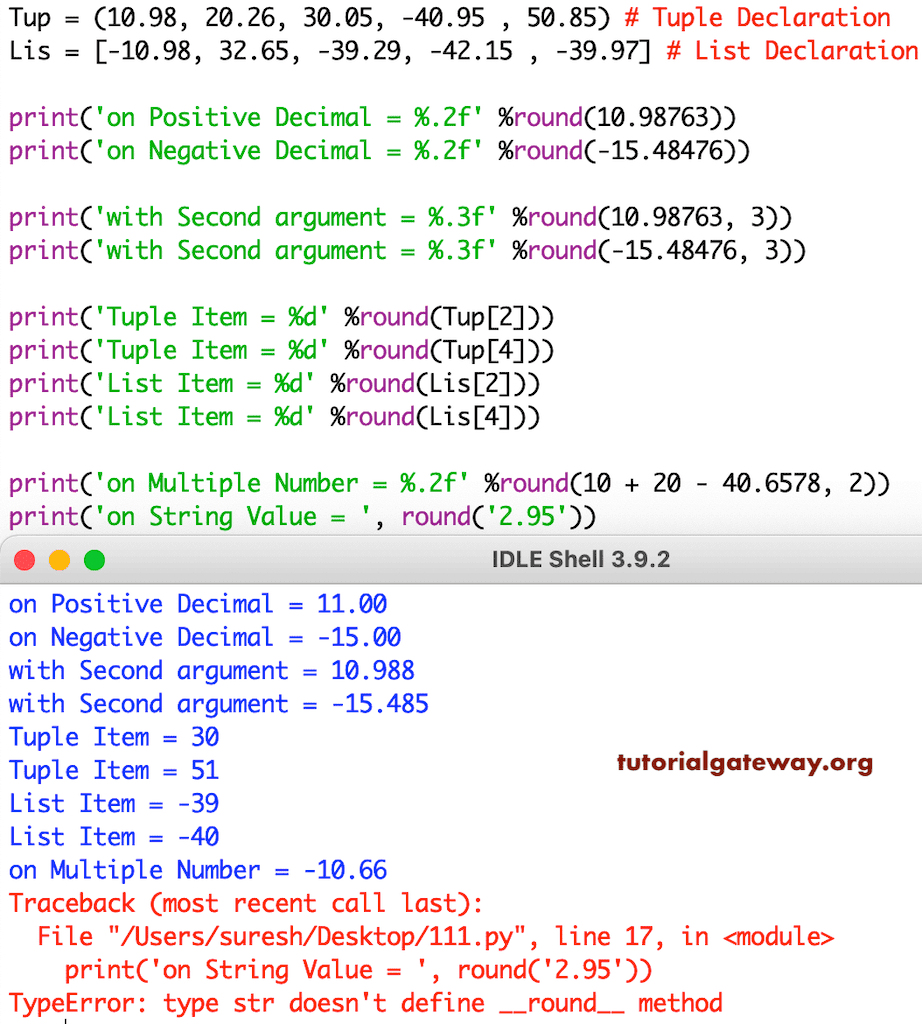
This math function rounds the number to the nearest integer. In this example, we will find the nearest values of different data types. In the first two, we used the round function directly on both the Positive decimals and negative decimals.
Tup = (10.98, 20.26, 30.05, -40.95 , 50.85) # Tuple Declaration
Lis = [-10.98, 32.65, -39.29, -42.15, -39.97] # List Declaration
- Next two statements, we used the Python round function with two arguments, so they display the nearest decimal fractions in the third position.
- Following four, we used this on Tuple and List items. If you observe the Python screenshot, this Math function is working correctly on them.
- Then, We tried directly on multiple values.
- Last, We tried on the String value, and it returns TypeError.
round() function without ndigits
As we mentioned earlier, the ndigits or the second argument is optional for the built-in round() function. In the following example, we use the round() function on integers and floating-point numbers without ndigits to check the result.
print(round(10))
print(round(10.6))
print(round(10.65))
print(round(10.678))
print(round(10.450))
10
11
11
11
10
round() function with ndigits
In the following example, we use the round() function on floating-point numbers with ndigits to round the decimal precision values.
print(round(50.62, 1))
print(round(50.667, 2))
print(round(50.6781, 3))
50.6
50.67
50.678
TIP: Please refer to the Python ceil, Python floor, and Python trunc functions.
Python round function not working as expected to the nearest 0.5
The round() function follows a simple rule:
- If the decimal precision is less than 0.5, it returns the previous value. For example, 10.49 becomes 10.
- If the decimal precision is greater than 0.5, it returns the next value. For instance, round(10.6) or 10.51 returns 11.
- If the decimal precision is 0.5, it follows the even number rule. It means the round() function always returns an even number. For instance, 10.5 becomes 10 because 10 is even, whereas 11.5 becomes 12. After all, 12 is the nearest even number.
The following example shows the round() function, even half-working functionality.
print(round(10.5))
print(round(11.5))
10
12
How to fix Python round function floating-point precision errors?
When working with floating-point numbers, the round() function contains precision issues because of the 0.5 rule. When working with financial data, including money or currency, these precision errors are costly.
print(round(2.675, 2))
print(round(3.675, 2))
print(round(5.675, 2))
2.67
3.67
5.67
To fix this problem, we must use Decimal and pass the value as a string.
from decimal import Decimal, ROUND_HALF_UP

n = Decimal("3.675")
result = n.quantize(Decimal("0.01"), rounding=ROUND_HALF_UP)
print(result)
3.68Python round up to nearest 10, 100, or 1000 using the round function
The built-in round() function accepts a negative integer value as the second argument. If we use the round() function with a negative number as the 2nd argument, it automatically rounds up the given number to the nearest 10, 100, or 100.
Round to the nearest 10
In the following example, we used -1 as the second argument, and the program rounds up the given value to the nearest 10.
import math
print(round(1024, -1))
print(round(1026, -1))
1020
1030
Round to the nearest 100
Here, we used -2 as the second argument of the round() function to round the given number to the nearest 100.
import math
print(round(1545, -2))
print(round(1567, -2))
1500
1600
Round to the nearest 1000
We must use -3 as the round() function’s second argument to round the given value to the nearest 1000.
import math
print(round(19450, -3))
print(round(19567, -3))
19000
20000