
Write a Python program to get the current date and time with an example. When working with data, getting the current date and time is a common requirement. We can use it for logging, finding differences, scheduling time, etc.
Python Program to Get Current Date and Time
For example, in this programming language, we have a datetime module to work with or print the current date and time, and it will display the output.
from datetime import date

today = date.today()
print("Current Date = ", today)
Current Date = 2021-11-06In this Python example, we used Python datetime now to print the current date and time and also used the Python strftime function to format the same.
from datetime import datetime

today = datetime.now()
print("Current Date and Time = ", today)

# Formatting
dt = today.strftime("%B %d, %Y %H:%M:%S")
print("Current Date and Time = ", dt)
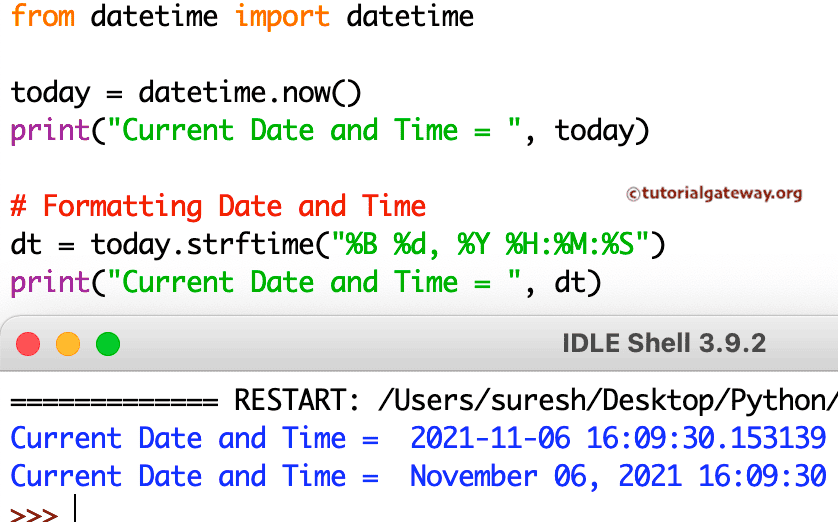
Get the current date and time using datetime.now() function
If we import the datetime module, we can use the now() function to return the current timestamp.
import datetime as dt

res = dt.datetime.now()
print(res)
2026-10-21 15:52:02.319795Use isoformat() to get the current date and time
This program is the same as the above, but it uses the isoformat() function to convert the current date and time to the ISO 8601 standard.
from datetime import datetime as dt

res = dt.now().isoformat()
print(res)
2026-10-21T15:54:51.132549Use the pytz module to get the current date and time of a specific timezone
By default, the now() function returns the current date and time based on the local time zone. Here, we use the pytz module to set the timezone to New York. So, the following program returns the current date and time in New York.
from datetime import datetime as dt
import pytz

tzone = pytz.timezone('America/New_York')
res = dt.now(tzone)
print(res)
2026-10-21 06:28:57.508358-04:00Use the zoneinfo module to get the current date and time of a specific timezone
Similar to the above, we can use the zoneinfo module to display the current date and time
from datetime import datetime as dt
from zoneinfo import ZoneInfo

res = dt.now(tz = ZoneInfo('UTC'))
print(res)
2026-10-21 10:33:51.102718+00:00Get the current date and time using the today() function
Similar to the now() function, we can use the today() function from the datetime module to display the current date and time.
import datetime as dt

res = dt.datetime.today()
print(res)
2026-10-21 15:52:23.495683Display Current UTC date and time using the utcnow() function
The datetime module has the utcnow() function (deprecated in the future version) that returns the current date and time according to Coordinated Universal Time (UTC).
from datetime import datetime as dt
res = dt.utcnow()
print(res)
2026-10-22 04:59:11.022106Also Read