The Python hypot function returns the square root of the sum of squares of the specified arguments. In this section, we discuss how to use the hypot function with an example. The syntax of the math hypot in this programming language is as shown below.
math.hypot(Value1, Value2, ...ValueN);
- If the value argument is a positive integer and a Negative integer, it returns the Output.
- If it is not a number, it returns TypeError.
Python hypot Function Example
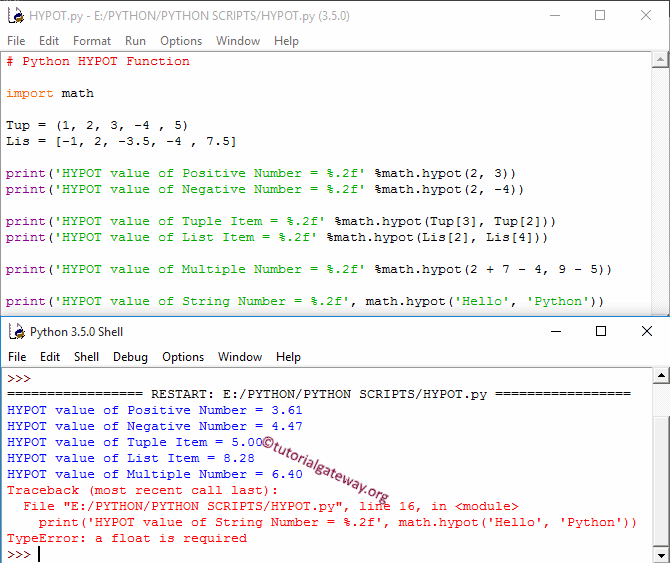
The hypot function finds the square root of the sum of squares of a given number. In this example, we will find the sum of squares of the square root of different data types and display the output.
First, we used it directly on both Positive integers and negative integers. The following Python coding statements find the square root of the sum of squares of the corresponding values.
Next, we used the hypot Function on Tuple and List items. As you see from the image below, it is working perfectly with them. Next, we used the hypot() method from available math functions on multiple values. Check the Tuple in Python and Lists in Python.
Within the last statement, we tried the hypot() on the String value, and it returns TypeError. Please refer to the Python sqrt and Python pow functions from the list of Python math methods
import math

Tup = (1, 2, 3, -4 , 5)
Lis = [-1, 2, -3.5, -4 , 7.5]

print('HYPOT value of Positive Number = %.2f' %math.hypot(2, 3))
print('HYPOT value of Negative Number = %.2f' %math.hypot(2, -4))

print('HYPOT value of Tuple Item = %.2f' %math.hypot(Tup[3], Tup[2]))
print('HYPOT value of List Item = %.2f' %math.hypot(Lis[2], Lis[4]))

print('HYPOT value of Multiple Number = %.2f' %math.hypot(2 + 7 - 4, 9 - 5))

print('HYPOT value of String Number = %.2f', math.hypot('Hello', 'Python'))