
Python endswith method returns Boolean TRUE if the string ends with the specified substring. Otherwise, it returns False. The string endswith Function is very useful when we want to check the ending term of User inputs, and the basic syntax of it is
String_Value.endswith(Substring, Starting_Position, Ending_Position)
- Substring: String you want to search for.
- Starting_Position: If you want to specify the starting index position for the string endswith function, please specify the index value here.
- Ending_Position: If you want to specify the Ending index position, please specify the index value here.
Python endswith method Example
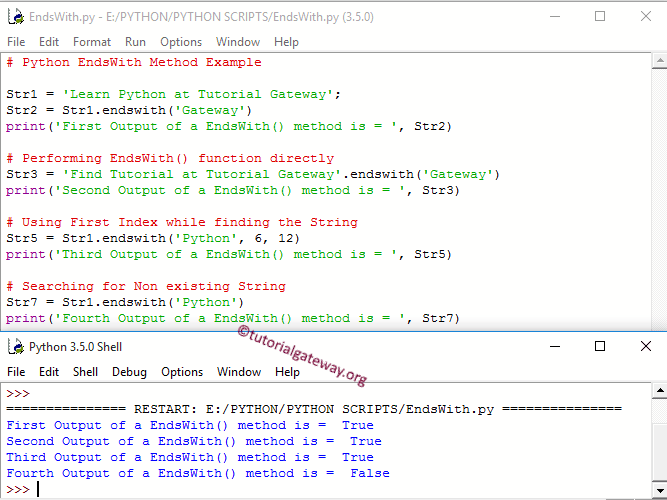
The following set of examples helps you understand the string endswith Function. First, we declared a sample text. Next, Str2 checks whether the string Str1 ended with the term ‘Gateway’ or not and prints the output.
It also allows us to use it directly on a string literal. So, we used the same for Str3. The Python string endswith function allows us to use beginning and ending indices. By specifying the starting and ending index positions, we can increase performance. Please refer to the Python string article from our Python basics page.
The following Python statement for Str5 starts looking from position 6 and checks whether the keyword ‘Python’ is at position 12 or not.
If it does not find the specified string at the ending point, it returns Boolean False. The following Str7 statement is returning False because this String Method starts looking for the term ‘Python’, and we all know that Str1 is ending with ‘Gateway’.
Str1 = 'Learn Python at Tutorial Gateway';
Str2 = Str1.endswith('Gateway')
print('First Output of a method is = ', Str2)

Str3 = 'Find Tutorial at Tutorial Gateway'.endswith('Gateway')
print('Second Output of a method is = ', Str3)

# Using First Index
Str5 = Str1.endswith('Python', 6, 12)
print('Third Output of a method is = ', Str5)

# Searching for Non existing
Str7 = Str1.endswith('Python')
print('Fourth Output of a method is = ', Str7)
Python endswith in an if statement
We can use the built-in endswith() function directly inside an if statement to check whether a string ends with a certain substring or text. For example, the program below checks whether the file name ends with a txt extension or not. Refer to the Python if else statement.
filename = "NewYorkSale.txt"

if filename.endswith(".txt"):
    print("Its a text file")
Its a text fileSimilarly, we can use the endswith() function to check for multiple extensions. For instance, the program below checks whether the given file is txt, csv, or pdf. Also, uses an else statement to display a message if the file extension does not match any of the three.
filename = "NewYorkSale.xlsx"

if filename.endswith((".txt", ".csv", ".pdf")):
    print("Upload Complete")
else:
    print("We wont support this file format")
We wont support this file formatTIP: Please refer to the Python startswith and Python find functions from the list of available Python String Methods.
Python endswith list
By default, the endswith function accepts either a single item. If you want to check against multiple items, use the endswith function and pass a tuple of multiple items as the argument.
If you have a list of strings or filenames and you want to use the endswith function to find multiple items, use the following program.
filenames = ["main.css", "sample.csv", "employee.txt"]

for file in filenames:
    if file.endswith((".css", ".txt")):
        print(file)
main.css
employee.txt
NOTE: If you already have a list of file extensions or substrings that you want to check using the endswith function, use the tuple() function to convert the list to a tuple. Next, use that converted tuple as the endswith function parameter.