
The Python update method is useful for updating key-value pairs of a dictionary. It is instrumental in updating one dictionary value with another or inserting key-value pairs from user inputs. In this section, we discuss how to use the Dictionary update function and how it removes duplicates. The syntax is:
dictionary_name.update(others)
Python Dictionary update example
We can use a dictionary or any iterable of key-value pairs as a parameter. Remember, the dict.update() function does not return any output. Instead, it updates the existing or original dictionary.
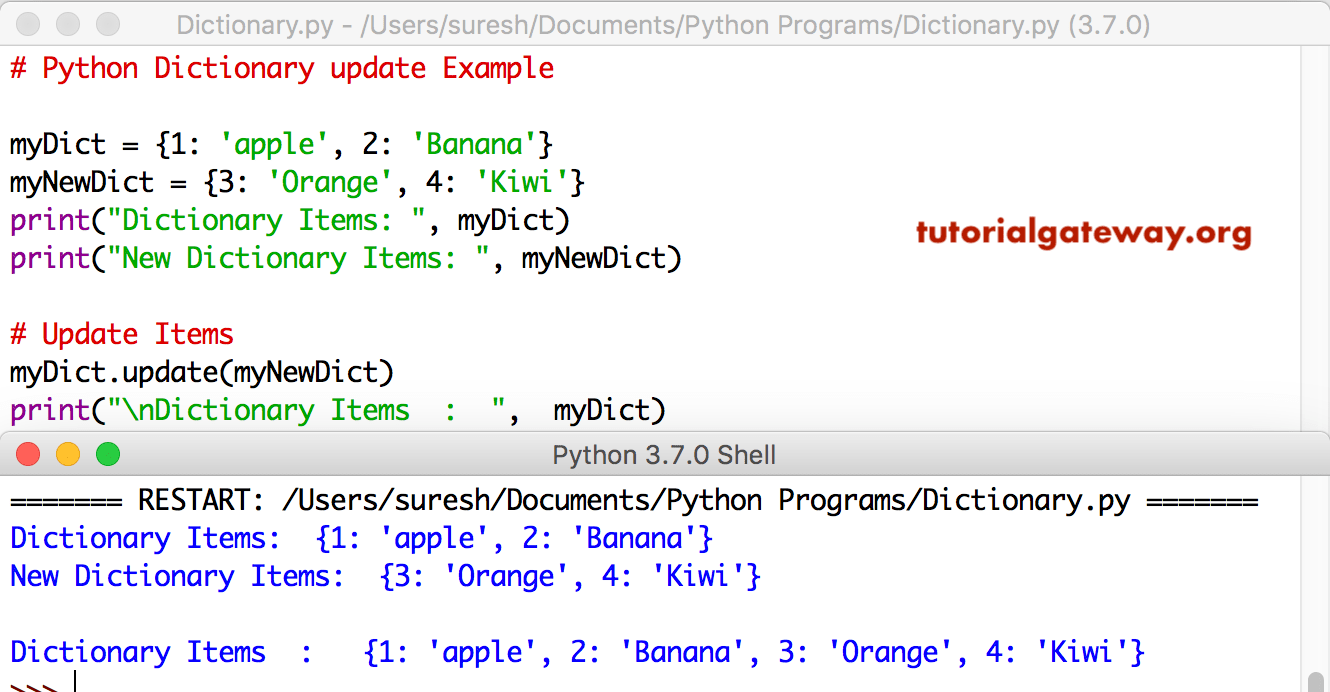
This Dictionary update Example method updates the dictionary object with another one. Refer to the Python Dictionary article from our Python basics page to understand everything about them.
myDict = {1: 'apple', 2: 'Banana'}
myNewDict = {3: 'Orange', 4: 'Kiwi'}
print("Items: ", myDict)
print("New Items: ", myNewDict)

myDict.update(myNewDict)
print("\nItems  :  ",  myDict)
Dictionary update existing key
In the following example, we used the dict.update() function to modify the existing key-value pair. Here, the name (key) of the dictionary is updated from “John” to “Smith”. You can see the modified dictionary in the output.
data = {"name": "John", "age": 25}

data.update({"name": "Smith"})
print(data)
{'name': 'Smith', 'age': 25}In the example below, we used the Python dictionary update() function with a keyword argument to modify the existing dictionary. For more functions, refer to the the list of available Python dictionary methods.
data = {"name": "John", "age": 25}

data.update(city = "London", country = "UK")
print(data)
{'name': 'John', 'age': 25, 'city': 'London', 'country': 'UK'}Using dict.update() to modify multiple keys
We can use the built-in dict.update() to update multiple keys in a single statement. Here, we update the age information from 30 to 29. Next, we insert a new key-value pair (city = London).
data = {"name": "Matt", "age": 30}

data.update({"age": 29, "city": "London"})
print(data)
{'name': 'Matt', 'age': 29, 'city': 'London'}Python dictionary update from a list of tuples or key-value pairs
Similar to joining two dictionaries, we can use the built-in update() function to update a dictionary from a list of tuples where each tuple item is a key-value pair. All we have to do is pass the list of tuples as the update() method argument, and the rest is taken care of by the controller.
data = {"a": 10, "b": 20}

keyValues = [("b", 50), ("c", 100), ("d", 200)]
data.update(keyValues)
print(data)
{'a': 10, 'b': 50, 'c': 100, 'd': 200}TIP: Please refer to the Python dictionary setdefault and Python dictionary copy functions.
Python dict update vs merge operator
We can use either the built-in update() function on the standard merge operator (|) to combine two dictionaries. When combining two dictionaries, both of them remove duplicate keys and update the values. However, the dict.update() updates the original dictionary (in place). On the other hand, the merge operator creates a completely new dictionary and keeps the original dict unchanged.
Using Python dictionary update() function
In the example below, there is a common key in both dictionaries. As we are updating d1 with items from d2, the “b” value will update from 20 to 50. If there is another item in d2 with “a”: 10, it will be removed because duplicates are automatically removed.
d1 = {"a": 10, "b": 20}
d2 = {"b": 50, "c": 100}

d1.update(d2)
print(d1)
{'a': 10, 'b': 50, 'c': 100}Using Merge Operator (|)
From the example below, you can observe that the merge operator used a completely new dictionary variable to assign the combination of two dictionaries. It keeps the original dictionaries as they are and creates a new one with the combined dictionaries.
d1 = {"a": 10, "b": 20}
d2 = {"b": 50, "c": 100}

d3 = d1 | d2
print(d1)
print(d2)
print(d3)
{'a': 10, 'b': 20}
{'b': 50, 'c': 100}
{'a': 10, 'b': 50, 'c': 100}
Using the Merge assignment operator (|=)
In modern coding, we can use the Merge assignment operator in Python (|=) which acts the same as the dict.update() function.
d1 = {"a": 10, "b": 20}
d2 = {"b": 50, "c": 100}

d1 |= d2
print(d1)
print(d2)
{'a': 10, 'b': 50, 'c': 100}
{'b': 50, 'c': 100}