
The Python list count() function is used to count the total number of times an item or element is repeated (occurred) in a given list. It is very helpful to identify the duplicates, log examinations, etc.
The Python list count() function starts searching for the given value from the beginning of the list. It means the search operation starts from index 0 and moves until it reaches the last item in a list. When the count() function finds the given value in a list, it increments the counter value by 1. After finishing searching (reaching the last item), it returns the value inside the counter.
Python list count() syntax
The syntax of the list count() function to find out the total occurrence of a given item is
listName.count(value)
In the above syntax, the listName is the original string where the count() method searches for an item.
value: It is the list element or item. The Python list count() function searches the listName from start to end to count the total number of times it appears in the list.
Return Value: The count() function returns the total number of times the value is repeated in listName. It is of an integrator type. If the specified value does not exist or is not found in a list, the count() function returns 0.
NOTE: The list count() function is case sensitive.
Python list count() function example
As we mentioned earlier, the count() method finds and returns the total number of times an item is repeated in a list. To demonstrate, we declared an integer list.
Next, we assigned 2 as the parameter of the count() method. It means the function must find the total occurrences of 2 inside the given list. As it is repeated three times, the result is 3.
n = [1, 2, 3, 2, 4, 2, 9]

a = n.count(2)
print(a)
3Non-existing item
When you use the Python list count() function to search for a non-existing item, it returns 0. For instance, if we use the above example and search for 5, it returns 0.
n = [1, 2, 3, 2, 4, 2, 9]

print(n.count(5))
0Counting multiple items
If the list consists of multiple duplicate items (multiple occurrences), we must use the count() function multiple times. The function accepts one argument at a time. For different items, use the Python list count() function separately.
For instance, in the example below, the list consists of multiple 10s and 20s. So, we must use the count() function two times, and the first finds the total occurrence of 10. The second statement counts the total number of times 20 is repeated in a list.
a = [10, 20, 30, 10, 40, 10, 50, 20]

print("Total Number of Times 10 has repeated = ", a.count(10))
print("Total Number of Times 20 has repeated = ", a.count(20))
Total Number of Times 10 has repeated = 3
Total Number of Times 20 has repeated = 2
In the example below, we declared an integer list of positive and negative numbers. Next, the count() function finds the total number of times positive 9, negative 4, and 0 are repeated.
numbers = [9, -4, -5, 0, 9, 0, -4, 9, -4]

print('9 is repeated =', numbers.count(9))
print('-4 is repeated =', numbers.count(-4))
print('0 is repeated =', numbers.count(0))
9 is repeated = 3
-4 is repeated = 3
0 is repeated = 2
How to count user-entered integer list items in Python?
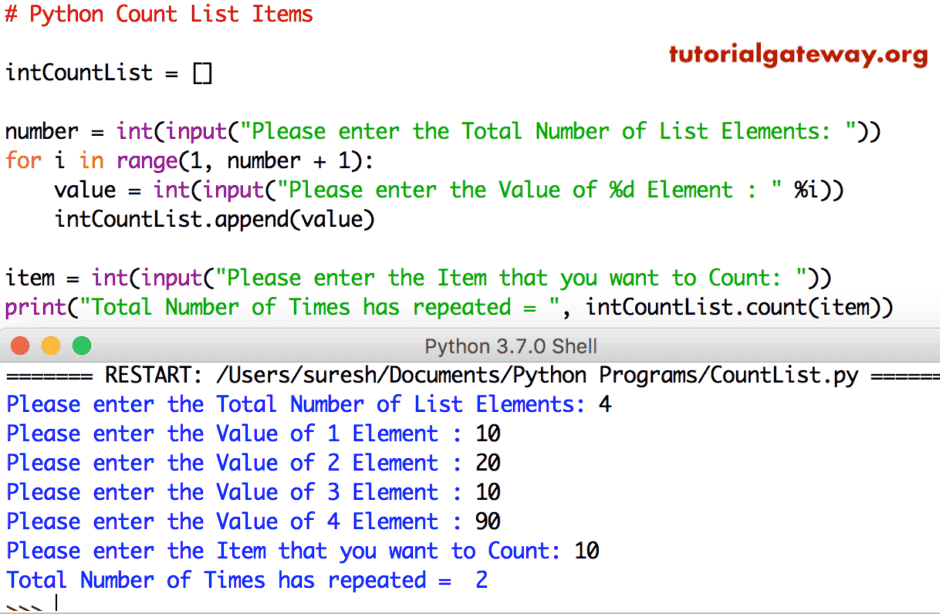
This Python program allows the user to enter the length and a for Loop to append those numbers to the intCountList. Then we used the count() method to check the total occurrence of item 10.
intCountList = []

number = int(input("Please enter the Total Number of List Elements: "))
for i in range(1, number + 1):
    value = int(input("Please enter the Value of %d Element : " %i))
    intCountList.append(value)

item = int(input("Please enter the Item that you want to Count: "))
print("Total Number of Times has repeated = ", intCountList.count(item))
Python list count() function with string elements
It is common to see repeated words or strings in a list. For instance, message, error, tags, etc. In such a case, we can use the count() function to check how many times a particular category repeats in the incoming list.
In this example, we declared a list of eight string items (fruits). Next, we utilized the list count() function to identify how many times Apple and Banana are repeated.
Fruits = ['Apple', 'Orange', 'Banana', 'Apple', 'Grape', 'Banana', 'Apple']

print("'Apple' has repeated = ", Fruits.count('Apple'))
print("'Banana' has repeated = ", Fruits.count('Banana'))
'Apple' has repeated =  3
'Banana' has repeated = 2
It is another example where we use the Python list count() function to find out the total occurrence of each item in a string list. As there are three distinct items in the list below. The count() function finds how many times Apple, Banana, and Kiwi are repeated.
Fruits = ['Apple', 'Orange', 'Banana', 'Kiwi', 'Apple', 'Kiwi']

#Count of List items
print('Kiwi = ', Fruits.count('Kiwi'))
print('Apple = ', Fruits.count('Apple'))
print('Banana = ', Fruits.count('Banana'))
Kiwi =  2
Apple =  2
Banana =  1
Case-sensitivity of Python list count() function
As we mentioned earlier, the count() function is case-sensitive and treats the lowercase and uppercase characters as different. The following example returns the Apple count as 2. However, there are three occurrences of an apple where one is lowercase and the other two are capitalized.
Fruits = ['Apple', 'Orange', 'Apple', 'Kiwi', 'apple']

print(Fruits.count('Apple'))
2How to count user-entered string list items?
This program allows users to enter the list size and dynamically builds it with the user’s input. As you can see, we allowed the user to enter five different strings. Next, the Python list count() function counts the total number of times Kiwi is repeated.
strCList = []

number = int(input("Total Number of Elements: "))
for i in range(1, number + 1):
    value = input("Value of %d Element: " % i)
    strCList.append(value)

item = input("Item to Count: ")
print(item, " repeated = ", strCList.count(item))
Total Number of Elements: 5
Value of 1 Element: Kiwi
Value of 2 Element: Dragon
Value of 3 Element: Kiwi
Value of 4 Element: Apple
Value of 5 Element: Kiwi
Item to Count: Kiwi
Kiwi  repeated =  3
Python list count() function on mixed data types
Apart from the normal lists, we can utilize the count() function on lists with mixed data types, and it works without any issue.
To demonstrate, we declared a list containing integers, floating-point numbers, strings, and Boolean values. Let me use the count function on the mixed List. Please refer to the List and List methods articles in Python.
MxList = ['Apple', 10, 'Banana', 10, 'Apple', 10, 30.70, 10, False, 'Apple']

print("Apple repeats =", MxList.count('Apple'))
print("10 repeats =", MxList.count(10))
Apple repeats = 3
10 repeats = 4
Using the Python list count() function on Nested Items
As we all know, the list count() function considers each sub-list (nested) as one item. If you observe the example below, we have declared a list with five sub-lists, and each nested list contains two items.
Here, the Python list count() function considers one nested list (sub-list) as one item and compares it against the other. If any two are matching, consider it a duplicate and count it.
To demonstrate it, we utilize the count() function to find the total occurrence of the nested list [10, 20]. As it considers the whole sub-list (one inside the other) as a single item, it checks for other entries. As there are two occurrences, the result is 2.
n = [[10, 20], [20, 30], [10, 20], [40, 50], [10, 80]]

print("[10,20] repeats = ", n.count([10,20]))
[10,20] repeats = 2In the following example, the list consists of nested lists and tuples. Here, we use the list count() function to count the total number of times a tuple has repeated in a list.
n = [[1, 2], (1, 3), [2, 4], (1,3)]
print(n.count((1, 3)))
2Python list count() function vs len()
Both the count() and len() functions look similar; they both serve different purposes. The count() function accepts a list item as input and checks how many times the element repeats inside that list. On the other hand, the len() function finds the total number of items (size) in a list, and it can be applicable for other iterables.
From the example below, the count() function returns 3 because 1 is repeated three times in the integer list. On the other hand, the len() function returns 5 because there are a total of 5 list items.
n = [1, 2, 1, 4, 1]

c = n.count(1)
print(c)

l = len(n)
print(l)
3
5
Alternatives to the Python list count() function
Apart from the built-in count() function, there are many options to find out the total occurrence of a given element in a list. It includes the custom approach of writing for loops or list comprehensions. Otherwise, use the built-in functions in other modules.
The following section covers possible alternatives to the Python list count() function.
Using a for loop
If you want to avoid built-in functions for counting occurrences, we can use a for loop and an if statement.
The for loop will iterate over the list items from the starting point to the end position. The if statement inside it will check whether the list item of that iteration is equal to the search item. If it is, increment the counter variable to 1. Once the for loop completes the iterations, print the counter value.
fruits = ["apple", "banana", "kiwi", "apple", "apple"]
count = 0

for fruit in fruits:
    if fruit == "apple":
        count+= 1

print(count)
3Using list comprehensions
List comprehension is an advanced technique for iterating over list items. In the example below, the list comprehension iterates over the fruit lists. The if statement checks whether the list item on each iteration is an apple. If true, the sum() function adds one.
fruits = ["apple", "banana", "kiwi", "apple", "apple"]

count = sum(1 for fruit in fruits if fruit == "apple")
print(count)
3Using counter() method
The collections module has a built-in counter() function, which is one of the most powerful options to count the occurrence of each item in a list. Unlike the Python list count() function, it reads all the list items and displays the count of each item.
The counter() function returns a Counter object, which is a dictionary of key-value pairs, as its output. The keys are the list items, and the values are the total occurrences of each particular item. Here, we utilized the key to access the total number of times 1 is repeated in a list.
from collections import Counter
n = [1, 2, 1, 3, 2, 4, 3, 2, 1,2]
c = Counter(n)
print(c)

a = c[1]
print(a)
Counter({2: 4, 1: 3, 3: 2, 4: 1})

3
TIP: Use the count() function to count the total occurrence of a single item. On the other hand, use the Counter() method to count the multiple occurrences of multiple items.
Using countof() method
The operator module has the countof() function that returns the total number of occurrences of a given item in a specified list. However, it takes two arguments and an extra module import. We use the countof() function to check the total occurrence of 2.
import operator as op
n = [1, 2, 1, 3, 2, 4, 3, 2, 1, 2]
c = op.countOf(n, 2)
print(c)
4Using pandas value_counts() method
The most famous Padas library has a series to read a normal list and convert it to a series. Next, the built-in value_counts() function in pandas is used to count the total occurrences of each item in a list.
Unlike the Python list count() function, the value_counts() method returns the total occurrences of each list item. We must call a particular item exclusively to see how many times it is repeated in the list.
import pandas as pd
n = [1, 2, 1, 3, 2, 4, 3, 2, 1,2]
c = pd.Series(n).value_counts()
print(c)
print(c[2])
Result
2    4
1    3
3    2
4    1
Name: count, dtype: int64
4
Using numpy unique() method
Similar to the pandas, we can use the NumPy module’s unique function to count the total occurrence of each item in a list. However, we must convert the given list to an ndarray and then utilize the unique function on it. Here, the return_counts argument is very important, and we must mention True.
import numpy as np

n = [1, 2, 1, 3, 2, 4, 3, 2, 1,2]
arr = np.array(n)
numbers, count = np.unique(arr, return_counts=True)
print(numbers, count)
[1 2 3 4] [3 4 2 1]