
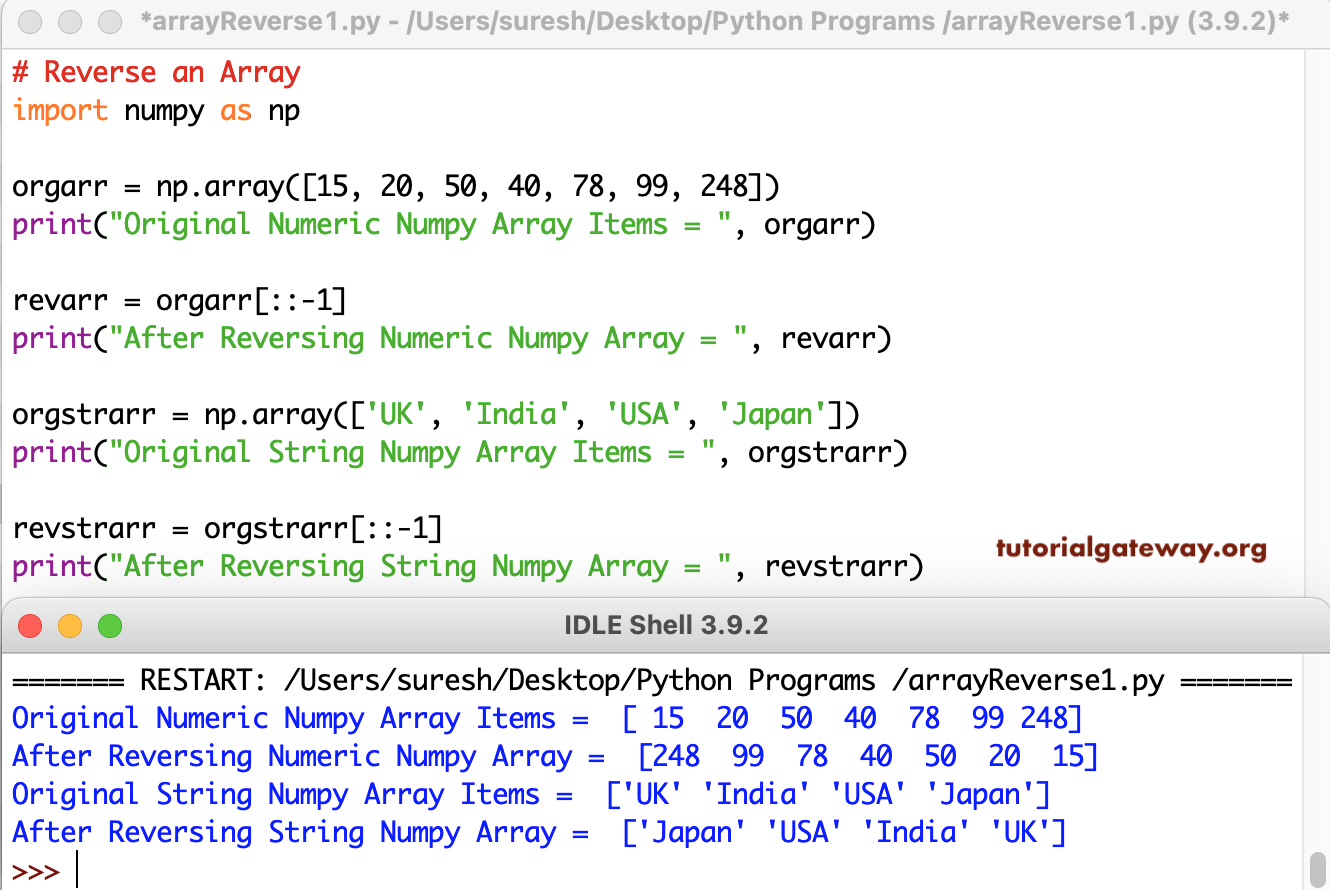
Write a Python Program to reverse the given Numpy Array. We can use the slicing technique with a negative value to get the Numpy Array reverse. In this example, we used the same to reverse the numeric and string arrays.
import numpy as np

orgarr = np.array([15, 20, 50, 40, 78, 99, 248])
print("Original Numeric Numpy Array Items = ", orgarr)

revarr = orgarr[::-1]
print("After Reversing Numeric Numpy Array = ", revarr)

orgstrarr = np.array(['UK', 'India', 'USA', 'Japan'])
print("Original String Numpy Array Items = ", orgstrarr)

revstrarr = orgstrarr[::-1]
print("After Reversing String Numpy Array = ", revstrarr)
Python Program to Reverse an Array using reversed() function
We can use the reversed() function to reverse elements in a NumPy array. However, it requires a workaround because it returns a reversed object. We must convert it to a list and then back to a NumPy array. This approach is a less effective method.
import numpy as np
a = np.array([1, 2, 3, 4, 5])
b = np.array(list(reversed(a)))
print(b)
[5 4 3 2 1]Reverse an array using the flip() method
The NumPy module has a built-in flip() method that will reverse the given array.
import numpy as np
a = np.array([1, 2, 3, 4])
b = np.flip(a)
print(b)
[4 3 2 1]Program to reverse array elements using NumPy arange()
This program uses the built-in NumPy arrange() function to iterate over the array elements. Here, we set the starting index position to the array’s last element and the stop to the first item. Next, set the step value to -1 to iterate in reverse order.
import numpy as np
a = np.array([1, 2, 3, 4, 5])
b = np.arange(len(a), 0, -1)
print(b)
[5 4 3 2 1]Python Program to Reverse an Array using While loop
This example uses the temporary variable to shift the numeric array items and reverse them.
import numpy as np

orgarr = np.array([14, 27, 99, 50, 65, 18, 195, 100])

j = len(orgarr) - 1
i = 0

while(i < j):
    temp = orgarr[i]
    orgarr[i] = orgarr[j]
    orgarr[j] = temp
    i += 1
    j -= 1

print(orgarr)
[100 195 18 65 50 99 27 14]Program to Reverse an Array Using functions
In this NumPy array example, we created a function (def reverseArray(orgarr, number)) that reverses the array passed to it. For more examples, refer to the Python Basic Programs.
# using functions
import numpy as np

def reverseArray(orgarr, number) :
    j = number - 1
    i = 0

    while(i < j):
        temp = orgarr[i]
        orgarr[i] = orgarr[j]
        orgarr[j] = temp
        i += 1
        j -= 1


arrList = []
number = int(input("Enter the Total Array Items = "))
for i in range(1, number + 1):
    value = int(input("Enter the %d Array value = " %i))
    arrList.append(value)

orgarr = np.array(arrList)
print("Original  = ", orgarr)

reverseArray(orgarr, number)
print("After  = ", orgarr)
Enter the Total Array Items = 4
Enter the 1 Array value =  20
Enter the 2 Array value =  40
Enter the 3 Array value =  60
Enter the 4 Array value =  80

Original = [20 40 60 80]
After = [80 60 40 20]
Program to Reverse array items using recursion
In this program, we created a recursive function to Reverse an Array (reverseArray(orgarr, i + 1, j – 1)) with updated values.
import numpy as np

def reverseArray(orgarr, i, j) :
   if(i < j):
        temp = orgarr[i]
        orgarr[i] = orgarr[j]
        orgarr[j] = temp
        reverseArray(orgarr, i + 1, j - 1)


orgarr = np.array([22, 44, 87, 538, 89, 120, 197])
print("Original Numeric Numpy Array Items = ", orgarr)

reverseArray(orgarr, 0, (len(orgarr) - 1))
print("After Reversing Numeric Numpy Array = ", orgarr)
Original Numeric Numpy Array Items = [22, 44, 87, 538, 89, 120, 197]
After Reversing Numeric Numpy Array = [197 120 89 538 87 44 22]
Reverse array elements using the swapping technique
On each iteration, this program swaps the first and last array elements, and the process continues until the reversal is complete.
import numpy as np
a = np.array([1, 2, 3, 4, 5])
ln = len(a)
for i in range(ln // 2):
    a[i], a[ln - 1 - i] = a[ln - 1 - i], a[i]

print(a)
[5 4 3 2 1]Also Read