
Write a Python Program to check whether the Number is Positive or Negative with a practical example. There are two traditional approaches to achieve the same, and they are using elif and nested statements.
Python Program to check Number is Positive or Negative using elif
This program allows the user to enter any numeric value. Next, using the elif statement, this program verifies whether that number is positive, negative, or zero.
number = float(input(" Please Enter any Numeric Value : "))

if(number > 0):
    print("{0} is a Positive Number".format(number))
elif(number < 0):
    print("{0} is a Negative Number".format(number))
else:
    print("You have entered Zero")
If you observe the output, first, we have until the positive number. Next time, we are using zero. Finally, we enter the negative value to check all the statements within the code.
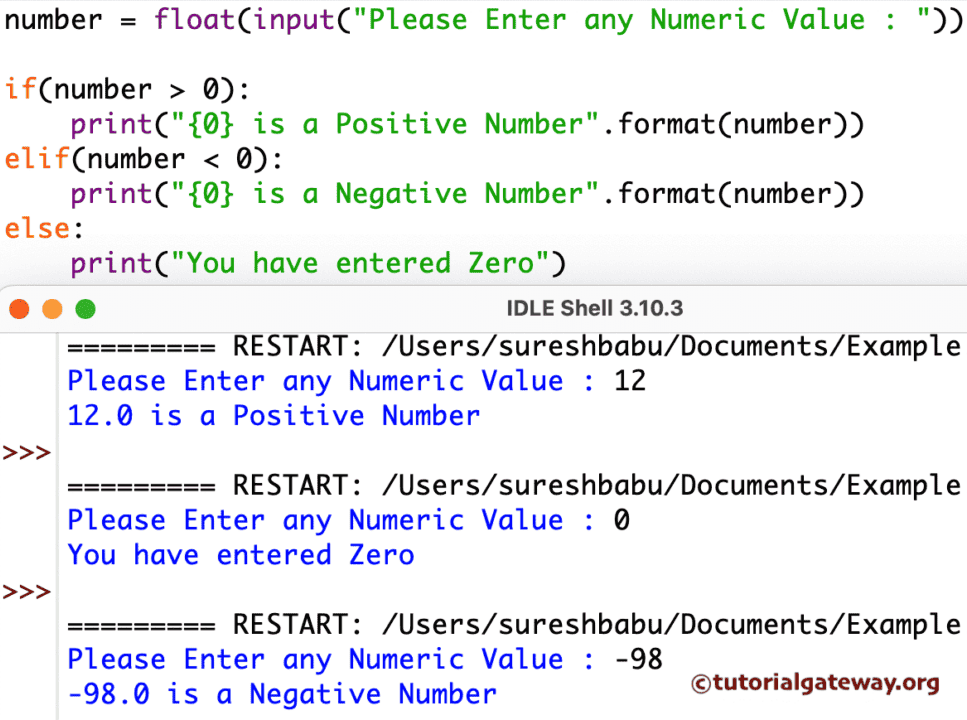
The below Python statement asks the user to Enter any integer.
number = float(input(" Please Enter any Numeric Value : "))
In the next line, We declared the Python else If statement
- The first Condition checks whether the given number is greater than 0. If it is true, then it is positive.
- Second condition: elif statement check whether a number is less than 0. If this is true, then the given value is negative.
- If both the above conditions fail, then it is 0.
Python Program to check Number is Positive or Negative using Nested if Statement
This Python example allows the user to enter any numeric value. Next, it uses the nested if statement to check whether the entered number is positive, negative, or zero. Refer to the Python nested if statement.
Let me divide the working principle of the below Program to check Number is Positive or Negative using the Nested if Statement into bullet points.
- The first statement (if n >= 0) checks whether the given number is greater than or equal to 0. If true, it enters the nested if else block.
- Within the nested block, the if condition (if n > 0) checks whether n is greater than zero. If it is true it’s a positive number otherwise it goes to the else block and prints n is zero.
- If the first condition that is n greater than or equal to 0 is false(if n >= 0), then the given number is obviously negative.
n = float(input(" Please Enter any Numeric Value : "))

if n >= 0:
    if n > 0:
        print("{0} is a Positive Number".format(n))
    else:
        print("You have entered Zero")
else:
    print("{0} is a Negative Number".format(n))

Check if a number is positive or negative using functions
In the following program, we define a function that accepts a number and uses the elif statement to check whether it is positive, negative, or zero.
def positiveOrNegative(n):
    if n > 0:
        print(n, 'is Positive')
    elif n < 0:
        print(n, 'is Negative')
    else:
        print(n, 'is Zero')

number = int(input('Enter any Value =  '))
positiveOrNegative(number)
Enter any Value  =  0
0 is Zero
Check if a number is positive or negative using NumPy sign
When we work with the NumPy module, we can use the sign() function to identify the sign of a given number. Based on the result, we can identify whether the number is positive, negative, or zero.
import numpy as np
n = int(input('Enter any Value  =  '))
s = np.sign(n)

if s == 1:
    print("Positive")
elif s == -1:
    print("Negative")
else:
    print("Zero")
Enter any Value  =  30
Positive
Find positive or negative number using lambda
n = 50

res = lambda x: "Positive" if x > 0 else "Negative" if x < 0 else "Zero"
print(res(n))
PositiveAlso Read