
Python clear function is used to clear or remove total items (key-value pairs) from a Dictionary. The syntax behind this clear function is:
dictionary_name.clear()
Python Dictionary clear function Example
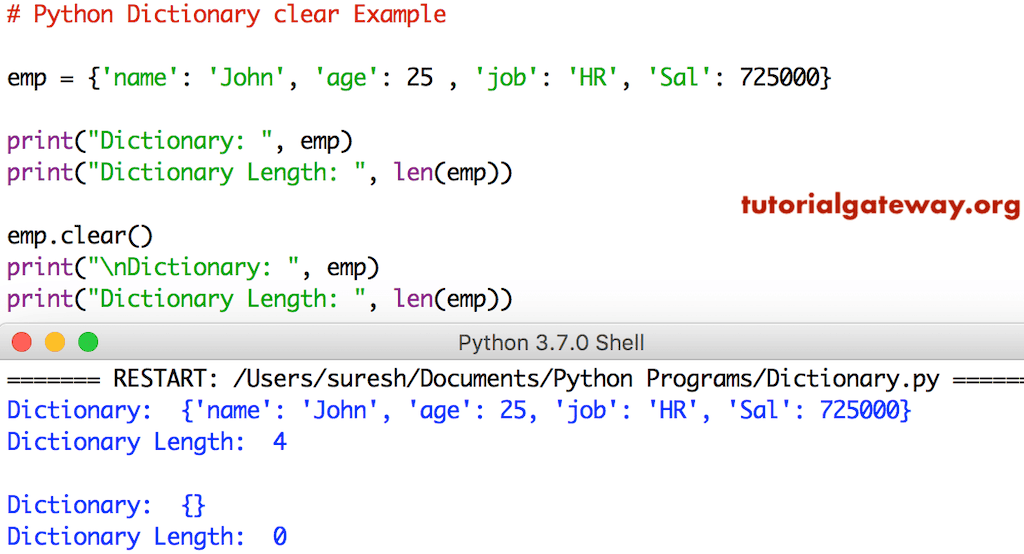
The clear function removes keys and values in a given dictionary. The code below removes items from the emp. The Python dictionary len function helps to return the length of a given dictionary.
TIP: Please refer to the Python Dictionary article from our Python tutorial page to understand everything about them.
emp = {'name': 'John', 'age': 25 , 'job': 'HR', 'Sal': 725000}

print("Dictionary: ", emp)
print("Dictionary Length: ", len(emp))

emp.clear()
print("\nDictionary: ", emp)
print("Dictionary Length: ", len(emp))
Python dictionary clear vs reassign empty dict
If you are working with a dictionary without any references to it, both the dictionary.clear() function and reassign original to an empty dict using {}, returning an empty dictionary. However, if there are any references to the original dictionary, they differ. Please refer to the Python dictionary keys and Python dictionary values functions.
TIP: If your job is to empty the original dictionary and all its references, use the clear() function. If the task is to empty the current dictionary and keep the references as they are (unchanged), prefer reassigning the original to an empty dict using {}.
In the following example, we use both options on a simple dictionary without any references.
s1 = {'Name': 'Mathew','Age': 22}
s1.clear()
print(s1)

s2 = {'Name': 'Mathew','Age': 22}
s2 = {}
print(s2)
{}
{}
In this example, we use the dictionaries with a reference.
Using Python dictionary clear()
In the example below, we declared a dictionary with two items. Next, we used the equals Python assignment operator to assign the original dictionary to a new one.
It means the original dictionary (s1) and its reference (s2) are pointing to the same dictionary object. So, if we use the built-in clear() function, it clears the information from both s1 and s2 dictionaries and makes them empty.
s1 = {'Name': 'Mathew','Age': 22}
s2 = s1
s1.clear()
print(s1)
print(s2)
{}
{}
Reassign empty dict {}
In this example, we are reassigning the original dictionary s3 to an empty dict using {}. It makes the s4 point to an original dictionary (unchanged). However, s3 will point to a completely new dictionary with empty items.
s3 = {'Name': 'Mathew','Age': 22}
s4 = s3
s3 = {}
print(s3)
print(s4)
{}
{'Name': 'Mathew', 'Age': 22}
Python dictionary clear vs del
The clear() method clears all items in a dictionary, making it empty. However, we can use the del to remove a specific key-value pair or a complete dictionary variable.
Dictionary clear() method
In the example below, we declared a dictionary of three items. When we apply the clear() method, it deletes those items and returns an empty dictionary as the output.
s1 = {'Name': 'Charlie','Age': 30, 'Income': 100000}
s1.clear()
print(s1)
{}Using del
We can use del either to delete a specific key-value pair or the complete dictionary. First, we used the del to remove the Age key-value pair from the s1 dictionary. Next, when we use del s1, it removes the complete dictionary (variable). If we call s1 after applying it, it will throw NameError because it has already been deleted.
s1 = {'Name': 'Charlie', 'Age': 30, 'Income': 100000}
del s1['Age']
print(s1)

del s1
print(s1)
{'Name': 'Charlie', 'Income': 100000}
NameError: name 's1' is not defined
TIP: Use Python dictionary pop and Python dict.popitem methods from the list of available Python dictionary functions to delete a single dictionary item and return it as the output.
Python copy and clear a dictionary
We can use the combination of both the copy() and clear() functions to avoid accidental data clearing mistakes. As we all know, the built-in Python dict.copy method shallow copies the original dictionary into a completely new dictionary.
Before applying the clear() method to clear the original dictionary, we can use the copy() method to maintain a backup of the dictionary. If there are accidental data clearances occur, we can get the data from the backup. Next, we can use the Python dict.update to modify the dictionary items.
s = {'Name': 'Charlie','Age': 30, 'Income': 100000}
duplicate = s.copy()
s.clear()
print(s)
print(duplicate)
{}
{'Name': 'Charlie', 'Age': 30, 'Income': 100000}