
The Python dictionary copy function will shallow-copy the dictionary items (key-value pairs). By default, the built-in copy() function does not modify the original dictionary. Instead, it shallow copies the original dictionary and returns a new dictionary with the same items.
The syntax of the Python dictionary copy() method is shown below.
dictionary_name.copy()
TIP: If the original dictionary contains immutable values like strings or numbers, use the copy() function to perform a shallow copy. However, if the dictionary contains mutables like Python lists, Python sets, or dictionaries, use the deepcopy() function.
Python Dictionary copy function Example
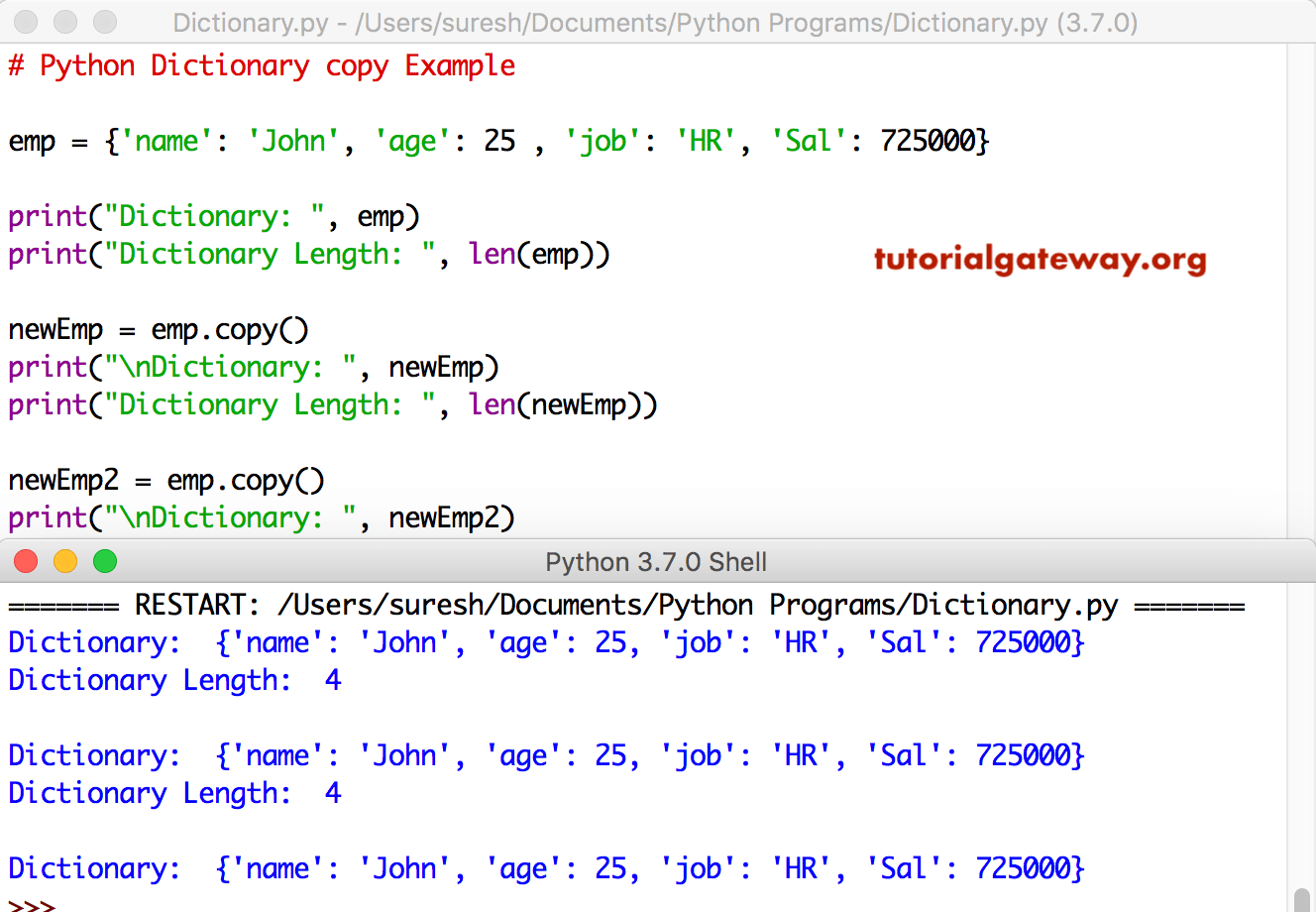
This function copies the keys, and values in a given dictionary to another one. The below code copies items in the emp to newEmp and newEmp2.
TIP: Check out the Python Dictionary article from our Python basics page to understand everything about them.
emp = {'name': 'John', 'age': 25 , 'job': 'HR', 'Sal': 725000}

print("Dictionary: ", emp)
print("Dictionary Length: ", len(emp))

newEmp = emp.copy()
print("\nDictionary: ", newEmp)
print("Dictionary Length: ", len(newEmp))

newEmp2 = emp.copy()
print("\nDictionary: ", newEmp2)
Python dictionary copy vs deep copy
AS we mentioned earlier, the copy() function performs a shallow copy of the existing dictionary into a completely new dictionary. Although it creates a new dictionary, both the original and the shallow dictionary share the same values.
Shallow copy
In the following example, we created a student dictionary with a name and a list of student marks. Next, we used the Python copy() method to perform a shallow copy of the dictionary.
Next, we use the append() function to add new subject marks to the list of a shallow dictionary. However, when we print the original and the copy, both return the new subject marks inside their list.
Although both student and newStudent are different dictionaries, if the values are mutable like dictionaries or lists, they are shared among both dictionaries.
student = {'Name': 'John Miller',
           'Marks': [89, 75, 66]
           }

newStudent = student.copy()
newStudent["Marks"].append(95)

print(student)
print(newStudent)
{'Name': 'John Miller', 'Marks': [89, 75, 66, 95]}
{'Name': 'John Miller', 'Marks': [89, 75, 66, 95]}
Deep Copy
To perform a deep copy of dictionaries, we must import the copy library first and then utilize its deepcopy() function. It creates a fully independent copy of the original dictionary. To demonstrate it, we used the same example.
If you observe the result, the deepcopy() function updates the newStudent dictionary, and the original one remains untouched. It means each dictionary has its own list of items (no sharing).
import copy
student = {'Name': 'John Miller',
           'Marks': [89, 75, 66]
           }

newStudent = copy.deepcopy(student)
newStudent["Marks"].append(95)

print(student)
print(newStudent)
{'Name': 'John Miller', 'Marks': [89, 75, 66]}
{'Name': 'John Miller', 'Marks': [89, 75, 66, 95]}
TIP: Please refer to the Python dict.copy vs == operator.
How to copy a nested dictionary in Python?
The copy() method allows you to shallow copy a nested dictionary. However, in terms of internal logic, it only copies the outer (main) dictionary, and the nested dictionary will be shared among the original and the shallow copied dictionaries.
In the following example, we declared a nested dictionary. When I use the built-in copy() function, it shallow copies the original dictionary. It means it creates a new dictionary.
As the string is immutable, both dictionaries can have different names. However, the nested dictionary is mutable, so both the original and the shallow copy share the nested dictionary values.
student = {'Name': 'Mathew Hayden',
           'Marks': {
               "Physics":89,
               "Math":92,
               "Chemistry":66 }
           }

newStudent = student.copy()
newStudent["Marks"]["Computers"] = 79

print(student)
print(newStudent)
{'Name': 'Mathew Hayden', 'Marks': {'Physics': 89, 'Math': 92, 'Chemistry': 66, 'Computers': 79}}
{'Name': 'Mathew Hayden', 'Marks': {'Physics': 89, 'Math': 92, 'Chemistry': 66, 'Computers': 79}}
NOTE: If you want to copy only keys with None as the values from one dictionary to another, use the Python dict.fromkeys function. For instance, newStudent = dict,fromkeys(student). Please refer to the Python dictionary keys and Python dictionary values functions.