
Python Bitwise operators help perform bit operations. First, all the decimal values will convert into binary values (bits sequence, i.e., 0100, 1100, 1000, 1001, etc.). Next, the bitwise operators work on these bits by shifting left to right or transforming bit values from 0 to 1 and vice versa.
The below table shows the different Python Bitwise operators and their meanings. For example, Consider x = 6 and y = 8 and their values in binary form are: x = 0110 and y = 1000
| Python Bitwise Operators | Meaning | Examples |
|---|---|---|
| & | Bitwise AND | X & Y = 0000 |
| | | OR | X | Y = 1110 |
| ^ | exclusive OR | X ^ Y = 1110 |
| ~ | complement | ~X = 00001001 (Not operator will convert all 0 into 1.) |
| << | Shift left | X << 1 = 00001100 (Bits will move 1 step left. If we use 2 or 3, then they shift accordingly) |
| >> | Shift right | Y >> 1 = 00000100 |
The Truth Table behind the Python Bitwise Operators is:
| x | y | x & y | X | y | x ^ y |
|---|---|---|---|---|
| 0 | 0 | 0 | 0 | 0 |
| 0 | 1 | 0 | 1 | 1 |
| 1 | 0 | 0 | 1 | 1 |
| 1 | 1 | 1 | 1 | 0 |
Python Bitwise Operators Example
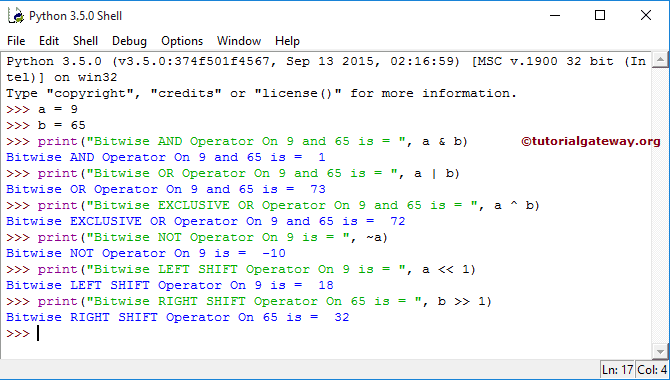
In this example, we use two variables, a and b, whose values are 9 and 65. Next, we use them to show you the list of Bitwise operations. See our Python tutorial for more operators and other topics.
a = 9
b = 65
print("AND On 9 and 65 is = ", a & b)
print("OR On 9 and 65 is = ", a | b)
print("EXCLUSIVE OR On 9 and 65 is = ", a ^ b)
print("NOT On 9 is = ", ~a)

print("LEFT SHIFT On 9 is = ", a << 1)
print("RIGHT SHIFT On 65 is = ", b >> 1)
TIP: Bitwise operators perform bit operations on individual bits. However, to perform mathematical calculations on actual variable values, use either the Python arithmetic operators or the Python assignment operators.
In this Python bitwise operators program, we declared two integers, a and b, and assigned the values 9 and 65. The binary form of 9 = 00001001 and 65 = 01000001.
>>> a = 9
>>> b = 65
Let’s see the Python calculations of these Operators
AND Operation = a&b
00001001 & 01000001 = 00000001 = 1
OR Operation on integer values = a | b
00001001 | 01000001 = 01001001 = 73
The Exclusive OR Operation = a^b
00001001 ^ 01000001 = 01001000 = 72
Right Shift Operation = b >> 1
01000001 >> 1 = 00100000 = 32
Python Bitwise AND (&) Operator
The bitwise AND operator is denoted by the “&” symbol, which performs bit-by-bit comparison between the given two numbers. If both bits (corresponding bits from two numbers) are 1, the result bit becomes 1. Please check the above truth table.
In the example below,
a = 9 = 1001 (binary number 8421 rule)
b = 5 = 0101
If you observe them, there is only one position (the first place) where both bits from a and b are 1, so the result is 1. For all the remaining positions, the result is 0 because they are combinations of 0 and 1. So, the result is 0001 (1 in decimal).
a = 9
b = 5

print(a & b)
1Using the Bitwise AND operator to check Even or Odd
We can use the Bitwise AND operator to check whether the given value is even or odd.
n = int(input("Enter a Number: "))

if n & 1:
    print("It is an Odd Number")
else:
    print("It is an Even Number")
Enter a Number: 11
It is an Odd Number
Multiple Bitwise AND operations
The Python bitwise operators are not limited to performing bit operations on two operands. We can use more than two numbers and perform bit operations. In such a case, it performs bitwise operations on the first two numbers. Next, use the result as the first operand and the third variable as the second operand to perform bitwise operations.
a = 7 = 0111
b = 5 = 0101
Result = 5 = 0101
c = 9 = 1001
Final result = 0001 = 1
a = 7
b = 5
c = 9

print(a & b)
print(a & b & c)
5
1
Python Bitwise OR (|) Operator
The bitwise OR operator, represented by the “|” symbol, performs bitwise comparison (1 or 0) between two given numbers. If either bit (corresponding bits from the two numbers) is 1, the result bit becomes 1. Please check the above truth table.
In the example below,
pizzas = 9 = 1001
burgers = 3 = 0011
If you observe the binary numbers of 9 and 3, at the third place both bits are 0s. For all the remaining positions, the result is 1 because 1 or 0 becomes 1. So, the result is 1011 (11 in decimal).
pizzas  = 9
burgers = 3

print(pizzas | burgers)
11Python Bitwise XOR (^) Operator
The bitwise XOR operator, represented by the “^” symbol, performs bit comparison and returns 1 if the corresponding bits are different. It means 1 ^ 1 or 0 ^ 0 returns 0, and for the remaining cases, it returns 1.
For example, if the price of pizza is 10 dollars and fries is 6. If we use the bitwise XOR operator,
pizza = 10 = 1010
fries = 6 = 0110
Result = 1100 (12 in decimal)
In the last two positions, the bits are different, and the bits are the same in the remaining positions. So, the result is 1100.
pizza  = 10
fries = 6

print(pizza ^ fries)
12Python Bitwise NOT (~) operator
Although internally, a lot happens to return the result. There is a golden rule for the Bitwise NOT operator, which is ~(n) = -(n + 1).
pizza  = 8
print(~pizza)
-9Python Left Shift (<<) Operator
The bitwise left shift operator, represented by the “<<” symbol, shifts the bit positions to the left side based on the given number. For example, x << 1 means shift the bit positions by 1 to the left and fill the gap with 0s.
There is a mathematical formula to calculate the result of the bitwise left shift operator.
X << n = x * 2n
In the example below, we declared the burger price as 7 dollars. Next, we used the bitwise left shift operator to shift the bits to the left by 3 positions.
Burger = 7 = 0000 0111
Burger << 3 = 0011 1000 (32 + 16 + 8 = 56)
Burger  = 7
print(Burger << 3)
56According to the mathematical formula = 7 * 23 = 7 * 8 = 56.
Python Right Shift (>>) Operator
The bitwise right shift operator, represented by the “>>” symbol, shifts the bit positions to the right side based on the given number. For example, x >> 2 means shift the bits 2 positions to the right and fill the gap with 0s.
The mathematical formula to calculate the bitwise right shift operator result.
x >> n = floor( x / 2n)
In the example below, we declared the burger price as 7 dollars. Next, we used the bitwise left shift operator to shift the bits to the left by 3 positions.
Golden_Glizzy = 100 = 0110 0100
Golden_Glizzy >> 2 = 0001 1001 (16 + 8 + 1 = 25)
Golden_Glizzy  = 100
print(Golden_Glizzy >> 2)
25According to the mathematical formula = 100 / 22 = 100 / 4 = 25. If there are any decimal values, the Python floor function will round them down.
Python Bitwise Operators on strings
Generally, we cannot use the bitwise operators directly on strings. If this situation occurs, you must convert them to Unicode values or use their ASCII values to perform bit operations.
s1 = "A"
s2 = "B"
print(ord(s1))
print(ord(s2))
print(ord(s1) ^ ord(s2))
65
66
3
Python Bitwise Operators Precedence
By default, the Bitwise operators follow a particular order, so you must use parentheses () to perform bit operations on multiple operands. The following list shows the bitwise operators’ precedence from highest to lowest.
- Bitwise NOT (~)
- Left and Right Shift Operators (<< and >>)
- Bitwise AND (&)
- Bitwise XOR (^)
- Bitwise OR (|)
TIP: In most cases, we may confuse ourselves with these bitwise operators’ precedence and do the wrong step. So, always use parentheses for a perfect result.
Comments are closed.