
Python dictionary popitem is one of the Dictionary functions used to remove the last inserted key-value pair and print the removed item pair. In this section, we discuss how to use the Dictionary popitem function, and the syntax is:
dictionary_name.popitem()
Python Dictionary popitem Example
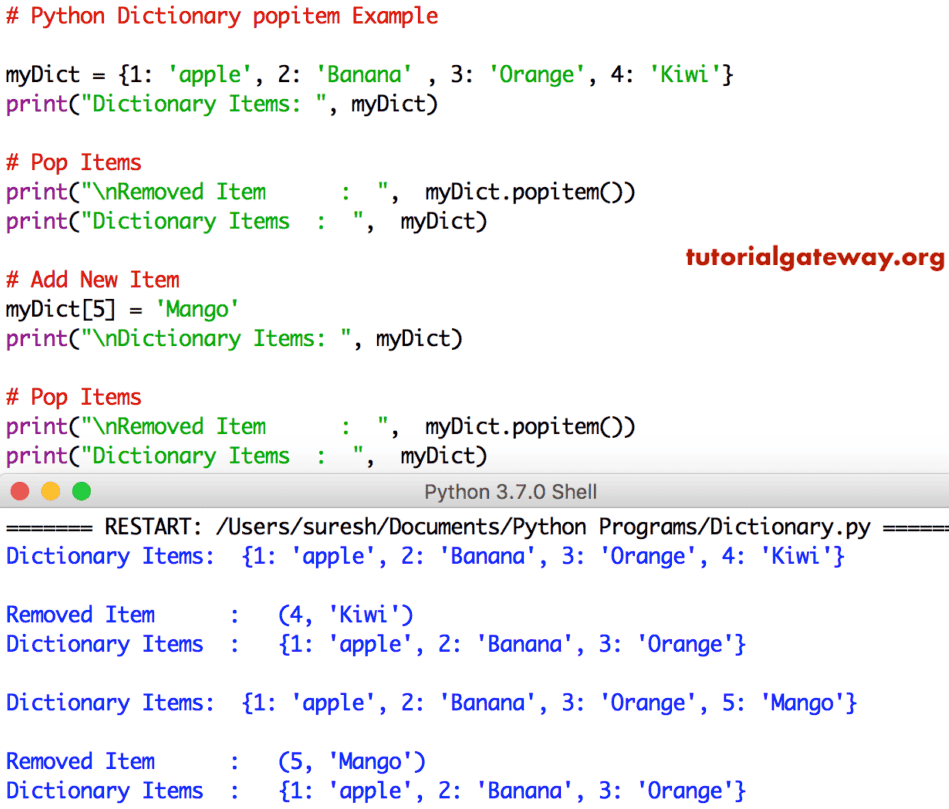
The popitem function removes the last inserted key-value pair and prints the removed items. Please refer to the Dictionaries in Python article from our Learn Python Programming page to understand everything about them.
myDict = {1: 'apple', 2: 'Banana' , 3: 'Orange', 4: 'Kiwi'}
print("Dictionary Items: ", myDict)

print("\nRemoved Item      :  ",  myDict.popitem())
print("Dictionary Items  :  ",  myDict)

# Add New Item
myDict[5] = 'Mango'
print("\nDictionary Items: ", myDict)

print("\nRemoved Item      :  ",  myDict.popitem())
print("Dictionary Items  :  ",  myDict)
How to use dict.popitem() in a while loop to clear dictionary items?
There are some situations where we might use Python for loop to remove dictionary items one after another until the dictionary becomes empty. In such a case, we use the while loop to iterate over the dictionary.
Inside the while loop, the popitem() function executes on each iteration to extract the last item from the dictionary, delete that item, and print the key and value pair. Refer to the while loop in Python.
fruits = {"Apple": 50, "Banana": 100, "Orange": 95}

while fruits:
    key, value = fruits.popitem()
    print(key, value)
print(fruits)
Orange 95
Banana 100
Apple 50
{}
How to handle KeyError raised by the Python dictionary popitem()?
As we mentioned earlier, if we use the popitem() against an empty dictionary, it raises a KeyError. To handle the error, we can use the try/except method.
In the following example, the code inside the try block uses the popitem() to remove the last dictionary item and print the key and value. If it is empty or raises KeyError, display an empty message.
d = {}

try:
    key, value = d.popitem()
    print(key, value)
except KeyError:
    print("The dictionary is empty.")
The dictionary is empty.Difference between dict.pop() and dict.popitem in Python?
Both the pop() and popitem() functions help to remove an item from a dictionary based on the user-given key. If the task is to empty the dictionary, use Python dict.clear().
- Python dict.pop function removes a specific dictionary item based on the given key. If the key is not present, it raises KeyError, and to avoid this, use the default value.
- dict.popitem() function does not accept any argument and removes the last item in a dictionary.
Using dict.pop()
In the following example, we use the pop() method to remove an existing key (city) from the user dictionary.
user = {"name": "Mathew", "age": 27,"city": "New York"}

city = user.pop("city")
print(city)
print(user)
New York
{'name': 'Mathew', 'age': 27}
Using Python dictionary popitem() function
In the following example, we use the popitem() method to remove the last item from the user dictionary. As it does not allow any arguments, it simply deletes the city as it is the last dictionary item. Please refer to the Python dict keys and Python dict values functions.
user = {"name": "Mathew", "age": 27,"city": "New York"}

city = user.popitem()
print(city)
print(user)
('city', 'New York')
{'name': 'Mathew', 'age': 27}
NOTE: If we pass a non-existing key as the argument, or use pop() or popitem() on an empty dictionary, both raise KeyError. However, the pop() method has the default_value argument to display it instead of an error.