
JavaScript Comparison operators help check conditions and perform decision-making based on the result. For example, Comparison operators are commonly used to check the relationship between two variables. If the relation is true, it will return Boolean TRUE; if the relation is false, it will return Boolean FALSE.
The JavaScript Comparison operators are mostly used in if statements, while loops, for loops, or switch cases. For example, checking a variable value is greater than or equal to 0 for a positive number. There are eight types of comparison operators, and the table below explains them.
JavaScript Comparison Operators List
The table below shows all the Relational Operators with examples.
| Comparison Operators | Usage | Description | Example |
|---|---|---|---|
| Greater than (>) | a > b | a greater than b | 7 > 3 returns True |
| Less than (<) | a < b | a less than b | 7 < 3 returns False |
| Greater than or equal (>=) | a >= b | a greater than or equal to b | 7 >= 3 returns True |
| Less than or equal (<=) | a <= b | a less than or equal to b | 7 <= 3 return False |
| Equality operator (==) | a == b | a equal to b | 7 == “7” returns True |
| Strict equality (===) | a === 7 | a Exactly equal to b | 7 === “7” returns False |
| Inequality operator (!=) | a != b | a is not equal to b | 7 != 3 returns True |
| Strict inequality (!==) | a !== b | a is not equal to b, and its Type | 7 !== 3 returns True |
Equality Operator (==)
The equality comparison operators in JavaScript, denoted by the == symbol, checks whether two operands are equal or not. If they are equal, it returns a Boolean True; otherwise, it returns false.
It is the most commonly used operator to check whether the left operand is equal to the right or the variable value is equal to a given number, and so on.
let a = 10
let b = 10
let c = 15
console.log(a == b)
console.log(a == c)
console.log(c == 15)
true
false
true
If we use the equality operator (==) to compare operands of two different data types, it automatically performs type conversion and compares them. Remember, if the type conversion is not possible, it returns false.
TIP: Apart from the above mentioned ones, we can use the comparison operators in the Ternary operator and the Nested if statement.
In the example below, string 10 is automatically type-cast to an integer and performs the comparison. The second is the comparison of two Boolean values. The third statement converts the empty string to 0 and compares them.
console.log(10 == '10')
console.log(false == 0)
console.log('' == 0)
true
true
true
Similarly, we can use it to compare special values such as NaN and null values.
console.log(NaN == NaN)
console.log(null == 0)
false
false
NOTE: The arithmetic operators create mathematical expressions or calculations, whereas the comparison operators are introduced to evaluate expressions.
Inequality (!=) Comparison operators in JavaScript
The inequality operator, denoted by the != symbol, checks the inequality of the two operands. If the operands are not equal, it returns true; otherwise, it returns false.
let a = 5
let b = 10
console.log(a != 10)
console.log(a != b)
console.log(b != 10)
true
true
false
Similar to the equality operator, the inequality operator performs the type conversion on operands if they are of the same type.
console.log('10' != 100);
console.log('10' != '10');
true
false
The following statements use the inequality operator to check special values.
console.log(1 != true);
console.log(NaN != NaN);
console.log(null != 0);
console.log('' != 0);
false
true
true
false
Strict equality operator (===)
The strict equality Comparison operators in JavaScript, denoted by the === symbol, check whether the two operands’ values and their respective data types are equal or not. If the value and the data type of the two operands are equal, it returns true; otherwise, it returns false.
console.log(10 === 10);
console.log(5 === 10);
console.log(10 === '10');
console.log('Hi' === 'Hi');
true
false
false
true
Using the strict equality operator to check against special values.
console.log(0 === false);
console.log(NaN === NaN);
console.log(null === 0);
console.log('' === 0);
false
false
false
false
Strict inequality operator (!==)
The strict inequality comparison operators in JavaScript, denoted by the !== symbol, checks whether the two operands are unequal in their values or data types. If the value or data type of the two operands is unequal, it returns true; otherwise, it returns false.
In the second statement, values are unequal, and in the third line, the data types of the two operands are unequal.
console.log(20 !== 20);
console.log(20 !== 10);
console.log(5 !== '5');
console.log('Hi' !== 'Hi');
false
true
true
false
Using the strict equality operator to check against special values.
console.log(0 !== false);
console.log(NaN !== NaN);
console.log(null !== 0);
console.log('' !== 0);
true
true
true
true
Greater than (>) Comparison operators in JavaScript
The greater than operator, denoted by the > symbol, checks whether the left operand is greater than the right operand value. If yes, it returns true; otherwise, it returns false. Similar to the regular comparison operators, it performs type casting if the two operands are of different data types.
When comparing string characters, it checks whether the ASCII value of the left operand is greater than the ASCII value of the right character. It performs character by character. Here, the ASCII value of H is less than a. Next (‘Hi’ > ‘Ha’), the ASCII value of H is the same, but i value is greater than a.
console.log(20 > 10);
console.log(20 > 100);
console.log(10 > '5');
console.log('H' > 'a');
console.log('Hi' > 'Ha');
true
false
true
false
true
Greater than or equal Operator (>=)
The greater than or equal Comparison operators in JavaScript, denoted by the >= symbol, check whether the value of the left operand is greater than or equal to the right operand value. If yes, it returns true; otherwise, it returns false. The >= operator performs type casting if the two operands are of different data types.
Here, the ASCII value of G is greater than B, so it returns True. Next (‘Hi’ > ‘Hj’), the ASCII value of H is the same, but i value is less than j.
console.log(10 >= 10);
console.log(10 >= 2);
console.log(10 >= 20);

console.log(100 >= '50');
console.log('G' >= 'B');
console.log('Hi' >= 'Hj');
true
true
false
true
true
false
Less than Operator (<)
The less than Comparison operators in JavaScript, denoted by the < symbol, check whether the left value is less than the right operand value. If yes, it returns true; otherwise, it returns false. The < operator type casts if the two operands are of different data types.
console.log(5 < 1);
console.log(10 < 5);

console.log(10 < '2');
console.log('B' < 'A');
console.log('BB' < 'BC');
false
false
false
false
true
Less than or equal Operator (<=)
The less than or equal operator, denoted by the <= symbol, checks whether the left operand value is less than or equal to the right operand. If yes, it returns true; otherwise, it returns false. The <= operator performs type casting if the two operands are of different data types.
console.log(5 <= 10);
console.log(5 <= 5);
console.log(5 <= 2);

console.log(10 <= '20');
console.log('A' <= 'C');
console.log('Gt' <= 'Gi');
true
true
false
true
true
false
JavaScript Comparison Operators Example
This example helps you to understand all the comparison operators practically. For this example, we are using two variables, a and b, whose values are 9 and 4. Next, we will use these two variables to perform various JavaScript relational operations.
<!DOCTYPE html>
<html>
<head>
    <title>JavaScriptComparisonOperators </title>
</head>
<body>
    <h1>PerformingComparisonOperations </h1>
<script>
   var a = 12, b = 4;

   document.write("Result of " + a +" Greater than " + b +" is = " + (a > b) + "<br />");
   document.write("Result of " + a +' Greater than or Equal to ' + b +" is = " + (a >= b) + "<br />");
   document.write("Result of " + a +' Less than or Equal to ' + b +" is = " + (a <= b) + "<br />");
   document.write("Result of " + a +' Less than ' + b +" is = " + (a < b) + "<br />");
   document.write("Result of " + a +' Equal to ' + b +" is = " + (a ==b ) + "<br />");
   document.write("Result of " + a +' Not Equal to ' + b +" is = " + (a !=b ) + "<br />");
</script>
</body>
</html>
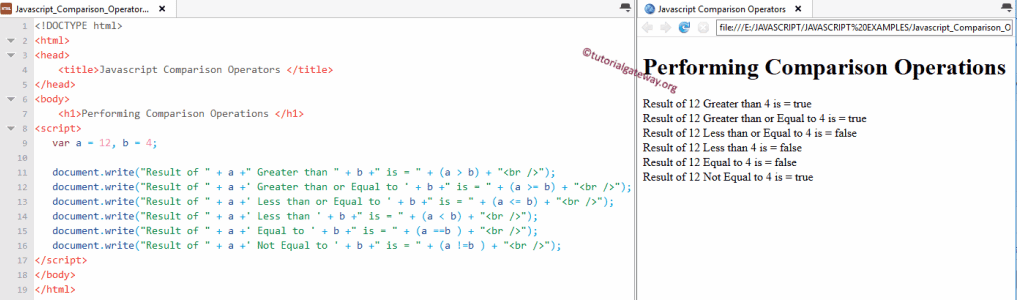
In this Comparison Operators example, we assigned 2 integer values, a and b, and we assigned the values 9 and 4 using the below statement.
var a = 12, b = 4;
In the next line, we checked these values against each and every Comparison operator we have. Remember, we have to use a combination of if statements with comparison operators to execute the break and continue statements.
JavaScript Comparison Operators using If Condition
This example helps you understand how Comparison operators are used in the If Else Statement. For this JavaScript example, we use two variables, x and y, with values of 10 and 25. We will use the equality operator (==) to check whether variable x is equal to y or not.
const x = 12;
const y = 24;

if (x === y) {
    console.log(x +' is Equal to ' + y);
}
else {
    console.log( x +' is Not Equal to ' + y);
}
12 is Not Equal to 24If Condition
If x is exactly equal to y, then the first statement (the statement inside the If block) will be executed.
console.log(x +' is Equal to ' + y);
If x is not equal to y, the second statement (statement inside the Else block) will be executed.
console.log( x +' is Not Equal to ' + y);
Here, x = 12 is obviously not equal to 25, so the second statement will display as the output.
FAQs
What is === and ==?
Among the JavaScript comparison operators
- Equality operator (==) checks whether the two operands are equal and performs the implicit type casting.
- Strict equality operator (===) checks operands’ values and the data types are equal.
Difference between != and !== operator
- The inequality operator (!=) checks whether the value on the left-hand side is not equal to the value on the right-hand side.
- !== check whether the value and the data type on the left-hand side are not equal to the value and the data type on the right-hand side.
console.log("Unequality =", 10 != 12);
console.log("Strict Unequality =", 10 !== 12);
console.log('Unequality =', 11 != '11');
console.log('Strict Unequality =', 11 !== '11');
Unequality = true
Strict Unequality = true
Unequality = false
Strict Unequality = true
Should I use == or === in JS?
This JavaScript Comparison Operators example helps you understand the difference between ==, ===, !=, and !== operators.
- == (equality operator ) check whether the value on the left-hand side is equal to the value on the right-hand side. It ignores the data type because it implicitly typecasts the data type.
- === (strict equality operator) check whether the value and the data type on the left-hand side are equal to the value and the data type on the right-hand side.
console.log("Equality =", 12 == 12);
console.log("Strict Equality =", 12 === 12);
console.log('Equality =', 18 == '18');
console.log('Strict Equality =', 18 === '18');
Equality = true
Strict Equality = true
Equality = true
Strict Equality = false
NOTE: When working with the conditions inside the else if or any other control flow or loop statements, we must not use the Assignment operator (=) to evaluate expressions. Instead, use the comparison operator like (== or ===_.
JavaScript comparison operators with null values
If any of the operands is a null value, each comparison operator behaves differently.
console.log(null == 0);
console.log(null === 0);
console.log(null != 0);
console.log(null !== 0);
console.log(null > 0);
console.log(null >= 0);
console.log(null < 0);
console.log(null <= 0);
false
false
true
true
false
true
false
true