
The JavaScript Bitwise Operators perform bit operations on a 32-bit binary number. First, JavaScript converts all decimal values (numbers) into binary values (a sequence of bits, 1000, 1100, 1110, 1001, etc.). Next, the bitwise operator will perform bit operations, such as shifting bits from left to right or converting bit values from 0 to 1, etc.
JavaScript Bitwise Operators list
The table below shows the seven different Bitwise operators and their meanings. For example, Consider x = 6 and y = 8 and their values in binary form are: x = 0110 and y = 1000
| Bitwise Operators | Meaning | Examples |
|---|---|---|
| & | Bitwise AND | X & Y = 0000 |
| | | Bitwise OR | X | Y = 1110 |
| ^ | Bitwise XOR | X ^ Y = 1110 |
| ~ | Bitwise NOT | ~X = 00001001 (Not operator will convert all 0 into 1.) |
| << | Left Shift operator | X << 1 = 00001100 (Bits will move 1 step left. If we use 2 or 3, then they shift accordingly) |
| >> | Right Shift Operator | Y >> 1 = 00000100 |
| >>> | Zero fill right shift | y >> 1 = 0100 |
JavaScript Bitwise AND Operator (&)
The Bitwise AND operator, denoted by the & symbol, returns 1 if the corresponding bits of both operands are 1; otherwise, it returns false.
The Truth Table of the Bitwise AND operator is.
| x | y | Logical AND(x & y) |
|---|---|---|
| 0 | 0 | 0 |
| 0 | 1 | 0 |
| 1 | 0 | 0 |
| 1 | 1 | 1 |
Bitwise AND operator example
In the following example, we declared a and b variables with values 10 and 6. The JavaScript bitwise AND operator operate on individual bits of operands; both integers are converted to their binary form.
NOTE: Integers are of 32-bit size. However, to make the explanation simple and easy, we are using only the last four bits (required).
a = 10 = 1010
b = 6 = 0110
a & b = 0010 = 2 (in decimal)
If you observe the binary numbers from left to right, the first two bits are the combination of 1 and 0; the logical AND operator returns 0. The third value of the corresponding bits is 1, and 1 returns 1. The last bit is a combination of 0 and 0; it returns 0.
let a = 10;
let b = 6;
let result = a & b;
console.log(result);
2TIP: Users confuse the Bitwise & operator with logical operators (&& and ||). The bitwise operators perform bit operations on two operands, whereas the logical operators combine or evaluate multiple expressions.
JavaScript Bitwise OR Operator (|)
The Bitwise OR operator, denoted by the | symbol, accepts two operands and returns 1 if any of the two operands’ corresponding bits are 1. If both operands’ bits are 0, it returns 0.
The Truth Table behind the Bitwise OR Operator is.
| x | y | Bitwise OR x | y |
|---|---|---|
| 0 | 0 | 0 |
| 0 | 1 | 1 |
| 1 | 0 | 1 |
| 1 | 1 | 1 |
Bitwise OR operator example
Let us see the JavaScript bitwise OR operators operation on 10 and 6. If you observe the binary numbers, the left-most three bits are the combination of (1 | 0, 1 | 0, and 1 | 1); the logical OR operator returns 1. The last bit is a combination of 0 | 0; it returns 0.
a = 10 = 1010
b = 6 = 0110
a | b = 1110 = 14 (in decimal)
let a = 10;
let b = 6;
console.log(a | b);
14JavaScript Bitwise XOR operator (^)
The bitwise XOR operator, denoted by the ^ symbol, accepts two operands and returns 1 if the corresponding bits are different. If the bits from both operands are the same, it returns 0.
The Truth Table behind the Bitwise XOR operator is.
| x | y | Bitwise XOR x ^ y |
|---|---|---|
| 0 | 0 | 0 |
| 0 | 1 | 1 |
| 1 | 0 | 1 |
| 1 | 1 | 0 |
Bitwise XOR operator example
As we mentioned earlier, the bit values of the two operands must be different to return 1. If you observe the binary number, there are three locations where the corresponding bits of 12 and 25 differ.
a = 12 = 0000 1100
b = 25 = 0001 1001
a ^ b = 0001 0101 = 21 (in decimal)
let a = 12;
let b = 25;
console.log(a ^ b);
21JavaScript Bitwise NOT Operator (~)
The bitwise NOT operator, also called the unary operator, denoted by the ~ symbol, accepts a single operand and flips its bits. If we pass 0, it flips to 1 and vice versa.
The truth table of the Bitwise NOT operator is
| x | Bitwise NOT (~x) |
|---|---|
| 0 | 1 |
| 1 | 0 |
Bitwise NOT operator example
In short, we can say that the bitwise NOT operator of x returns – (x + 1). For instance, ~(10) = -(10 + 1) = -11.
However, if we use it on negative values, the result of ~-x = (x – 1). For instance, ~(10) = (10- 9) = 9.
console.log(~10);
console.log(~-10);

console.log(~20);
console.log(~-20);
-11
9

-21
19
TIP: The arithmetic and Assignment operators perform math calculations on variable values. On the other hand, use the bitwise operators to work on individual bits in a given number.
JavaScript Bitwise Left Shift Operator (<<)
The bitwise left shift operator, denoted by the << symbol, accepts two operands and performs the left shift operation. It converts the first operand to a binary number and shifts the bits to the left side by the specified number of bits mentioned in the right operand.
Bitwise Left Shift Operator example
In the following example, we use the bitwise left shift operator to shift the bit position by 1 and 2 places to the left-hand side. Here, a << 1 means shift one position and a<< 2 means move bits two positions to the left side.
a = 0000 0101
a << 1 = 0000 1010 = 10 (in decimal)
a << 2 = 0001 0100 = 20 (in decimal)
let a = 5;
console.log(a << 1);
console.log(a << 2);
10
20
Sign Propagating Right Shift Operator (>>)
The sign propagating right shift bitwise operator in JavaScript , denoted by the >> symbol, accepts two operands and performs the right shift operation. It converts the first operand to a binary number and shifts the bits to the right side by the specified number of bits mentioned in the right operand.
Depending upon the sign of a given number, the sign propagating as a bit adds to the left side (Positive = 0 and negative = 1).
Bitwise Right Shift Operator example
Here, a >> 1 means right shift one position, and a >> 2 means move bits two positions to the right side.
a = 1010
a >> 1 = 0101 = 5 (in decimal)
a << 2 = 0010 = 2 (in decimal)
let a = 10;
console.log(a >> 1);
console.log(a >> 2);
5
2
For a negative number
-3 = 11111111111111111111111111111101
a >> 1 = 11111111111111111111111111111110 = -2 (in decimal)
let a = -3;
console.log(a >> 1);
-2Zero fill Right Shift Operator (>>>) in JavaScript
The bitwise zero-fill right shift operator, denoted by the >>> symbol, accepts two operands. If we assign it on positive number, it returns the same result as the >> operator. When it comes to a negative number, it shifts the bits to the right side for a given number of positions and fills the gap with 0’s.
Zero fill Right Shift Operator example
If we use the zero fill right shift operator (>>>) on a positive number, it returns the same result as the regular right shift operator (>>).
let a = 10;
console.log(a >>> 1);
console.log(a >>> 2);
5
2
However, the result is completely different when it comes to a negative number
-3 = 11111111 11111111 11111111 11111101
a >> 1 = 01111111 11111111 11111111 11111110 = 2147483646 (in decimal)
let a = -3;
console.log(a >>> 1);
2147483646JavaScript Bitwise Operators Example
Let us see one example for a better understanding. For this bitwise operators example, we use two variables, a and b; their values are 9 and 65. We are going to use these two variables to show you various Bitwise operations
<!DOCTYPE html>

<html>
<head>
    <title> JavaScriptBitwiseOperators </title>
</head>

<body>
    <h1> JavaScriptBitwiseOperators </h1>
<script>
    var a = 9, b = 65;

    document.write("Bitwise AND Operator a & b =  " + (a&b));
    document.write("<br \> Bitwise OR Operator a | b =  " + (a|b));
    document.write("<br \> Bitwise EXCLUSIVE OR Operator a^b =  " + (a^b));
    document.write("<br \> Bitwise NOT Operator ~a =  " + (~a));

    document.write("<br \> LEFT SHIFT Operator a << 1 =  " + (a << 1));
    document.write("<br \> RIGHT SHIFT Operator b >> 1 =  " + (b >> 1));
 </script>
</body>
</html>
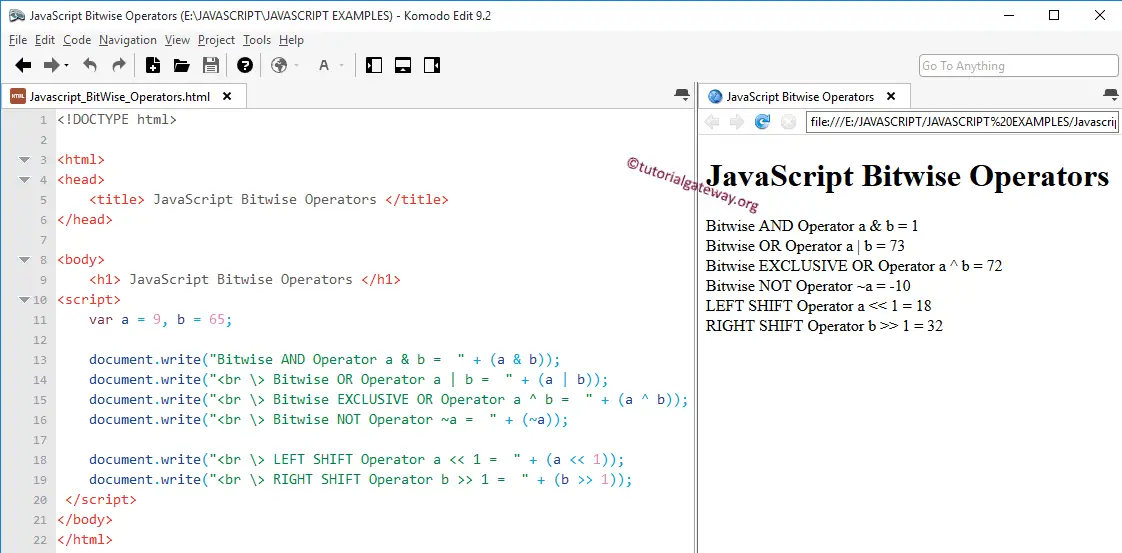
In this JavaScript Bitwise Operators program, we declared 2 integers, a and b, and assigned the values 9 and 65. The binary form of 9 = 0001001 and 65 = 1000001.
The document write statements will perform the bitwise operations on a and b, and then they will display the output. Let us see the JavaScript calculations
AND Operation = a&b
0001001 & 1000001 = 0000001 = 1
OR Operation = a || b
0001001 || 1000001 = 1001001 = 73
Exclusive OR Operation = a^b
0001001 ^ 1000001 = 1001000 = 72
JavaScript bitwise Left Shift Operator operation: Left Shifting one position equals multiplying the number by 2. It means,
a << 1 = (9 * 2) = 18
If we say, a<<2, then multiply the number with 4, and so on
OR
a << 1 = 0001001 << 1 = 0010010 = 18
Right Shift Operation = b>> 1
1000001 >> 1 = 0100000 = 32
The next step is to learn about the Comparison Operators, Increment and Decrement operators, and the Ternary operator.