
The JavaScript acos function is a math function that calculates the trigonometric Arc Cosine for the specified expression. Otherwise, we can say that the acos() function returns the inverse of a cosine Value. The syntax of the acos Function is
Math.acos(number);
Parameter: If the number argument is not a number or is outside the range -1 and 1, the acos function will return NaN.
Return Value: The Math.acos method returns a number between 0 and π radians.
JavaScript acos Function Example
In this Math acos function example, we will find the Arc Cosine values for different data types and display the output. For this, we applied the acos() function on positive and negative numbers. Please refer to the JavaScript Math functions article from the Learn JavaScript page.
<!DOCTYPE html>
<html>
<head>
    <title> JavaScriptACOSFunction </title>
</head>
<body>
  <h1> JavaScriptACOSFunction </h1>
  <p id = "Pos"></p>
  <p id = "Neg"></p>
  <p id = "Dec"></p>
  <p id = "Neg_Dec"></p>
  <p id = "Str"></p>
  <p id = "Exp"></p>
  <p id = "Null"></p>
  <p id = "Multi"></p>
  <p id = "Out"></p>
  <script>
    document.getElementById("Pos").innerHTML = Math.acos(1);
    document.getElementById("Neg").innerHTML = Math.acos(-1);
    document.getElementById("Dec").innerHTML = Math.acos(0.45);
    document.getElementById("Neg_Dec").innerHTML = Math.acos(-0.75);
    document.getElementById("Str").innerHTML = Math.acos("JavaScript");
    document.getElementById("Null").innerHTML = Math.acos(null);
    document.getElementById("Multi").innerHTML = Math.acos(0.25 + 0.55 - 0.77);
    document.getElementById("Out").innerHTML = Math.acos(25);
  </script>
</body>
</html>
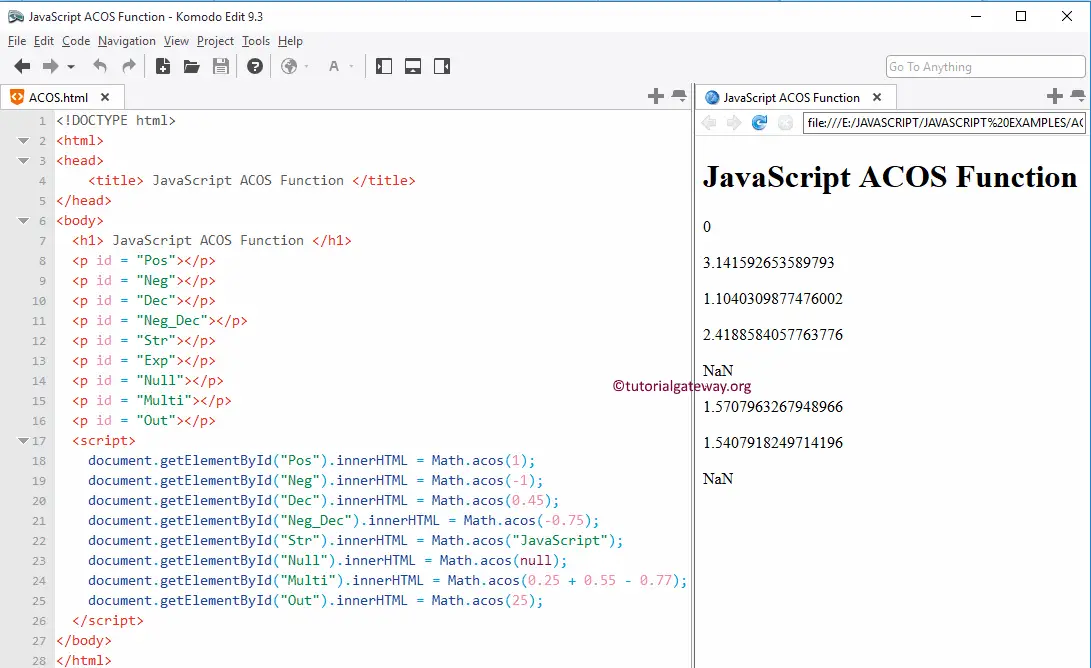
Example 2: In the following example, we use the acos() function on positive and negative numbers.
console.log(Math.acos(0));
console.log(Math.acos(-0));
1.5707963267948966
1.5707963267948966
Example 3: When we use the acos() function on Infinity and NaN values, it returns the same output. Please refer to the cosh() and acosh() functions for the hyperbolic cosine values.
let a = Infinity;
let b = -Infinity;
let c = NaN;
console.log(Math.acos(a));
console.log(Math.acos(b));
console.log(Math.acos(c));
NaN
NaN
NaN