
The Python upper function is used to convert all alphabetical characters in the given string into Uppercase letters and returns a new string. The syntax of the string upper Function for the uppercase is
String_Value.upper()
TIP: It keeps the Non-letters unchanged.
Python upper method Example
The following examples help us to learn the upper Function. Alternatively, say, this Python program converts the specified string to uppercase.
# Uppercase Method Example

Str1 = 'Learn PYTHON AT TutOrial Gateway'
Str2 = Str1.upper()
print('First Output  is = ', Str2)

# Observe the Original String
print('Converted String is = ', Str1.upper())
print('Original String is = ', Str1)

# Performing function directly
Str3 = 'PYTHON ProGramming'.upper()
print('Second Output  is = ', Str3)

Str4 = 'python1234TutorIal'.upper()
print('Third Output  is = ', Str4)

Str5 = '12345'.upper()
print('Fourth Output  is = ', Str5)
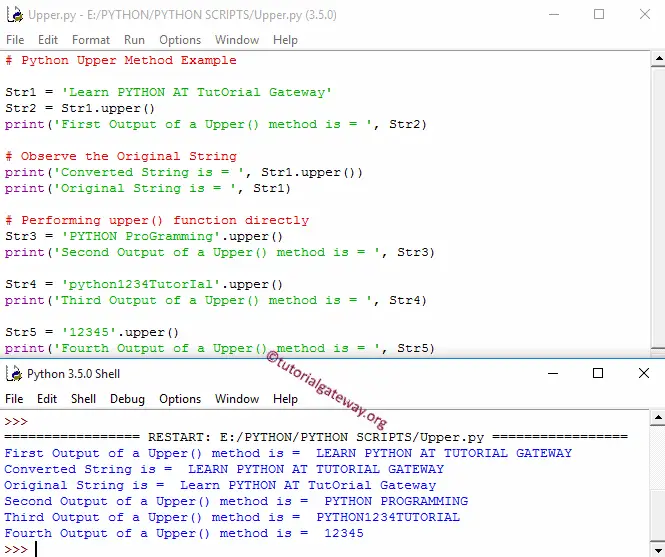
Within this example, the following statement converts the above string into Uppercase using this function and prints the output
Str2 = Str1.upper()
print('First Output of an Upper() method is = ', Str2)
The string uppercase function returns the output in a new one. Please refer to the Python string article from our Learn Python page.
print('Converted String is = ', Str1.upper())
print('Original String is = ', Str1)
Use the below Python function code to change the original text.
Str1 = Str1.upper()
This method only converts the characters to Uppercase and leaves others unchanged. Within the below upper string function code, we used numeric values along with letters, and see the output.
Str4 = 'python1234TutorIal'.upper()
print('Third Output is = ', Str4)

Str5 = '12345'.upper()
print('Fourth Output is = ', Str5)
How to convert a list of strings to Uppercase in Python?
As we all know, there is a built-in string upper() function that can be used to convert a string to uppercase. However, to convert a list of strings to Uppercase, we must use a list comprehension or a map function to apply the upper() function on each item in a list. Please refer to the Python list and Python map function
In the following example, the Python list comprehension with a Python for loop iterates over the fruits (string) list. On each iteration, the upper() function converts each string word to uppercase.
fruits = ["apple", "kiwi", "cherry", "BANANA"]

new_items = [word.upper() for word in fruits]
print(new_items)
['APPLE', 'KIWI', 'CHERRY', 'BANANA']NOTE: We cannot use the upper() function directly on a list; if you use it, it throws an AttributeError. So, always use a for loop or list comprehension for iterating and apply the upper() function on each iteration.
How to convert a specific character to uppercase in Python?
Instead of converting a complete string to uppercase, we can use the upper() function with the index position to convert a specific character to an uppercase letter.
In the following example, we want to convert y to uppercase. As we all know, the index position of y is 4; we used the slicing technique to convert the specified character to uppercase.
- text[:i] returns New
- text[i].upper() converts y to uppercase Y.
- text[i + 1:] adds “ear” at the end.
text = "New year"
i = 4

result = text[:i] + text[i].upper() + text[i + 1:]
print(result)
New YearTIP: Please refer to the Python lower() and Python swapcase functions articles from the list of available Python string functions.
What is the difference between isupper() and upper in Python?
The upper() function converts all characters in the given string to uppercase letters and returns the result as a new string. The isupper() function checks whether the given string is uppercase or not and returns a Boolean True or False. Refer to the Python isupper.
s1 = "Hello"
s2= s1.upper()
print(s2)

print(s1.isupper())
print(s2.isupper())
HELLO
False
True