
Python isupper Function is useful to check whether the given string has at least one character and whether the character is either in uppercase or not. If it is in Uppercase, then isupper function returns true; otherwise, it returns False.
This section will discuss how to write an isupper Function in this Programming with an example, and the syntax is as shown below.
String_Value.isupper()
Python isupper function example
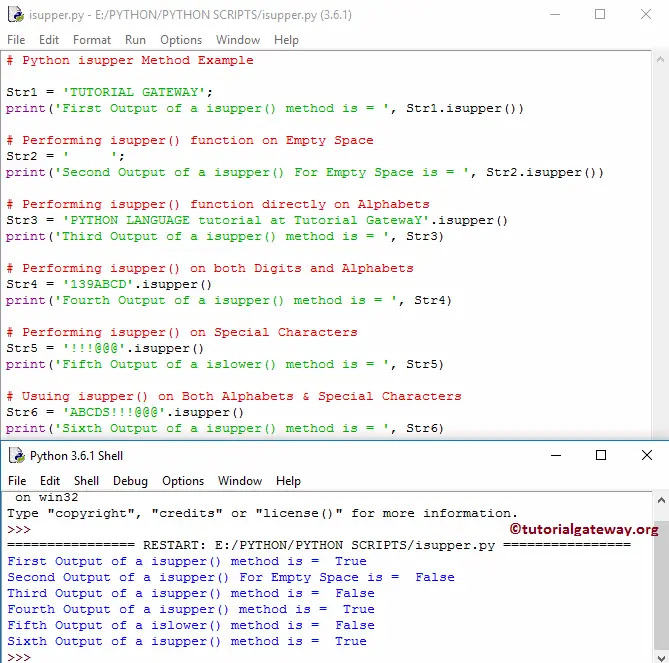
The following set of examples helps you understand isupper function. Please refer to the Python Strings and Python string Methods articles from the Python tutorial page to understand them.
Str1 = 'TUTORIAL GATEWAY';
print('First Output of a method is = ', Str1.isupper())

# Performing on Empty Space
Str2 = '     ';
print('Second Output For Empty Space is = ', Str2.isupper())

# Performing directly on Alphabets
Str3 = 'PYTHON LANGUAGE tutorial at Tutorial GatewaY'.isupper()
print('Third Output  is = ', Str3)

# Performing both Digits and Alphabets
Str4 = '139ABCD'.isupper()
print('Fourth Output is = ', Str4)

# Performing on Special Characters
Str5 = '!!!@@@'.isupper()
print('Fifth Output is = ', Str5)

# Using on Both Alphabets & Special Characters
Str6 = 'ABCDS!!!@@@'.isupper()
print('Sixth Output is = ', Str6)
How to check if the first letter is an uppercase in Python?
As we all know, the isuppper() function checks whether all characters in a string are uppercase letters. If we use the Python if else statement along with the index position of the first character, we can check if the first letter is uppercase in Python.
s = "Tutorial Gateway"

if s and s[0].isupper():
    print("First letter is uppercase")
else:
    print("First letter is not uppercase")
First letter is uppercaseTIP: Please refer to the Python islower and Python swapcase functions.
Python isupper list comprehension
Along with the regular strings, we can use the isupper function to check whether the list items are uppercase or not. We must use a Python map function or Python list comprehension with a Python for loop to iterate over the list items. Next, apply the isupper function to each list item.
The following example checks whether each item (word) in a list of strings is uppercase or not. If true, it prints True; otherwise, it returns False. Refer to the Python lists.
fruits = ["APPLE", "banana", "KIWI", "ORANGE"]

result = [w.isupper() if w else False for w in fruits]
print(result)
[True, False, True, True]Similar to the above, we can use the index position of the first character to check whether the first character in each word is uppercase. The following example prints the fruits with the first letter as an uppercase character.
fruits = ["Apple", "banana", "kiwi", "Orange", "Mango"]

result = [word for word in fruits if word and word[0].isupper()]
print(result)
['Apple', 'Orange', 'Mango']