
The SQL Server RAND function is a Mathematical function used to return the Pseudo random number between Zero and One. The value generated by the RAND function is from 0 (included) and less than 1.
The basic syntax of the RAND Function is as shown below:
SELECT RAND(seed)
FROM [Source]
Seed: It is an integer expression of type int, tinyint, or smallint.
- If you omit this argument then, it will assign the seed value at random.
- If you specify the seed value then, the result will always be the same
SQL Server RAND Function Example
The RAND Function returns the Pseudo random numbers between 0 to 1. In this example, we will check the same and display the output.
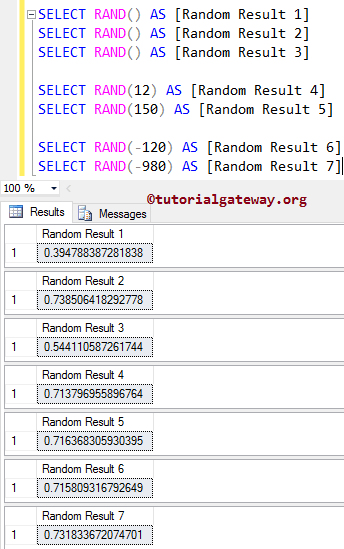
The first three lines of code will return the random values. If you see the screenshot below, we called the RAND Function three times, and it returned three different (random) values. Please refer to the list of SQL Server Math functions from our SQL Programming page.
In the next two statements, We used the RAND function directly on the positive numeric values 12 and 150. We also assigned a new name to the result using the ALIAS Column.
Next, we used the Math RAND method directly on the negative numeric values -120 and -980. Please refer to the SQL CEILING, SQL FLOOR, and SQL ROUND functions from the available Mathematical methods.
SELECT RAND() AS [Random Result 1]
SELECT RAND() AS [Random Result 2]
SELECT RAND() AS [Random Result 3]

SELECT RAND(12) AS [Random Result 4]
SELECT RAND(150) AS [Random Result 5]

SELECT RAND(-120) AS [Random Result 6]
SELECT RAND(-980) AS [Random Result 7]
Use RAND() to generate a random integer
In the query below, we use the RAND () function to generate a random number between 0 and 1. Next, multiply the random number by 100. Then, use the FLOOR or CEIL functions to round the floating-point number to the nearest integer.
SELECT FLOOR(RAND() * 100)
28Use RAND() to generate a random number in a range
We can use a custom formula to generate random numbers in a given range.
SELECT RAND() * (@maximum - @minimum) + @minimum
The following query generates a random number between 10 and 50.
SELECT RAND() * (50 - 10) + 10 AS R1,
	FLOOR(RAND() * (50 - 10) + 10) AS R2
R1	R2
46.2447865128079	18
Use RAND Function with while loop
In this example, we will use the SQL RAND function inside a WHILE LOOP. I suggest you refer to both SQL SUBSTRING, ALIAS, and SQL WHILE LOOP articles to understand this query execution.
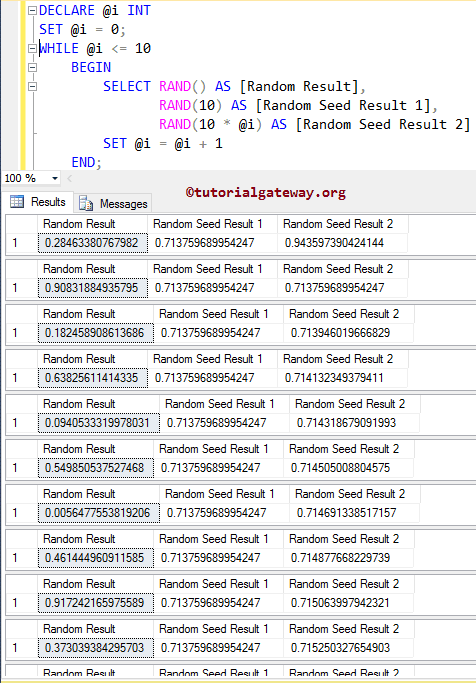
If you observe the below screenshot, the first statement is returning a different result for each iteration because we haven’t specified the seed value.
The next statement returns the same result for each iteration because we specified the seed value as 10.
DECLARE @i INT
SET @i = 0;

WHILE @i <= 10
	BEGIN
		SELECT RAND() AS [Random Result],
		       RAND(10) AS [Random Seed Result 1],
		       RAND(10 * @i) AS [Random Seed Result 2]
		SET @i = @i + 1
	END;
Use SQL RAND() to generate random values for Table columns
To demonstrate this, we use the Department table from our SQL JOINS. In most cases, if we use the RAND() function to generate random numbers from an entire table, it returns the same number for all rows.
To avoid this, we use CHECKSUM() and NEWID() functions before using RAND() to get unique random numbers. Next, we used the FLOOR function to generate random integers from 1 to 100.
SELECT [id]
      ,[DepartmentName]
      ,RAND(CHECKSUM(NEWID())) AS Random_Number
      ,FLOOR(RAND(CHECKSUM(NEWID())) * 100) AS Random_Number
  FROM [Department]
id	DepartmentName	Random_Number	Random_Number
1	Software Developer	0.702774038135668	66
2	Sr. Software Developer	0.213659278818434	54
3	Module Lead	0.300460332346503	95
4	Team Lead	0.871961171756619	48
5	Project Manager	0.102818497465107	73
6	Manager	0.421399733361636	49
7	CEO	0.880433944768362	6
8	HR	0.879188621631498	5