
The Ranking functions in SQL Server return a ranking value for each row in a partition. Microsoft provides various Functions that allow us to assign different ranks. Depending on the function you select, they return a different number. The following table will show you the list of available Ranking Functions.
| Ranking Functions | Description |
|---|---|
| SQL RANK | It will assign the rank number to each record present in a partition. |
| SQL DENSE_RANK | It will assign the number to each record within a partition without skipping the numbers. |
| SQL NTILE | This will assign the number to each record present in a partition. |
| SQL ROW_NUMBER | It will assign the sequential number to each unique record present in a partition. |
Ranking Functions in SQL Server Example
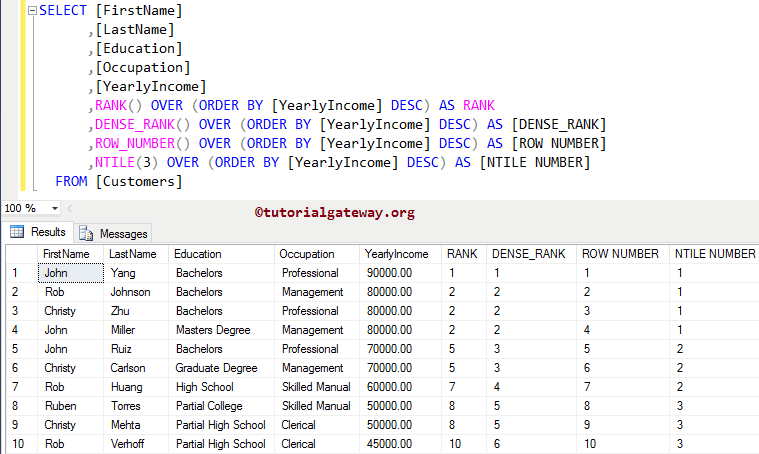
In this SQL Server example, we are going to show you the functionality of all the rank functions in one place. To learn more basics, visit our SQL Server tutorial page.
SELECT [FirstName]
      ,[LastName]
      ,[Education]
      ,[Occupation]
      ,[YearlyIncome]
      ,RANK() OVER (ORDER BY [YearlyIncome] DESC) AS RANK
      ,DENSE_RANK() OVER (ORDER BY [YearlyIncome] DESC) AS [DENSE_RANK]
      ,ROW_NUMBER() OVER (ORDER BY [YearlyIncome] DESC) AS [ROW NUMBER]
      ,NTILE(3) OVER (ORDER BY [YearlyIncome] DESC) AS [NTILE NUMBER]
  FROM [Customers]
TIP: Please refer to the SQL Common Table Expression and SQL ORDER BY clause articles.
Comments are closed.