The SQL Server PATINDEX is used to return the starting index position of the first occurrence of a pattern in a specified expression. If the specified string is not found, then it will return zero. The index position of the PATINDEX Function will start from 1, Not 0, and the syntax of it is
SELECT PATINDEX (%pattern%, ExpressionToSearch)
FROM [Source]
The PATINDEX function searches for the index position of a specific pattern from the original string. It will return NULL if either pattern or ExpressionToSearch is NULL.
SQL Server PATINDEX Example
We will show multiple ways to use this function. Please refer to the list of SQL String Functions from our SQL Server Programming.
DECLARE @str1 VARCHAR(50), @str2 VARCHAR(50)
SET @str1 = 'Tutorials On SQL Server 2014'
SET @str2 = 'We are xyz working at xyz Corporation'

SELECT PATINDEX('%a%', @str1) AS Result1

-- Finding the Index position
SELECT PATINDEX('%sql%', @str1) AS Result2

SELECT PATINDEX('%language%', @str1) AS Result3

-- Finding the Index position of First Occurred xyz
SELECT PATINDEX('%xyz%', @str2) AS Result4

SELECT PATINDEX('%a_%', @str2) AS Result5
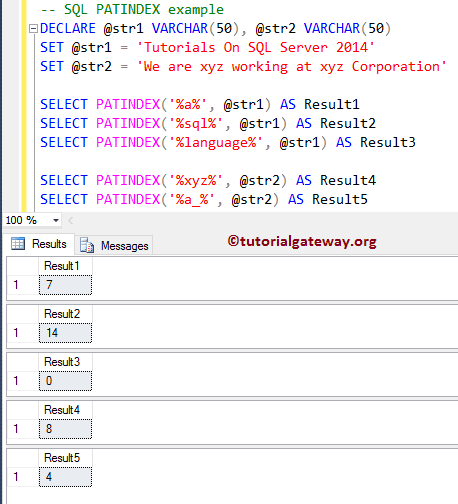
We used the PATINDEX function to find the index position of ‘a’ from the variable @str1.
SELECT PATINDEX('%a%', @str1) AS Result1
Next, we are looking for the xyz index position. Check the SQL TRIM function.
SELECT PATINDEX('%xyz%', @str2) AS Result4
Although it has xyz at multiple places, it has returned a value of 8. It is because the PATINDEX will return the index position of a first occurrence, and it does not care about others. In the next line, we searched for language, which does not exist inside the @str1 variable. That’s why this String Function is returning 0.
SELECT PATINDEX('%language%', @str1) AS Result3
SQL PATINDEX Function Example 2
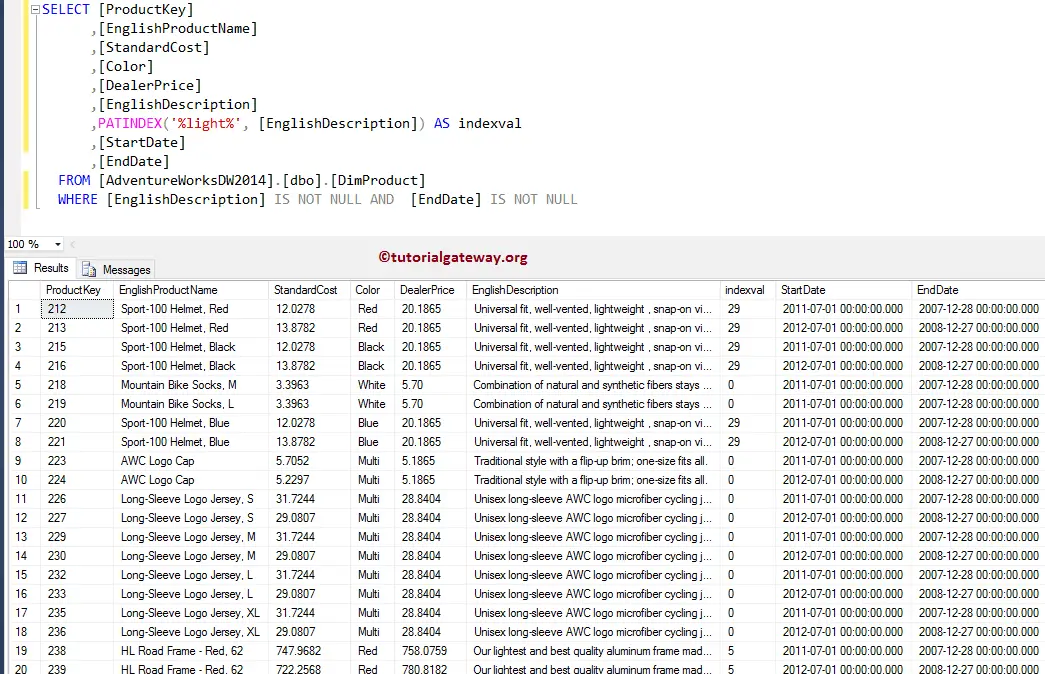
It also allows you to search for the patterns inside the column values. In this SQL Server example, We find the index position of light inside the [English Description] column. For this example, We use the DimProduct table data inside the Adventure Works DW 2014 Database.
TIP: Please refer to the SQL REPLACE and SQL SUBSTRING function.
SELECT [ProductKey]
      ,[EnglishProductName]
      ,[StandardCost]
      ,[Color]
      ,[DealerPrice]
      ,[EnglishDescription]
      ,PATINDEX('%light%', [EnglishDescription]) AS indexval
      ,[StartDate]
      ,[EndDate]
  FROM [AdventureWorksDW2014].[dbo].[DimProduct]
  WHERE [EnglishDescription] IS NOT NULL AND  [EndDate] IS NOT NULL