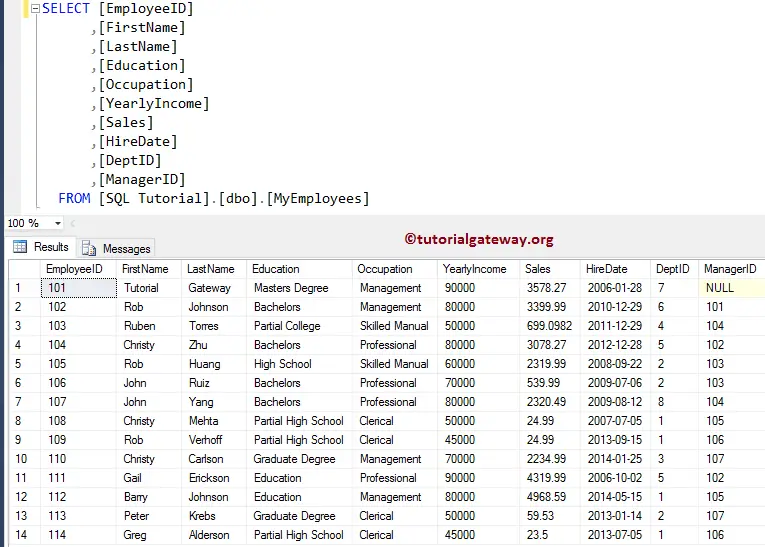
The SQL Server COUNT_BIG Function is useful to Count the number of items/rows selected by the SELECT Statement. It works the same as the Count function, but it returns the bigint. For this COUNT_BIG function, We are going to use the below shown data.
SQL Server COUNT_BIG (*) Example
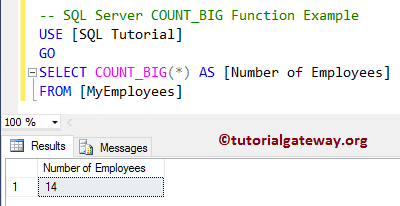
The COUNT_BIG (*) returns the total number of records from the MyEmployees table. Let us see one example for a better understanding.
SELECT COUNT_BIG(*) AS [Number of Employees]
FROM [MyEmployees]
Above Query will count the total records present in the MyEmployees table
COUNT_BIG (Column Name) Example
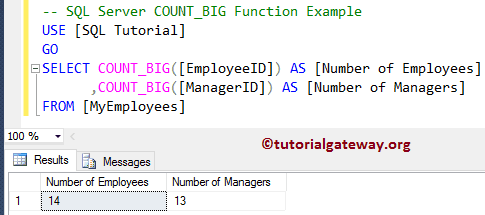
The COUNT_BIG Column Name returns the records whose values are NOT NULL (Ignores the NULL Records). Remember, it is the same as the SQL COUNT function available in the SQL Aggregate Functions list.
SELECT COUNT_BIG([EmployeeID]) AS [Number of Employees]
      ,COUNT_BIG([ManagerID]) AS [Number of Managers]
FROM [MyEmployees]
SQL Unique Count_BIG Example
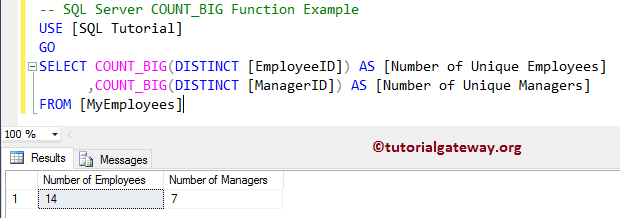
The COUNT_BIG (DISTINCT Column Name) returns the Unique number of records present in the specified column whose values are NOT NULL. The SQL DISTINCT Keyword is used to remove duplicates in a table. Explore more from the SQL Programming page.
SELECT COUNT_BIG(DISTINCT [EmployeeID]) AS [Number of Unique Employees]
      ,COUNT_BIG(DISTINCT [ManagerID]) AS [Number of Unique Managers]
FROM [MyEmployees]
COUNT BIG with GROUP BY Clause
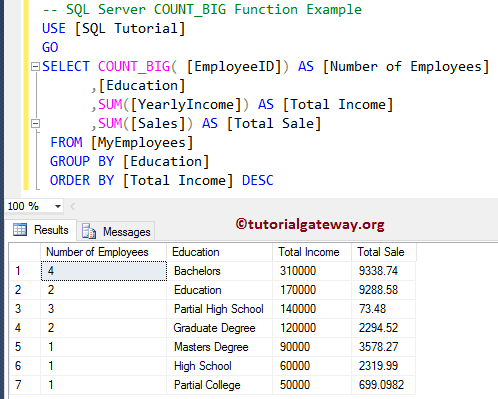
In general, we write a SQL Server SELECT query to check for the number of products that belong to a particular category or color, etc. In these situations, we use the SQL GROUP BY clause to group the products by color or category. We then use the COUNT_BIG Function to count the number of products present in that group. Let us see the Example.
TIP: Please refer to the SQL Server SUM and SQL Server AVG functions.
SELECT COUNT_BIG( [EmployeeID]) AS [Number of Employees]
	  ,[Education]
      ,SUM([YearlyIncome]) AS [Total Income]
      ,SUM([Sales]) AS [Total Sale]
 FROM [MyEmployees]
 GROUP BY [Education]
 ORDER BY [Total Income] DESC