
The SQL Server ATAN function is a Mathematical Function that calculates the trigonometry Arc tangent for the specified expression. The SQL Arc tangent is also called the inverse of a TANGENT Function. The syntax of the ATAN Function is
SELECT ATAN (Float_Expression)
FROM [Source]
For this demo, we use the below shown Math Table data
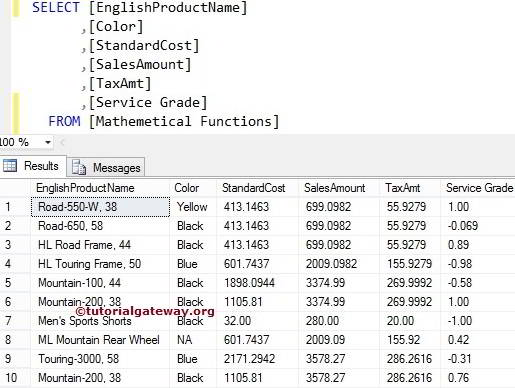
SQL ATAN Function Example
It calculates the Arctangent value for the given angle. The following query shows multiple ways to use the ATAN function. Please refer to the list of SQL Server Math functions from our SQL tutorial page.
In the following SELECT statement, we used the ATAN mathematical function to calculate the Arc TANGENT value for the variable @i. It means ATAN(-208.80) and is assigned a new name, ‘Arc Tangent’, using the ALIAS column name. Refer to the SELECT statement and SQL TAN function articles.
DECLARE @i Float
SET @i = -208.80

SELECT ATAN(@i) AS [Arc Tangent]

-- Calculating ATAN directly
SELECT ATAN(0.27) AS [Arc Tangent]

-- Calculating ATAN directly
SELECT ATAN(22.25 + 78.55 - 140.77) AS [Arc Tangent]
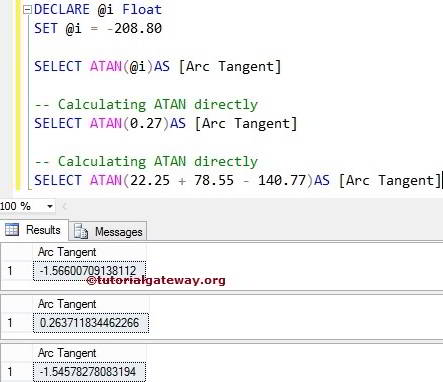
ATAN Function Example 2
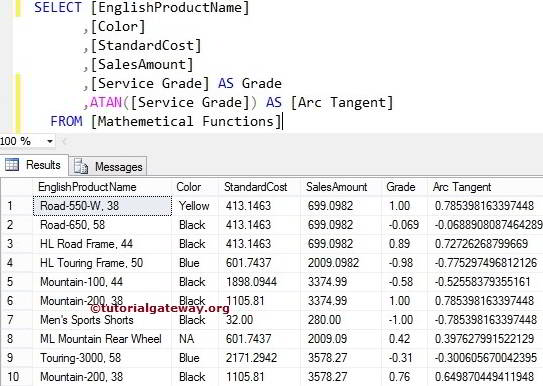
In the following query, we will calculate the Arctangent value for all records present in [Service Grade] using the SQL Server Function. Please refer to the SQL ASIN and SQL ACOS functions from the available Mathematical Functions to find the arc sine and arc cosine values.
Also, check the SQl ATN2.
SELECT [EnglishProductName]
      ,[Color]
      ,[StandardCost]
      ,[SalesAmount]
      ,[Service Grade] AS Grade
      ,ATAN([Service Grade]) AS [Arc Tangent]
  FROM [Mathemetical Functions]
Comments are closed.