
A List is a powerful one to hold a collection of different kinds of items in sequence. Python list methods are built-in functions that we can use to perform various operations on list elements, including adding items, removing items, updating, and performing aggregations.
In this article, we explain the available Python list functions with an example of each method. We also include some common list methods such as len, sum, min, and max functions. Although we provide a basic example, you can use the hyperlinks to each list function to delve deeper.
Python List Functions
The List Data type has separate built-in Python list functions or methods for adding, removing, finding, manipulating, and reversing elements. Please use these links to understand the list functions with examples.
The following are the built-in Python list methods or functions available for working with list elements.
| Functions | Description |
|---|---|
| append() | It appends or adds item x to the end of a list. |
| insert() | Inserts the specified list item x at index position i. |
| extend() | It adds the new list element to the end of an existing one. |
| del | This function removes the list value at a specified index. |
| pop() | Remove an item at a specified index and display the removed list item. After removing the remaining items, the remaining items moved forward to fill the index gap. |
| remove() | It removes the user-specified list item. It is very useful if we know the item. |
| copy() | This shallow copies the list items into a new one. |
| clear() | It clears the existing list elements. |
| count() | Counts the number of times the value is repeated inside a list. |
| reverse() | This method reverses the list items |
| sort() | Sort the list items in ascending or descending order |
| index() | The index method prints the index position of a specified list value. |
TIP: The following series of sections contains examples of the available list functions. Please refer to the List article in Python.
Python List Functions to add elements
In the Python programming language, there are three ways to add elements to a list, which include using the append(), insert(), and extend() functions. In this section, we cover these three methods with examples. Please visit each post to understand the unique features of these functions.
Apart from the above-mentioned three functions, there is a copy() method for duplicating the whole list into another.
Python list methods – append()
The append() function helps us to add an item at the end of a list. Since the list append() function accepts a single argument, to add multiple items, we must use the append() function multiple times.
In the following example, we will add 520 to the existing numbers list.
number = [150, 200, 130, 340]

number.append(520)

print("After appending 520 = ", number)
After appending 520 = [150, 200, 130, 340, 520]list extend function
The extend() function adds one or more items at the end of a list. We can use the list extend () function to combine two or more lists into one or any other iterable.
In this example, we declared a numbers list with four items. Next, we have declared another list “a” with two elements. Next, we used the extend() function to add list “a” items to the numbers.
n = [10, 200, 630, 90]
a = [222, 333]

n.extend(a)
print(n)
[10, 200, 630, 90, 222, 333]TIP: To add a single item to a list, use the append() function. On the other hand, use the extend() function to add multiple list items.
Python list functions – insert()
The insert() function inserts any given iterable at the specified index position. If you pass a list item, it inserts the element at a specified index position.
For example, the first statement in the following program inserts list item 100 at index position 2.
n = [5, 10, 15, 22, 19, 90]

n.insert(2, 100)
print("Inserting 100 at 2 : ", n)
Inserting 100 at 2 : [5, 10, 100, 15, 22, 19, 90]NOTE: Both append() and extend() functions add items at the end of the existing list. Whereas the insert() function adds items at any given position. It means more control over the insert position.
list copy
The copy() function shallow copies the list items into a completely new one. It is helpful to perform a variety of operations on list elements without touching the original list.
n = [6, 10, 18, 220, 90, 119]
new = n.copy()
print(new)
[6, 10, 18, 220, 90, 119]Python List Functions to delete elements
In the Python programming language, there are two functions for deleting elements from a list, and they are the pop() and remove() functions. There is a del keyword to remove a list item.
In this section, we cover two methods and the del keyword with examples. Please visit each post to understand the unique features of these functions.
Apart from the above-mentioned three options, there is a clear() function to remove all list items.
list del function
The del function or method deletes the value at a specified index. This example deletes items at index positions 5, 0, and 3.
n = [9, 17, 10, 18, 55, 120, 90]

del n[5]
print("Deleting 5th Index Item = ", n)
Deleting 5th Index Item = [9, 17, 10, 18, 55, 90]Python list functions – pop()
The pop() method removes the list items at the user-given index and displays the removed element. By default, it removes the last list element.
After removing the list item, the remaining values adjust to fill the index gap. The program below removes and displays the items at index position 2.
n = [17, 6, 10, 18]
a = n.pop(2)

print("After Deleting 2nd Index Item: ", n)
print("Items Extracted by the Pop: ", a)
Result
After Deleting 2nd Index Item: [17, 6, 18]

Items Extracted by the Pop: 10
List remove function
If we know the item, we can use the remove() function to delete the list element. The remove() function deletes the first occurrence of the given argument from a list of elements. The program below removes the first occurrence of the number 22 from a list.
n = [55, 10, 18, 22, 162, 22]

n.remove(22)
print("After Removing 22 : ", n)
After Removing 22 : [55, 10, 18, 162, 22]TIP: If you know the index position, the pop() function is the best solution to remove an item from a list. On the other hand, if you know the actual item value, use the remove() function to delete a specific value.
List clear
The clear() function helps you to clear all the existing list items. After executing the clear() function, it returns an empty list if you call or print it.
n = [6, 10, 18, 220, 90, 119]
n.clear()
print(n)
[]NOTE: The above-mentioned three approaches delete one list element at a time. However, use the clear() function to delete all the list items and keep the list.
Python List methods for ordering items
There are two built-in list methods for modifying the order of existing list items: sort() and reverse() functions.
sort() – Sorting the list items
The list sort() method helps sort the list elements in ascending or descending order. By default, it sorts in ascending order. However, use the reverse argument with a True value to sort the list items in descending order.
n = [2, 6, 0, 12, 15, -2, 19, 16, -9, 4]

n.sort()
print(n)

n.sort(reverse=True)
print(n)
Result
[-9, -2, 0, 2, 4, 6, 12, 15, 16, 19]

[19, 16, 15, 12, 6, 4, 2, 0, -2, -9]
reverse() – How to reverse the list items?
The List reverse() method helps to reverse the items. We can use this reverse() function when we want to invert the complete list. The following example reverses the numbers in a given list.
n = [22, 6, 12, 15, 19, 16, -9, 4]

n.reverse()
print(n)
[4, -9, 16, 19, 15, 12, 6, 22]Python list methods to search for items
There are two built-in functions to perform search operations on list elements: index() and count(). The first one returns the index position, and the second one returns the total occurrence of a given item.
list index
The List index() method returns the index position of the first occurrence of a user-given item value. Here, we are finding the index position of item 12 in numbers.
numbers = [22, 6, 12, 15, 12]

a = numbers.index(12)
print("Index Position of 12 = ", a)
Index Position of 12 = 2count() – How to count the items in a list?
The List count() function counts the number of times a specified value is repeated. It accepts an argument and finds how many times the argument value is repeated in a given list. Here, we count how many times 22, 6, and 19 are repeated.
n = [22, 6, 15, 19, 22, 90, 22, 6, 22]

a = n.count(22)
print("Number of Times 22 was repeated   : ", a)

b = n.count(6)
print("Number of Times 6 was repeated    : ", b)
Number of Times 22 was repeated   :  4

Number of Times 6 was repeated    :  2
Python list functions to perform aggregations
The Python programming language provides common built-in functions to perform aggregations on list elements. So, we can use sum(), len(), min(), max(), and count() functions on Python list elements to find the total, length, minimum, maximum, and find the total occurrence of an item.
In the previous section, we have already covered the count() function. So, this section will concentrate on the sum(), min(), max(), and len() functions.
List max function
The list max() function returns the maximum value in a given list of elements. The syntax of the max() method is
max(list_name)
The following example uses the max() function and returns the highest or maximum value in a given list.
n = [22, 6, 55, 15, -9, 33]

print(max(n))
55Python List functions – min()
The list min() function finds and returns the minimum value in a given list of elements. The syntax of the min() method is
min(list_name)
The following example uses the min() function and returns the lowest or minimum value in a given list.
n = [22, 6, 55, 15, -9, 33]

print(min(n))
-9List len() function
The list len() function finds the length of a list or returns the total number of elements in a list. The syntax of the len() method is
len(list_name)
The following example uses the len() function to return the total number of elements in a given list.
n = [22, 10, 55, 15, 33]

print(len(n))
5Python List functions – sum()
The list sum() function calculates and returns the sum of the total items in a given list of elements. The syntax of the sum() method is
sum(list_name)
The following example uses the sum() function to calculate the sum of the total elements in a given list. Here, 131 – 9 = 122
n = [22, 6, 55, 15, -9, 33]

print(sum(n))
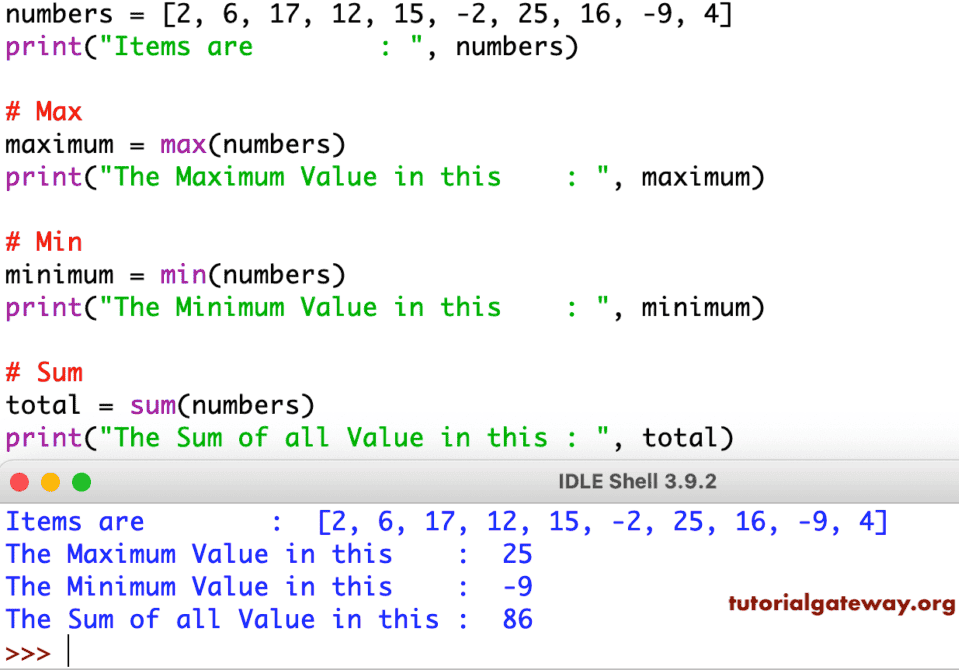
122This example shows the list methods sum, min, and max. The sum returns the sum of all items available in a given one. Next, the min returns the minimum value among the given items, and the max returns the maximum value.
numbers = [2, 6, 17, 12, 15, -2, 25, 16, -9, 4]

print("Items are        : ", numbers)

# Max
maximum = max(numbers)
print("The Maximum Value in this    : ", maximum)

# Min
minimum = min(numbers)
print("The Minimum Value in this    : ", minimum)

# Sum
total = sum(numbers)
print("The Sum of all Value in this : ", total)
Other Python list methods
list() function
It converts any iterable object into a list. The following example converts a set into a list using the list() function.
a = {1, 2, 3}

b = list(a)
print(b)
[1, 2, 3]List type() function
We can use the type() function to find out the class type of an object. For instance, the example below returns a <class ‘list’> as the output because ‘a’ is a list..
a = [1, 2, 3]

print(type(a))
<class 'list'>