
The If statement in C programming is one of the most useful decision-making expressions in real-time programming. The If condition allows the compiler to test the condition first, and then, depending upon the result, it will execute the statements. Whether the test condition is true, then only statements within the if condition is performed by the compiler.
If Statement in C syntax
The basic syntax of the If statement in this programming language has a simple structure:
if (test condition)
{

  Statement1;
  Statement2;
  Statement3;
  ………….
  ………….
  Statementn;
}
From the above code, whether the test condition in the If clause is true, the code block (Statement1, Statement2, Statement3, ……., Statementn) will be executed. Otherwise, all these lines will skip.
If statement in C Example
This example program checks for a positive number using the if statement. For the single printf function, curly brackets are not required in this C Programming tutorial. But for multiple lines of code, it is mandatory.
#include <stdio.h>

int main()
{

 int number;

 printf("Enter any integer Value\n");
 scanf("%d",&number);

 if( number >= 1 )
 {
   printf("You Have Entered Positive Integer\n");
 }

 return 0;
}
It is always good practice to use curly brackets following the If statement. Inside the if statement, we must use the comparison operators to evaluate the expression. Refer to the comparison operators in C.

When you look at the above if condition, the Value stored in the number variable is greater than or equal to 0. That’s why it printed (print function) inside the curly brackets ({}}.
From the above example, what happens when the condition fails? (number < 1).
Enter any integer Value
-22
Program ended with exit code: 0
It prints nothing because we don’t have anything to print after the if block. I hope you are confused with the result, so let us see the flow chart.
If statement in C flow chart
The flow chart of an If statement in this programming is as shown below:
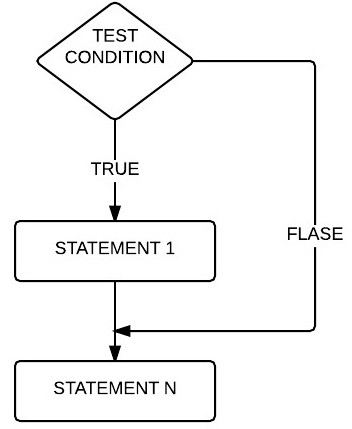
Whether the test condition is true, STATEMENT1 is executed, followed by STATEMENTN. When the condition is False, STATEMENTN executes because it is out of the if block. It has nothing to do with the condition result.
#include <stdio.h>

int main()
{
 int number;

 printf("Enter any integer Value\n");
 scanf("%d",&number);

 if( number >= 1 )
 {
   printf("You Have Entered Positive Integer\n");
 }

 printf("This Message is not coming from IF STATEMENT\n");

 return 0;
}
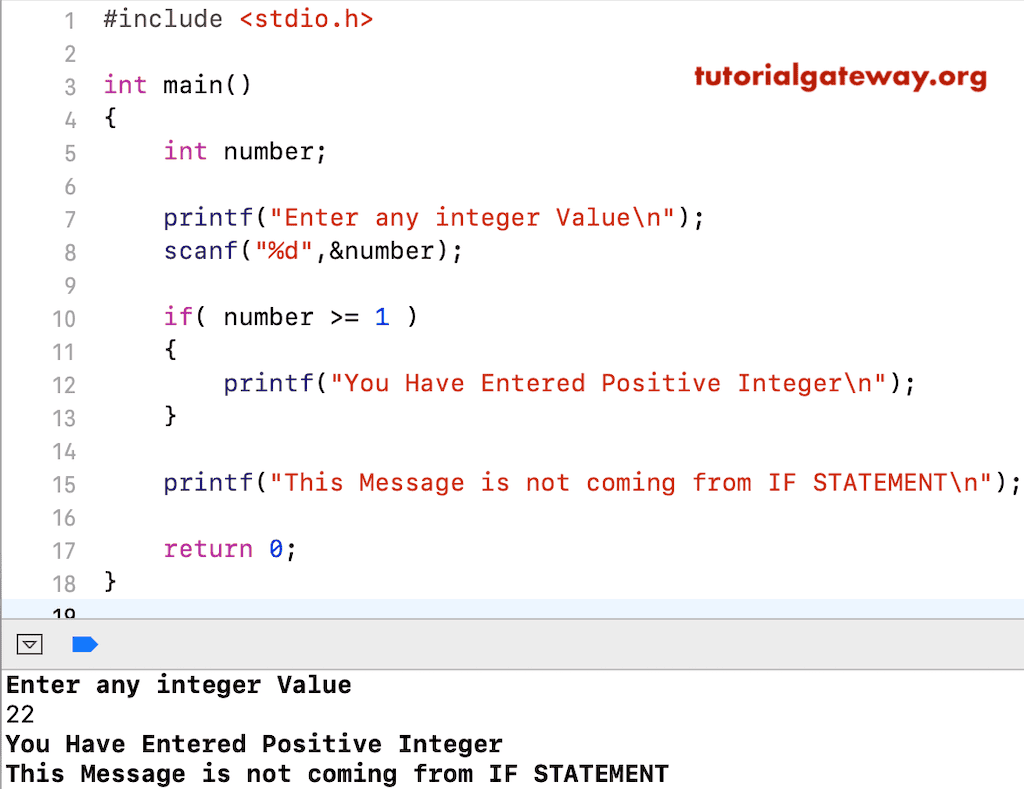
You can observe from the above output it printed both the printf functions because 22 is greater than 1. Let’s try the negative values to fail the condition deliberately.
Enter any integer Value
-13
This Message is not coming from IF STATEMENT
If condition (number < 1) fails here, it prints nothing from the If statement block. So, it wrote only one printf, which is outside of the block.
Once you understand the if condition, the next step is to master the below items
C if statement with multiple conditions
In the previous example, we used the if statement to check against a single condition. However, we can use Logical operators (&&, ||) inside the if statement to check multiple conditions. Please refer to the C Logical operators from the operator in C page.
In the following example, we use the Logical AND operator inside the If statement to check multiple conditions. If the user’s age is above 18, and a valid voter ID card allows them to vote in elections.
#include <stdio.h>

int main()
{
    int age = 28;
    int hasVoterIDCard = 1;

    if (age >= 18 && hasVoterIDCard == 1)
    {
        printf("You are allowed to vote.");
    }
    return 0;
}
You are allowed to vote.C If statement to perform string comparison
To perform the sign comparison, we need the if statement. However, we must not use the equal to (C assignment operator) for string comparison. Instead, use the built-in C strcmp() function. To perform the case-insensitive string comparison, use the strcasecmp() function.
#include <stdio.h>
#include <string.h>

int main()
{
    char s1[] = "Hello";
    char s2[] = "Hello";

    if (strcmp(s1, s2) == 0)
    {
        printf("Strings are equal.");
    }
    return 0;
}
Strings are equal.What happens if you don’t put curly brackets in the C if statement?
When working with the if statement, curly brackets are optional. Therefore, the if statement works with or without curly brackets. However, if there are no curly braces, it only considers the first statement as inside the if block and keeps the remaining statements as outside of it.
NOTE: It is always good practice to use the curly brackets in the if statement.
In the following example, there is one statement inside the if statement, so it prints that line.
#include <stdio.h>
#include <string.h>

int main()
{
    int n = 10;

    if (n > 0)
        printf("Positive");

    return 0;
}
PositiveIn the example below, the if condition fails, which is why the first printf statement won’t be executed. However, the second printf() will return a message because it is considered outside the if statement code block.
#include <stdio.h>
#include <string.h>

int main()
{
    int n = -10;

    if (n > 0)
        printf("Positive");
        printf("Outside the block");

    return 0;
}
Outside the block