
A Do While loop in C programming executes the code block at least once, even if the condition fails. It tests the condition at the loop end. Unlike the other loops (For loop and while loop), the do while loop guarantees that the code inside the loop executes at least once.
This scenario explains the situation where we can use the Do While loop in C programming. The While loop discussed in our previous article tests the condition before the compiler enters the code block. If the condition result is True, only the code inside the loop executes. Otherwise, it won’t run at least once. In some circumstances, it is necessary to execute certain operations (perform specific statements) first and then check the condition.
Syntax of Do While Loop in C
The syntax of the do while loop to repeat the execution of a code for n times is as shown below. First, it executes the lines inside the loop, and after arriving at the end, the compiler checks the while condition. If the condition returns True, the process recurs; the do while loop terminates if it fails.
do
{
  statement 1;
  statement 2;
    ………….
  statement n;
}
While (condition);
From the above C do while loop syntax:
- do keyword: It is an entry point to the iteration. When the compiler finds the do keyword, it understands that the code inside this block should run at least once.
- Body {}: The code inside the curly braces between the do and while keywords is known as the body. It may have one or more statements, and the compiler must execute them at least once.
- while: It is a system reserved keyword to inform the compiler to check the condition.
- Condition: It is a logical expression that will return a Boolean true or false. If the expression is evaluated to True, repeat the do while loop in C. Otherwise, exit the loop.
- Semicolon(;): Within the do while loop declaration, we must put a semicolon after the While condition to mark the end of the structure. Refer to the C while loop and C for loop from the C tutorial page.
Flowchart and Working of the Do While Loop in C
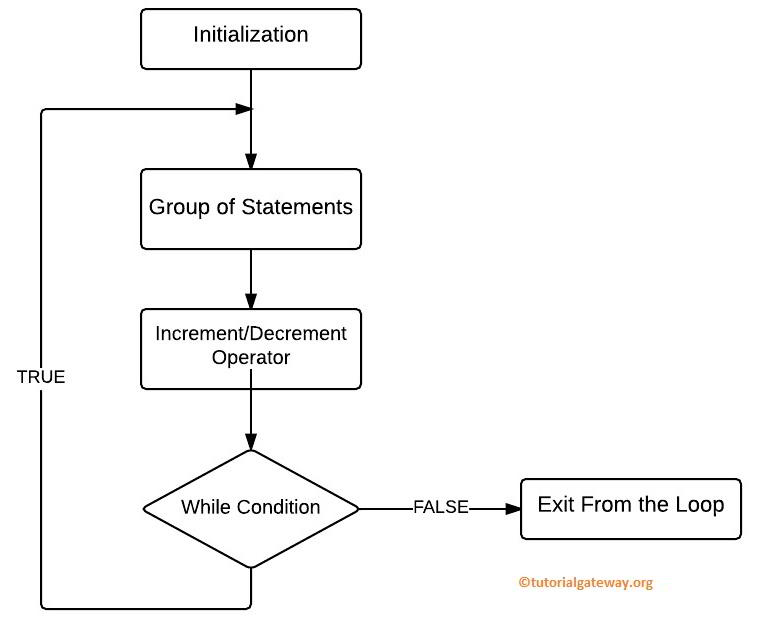
As we mentioned earlier, when the program control comes to the do keyword, it understands that it is an iteration block. The flow chart sequence of a Do while loop is as shown below. The following steps explain the working of the do while loop in the C Programming language.
- Initialization: The first step is to perform a variable initialization. These variables can be used inside a do while loop and later in the program.
- Group of Statements: The code inside the curly braces (between do and while keywords) will be executed by the C Programming compiler. As these statement comes first (before the condition), the compiler executes these statements first and then moves to the while condition.
- Increment/Decrement: Within the C do while loop group of statements, we must use the Increment and Decrement Operators to update the values. Alternatively, we can use C arithmetic operators or C assignment operators.
- While condition: After executing the code block for one time, the program control comes to the while condition section.Here, it checks the condition and returns a Boolean True or False. If the condition output is True, the code inside the do while loop executes again. The process will repeat until the condition fails.
- If the condition is evaluated to False, the compiler exits from the do while loop and executes the code after the loop (if any).
Examples of Do While Loop in C
The above sections help understand the syntax and working functionality of the do while loop. In this section, we will show some practical examples, starting with a simple one and progressing to complex examples, for a better understanding.
Basic example of do while loop in C
In the example below, we use the do while loop to print a message or string repeatedly five times. Here, we declared an integer variable and assigned a value of 1.
The compiler enters the do while loop and prints the Happy message. Next, the i++ statement increments the “i” by 1. Next, the condition inside the while loop is evaluated. As 2 is less than 5, the iteration continues and prints the same message. When the “i” value becomes 6, the condition (i <= 5) returns false, and the compiler exit loop.
#include <stdio.h>
int main()
{
    int i = 1;
    do
    {
        printf("Happy\n");
        i++;
    }while(i <= 5);
}
TIP: We must put the semicolon after the condition. Most of the do while loop errors occur because of forgetting a semicolon.
Happy
Happy
Happy
Happy
Happy
C do while loop to print numbers from 1 to 10
In the example below, we use a do while loop to iterate over the numbers from 1 to 10 and print those numbers. Here, the condition ensures the loop iterates until the n value is less than or equal to 10.
When n becomes 11, the compiler exits the loop. The group of statements within the do while loop prints a number on each iteration and increments it by 1.
#include <stdio.h>
int main()
{
    int n = 1;
    do
    {
        printf("%d ", n);
        n++;
    }while(n <= 10);
}
1 2 3 4 5 6 7 8 9 10Sum of the first 10 natural numbers using do while loop in C
This sum of natural numbers program helps you understand the Do While Loop. In this program, the User will enter any value below 10, and the total variable will be initialized to 0.
- The user-entered value will be assigned to the number variable, and then the number will be added to the total.
- In the next line, we used the ++ operator to increment the number value. Refer to the C Increment and Decrement Operators.
- After this line, the value in a Number variable tests against the while condition. If the condition results in true, it repeats the process. Otherwise, it will exit.
- In the next line, we used one more printf statement to show that it comes from outside the while loop.
For a better understanding of the iteration process, we used the printf() statement inside the C do while loop to print the number and the total. On each iteration, it prints the number and the total for that particular loop.
For example, we entered 6 as the number. In the first iteration, the number is 6 and total = 6. After executing the number++ line, the number becomes 7. So, for the second iteration, it prints number = 7 and total = 6 +7 = 13.
#include <stdio.h>

int main()
{
  int number, total=0;

  printf("\n Please Enter any integer below 10 \n");
  scanf("%d", &number);

  do
   {
     total = total + number;
     printf(" Number = %d\n", number);
     printf(" Total Value is: %d\n", total);
     number++;
   }while (number< 10);

  printf(" Total Value from outside is: %d \n", total);
  return 0;
}
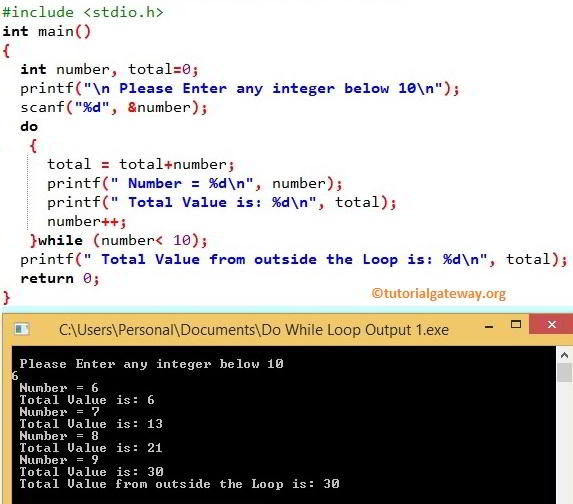
Let us enter a value greater than 10 to see what will happen.
 Please Enter any integer below 10
11
 Number = 11
 Total Value is: 11
 Total Value from outside is: 11
If you observe the above result, we entered the value 11, and it still displays the total as 11 because after executing that code, it checked the while condition. It failed, so it exits.
Do while loop with a false condition
In the example below, we use the C do while loop with a false condition (the condition that is never true). In such a scenario, the compiler will execute the statements inside the do while loop one time and test the condition. As the condition fails, the loop terminates.
#include <stdio.h>
int main()
{
    int n = 5;
    do
    {
        printf("Hello World!" );
        n++;
    }while(n <= 1);
}
Hello World!User input password validation using do while loop in C
In the example below, we allow the user to enter the password. However, we used the printf() and scanf() statements inside the do while loop. The C strcmp() function inside the condition checks whether the user input matches the existing password. If true, the program prints the success message> Otherwise, it repeatedly asks the user to enter the correct password.
#include <stdio.h>
#include<string.h>
int main()
{
    char password[50];
    do
    {
        printf("Enter the Password = ");
        scanf("%s", password);
    }while(strcmp(password, "sample1234") != 0);

    printf("Login Successful");
}
Enter the Password = admin
Enter the Password = sample123
Enter the Password = sample1234
Login Successful
Menu-driven program using do while loop in C
In the example below, we use a do-while loop and a switch case to choose the menu from available options. Based on the chosen option, the program performs the arithmetic calculations. Here, there are three options to choose from, and anything above 3 or below 1 is considered invalid. Option 1: Addition, and 2 is for multiplication. These options repeat until the user enters the 3rd option (exit). Refer to the C switch case.
#include <stdio.h>

int main() {
    int choice;
    float a, b;

    do {
        printf("\n--- MENU ---\n");
        printf("1. Addition\n");
        printf("2. Multiplication\n");
        printf("3. Exit\n");
        printf("Enter your choice: ");
        scanf("%d", &choice);

        if (choice == 1 || choice == 2) {
            printf("Enter two numbers: ");
            scanf("%f %f", &a, &b);
        }

        switch(choice) {
            case 1:
                printf("Result = %.2f\n", a + b);
                break;
            case 2:
                printf("Result = %.2f\n", a * b);
                break;
            case 3:
                printf("Exiting program...\n");
                break;
            default:
                printf("Invalid choice! Try again.\n");
        }

    } while (choice != 3);

    return 0;
}
--- MENU ---
1. Addition
2. Multiplication
3. Exit
Enter your choice: 2
Enter two numbers: 10 3
Result = 30.00

--- MENU ---
1. Addition
2. Multiplication
3. Exit
Enter your choice: 3
Exiting program...
If you enter a number above 3, the following message will print.
Invalid choice! Try again.Infinite do while loop in C
When a do while loop continues executing without termination is called an infinite loop. It can happen for many reasons. For instance, using a condition that is always true. The other reason is forgetting to increment or decrement the counter variable, which makes the condition always True.
Do while loop with 1 as the condition
The most common way of C do while loop that enters into an infinite loop is using 1 as the condition. In the example below, we tried to print the natural numbers from 1 to N. However, instead of specifying the maximum value in the do while condition, we mentioned 1. Here, while(1) condition is always true, the loop continues forever.
#include <stdio.h>
int main()
{
    int n = 1;
    do
    {
        printf("%d ", n);
        n++;
    }while(1);
}
1 2 3 4 5 6 …….To deal with the situation, we must use a break statement to inform the compiler to exit the loop when a certain condition is met. For instance, in the example below, we used the break statement to exit the C do while loop when the number is 3.
#include <stdio.h>
int main()
{
    int n = 1;
    do
    {
        printf("%d ", n);
        n++;
        if(n == 3) {
            break;
        }
    } while (1);
}
1 2TIP: Similarly, use the continue statement inside a do-while loop to skip the current iteration. Please refer C continue statement and C break statement articles.
Miss Updating Counter variable
Another way to enter into the infinite loop is by not updating the counter variable. If we miss updating (increment or decrement) the original counter variable, the value will be the same, and the C do while loop iterations will happen infinitely.
In the example below, we haven’t used any increment or decrement operator to update the initial counter value of i. It means the value of i is always 10, and the do while loop executes infinitely.
#include <stdio.h>
int main()
{
    int n = 10;
    do
    {
        printf("%d ", n);
    } while (n > 0);
}
To avoid this, we must increase or decrease the n value. Here, we want to print the numbers in reverse order from 10 to 1. So, add n– to decrease the n value on each iteration by 1.
#include <stdio.h>
int main()
{
    int n = 10;
    do
    {
        printf("%d ", n);
        n--;
    } while (n > 0);
}
10 9 8 7 6 5 4 3 2 1Nested do while loop in C
Using one do while loop inside another is called a nested do while loop. On each outer loop iteration, the nested do-while loop must complete all iterations and move to the next outer loop iteration.
To traverse multidimensional arrays in C or print patterns, including C star patterns, C alphabet patterns, and C number patterns, use do while loop.
To demonstrate the nested do while loop, we will print the right-angled triangle pattern of stars. Here, the outer and inner do while loops iterate over the rows and columns to print the right triangle.
#include <stdio.h>
int main()
{
    int i = 1, n = 5;
    do
    {
        int j = 1;
        do
        {
            printf("*");
            j++;
        } while (j <= i);
        printf("\n");
        i++;
    } while (i <= n);
}
*
**
***
****
*****
Difference between a while loop and Do While in C Programming?
Although the Do While and While loop look similar, their execution differs.
- For a While, the condition is tested at the beginning, and if the condition is True, then only the statements in that block will execute. It means that the while loop executes the code block only if the condition is True. In short, a while loop is a pre-tested or entry-controlled loop.
- For Do While, the condition tests at the end. A do while loop executes the statements in the code block at least once, even if the condition fails. In short, do while is a post-tested loop.
TIP: Apart from the while loop and the do-while loop, there is a for loop, which is a powerful one among the three.
If you want the code inside a block to run at least once, even if the condition fails, use the do while loop. When you want to restrict the compiler from executing the code block not even once when the condition fails, use a while loop.
I think you will understand it better when you see the example, so let’s write the same program using the While and Do While loop in C.
While loop Example
In this program, we are declaring integer and then check whether 0 is greater than ten or not. If the condition is True, it will print this statement, “X is Greater Than 10”. There is one more printf statement outside the While, and this statement will execute after the while.
#include <stdio.h>

int main()
{
  int x=0;

  while(x > 10)
   {
     printf("\n X is Greater Than 10\n");
   }

  printf("\nStatement Outside of it\n");
  return 0;
}

C Do While loop Example
We will write the same example using the do while. Remember, although the condition fails, the statement inside the do while loop executed once because of the condition tested after executing the statements.
#include <stdio.h>

int main()
{
 int x=0;

 do
  {
    printf("\n X is Greater Than 10 \n");
  }while(x > 10);

 printf("\n Statement Outside of it \n");
 return 0;
}
