
The Else If Statement in C is instrumental, while we have to test several conditions. Apart from the Else If, we can utilize the Nested If statement to accomplish the same. However, as the number of conditions rises, the code complexity will grow further.
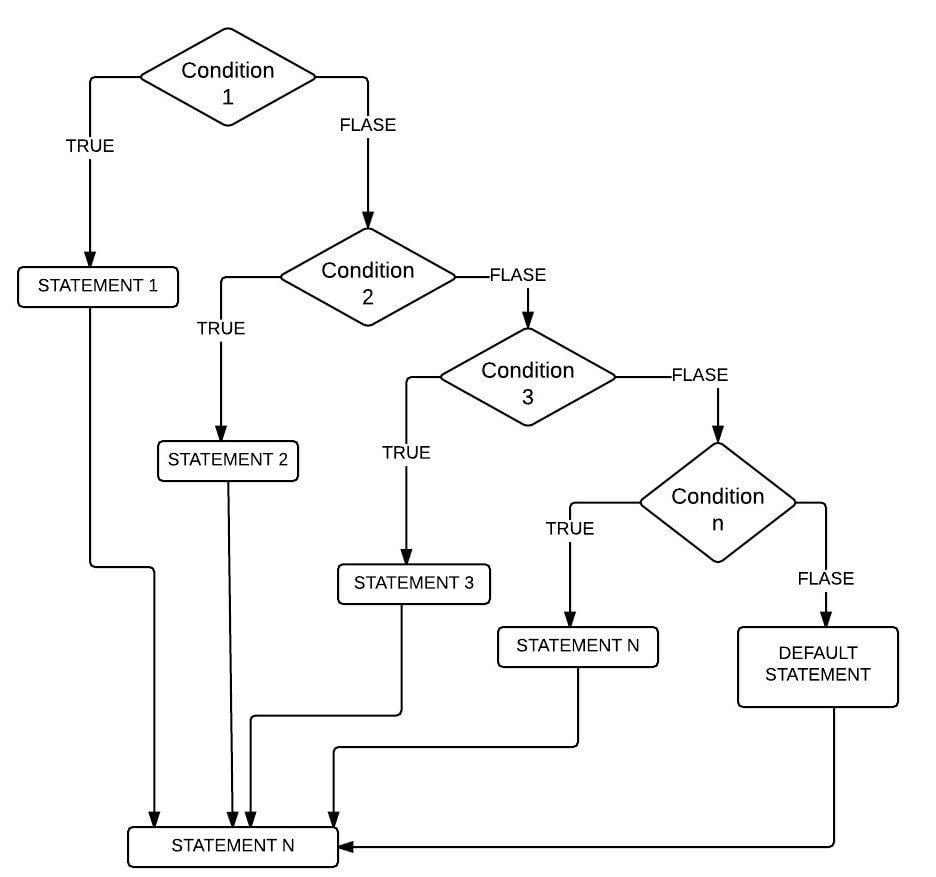
Else If statement in C Programming language effectively handles multiple statements by sequentially executing them. The compiler will check for the first condition. If the condition result is TRUE, then the statements present in that block will run. If the result is FALSE, the compiler verifies the Next one (Else If condition), and so on.
Else If Statement in C Syntax
The syntax of the Else If statement is as follows:
if (condition 1)
          statements 1
else if (condition 2)
          statements 2
else if (condition 3)
          statements 3
      ...........
else if (condition n)
          statements n
else
    default statements
There are some circumstances where both the condition1 and condition2 are TRUE, for instance:
x= 20, y=10
Condition 1: x > y //TRUE
Condition 2: x != y //TRUE
In these circumstances, code under Condition1 will execute. Because ELSE IF conditions will only execute if its prior IF or ELSE IF statement fails.
Flow chart of Else If statement in C
The programming flow Chart behind this Else If Statement in this programming language.
Else If Statement in C Example
In this program, the user is asked to enter their total six subject marks. Using this Else if statement, we will decide whether the person is qualified for a scholarship or not
/* Example */

#include <stdio.h>

int main()
{
 int Totalmarks;

 //Imagine you have 6 subjects and Grand total is 600
 printf("Please Enter your Total Marks\n" );
 scanf( "%d", &Totalmarks );

 if (Totalmarks >= 540)
  {
    printf("You are eligible for Full Scholarship\n");
    printf("Congratulations\n");
  }
 else if (Totalmarks >= 480)
  {
    printf("You are eligible for 50 Percent Scholarship\n");
    printf("Congratulations\n");
  }
 else if (Totalmarks >= 400)
  {
    printf("You are eligible for 10 Percent Scholarship\n");
    printf("Congratulations\n");
  }
 else
  {
    printf("You are Not eligible for Scholarship\n");
    printf("We are really Sorry for You\n");
  }
}
OUTPUT 1: For this example, we will provide Totalmarks = 570. First, the if condition is TRUE. Please refer to the C Nested If statement article from the C tutorial page as well.
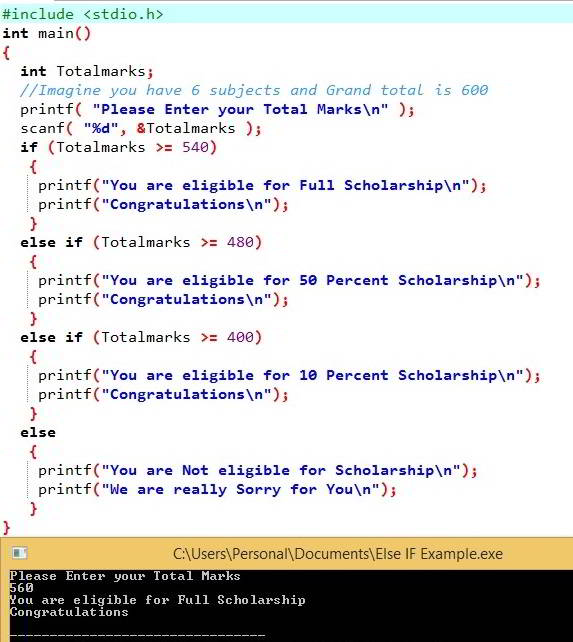
OUTPUT 2: This is to demonstrate the Else IF statement. We entered Totalmarks = 490 means the first IF condition is FALSE.
It will check the (Totalmarks >= 480), which is TRUE so that the Program will print the code inside this block. Although else if(Totalmarks >= 400) condition is TRUE, the compiler will not check this condition.
Please Enter your Total Marks
490
You are eligible for 50 Percent Scholarship
Congratulations
3rd OUTPUT: Total marks as 401 – first IF condition, else if (Totalmarks >= 480) is FALSE. Next, It will check the else if (Totalmarks >= 401), which is TRUE. So it will print this code block.
Please Enter your Total Marks
401
You are eligible for 10 Percent Scholarship
Congratulations
OUTPUT 4: Let me enter Total marks = 380. It indicates all the IF conditions Fail. So, It prints the statements inside an else block.
Please Enter your Total Marks
380
You are Not eligible for Scholarship
We are really Sorry for You
C else if multiple conditions
Similar to any other if else statements, we can use logical operators (&&, ||) inside the else if statement to evaluate multiple conditions. Refer to the C if else statements and C logical operators articles.
In the following example, we used the LOGICAL AND operator inside the else if statement to check multiple conditions.
- if (age <= 18) checks whether the user’s age is less than or equal to 18. If true, the person is not eligible to work.
- else if (age > 18 && degree) checks multiple conditions and both have to be true. It means users’ age should be greater than 18 and they holds degree certificate to apply for an interview.
- No degree means print the else block message.
#include <stdio.h>

int main()
{
    int age = 22;
    int degree = 1;

    if (age <= 18)
    {
        printf("Not eligible to Work\n");
    }
    else if (age > 18 && degree)
    {
        printf("Eligible for Interview\n");
    }
    else
    {
        printf("Job requires Minimum Degree.\n");
    }

    return 0;
}
Eligible for interviewWhat is the difference between writing multiple if statements vs else if in C?
When we use multiple if statements, the compiler checks all the conditions and returns the result of every valid expression. On the other hand, the else if statement returns the first matching result and stops checking the other conditions.
To demonstrate the difference between multiple if statements and else if, we use a simple example. Here, we used multiple if conditions, each with an associated expression. First, we declared the age as 40. Next, the compiler moves to the first if condition.
- if (age > 13) = True. So, print the message. Next, the compiler moves to the second if condition.
- if (age > 19) = True. So, print the message. Next, the compiler moves to the third if condition.
- if (age > 35) = True. So, print the message.
It means that the compiler will execute all the C if statements and print all messages because all of them are true. I also suggest you refer to the C switch case as an alternative.
#include <stdio.h>

int main()
{
    int age = 40;

    if (age > 13)
    {
        printf("Teenager\n");
    }
    if (age > 19)
    {
        printf("Young Adult\n");
    }
    if (age > 35)
    {
        printf("Adult");
    }
}
Teenager
Young Adult
Adult
In the following example, we use the C else if statement to inform the user’s age group. Here, the compiler checks the first if condition ( if (age > 35)), which is true. So, it prints the message inside it and stops looking for the other conditions.
TIP: If the program has multiple else if true conditions, the compiler will return the first match and ignore the remaining conditions.
#include <stdio.h>

int main()
{
    int age = 40;
    if (age > 35)
    {
        printf("Adult");
    }
    else if (age > 19)
    {
        printf("Young Adult\n");
    }
    else if (age > 13)
    {
        printf("Teenager\n");
    }
    else
    {
        printf("Baby");
    }
}
Adult