
The SQL Server WHERE Clause restricts (filters) the number of rows (or records) returned by the SELECT Statement. It means the SELECT statement returns the records only if the condition specified after the WHERE keyword is TRUE. We can use the WHERE clause with a single table or multiple tables. The WHERE clause is essential for selecting, updating, or deleting the required rows.
In general, a table might contain thousands or millions of records, and when working, we don’t need all rows in a table. The SQL WHERE clause narrows down the result set by forcing the query to meet certain conditions (logical expression). It can be applied to a single column or multiple columns. For example, showing 2025 sales, products sold in the USA, customers from New York, etc.
SQL WHERE Clause example: For instance, we want to order shoes on the Amazon website. When we type shoes in the search bar, it will display thousands of shoes with different brand names and sizes. However, to select the required shoe, we use filters such as a price range between $2000 and $2500, black color, and Nike or Adidas brand names.
Using the above filters will only display shoes that match the specified requirements, allowing us to easily select them. Let us see what happens internally (Query against the Amazon Database). It uses the SQL WHERE clause, and it will go something like this:
SELECT [Product Name], [Size], [Brand], [Price], [Discount]
FROM [Products_table]
WHERE ([Product Name] = 'Shoes') AND
      (Brand = 'Nike' OR 'Adidas') AND
      ([Price] BETWEEN 2000 AND 2500)
SQL WHERE Clause Syntax
The Syntax of the SELECT Statement and WHERE clause can be written as:
SELECT [Column Names]
FROM [Source]
WHERE [Conditions]
From the above SQL WHERE clause syntax
- Columns: The SELECT statement allows us to choose the number of columns in the tables. It may be one or more.
- Source: The table from which we want to retrieve records. It can be one or more tables from the Database. JOINS are used to join multiple tables.
- Conditions: Here, we have to provide filters or conditions. If the condition is TRUE, then only the SELECT Statement returns the records. The condition is a combination of expressions, operators, and values.
SQL WHERE Clause Examples
Although the syntax shows the WHERE clause in the SELECT statement, it is not limited to this. We can use the WHERE clause in UPDATE and DELETE statements. In fact, we must not use those statements (UPDATE and DELETE) without the WHERE clause.
This section covers all possible SQL WHERE clause examples along with a detailed explanation. The common server execution process of the SELECT statement with the WHERE clause is FROM -> WHERE -> SELECT. The server executes the FROM clause to pick the source table, and based on the condition, the WHERE clause filters the records. Next, the SELECT statement will return the specified columns.
To demonstrate the WHERE clause, we use a simple Customer table available in our database and the AdventureWorksDW2022 database. Before going to the examples, let me show you the operators used in the WHERE clause.

Operators in the SQL WHERE clause
As we mentioned earlier, the WHERE clause filters the selected data using a given condition. To check any condition, we need operators residing in-between the columns against the expression. The following table shows the list of available operators that you can use in the WHERE clause. Among all of them, the = operator is the most commonly used one.
| Operators | Details |
|---|---|
| Comparison Operators (=, >, <, >=, <=, <>) | To check whether the left operand is equal, greater, etc than the right operand. |
| Logical Operators (AND, OR, and NOT) | It helps to use multiple conditions in the WHERE clause. |
| BETWEEN and NOT BETWEEN | To find records within a range. |
| LIKE and NOT LIKE | To perform the wildcard search. |
| IN and NOT IN | It searches for multiple values. |
| IS NULL and IS NOT NULL | To filter the NULL values. |
TIP: Please use the hyperlinks to understand each operator with multiple examples.
SELECT statement Without any Condition
Typically, the SELECT statement returns all rows in a table of all or specified columns. It is the WHERE clause that filters the total number of rows returned by the SELECT statement. To demonstrate this, let me use the SELECT statement without any SQL WHERE clause.
SELECT * FROM Customer
As you can see from the message below, the above query returns 15 rows. Please refer to the above image to see the information.
(15 rows affected)SQL WHERE Clause with a single Condition
Although it is optional to use the WHERE clause, it is very important to select the required number of rows instead of printing out all of them. We start this series of examples with a simple numeric field.
Suppose you want to view a particular customer’s information from the Customer table. Use the WHERE clause with the SELECT statement to filter that person.
As we all know, each customer has a unique ID, and if we remember the value, provide the ID to filter the table. The query below prints the customer’s information from the Customer table whose ID value is equal to 10.
SELECT * FROM [Customer]
WHERE EmpID = 10
EmpID	FirstName	LastName	Education	Occupation	YearlyIncome	Sales	HireDate
10	Christy	Carlson	Graduate Degree	Management	70000	2234.99	2014-01-25 16:14:14.110
Similarly, we can use the remaining SQL comparison operators in the WHERE clause. The following examples give an idea of how to use the <, <=, >, and >= in the WHERE clause.
It prints the customers whose employee ID is less than 2 (i.e., 1)
SELECT * FROM [Customer]
WHERE EmpID < 2
EmpID	FirstName	LastName	Education	Occupation	YearlyIncome	Sales	HireDate
1	John	Yang	Bachelors	Professional	90000	3578.27	2006-01-28 13:10:02.047
Here, the less than or equal to means print the customers whose ID is 1 or 2.
SELECT * FROM [Customer]
WHERE EmpID <= 2
EmpID	FirstName	LastName	Education	Occupation	YearlyIncome	Sales	HireDate
1	John	Yang	Bachelors	Professional	90000	3578.27	2006-01-28 13:10:02.047
2	Rob	Johnson	Bachelors	Management	80000	3399.99	2010-12-29 15:10:02.407
It prints the customers whose employee ID is greater than 14. As there are 15 rows in our table, it prints the ID number 15 details. (i.e., 1)
SELECT * FROM [Customer]
WHERE EmpID > 14
EmpID	FirstName	LastName	Education	Occupation	YearlyIncome	Sales	HireDate
15	Tutorial	Gateway	Masters Degree	Management	125000	1290	2006-01-01 13:10:02.047
Here, the greater than or equal to means print the customers whose ID is 14 or 15.
SELECT * FROM [Customer]
WHERE EmpID >= 14
EmpID	FirstName	LastName	Education	Occupation	YearlyIncome	Sales	HireDate
14	Greg	Alderson	Partial High School	Clerical	45000	23.5	2013-07-05 05:03:10.333
15	Tutorial	Gateway	Masters Degree	Management	125000	1290	2006-01-01 13:10:02.047
SQL WHERE Clause with Text Field
In the above example, we used the numeric field in the WHERE clause, and it is not limited to numbers. The WHERE clause also allows using the text field or string information to filter the data. Remember, we must enclose the string text within a single quote (”).
The query below selects the customer whose last name is ‘Gateway’. By default, the server performs case-insensitive searches. So, the query returns the same result even if you can use uppercase, lowercase, or a combination of both.
SELECT * FROM [Customer]
WHERE LastName = 'Gateway'
EmpID	FirstName	LastName	Education	Occupation	YearlyIncome	Sales	HireDate
15	Tutorial	Gateway	Masters Degree	Management	125000	1290	2006-01-01 13:10:02.047
As there is only one record with the last name ‘Gateway’, it will return the details of the EmpID 15. However, if you use the following SQL WHERE clause query, it returns three rows (4, 8, and 10) because all these customers have ‘Christy’ as their first name.
SELECT * FROM [Customer]
WHERE FirstName = 'Christy'
EmpID	FirstName	LastName	Education	Occupation	YearlyIncome	Sales	HireDate
4	Christy	Zhu	Bachelors	Professional	80000	3078.27	2012-12-28 19:04:22.380
8	Christy	Mehta	Partial High School	Clerical	50000	24.99	2007-07-05 15:13:14.290
10	Christy	Carlson	Graduate Degree	Management	70000	2234.99	2014-01-25 16:14:14.110
General Expressions (1 = 2)
Instead of testing conditions against Column Names, the WHERE clause allows us to test general conditions. For instance, the condition below checking 1 is exactly equal to 2, which is False. So the SELECT statement will not return any record from the Server table.
SELECT * FROM [Customer]
WHERE 1 = 2
(0 rows affected)NOTE: As we mentioned earlier, the WHERE clause comes first, and when the condition fails, it won’t return any records in a table.
WHERE 1 = 1 Example
Let us change the SQL WHERE clause condition from (1 = 2) to (1 = 1) general expression. Here, the condition is TRUE, so it displays all fifteen records present in the customer Table.
SELECT * FROM [Customer]
WHERE 1 = 1
Do not use ALIAS Column Names in the condition. Because the condition will execute first, and then the SELECT statement will choose the Columns. So, the WHERE Clause does not understand the ALIAS Columns declared in the SELECT statement.
SQL WHERE Clause with Multiple Conditions
The SQL Server provides the logical operators, such as AND, OR, and NOT. Among them, logical AND and logical OR operators help to combine two or more conditions within the WHERE clause.
TIP: Within the WHERE clause, we can use multiple AND or multiple OR conditions or a combination of both. When using multiple conditions, use () brackets to prioritize the execution order.
This example uses the WHERE clause with multiple conditions joined by the AND operator. The query below returns all Customer records whose occupation is equal to Management and Education Master’s Degree.data to explain the WHERE Clause to filter the data before extracting it using the SELECT statement.
SELECT * FROM [Customer]
WHERE [Occupation] = 'Management' AND
	Education = 'Masters Degree'
EmpID	FirstName	LastName	Education	Occupation	YearlyIncome	Sales	HireDate
7	John	Miller	Masters Degree	Management	80000	2320.49	2009-08-12 15:13:14.113
15	Tutorial	Gateway	Masters Degree	Management	125000	1290	2006-01-01 13:10:02.047
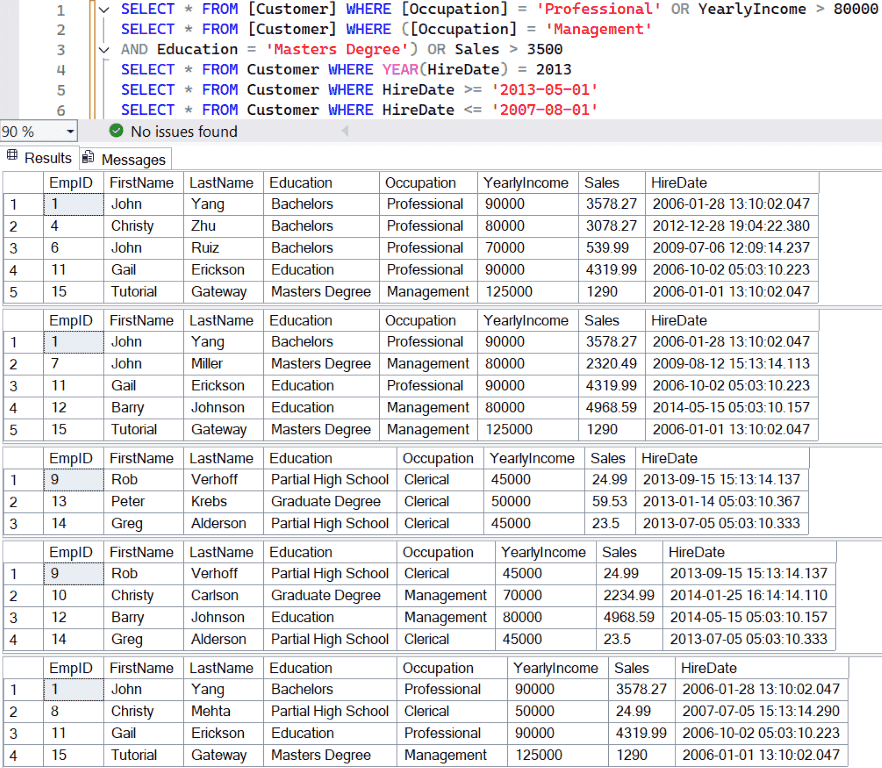
Similar to the above, we use the OR operator to join multiple conditions inside the WHERE clause. The following query prints customers whose occupation is professional or whose income is higher than 80000.
SELECT * FROM [Customer]
WHERE [Occupation] = 'Professional' OR
	YearlyIncome > 80000
The query below shows the combination of AND and OR operators in a single SQL WHERE clause. Here, we used the () brackets to divide the two conditions. The first condition checks whether the occupation is a Management and Master’s Degree Education. The next condition is Sales greater than 3500. So, either the first condition is TRUE or the second is TRUE, display that row.
SELECT * FROM [Customer]
WHERE ([Occupation] = 'Management' AND
	Education = 'Masters Degree') OR
	Sales > 3500
How to sort the filtered data?
SQL Server allows the combination of the WHERE clause and the ORDER BY clause to sort the filtered data in ascending or descending order. The query below prints the customers whose occupation is Skilled Manual or whose sales are greater than 4500. The ORDER BY Clause uses the sales amount to sort the result set in descending order.
SELECT FirstName, LastName, Education,
	YearlyIncome, Sales FROM [Customer]
WHERE [Occupation] = 'Skilled Manual' OR Sales > 4500
ORDER BY Sales DESC
FirstName	LastName	Education	YearlyIncome	Sales
Barry	Johnson	Education	80000	4968.59
Rob	Huang	High School	60000	2319.99
Ruben	Torres	Partial College	50000	699.0982
SQL WHERE clause with DATE and TIME
Like any other values (string, number), you can use the date and time values in the WHERE clause to filter the data. For example, the query below returns the customers hired in the year 2013. Here, we used the YEAR() function to extract the year value from the HireDate and compared it with an integer number (2013).
SELECT * FROM Customer
WHERE YEAR(HireDate) = 2013
Generally, within the WHERE clause, we must enclose the date and time values in single quotes. Otherwise, it will throw an error. In the above example, the YEAR() function returns an integer, so we used the integer value as the right operand.
The query below returns customers hired on or after (greater than or equal to) 01, 2013.
SELECT * FROM Customer
WHERE HireDate >= '2013-05-01'
Similarly, the following example displays customers hired on or before (less than or equal to) August 01, 2007.
SELECT * FROM Customer
WHERE HireDate <= '2007-08-01'
SQL WHERE Clause with BETWEEN Operator Example
The WHERE clause allows the BETWEEN operator to find or filter records within a given range. We can use this combination to find products sold in a specific time frame or customers in a certain age group, and so on.
The following query uses the WHERE clause and the BETWEEN operator to display all customers whose sales are between 10 and 100.
SELECT * FROM Customer
WHERE Sales BETWEEN 10 AND 100
EmpID	FirstName	LastName	Education	Occupation	YearlyIncome	Sales	HireDate
8	Christy	Mehta	Partial High School	Clerical	50000	24.99	2007-07-05 15:13:14.290
9	Rob	Verhoff	Partial High School	Clerical	45000	24.99	2013-09-15 15:13:14.137
13	Peter	Krebs	Graduate Degree	Clerical	50000	59.53	2013-01-14 05:03:10.367
14	Greg	Alderson	Partial High School	Clerical	45000	23.5	2013-07-05 05:03:10.333
Generally, the BETWEEN operator helps work with dates. The query below displays all customers who were hired between January 01, 2012, and March 30, 2014.
SELECT * FROM Customer
WHERE HireDate BETWEEN '2012-01-01' AND '2014-03-30'
EmpID	FirstName	LastName	Education	Occupation	YearlyIncome	Sales	HireDate
4	Christy	Zhu	Bachelors	Professional	80000	3078.27	2012-12-28 19:04:22.380
9	Rob	Verhoff	Partial High School	Clerical	45000	24.99	2013-09-15 15:13:14.137
10	Christy	Carlson	Graduate Degree	Management	70000	2234.99	2014-01-25 16:14:14.110
13	Peter	Krebs	Graduate Degree	Clerical	50000	59.53	2013-01-14 05:03:10.367
14	Greg	Alderson	Partial High School	Clerical	45000	23.5	2013-07-05 05:03:10.333
There is also a NOT BETWEEN operator that we can use with the SQL WHERE clause to display table records that do not fall in the specified range. The following query displays customers who were not hired between January 01, 2009, and December 31, 2014.
SELECT * FROM Customer
WHERE HireDate NOT BETWEEN '2009-01-01' AND '2014-12-31'
EmpID	FirstName	LastName	Education	Occupation	YearlyIncome	Sales	HireDate
1	John	Yang	Bachelors	Professional	90000	3578.27	2006-01-28 13:10:02.047
5	Rob	Huang	High School	Skilled Manual	60000	2319.99	2008-09-22 19:04:22.123
8	Christy	Mehta	Partial High School	Clerical	50000	24.99	2007-07-05 15:13:14.290
11	Gail	Erickson	Education	Professional	90000	4319.99	2006-10-02 05:03:10.223
15	Tutorial	Gateway	Masters Degree	Management	125000	1290	2006-01-01 13:10:02.047
Filter the records from Multiple tables
In all the above-mentioned examples, we use a single table to demonstrate the WHERE clause. However, we can apply the SQL WHERE clause on multiple tables to filter rows from both tables.
To demonstrate the WHERE clause with JOIN example, we use the tables we have already created in the INNER JOIN article. The following query joins the Geography and Fact tables using the common GeographyID column. Here, the WHERE clause condition instructs the server to display only the sales information that belongs to the United States.
SELECT f.ID, g.Country, f.Orders, f.Sale, f.OrderDate
FROM Geography g JOIN Fact f
ON g.GeographyID = f.GeographyID
WHERE g.Country = 'USA'
ORDER BY g.GeographyID
ID	Country	Orders	Sale	OrderDate
301	USA	15	7500.00	2025-09-28
304	USA	10	4000.00	2023-07-11
305	USA	9	1500.00	2024-12-31
307	USA	30	8000.00	2025-05-01
SQL WHERE LIKE Clause Example
Instead of checking against a specific item, we can use the LIKE Operator along with this to perform Wildcard searches against the Table. By this, we can search for a pattern to filter the records in a table. For instance, finding the users from a city starting with the letter C, F, etc.
There are many wildcards that we can use within the WHERE clause, and we have already explained them in the LIKE Wildcard article. To keep the query as simple as possible, we focus on the % wildcard. The query below returns all customers whose Education starts with M. Remember, it does not matter about the remaining characters; all it needed is the starting letter M.
SELECT [EmpID], [FirstName], [LastName], [Education]
	,[Occupation], [YearlyIncome], [Sales]
FROM [Customer]
WHERE [Education] LIKE 'M%'
EmpID	FirstName	LastName	Education	Occupation	YearlyIncome	Sales
7	John	Miller	Masters Degree	Management	80000	2320.49
15	Tutorial	Gateway	Masters Degree	Management	125000	1290
Apart from the above, we can use the NOT LIKE operator to perform a wildcard search and display the records that do not match the pattern. The code below writes all the records from the customer table whose Occupation does not end with l.
SELECT [EmpID], [FirstName], [LastName], [Education]
	,[Occupation], [YearlyIncome], [Sales]
FROM [Customer]
WHERE [Occupation] NOT LIKE '%l'
SQL WHERE Clause with IN Operator
As we already know, the = operator tests against one value. When there are multiple values to check against a column, use the WHERE clause with the IN operator. The IN operator provides () to add two or more values. The SEELCT statement retrieves if any of those list values match.
The following query uses the WHERE clause with the IN operator to find all the customers whose last name is ‘Johnson’, ‘Erickson’, or ‘Miller’.
SELECT * FROM [Customer]
WHERE LastName IN ('Johnson', 'Erickson', 'Miller')
We can also use the SQL WHERE clause with the NOT IN clause to display the records that are not on the list. To demonstrate the NOT IN operator, we use the above-mentioned GROUP BY example. Here, it displays the total order, product cost, and the total sales amount grouped by the product color. The WHERE clause with the NOT IN operator will not allow ‘NA’, ‘Silver’, and ‘White’ colors.
SELECT p.Color
    ,SUM(f.OrderQuantity) AS Orders
    ,SUM(f.TotalProductCost) AS ProductCost
    ,SUM(f.SalesAmount) AS Sales
FROM [DimProduct] p JOIN FactInternetSales f
ON p.[ProductKey] = f.[ProductKey]
WHERE p.Color NOT IN('NA', 'Silver', 'White')
GROUP BY p.Color
Color	Orders	ProductCost	Sales
Black	9843	5092217.0557	8838411.9576
Blue	3970	1389440.2613	2279096.28
Multi	3926	81982.4698	106470.74
Red	4949	4696177.2708	7724330.524
Yellow	4799	3066472.7969	4856755.6275
SQL WHERE GROUP BY clause
The GROUP BY clause groups the common table records in a given column. The combination of the WHERE condition and the GROUP BY clause helps to filter the data before grouping. We use a simple example to explain the execution process.
In the following query, the FROM clause decides the source table as the Customer. The SQL WHERE clause filters the customers by removing the persons whose education is not ‘High School’ or ‘Partial High School’. Next, the GROUP BY clause groups the customers by their occupation and calculates the total income and sales amounts. Here, the calculation happened on filtered data (Excluding the customers with ‘High School’ or ‘Partial High School’ background.
SELECT Occupation, SUM(YearlyIncome) AS Income,
	SUM(Sales) AS TotalSales
FROM Customer
WHERE Education NOT IN ('High School', 'Partial High School')
GROUP BY Occupation
Occupation	Income	TotalSales
Clerical	50000	59.53
Management	435000	14214.06
Professional	330000	11516.52
Skilled Manual	50000	699.0982
SQL WHERE Clause and HAVING Clause
The WHERE clause filters the table records before the grouping occurs, whereas the HAVING clause filters the grouped data (after grouping happens). We have already explained the differences in detail in the HAVING clause article. So, please to that article to understand more.
The WHERE clause in the following query removes Silver and White color products from the DimProduct table. Next, the GROUP BY groups products by color, and the SUM() function calculates the total sales, cost, and orders. The HAVING clause checks whether the total sales are greater than 150000. If True, add that row to the final result set.
SELECT p.Color ,SUM(f.OrderQuantity) AS Orders
    ,SUM(f.TotalProductCost) AS ProductCost
    ,SUM(f.SalesAmount) AS Sales
FROM [DimProduct] p JOIN FactInternetSales f
ON p.[ProductKey] = f.[ProductKey]
WHERE p.Color NOT IN('Silver', 'White')
GROUP BY p.Color
HAVING SUM(f.SalesAmount) > 150000
Color	Orders	ProductCost	Sales
Black	9843	5092217.0557	8838411.9576
Blue	3970	1389440.2613	2279096.28
NA	28919	162734.522	435116.69
Red	4949	4696177.2708	7724330.524
Yellow	4799	3066472.7969	4856755.6275
SQL WHERE clause with Subquery condition
To perform the complex calculation and compare a column value against the expression, we can use Subqueries. Here, we use a WHERE and subquery to display customer records whose sales value is greater than the average table sales. Here, we used AVG to find the average sales for the complete table.
SELECT * FROM [Customer]
WHERE Sales > (
	SELECT AVG(Sales) FROM [Customer])

How to use Multiple filters?
In the above example, we have shown the combination of the WHERE clause and subqueries. However, we can use a SQL WHERE clause inside the subqueries to prefilter the subquery before the main query.
Here, the subquery extracts only one product with a sales amount greater than 3500. The Main query uses the WHERE clause with the EXISTS operator to display the columns from the subquery.
SELECT p.ProductKey, p.EnglishProductName,
    p.Color,p.ListPrice
FROM DimProduct AS p
WHERE EXISTS
(
    SELECT 1 FROM FactInternetSales AS f
    WHERE f.ProductKey = p.ProductKey
        AND f.SalesAmount > 3500
);
ProductKey	EnglishProductName	Color	ListPrice
310	Road-150 Red, 62	Red	3578.27
311	Road-150 Red, 44	Red	3578.27
312	Road-150 Red, 48	Red	3578.27
313	Road-150 Red, 52	Red	3578.27
314	Road-150 Red, 56	Red	3578.27
SQL WHERE clause Vs ON clause?
The WHERE clause filters the table records, whereas the ON clause defines how two tables are joined. When performing joins (LEFT, RIGHT, FULL, INNER), we must specify the common column between the two tables within the ON clause. Between the two, the server executes the ON clause first to join the two tables, and then the WHERE clause filters the final result set after joining the tables.
Although both queries return the same result, it is always advisable to use the first example to join the two tables. If you change the JOIN type from INNER to RIGHT, FULL, etc, the results of the two queries are very different.
SELECT f.ID, g.Country, f.Orders, f.Sale, f.OrderDate
FROM Geography g INNER JOIN Fact f
ON g.GeographyID = f.GeographyID
ORDER BY g.GeographyID

SELECT f.ID, g.Country, f.Orders, f.Sale, f.OrderDate
FROM Geography g, Fact f
WHERE g.GeographyID = f.GeographyID
ORDER BY g.GeographyID
ID	Country	Orders	Sale	OrderDate
301	USA	15	7500.00	2025-09-28
304	USA	10	4000.00	2023-07-11
305	USA	9	1500.00	2024-12-31
307	USA	30	8000.00	2025-05-01
306	INDIA	22	1200.00	2025-09-30
302	INDIA	45	500.00	2025-04-01
308	NULL	25	9000.00	2025-01-13
Here, we explain the difference between the SQL WHERE clause and the ON clause, so we show the execution process.
The query below will join the Geography and fact tables using the INNER JOIN. Next, the WHERE clause filters the joined result set and displays the sales information whose country name is NULL.
SELECT f.ID, g.Country, f.Orders, f.Sale, f.OrderDate
FROM Geography g INNER JOIN Fact f
ON g.GeographyID = f.GeographyID
WHERE g.Country iS NULL
Here, we removed the WHERE clause and added the condition within the ON clause. It means the filtering happens when a join between two tables occurs.
SELECT f.ID, g.Country, f.Orders, f.Sale, f.OrderDate
FROM Geography g INNER JOIN Fact f
ON g.GeographyID = f.GeographyID
AND g.Country iS NULL
ID	Country	Orders	Sale	OrderDate
308	NULL	25	9000.00	2025-01-13
SQL WHERE Clause in UPDATE statement
The WHERE clause not only restricts the records selected by the SELECT Statement. It is useful, in fact, mandatory to use this inside an UPDATE Statement.
The query below adds 132500 to the Yearly income column for all customers whose Sales are above 3000.
UPDATE [Customer]
	SET [YearlyIncome] = [YearlyIncome] + 132500
  FROM [Customer]
  WHERE Sales > 3000
(5 rows affected)SQL WHERE Clause in DELETE Statement
When deleting records, the WHERE clause helps to restrict the number of records we want to delete. It is useful in the DELETE Statement.
The query below deletes all the customer records whose Occupation is Clerical.
DELETE FROM [Customer]
WHERE [Occupation] = 'Clerical'
(4 rows affected)The result after updating 5 records and deleting four rows.
EmpID	FirstName	LastName	Education	Occupation	YearlyIncome	Sales	HireDate
1	John	Yang	Bachelors	Professional	222500	3578.27	2006-01-28 13:10:02.047
2	Rob	Johnson	Bachelors	Management	212500	3399.99	2010-12-29 15:10:02.407
3	Ruben	Torres	Partial College	Skilled Manual	50000	699.0982	2011-12-29 22:14:02.470
4	Christy	Zhu	Bachelors	Professional	212500	3078.27	2012-12-28 19:04:22.380
5	Rob	Huang	High School	Skilled Manual	60000	2319.99	2008-09-22 19:04:22.123
6	John	Ruiz	Bachelors	Professional	70000	539.99	2009-07-06 12:09:14.237
7	John	Miller	Masters Degree	Management	80000	2320.49	2009-08-12 15:13:14.113
10	Christy	Carlson	Graduate Degree	Management	70000	2234.99	2014-01-25 16:14:14.110
11	Gail	Erickson	Education	Professional	222500	4319.99	2006-10-02 05:03:10.223
12	Barry	Johnson	Education	Management	212500	4968.59	2014-05-15 05:03:10.157
15	Tutorial	Gateway	Masters Degree	Management	125000	1290	2006-01-01 13:10:02.047
TIP: If you miss the WHERE clause, the above UPDATE and DELETE queries, the server will update and delete all customers.
Now, let us open the Customer table to see whether we successfully updated and deleted records or not.
Best Practices
The following is a list of SQL WHERE clause use cases, best practices, and the common issues that you might face in real-time.
- Always use the index columns inside the WHERE clause to increase the query performance.
- Use only the required column in the WHERE clause.
- When combining multiple AND and OR operators, use parentheses () brackets; otherwise, it will return wrong results.
- When working with LIKE wildcard search, please ensure that you are using the right wildcard.
- Avoid using built-in functions in the SQL WHERE clause. For example, using UPPER() will drop the indexes and drop query performance.
- Use the BETWEEN operator to find the records within a range.
- To check against multiple values, use the IN operator.
- Avoid using the = operator to find the NULL values. Always prefer IS NULL or IS NOT NULL operators.
- Always use the WHERE clause in DELETE and UPDATE statements.