
The Java equals method is a String Method, which compares a string with user-given Object data to check whether they both represent the same characters sequence or not. Based on the result, the string equals method will return Boolean True or False.
This article will show how to write string equals with an example. The basic syntax of the string equals method in Java Programming language is shown below.
The following equals method will accept the Object as the argument and compare the string with this Object to check whether the string is identical to this Object or not.
public boolean equals(Object Obj); // It will return boolean True or False

//In order to use in program
String_Object.equals(Object Obj)
Java equals Method Example
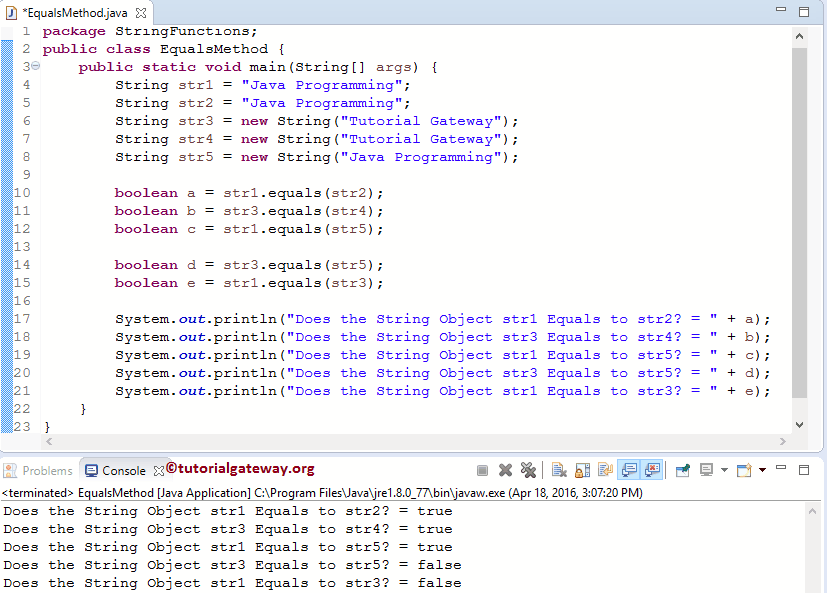
In this program, we use the equals method to check whether the string and user-specified object data represent the same sequence of characters. Within this example, we declared two String variables, str1, str2, and three Objects, str3, str4, and str5.
The first statement will call the public boolean equals (Object Obj) method to compare the str1 with str2. From the below screenshot, you can observe that it is returning True because String is an Object.
Next, we used the Java equals method to compare Object str3 with another string object str4. The following statement will compare str1 with the object str5.
Next, we checked for non-equivalent values. Here “Tutorial Gateway” is not the same as the “Java Program”.
package StringFunctions;

public class EqualsMethod {
	public static void main(String[] args) {
		String str1 = "Java Programming";
		String str2 = "Java Programming";
		String str3 = new String("Tutorial Gateway");
		String str4 = new String("Tutorial Gateway");
		String str5 = new String("Java Programming");

		boolean a = str1.equals(str2);
		boolean b = str3.equals(str4);
		boolean c = str1.equals(str5);

		boolean d = str3.equals(str5);
		boolean e = str1.equals(str3);

		System.out.println("Does the String Object str1 Equals to str2? = " + a);
		System.out.println("Does the String Object str3 Equals to str4? = " + b);
		System.out.println("Does the String Object str1 Equals to str5? = " + c);
		System.out.println("Does the String Object str3 Equals to str5? = " + d);
		System.out.println("Does the String Object str1 Equals to str3? = " + e);
	}
}
String equals method on user input
In this Java program, we will ask the user to enter any word. The Java equals string method program will display the message based on the user-entered string value.
Within the string method example, we declared a String object and assigned a corresponding value. The following statement will ask the user to enter any word. Next, we will assign the user-entered value to the variable str. Refer to the Java equalsIgnoreCase and Java contentEquals methods.
Next, we used the if-else statement to compare the user’s input with the String Object “programs” and check whether they are identical. Here, the Java string equals method compares them.
- If the statement inside the If is True, Java System.out.println(“Welcome to Programming Language”); statement will print
- Else System.out.println(“Goodbye to Tutorials”); statement will print
package StringFunctions;

import java.util.Scanner;

public class EqualsMethodex {
	private static Scanner sc;
	public static void main(String[] args) {
		sc = new Scanner(System.in);
		String str = new String("programs");
		System.out.println("Please Enter any word: ");
		String str1 = sc.nextLine();

		if (str1.equals(str)) {
			System.out.println("Welcome to Java Programming Language");
		}
		else {
			System.out.println("Goodbye to Tutorials");
		}
	}
}
Please Enter any word:
programs
Welcome to Programming Language
Let us enter a different word
Please Enter any word:
programming
Goodbye to Tutorials
TIP: I suggest you refer to the Java compareTo and Java compareToIgnoreCase functions from the list of Java String Methods.
Java String equals vs ==
In general, we use the assignment operator (==) inside if statements and other conditional flow statements to check whether the left operand is equal to the right operand. However, we should never use the == operator to check whether two strings are equal.
- == operator compares the memory reference of the given two strings. If they both point to the same memory, it returns True. If not, it returns False. So, as long as the given strings point to the same memory, it returns True.
- The equals() method checks the actual strings and compares each character in one string with another. If both strings have the same characters in the same sequence, it returns True.
In the following example, we created two string variables and two string objects that are stored in heap memory.
- a == b = True because both have the same memory reference.
- a == c = False because both are different memory objects.
- a.equals(c)) returns True because it does not matter what memory it uses; it simply checks whether the characters and the two strings’ order match.
public class example {
	public static void main(String[] args) {

	String a = "Avatar";
	String b = "Avatar";
	String c = new String("Avatar");
	String d = new String("Avatar");

	System.out.println(a == b);
	System.out.println(a == c);
	System.out.println(c == d);

	System.out.println(a.equals(b));
	System.out.println(a.equals(c));
	System.out.println(c.equals(d));
	}
}
true
false
false
true
true
true
Java String equals Null check (NullPointerException)
The built-in equals method accepts a null value as an argument, but it won’t allow null as the string object on which we perform the equals operation. For example, in the program below, we check whether RRR equals null, and the equals() method returns false.
public class example {
	public static void main(String[] args) {
	String a = null;
	String b = "RRR";

	System.out.println(b.equals(a));
	}
}
FalseIf we change the expression to System.out.println(a.equals(b));, it throws a NullPointerException. It means null.equals(“RRR”) returns an exception.
Null-safe string equals in Java
Using the Java if else statement or the Java ternary operator to check whether the first string is null. If it is not null, then apply the string equals() method.
public class example {
	public static void main(String[] args) {

		String a = null;
		String b = "RRR";

		if (a != null) {
			System.out.println(b.equals(a));
		} else {
			System.out.println("Use not-null strings");
		}
	}
}
Use not-null stringsHowever, in modern Java, we have an equals method from the Objects class. It acts the same as the String equals method. However, it handles null values exceptionally well.
import java.util.Objects;

public class example {
	public static void main(String[] args) {

		String a = null;
		String b = "RRR";

		if (Objects.equals(a, b)) {
			System.out.println("Both are Equal");
		} else {
			System.out.println("Strings are not equal or one is Null");
		}
	}
}
Strings are not equal or one is NullWhat is the difference between Java equals and compareTo?
Both the built-in equals() and compareTo() methods help compare two strings but serve different purposes.
- The equals() method checks whether the content in both strings is identical and returns a Boolean true or False. We can use it on any object, and if we use the Objects class equals() method, it can handle nulls in two strings.
- The compareTo() method is a built-in string method that lexicographically compares the two strings and returns 0, a positive, or negative value.
In the following example, we declared two identical strings and one different string to compare them using the equals() and compareTo() methods. The equals() method returns True if they are equal; otherwise, it returns false. On the other hand, compareTo returns 0 for identical strings.
When comparing “Avengers” against “Avatar”, the Unicode value of the third character, “e”, does not match “a”, and the difference between these characters is 4, so it returns 4. If we swap them, it returns -4 because “e” is greater than “a”
public class example {
	public static void main(String[] args) {

		String a = "Avengers";
		String b = "Avengers";
		String c = "Avatar";

		System.out.println(a.equals(b));
		System.out.println(a.equals(c));

		System.out.println(a.compareTo(b));
		System.out.println(a.compareTo(c));
		System.out.println(c.compareTo(a));
	}
}
true
false
0
4
-4