
The Java Do While loop will test the given condition at the end of the loop. So, it executes the statements inside the code block at least once, even if the given condition Fails.
The While Loop tests the condition before entering into the code block. If the condition is True, only statements inside it will be executed. Otherwise, statements will not be executed at least once. In some situations, it is necessary to perform some operations (execute some statements) first and then check for the condition. In these cases, we can go for the Java Do While loop.
Java Do While loop Syntax
The syntax of Do While Loop in the Programming language is as follows:
do  {
     statement 1;
     statement 2;
      ………….
     statement n;
} While (condition);
First, it will execute the statements inside curly brackets, and then after reaching the end, it will check the condition inside the while. If the condition is True, then it will repeat the process. If the condition fails, then Do While Loop will be terminated.
NOTE: We have to place a semi-colon after the While condition.
Java do while Loop flow chart
The flow chart of the Do While Loop is shown below.
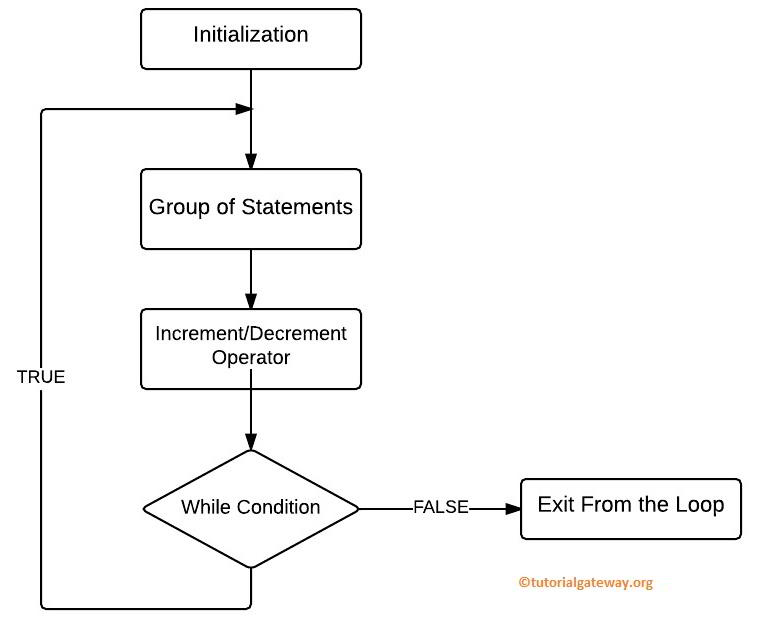
The Do while loop Flow chart sequence is:
- First, we initialize our variables. Next, it will enter into the flow.
- It will execute the group of statements inside it.
- Next, we have to use Increment & Decrement Operators inside the Java do while loop to increment or decrease the value. Please refer to the Java Increment and Decrement Operators article on the Java tutorial to understand increment and decrement operators.
- Now it will check for the condition. If the condition is True, the statements within the Do while loop will execute again. It will continue the process as long as the condition is True.
- If the condition is False, then it will exit from it.
Java Do While Loop Example
This program helps us to understand the Do While Loop. This program allows the user to enter an integer value below 10. By using this value, the Javac compiler will add those values up to 10.
package Loops;

import java.util.Scanner;

public class DoWhileLoop {
	private static Scanner sc;

	public static void main(String[] args) {
		int number, sum = 0;
		sc = new Scanner(System.in);

		System.out.println("\n Please Enter the any integer Value below 10: ");
		number = sc.nextInt();

		do  {
			sum = sum + number;
			number--;
		} while (number > 0);
		System.out.format(" Sum of the Numbers From the While  Loop is: %d ", sum);
	}
}
OUTPUT: We are going to enter the number = 4. It means, total = 4 + 3 + 2 + 1 = 10
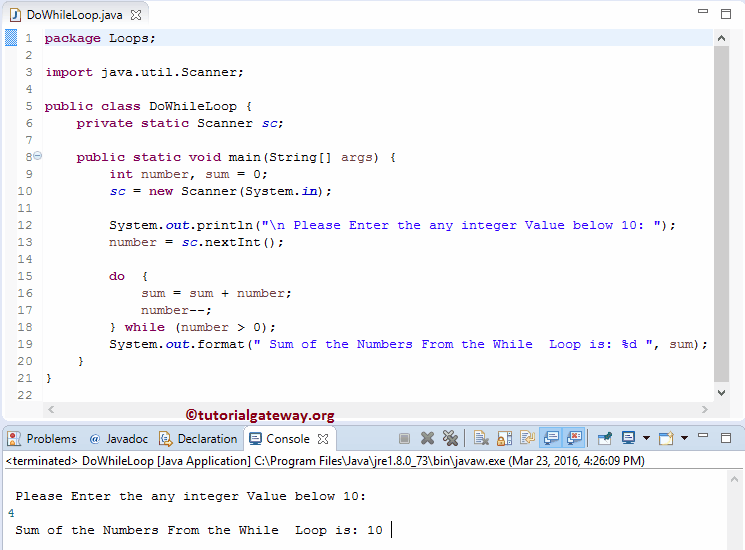
Within this example, we used the Do While loop. The Condition inside the While (number > 0) will ensure that the number exceeds 0.
In this example, User Entered value: Number = 4, and we initialized the sum = 0
First Iteration
sum = sum + number
sum = 0 + 4 ==> 4
Next, the number will be decremented by 1 (number –).
Next, the condition inside the while is True or Not. Here, 3 > 0 is True
Second Iteration: Within the first Iteration, the values of both Number and sum changed as Number = 3 and sum = 4
sum = 4 + 3 ==> 7
After the decrement (number –), check the while condition. Here, 2 > 0 is True.
Third Iteration
Within the Second Iteration of Java Do While Loop, the values of both changed as Number = 2 and sum = 7
sum = 7 + 2 ==> 9
After the decrement, the condition (1 > 0) is True
Fourth Iteration
After the third Iteration, Number = 1 and sum = 9
sum = 9 + 1 ==> 10
Next, the number will be decremented by 1 (number –).
Next, the condition inside the while is True or Not. Here, 0 > 0 is False. The last System.out.format statement in the example will print the number of digits in the given number as output.
TIP: Please refer to the Java for loop, Java while loop, and the difference between the while and do-while articles for more information on loops.
Example 2: Display numbers from 1 to 5
The following table explains the Java do while loop code iteration-wise.
| do-while loop Iteration | i | Condition (i <= 5) | println | i++ |
|---|---|---|---|---|
| i = 1 | It will not check the condition because it is at the bottom | It prints 1 as output. | The value of i is incremented to 2. | |
| 1 | i = 2 | (2 <= 5) true | Print 2. | i becomes 3. |
| 2 | i = 3 | (3 <= 5) true | Print 3. | i becomes 4. |
| 3 | i = 4 | (4 <= 4) true | Print 4. | i becomes 5. |
| 4 | i = 5 | (5 <= 5) true | Print 5. | i becomes 6. |
| 5 | i = 6 | (6 <= 5) false | Loop terminated |
public class example {
	public static void main(String[] args) {
		int i = 1, n = 5;
		do {
			System.out.println(i);
			i++;
		}while (i <= n);
	}
}
1
2
3
4
5
Example 3: Sum of Even Numbers
The if statement inside the do-while loop checks whether the value of i on each iteration is divisible by 2. If true, it’s an even number, and that number is added to the variable sum.
public class example {
	public static void main(String[] args) {
		int i = 1, n = 10, sum = 0;
		do {
			if(i % 2 == 0 ) {
				sum += i;
				System.out.print(i + " ");
			}
			i++;
		}while (i <= n);
		System.out.println("\nTotal = " + sum);
	}
}
2 4 6 8 10
Total = 30
Infinite Do While Loop in Java
If you forget to increment or decrement the value inside the do while, it will execute infinite times (also called an infinite loop). For example:
package Loops;

public class InfiniteDoWhile {
	public static void main(String[] args) {
		int number = 1;

		do  {
			System.out.format("%d \n", number);
		}while (number <= 10);
	}
}
1
1
1
1
1
1
...
...
...
Here, the number is always 1, and the number is always less than 10. So, it will go on executing the statements infinite times. Now, let us add an increment operator (number++) inside the. iteration to the above example.
package Loops;

public class InfiniteDoWhile {
	public static void main(String[] args) {
		int number = 1;

		do  {
			System.out.format("%d \n", number);
			number++;
		}while (number <= 10);
	}
}
Now, when it reaches 10, the condition will fail. Let us see the output of this program.
1
2
3
4
5
6
7
8
9
10
NOTE: We can use the Java break statement and Java continue statement to break the iterations or to stop the current iteration.
Java do while loop multiple conditions
If the requirement is to check multiple expressions, we can use the do while loop with multiple conditions. To do so, we need a Java logical operators (&& and ||) that can combine multiple expressions inside a do while loop.
In the program below, we all the user to shop up to 5 items and the left over budget is greater than or equal to 1000. On each purchase, it checks whether the items are less than 5 and the budget (money left) is above 1000.
NOTE: As the do while loop checks the condition after the purchase (loop) completes. That’s why we brought 5 items thought the condition specifies the shopping items should be less than 5. If the price is 2500, then the condition budget >= 1000 fails and we left with $0.
public class example {
	public static void main(String[] args) {
		int budget = 10000;
		int items = 0;
		int price = 1500;

		do {
			items++;
			budget = budget - price;

			System.out.println("You bought item " + items);
			System.out.println("Remaining Money: $" + budget);

		} while (budget >= 1000 && items < 5);
	}
}
You bought item 1
Remaining Money: $8500
You bought item 2
Remaining Money: $7000
You bought item 3
Remaining Money: $5500
You bought item 4
Remaining Money: $4000
You bought item 5
Remaining Money: $2500
Validate user input using a Java do-while loop
We can use a do-while loop to allow the user to enter input multiple times until they are right. For example, allowing the user to enter the correct password for login.
The do-while loop program below allows the user to enter the total number of items they want to purchase from the website. If the total number of items is less than 3, they won’t get any discount, or the site may not allow the purchase. So, the Java if statement sends a message to the user.
The do-while loop iteration allows them to change their mind and prompts them to choose another number. Once the user input is above 2, the do-while loop condition fails, and the user receives a 20% discount.
import java.util.Scanner;

public class example {
	public static void main(String[] args)
	{
		Scanner sc = new Scanner(System.in);

        int items;

        do {
            System.out.print("Enter number of items: ");
            items = sc.nextInt();

            if (items <= 2) {
                System.out.println("You must purchase at least 2 items to avail the Discount.");
            }

        } while (items <= 2);

        System.out.println("You are buying " + items + " item(s).");
        System.out.println("You discount percentage = 20%");

	}
}
Enter number of items: 0
You must purchase at least 2 items to avail the Discount.
Enter number of items: 1
You must purchase at least 2 items to avail the Discount.
Enter number of items: 2
You must purchase at least 2 items to avail the Discount.
Enter number of items: 3
You are buying 3 item(s).
You discount percentage = 20%
Nested do while loop in Java
Similar to other loops, we can nest one do-while loop inside another to iterate over rows and columns. If the data is multidimensional, we can use nested do-while loops to go to deeper levels.
In the following example, we use a typical e-commerce website. On day 1, we added two items to our cart, and the process continues for 3 days. After that, we probably buy them all.
The outer do while loop takes care of the shopping days, and the nested one takes care of the total products. If the total products added to the cart is 2, the Java compiler exits the inner loop, and the shopping day moves to the next day.
public class example {
	public static void main(String[] args)
	{
		int date = 1;

		do {
		    System.out.println("Shopping on Day " + date);

		    int item = 1;

		    do {
		    	System.out.println("  Product " + item + " added to cart");
		        item++;
		    } while (item <= 2);

		    date++;

		} while (date <= 3);

	}
}
Shopping on Day 1
  Product 1 added to cart
  Product 2 added to cart
Shopping on Day 2
  Product 1 added to cart
  Product 2 added to cart
Shopping on Day 3
  Product 1 added to cart
  Product 2 added to cart