
The Java compareTo method is one of the String Methods, which compares the string with a user-specified string lexicographically. The comparison is based on the Unicode of the string characters.
This article will show how to write compareTo with an example. The syntax of the String compareTo in this Programming language is as shown below.
Java String compareTo Syntax
The following compareTo method will accept the String data as an argument and compare both the strings to check whether they are lexicographically equal or not.
public int compareTo(String Str); // It will return integer

//In order to use in program
String_Object.compareTo(String Str)
The String compareTo method will lexicographically compare the character sequence of String_Object with the character sequence of Str.
- If the String_Object lexicographically precedes the Str, it will return the result as a Negative Integer.
- If the String_Object lexicographically follows the Str, it will return the result as a Positive Integer.
- When the String_Object and the string Str are equal, it returns the result as Zero.
Java String compareTo Example
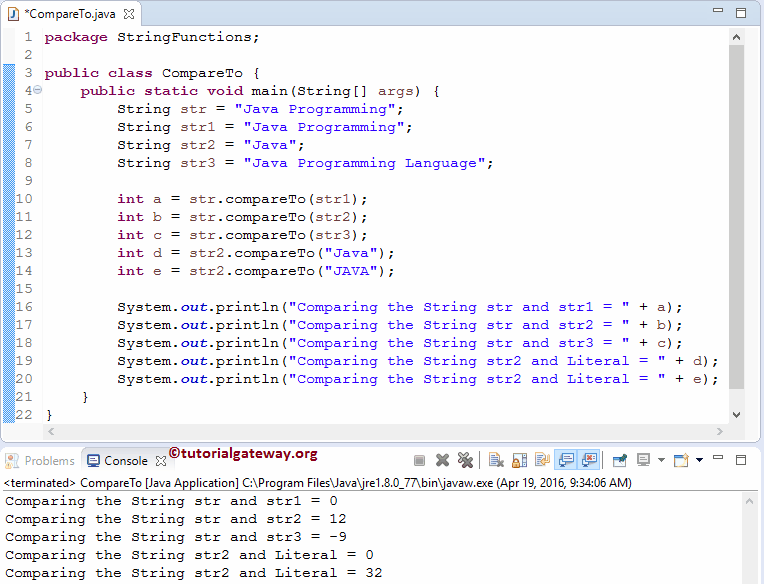
The compareTo method is to compare the string and user-specified data lexicographically. In this Java program, We are going to do the same. For this, first, we declared four variables.
For a, it will call the public int compareTo (String str) method to compare str with str2. From the screenshot below, please observe that the Java compareTo function is returning zero because they are both lexicographically equal. Also, check the Java equals and Java format functions.
The following Java statement will compare str with str2. It returns 12 because str has an extra 12 character values. The next String compareTo Method statement for c will compare str with str3. It is returning -9 because str3 has an extra 9 character values compared to str.
Within the last line, we assigned a sentence directly inside our method. It is returning 32 because the Unicode values of Uppercase & Lowercase letters are different.
package StringFunctions;

public class CompareTo {
	public static void main(String[] args) {
		String str = "Java Programming";
		String str1 = "Java Programming";
		String str2 = "Java";
		String str3 = "Java Programming Language";

		int a = str.compareTo(str1);
		int b = str.compareTo(str2);
		int c = str.compareTo(str3);
		int d = str2.compareTo("Java");
		int e = str2.compareTo("JAVA");

		System.out.println("Comparing the String str and str1 = " + a);
		System.out.println("Comparing the String str and str2 = " + b);
		System.out.println("Comparing the String str and str3 = " + c);
		System.out.println("Comparing the String str2 and Literal = " + d);
		System.out.println("Comparing the String str2 and Literal = " + e);
	}
}
TIP: I suggest you refer to the Java compareToIgnoreCase and Java substring functions from the list of Java String Methods.
Java compareTo int
As mentioned earlier, the built-in compareTo function is useful for comparing two objects. The object can be a String, Integer, etc. However, it does not work on primitive types like int.
In the following program, we declared three Integer variables (Object type) and assigned values to them. Next, we used the compareTo function to compare two integers.
- a and b hold 10, and they are equal, so it returns 0.
- 10 < 100, so the compareTo function returns -1.
public class example {
	public static void main(String[] args)
	{
		Integer a = 10;
		Integer b = 10;
		Integer c = 100;

		System.out.println(a.compareTo(b));
		System.out.println(a.compareTo(c));
	}
}
0
-1
If we change the declared variable from an object type to a primitive type, Java won’t let you use the compareTo () method on integers. Therefore, we must use the compare() function.
public class example {
	public static void main(String[] args)
	{
		int a = 10;
		int b = 10;

		System.out.println(Integer.compare(a, b));
	}
}
0Java compareTo (String)
In all our previous examples, we have already shown how the compareTo function lexicographically compares two strings. In the following example, we use three statements to show the compareTo method’s negative, positive, and zero return values.
- The first character from “Burger” compares against the first character from “Pizza”. The “B” character’s ASCII value is less than “P”; it returns a negative value. The ASCII code of “B” = 66 and “P” = 80. Therefore, 66-80 = -14 is the result.
- In the second statement, both strings are the same; the compareTo function returns 0.
- In the third statement, the first characters of both strings are different. The ASCII code of “P” = 80 and “F” = 70. Therefore, 80 – 70 = 10 is the result.
public class example {
	public static void main(String[] args)
	{
		System.out.println("Burger".compareTo("Pizza"));
		System.out.println("Burger".compareTo("Burger"));
		System.out.println("Pizza".compareTo("Fries"));
	}
}
-14
0
10
NOTE: The compareTo method performs the string comparison character by character. So, at any position, if the character in the first string differs from the second string based on the ASCII value, it returns the result.
Java compareTo Bigdecimal
Similar to any object type, we can use the compareTo() method to compare two Decimal or BigDecimal values. When working with money or scientific data, decimal values play a vital role. In such a case, we can use the compareTo() method.
The compareTo function compares the numerical part of the two BigDecimal numbers. If they are equal, it returns 0. In the program below, 100.50 is greater than 100.10, so the compareTo method returns 1 as the output.
import java.math.BigDecimal;

public class example {
	public static void main(String[] args)
	{
		BigDecimal a = new BigDecimal("100.50");
		BigDecimal b = new BigDecimal("100.10");
		System.out.println(a.compareTo(b));
	}
}
1Handling Null values in Java compareTo
If any one of the string objects that you want to compare is null, the compareTo function returns a NullPointerException.
public class example {
	public static void main(String[] args)
	{
		String a = null;
		String b = "apple";
		System.out.println(a.compareTo(b));
	}
}
NullPointerExceptionIf we change the variable positions (System.out.println(b.compareTo(a)), it still returns a NullPointerException. Therefore, we must be very careful with null values.
Null-safe compareTo example
In the Java programming language, we can use the Comparator class’s nullsFirst or nullsLast functions to perform null-safe comparison between two strings.
The example below returns -1 because nullsFirst considers null values is the smallest compare to others.
import java.util.Comparator;

public class example {
	public static void main(String[] args)
	{
		String a = null;
		String b = "apple";
		int res = Comparator.nullsFirst(String::compareTo).compare(a,  b);
		System.out.println(res);
	}
}
-1