
The Python isalpha method is one of the built-in string functions to check for alphabetical characters in a string. It checks whether the given string has at least one character and whether all characters are alphabet or not. If all characters are either lowercase or uppercase letters, the isalpha() function returns True. Otherwise, it returns False.
Examples of alphabetical characters in the English language are lowercase a to z, and uppercase A to Z. Any character apart from them is considered non-alphabetic, and the Python isalpha() function returns False for them.
In this section, we discuss how to write the isalpha function with string characters, numbers, empty spaces, and special characters. We also explain how the isalpha() function handles the Unicode characters and some real-time use case scenarios.
Python isalpha syntax
The syntax of the string isalpha() function to check for alphabets is as shown below.
string.isalpha()
Parameters: It does not accept any arguments because it operates on a whole string. If you pass any parameter value, it will throw a Type error.
Return Value: The isalpha() function returns a Boolean True or False.
- If all characters in a given string are letters (alphabet from a to z and A to Z), it returns True.
- If any one of the characters is a digit, space, or special character, it returns False.
- If the given string is empty, the isalha() function returns False.
Python isalpha() function Examples
When working with string data, it is common to check whether the text consists only of alphabetical characters. In those situations, we can use the isalpha() function, and the following examples show its working functionality.
Before getting into the actual examples, let me show you the table with different inputs to illustrate how the isalpha() function performs string validation and returns its value.
| Input | Result | Reason |
|---|---|---|
| ‘Hi’ | True | Only Letters |
| “你好” | True | Accepts Unicode Characters |
| ‘123’ | False | It won’t accept any Digits |
| “” | False | No empty String. |
| “Hi all” | False | It won’t accept spaces. |
| ‘Hello@1’ | False | It won’t accept any special characters. |
Basic Example – Check for letters only
We start the string validation examples series with a basic Python isalpha() function example to check letters only. In the following example, we declare a variable with only letters.
As we already know, the isalpha() function returns True when all the characters in a given string are alphabets.
s = 'tutorialgateway'
print(s.isalpha())
TrueThe isalpha() function is case-insensitive, so it treats both lowercase and uppercase letters as the same. When you pass only lowercase or only uppercase, a mix of both, the isalpha() function returns True.
s = 'TuToRiAl'
u = 'GATEWAY'

print(s.isalpha())
print(u.isalpha())
True
True
String contains whitespace
In the following program, we declare a value and assign a string of two words. It means there is a whitespace between the two given words of a single string.
As we mentioned earlier, the Python isalpha() function checks for alphabetical characters. Since the “s” variable has a space, which is a non-alphabetic character, the result is False.
s = 'Tutorial Gateway'
print(s.isalpha())
FalseHandling spaces in the Python isalpha() function
In the previous section, we showed how the isalpha() function returns False when it encounters a space in the string. However, there are many situations where a string might be a combination of words.
To overcome this situation, we must utilize another string function called replace() to remove the existing spaces. Next, apply the isaplha() function on the result to check for alphabetical characters.
s = 'Tutorial Gateway'
rs = s.replace(" ", "")

print(rs)
print(rs.isalpha())
TutorialGateway
True
Python isalpha() function with empty String
If the user-given string is empty, the isalpha() function returns False. To demonstrate it, we declared an empty string and applied the isaplha() function on it.
s = ''
print(s.isalpha())
FalseString with Numbers
In this example, we use only numbers or digits. The isalpha() function checks the string variable with digits and returns False because these are not alphabets.
s = '1122'
print(s.isalpha())
FalseString with Mixed Content
In this example, we declare a string with numbers and letters. Although there are a few alphabets, the isalnum() function returns False. Because it required all characters to be alphabetical. In the code below, 44 and 22 are non-alphabetical.
s = 'Hi44all22'
print(s.isalpha())
FalsePython isalpha() function with Special Characters
The isalpha() function exclusively checks for alphabetic characters, and if it finds any special characters, it returns False.
The following example uses special characters within the letters. As we all know, isalpha() considers special characters such as !, @, #, $,%, etc as non-alphabetical characters.
s = 'Hi@tg'
print(s.isalpha())
FalseDoes Python isalpha() function work with Unicode Characters?
The Unicode characters are the letters or alphabet from various languages across the world. For example, French, Chinese, Russian, etc. As the isalpha() function returns true for any alphabet, it works for Unicode characters from different languages.
In the following example, we declared strings in different languages. Next, applied the isalpha() function on those Unicode character strings, and it returns True for all of them.
# Chinese: "Hello"
chinese = "你好"
print(chinese.isalpha())

# French with accented character
word = "Café"
print(word.isalpha())

# Arabic: "World"
arabic = "عالم"
print(arabic.isalpha())

#Russian: "Hello"
cyrillic = "Привет"
print(cyrillic.isalpha())

# Greek: "Hello"
greek = "Γειά"
print(greek.isalpha())
Result
True
True
True
True
True
Python isalpha function to check for alphabetical characters
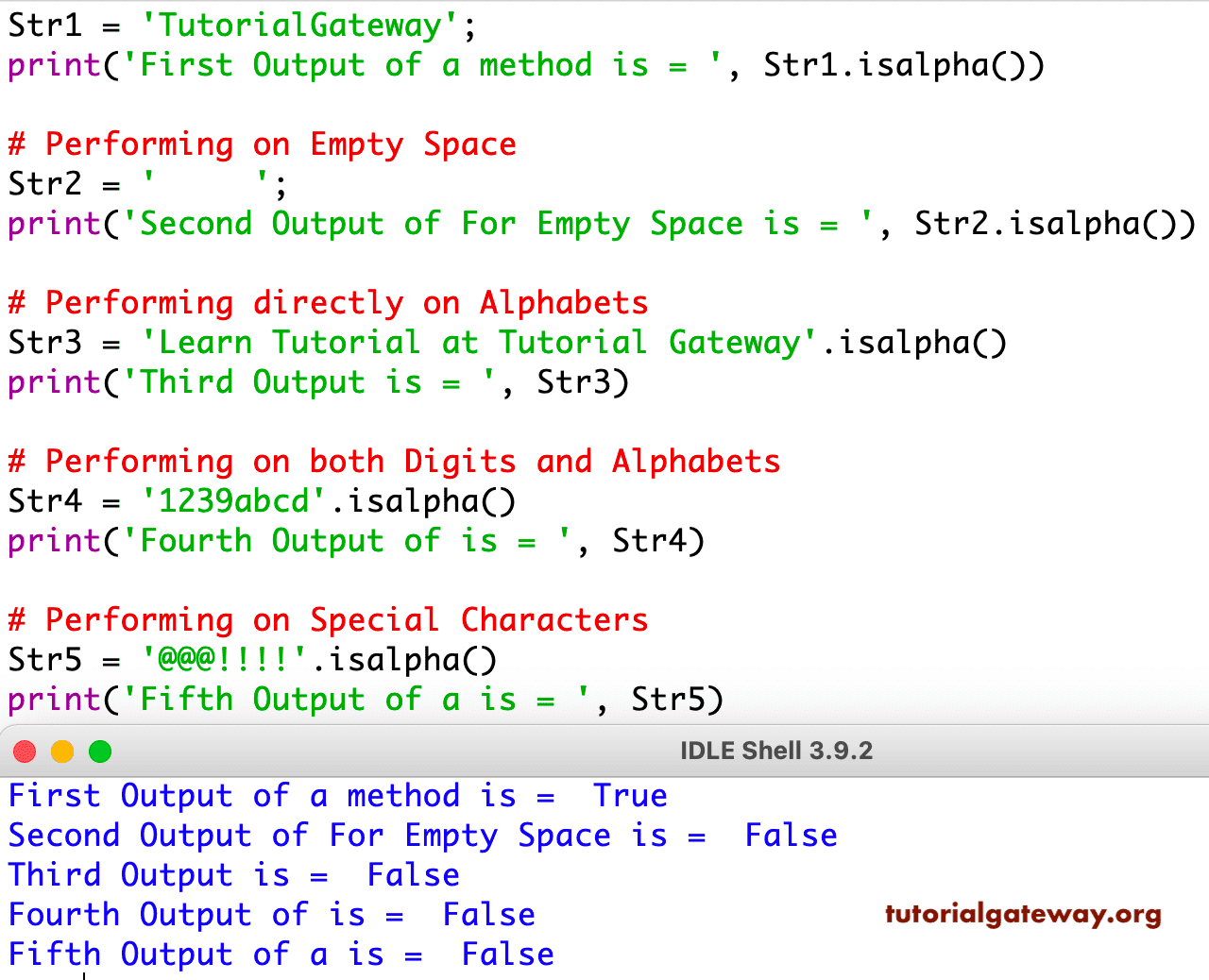
The following example uses all possible inputs to the isalpha() function to show the result in one place. Here, we used text, empty string, white spaces, and special characters. Please refer to the String and String Methods articles to understand them in Python.
Str1 = 'TutorialGateway';
print('First Output of a method is = ', Str1.isalpha())

# Performing on Empty Space
Str2 = '     ';
print('Second Output of For Empty Space is = ', Str2.isalpha())

# Performing directly on Alphabets
Str3 = 'Learn Tutorial at Tutorial Gateway'.isalpha()
print('Third Output is = ', Str3)

# Performing on both Digits and Alphabets
Str4 = '1239abcd'.isalpha()
print('Fourth Output of is = ', Str4)

# Performing on Special Characters
Str5 = '@@@!!!!'.isalpha()
print('Fifth Output of a is = ', Str5)
NOTE: We have already explained the difference between the isalpha(), isalnum(), and isnumeric() in the previous article. Please visit the isalnum() function article to see the difference.
Practical use cases of isalpha() function
The following isalpha() function examples are some of the real-time user case scenarios.
Python isalpha() function for User input Validation
In this example, we have defined a function with the If Else statement. The If statement uses the isalpha() function to check whether the user-given input contains only letters. If true, the input is valid. If there are any non-alphabetical characters, it returns false and prints the message “Don’t use Numbers and Special Characters”.
def input_Validation(s):
    if s.isalpha():
        return True, print('User is Valid')
    else:
        return False, print('dont use Numbers and Special Characters')

text = input('Enter a Text = ')
input_Validation(text)
Enter a Text = hiall
User is Valid

Enter a Text = welcom123
dont use Numbers and Special Characters
Use Python isalpha() function for Password Validation
When we design a form with a username and a password. The password must contains combination of letters, numbers, and special characters. If there are only letters, it becomes a weak password. To demonstrate the isalpha() function, we use a simple password validation example
In the following example, we use the isalpha() function to identify passwords with only letters. Next, prompt the user to enter mixed characters.
p = input("Enter Password = ")

if p.isalpha():
    print("Use Mixed characters. Weak password!")
else:
    print("Strong Password. Good for security!")
Enter Password = 123qweW@#$
Strong Password. Good for security!

Enter Password = sdfghjk
Use Mixed characters. Weak password!
Use Python isalpha() to identify non-alphabets in a string
We can also use the isalpha() function to identify the non-alphabetical characters from an incoming string. In the following example, we declared a string of letters, numbers, and special characters. The for loop iterates over this string, and the if statement performs the validation.
The not operator and the isalpha() function combination look for non-alphabetical characters. If it finds any, add that character to the ”non” variable.
str = 'Gate@W1#a123y90&*'

non = ''
for c in str:
    if not c.isalpha():
        non += c
print(non)
@1#12390&*Use Python isalpha() to remove non-alphabetic characters
To perform data cleaning, we may need to remove unwanted characters such as numbers, special characters, and spaces from a string. In such a case, we can use the isalpha() function against each character.
The for loop in the program below iterates over each character in a given string. The if statement uses the isalpha() function to check whether the character at each iteration is an alphabet. If true, the join() method adds that character to ”al” variable.
str = 'Tuto@#rial123'

al = ''. join([c for c in str if c. isalpha()])
print(al)
TutorialIf you want, you can use the longer version of the above code to remove the non-alphabetical characters from a given string.
str = 'Tuto@#rial123'

al = ''
for c in str:
    if c. isalpha():
        al = al + c
print(al)
Use Python isalpha() to filter the list
We can also use the isalpha() function filter the list items and display only the elements having alphabetical characters.
In the following example, we declared a list of letters, numbers, combination of special character elements. Next, the for loop iterates over the list items. The If statement uses the isalpha() function and checks whether each list item contains only letters. If true, print that list item.
str = ['Hi', '123', 'Hello', '19@Hi', 'Hi@you']

for c in str:
    if c.isalpha():
        print(c)
Hi
Hello
TIP: You can also use a list comprehension.
Use Python isalpha() to check if a string contains at least one alphabet
In the following example, we declared a string of mixed letters, numbers, and special characters. Next,
- for c in s: The for loop iterates over every character in a given string,
- c.isalpha(): It checks whether the character from the iteration is an alphabet. If it is an alphabet, it returns True. Otherwise, False.
- any() function returns True if any value in the iterable is True. It means if c.isalpha() returns True at least once, the nay function returns True.
This example returns True because Hello and abc are alphabets, and the isalpha() function returns True for these characters. The aby() function has at least one True.
s = "Hello1234!@#abc^&*"

has_alphabets = any(c.isalpha() for c in s)
print(has_alphabets)
TrueUse isalpha() to count alphabets in a string
We can use the Python isalpha() function to count the total number of alphabetical characters in a given string.
In the following example, we declared a function to return the total number of letters. Within the function, the list comprehension uses the isalpah() to filter only alphabets and store them in a new variable. Next, the len() function returns the total number of characters in the new string.
Here, we used a string with Unicode characters from different languages.
- Greek Hello = Γειά
- Japanese Welcome = ようこそ
- Chinese Hi = 到
- French = Café
def count_Alphabets(text):
    alphabets = [c for c in text if c.isalpha()]
    return len(alphabets)


s = "Γειά, @#$ ようこそ 到 %^& Café"
tot = count_Alphabets(s)
print("Total Number of Alphabets = ", tot)
Total Number of Alphabets = 13