
Python isalnum is one of the string functions used to check whether all characters in a given string are either an alphabet or a numeric value. It means isalnum() checks for alphanumeric characters. So, we can use it to detect special characters in a username.
The alphanumeric characters are the lowercase alphabet from a to z, the uppercase letters from A to Z, and the digits from 0 to 9. If every character in a string matches any one of them, the Python isalnum() function returns True. Otherwise, it returns False.
We can use it for form validation, data validation, and processing (removing special characters). In this section, we discuss how to use the isalnum function with some practical examples.
Python isalnum() Syntax
The syntax of the isalnum() function, checking for alphanumeric content in a string, is as shown below.
string.isalnum()
Parameters: From the above syntax, you can observe that the isalnum function does not accept any parameters.
Return Type: The isalnum function returns a Boolean True or False as an output.
- True – If all characters in a given string are alphanumeric (letters and digits).
- False – If a given string is empty or it contains at least one non-alphanumeric character.
NOTE: The isalnum() function is case-insensitive. That means this method treats both lowercase and uppercase characters the same.
Python isalnum() Examples
The following table provides a basic understanding of the Python isalnum() function. Consider this a reference and follow the next section for a practical program with a detailed explanation.
| Input | Result | Reason |
|---|---|---|
| ‘Hello’ | True | Only Letters |
| ‘1234’ | True | Only Digits |
| “” | False | String should not be empty. |
| “Hi all” | False | It won’t accept spaces. |
| ‘Hello1234’ | True | Letters and Numbers |
| ‘Hello@1’ | False | It won’t accept any special characters. |
Example 1 – Only Letters
As mentioned earlier, alphanumeric means a combination of letter or alphabets and numbers. So, if we use only alphabets or numbers, or the combination of both, the Python isalnum function will return True as the output.
The code below returns a Boolean True because it only contains the alphabet letters.
s = "text"
print(s.isalnum())
TrueWhen you try the combination of uppercase and lowercase letters, the isalnum() result will be True.
s = "textISSimPLE"
print(s.isalnum())
TrueExample 2 – String with Only Numbers
We declared only numeric values (numbers) in the following program and used the Python isalnum() function on them.
If you observe the “s” variable, we used double-quotes to specify the value. Since isalnum() is a string function, it does not accept integer values. Heer, s = “123” is correct. On the other hand, s = 123 is an Attribute Error.
s = "123"
print(s.isalnum())
TrueExample 3 – String with Letters and Numbers
The following isalnum() example returns True because the “s” variable contains only letters and numbers. It means you can use the combination of letters and numbers.
s = 'Hello1234'
print(s.isalnum())
TrueExample 4 – Empty String
An empty string means it does not contain any characters. However, the Python isalnum() function needs at least one character, and all characters must be alphanumeric. As the required condition fails, the isalnum() function returns False for the empty string.
In the following example, we declared an empty string and used the isalnum() function on that variable.
s = ""
print(s.isalnum())
Result
FalseTIP: The isalnum() function checks all the characters in a string. So, if there are n-1 alphanumeric characters and 1 non-alphanumeric character, it returns False.
Example 5 – String with Spaces
If the given string is not a continuous string of letters, numbers, or a combination of both, isalnum returns False. It means even the space between two words is considered a non-alphanumeric character, so the Python isalnum() function returns False.
The string program below returns false because there is a space between Hello and World.
s = 'Hello World'
print(s.isalnum())
FalseExample 6 – String with Special Characters
As mentioned earlier, only the numbers and the uppercase and lowercase alphabets are considered alphanumeric. Other special characters, such as -, +, !, @, #, and so on, are not alphanumeric. So, when you pass a string with these special characters, the Python isalnum() function returns False.
The program below returns False because it contains a special character @.
s = 'Hel@lo'
print(s.isalnum())
FalsePython isalnum function to check alphanumeric characters
The following set of examples helps you understand the isalnum function. Please refer to the String and Methods articles in Python to easily understand them.
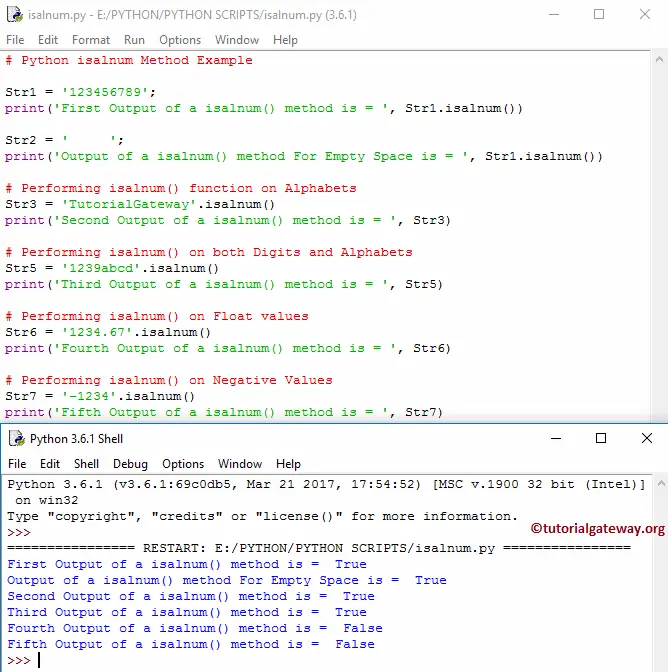
First, we declared the String variable Str1 and assigned an Integer Value using the following Str1 statement. Next, we used it to check whether the string is alphanumeric or not. As you can see, it is a digit, so the function returns TRUE.
For Str5, we are using the isdigit function on both digits and alphabets.
Str1 = '123456789';
print('First Output of a method is = ', Str1.isalnum())

Str2 = '     ';
print('Output of a method For Empty Space is = ', Str1.isalnum())

# Performing on Alphabets
Str3 = 'TutorialGateway'.isalnum()
print('Second Output is = ', Str3)

# Performing on both Digits and Alphabets
Str5 = '1239abcd'.isalnum()
print('Third Output is = ', Str5)

# Performing on Float values
Str6 = '1234.67'.isalnum()
print('Fourth Output is = ', Str6)

# Performing on Negative Values
Str7 = '-1234'.isalnum()
print('Fifth Output is = ', Str7)
Real World Scenarios of isalnum() function
The following are some of the real-world user case scenarios of the isalnum() function.
Python isalnum() function in IF Else Statement
The isalnum() function returns a boolean value. However, the real power comes when we specify an action if it is True or False. So, the combination of If else and isalnum() is a powerful one.
To demonstrate this If else, we simply print different messages when isalnum() returns True or False.
s = "Hello"

if(s.isalnum()):
    print("All Characters are Alphanumeric")
else:
    print("One or More Non-Alphanumeric characters exists")
All Characters are AlphanumericForm Username Validation System using Python isalnum
When we design a form, a textbox accepts a username and requires a condition. Among them, the most common ones are that the username should not be empty and should not allow any special characters. So, we must apply a logic that the username must be a combination of letters and numbers.
In the following program, the first if statement checks for an empty string. The elif statement uses the isalnum() to check whether the username is alphanumeric.
Remember, we can remove the text == ” because isalnum() won’t allow an empty string. If the user passes an empty string, the else block will execute. However, to provide a message, we added it. Otherwise, use if else and remove the first statement.
def usernameValidation(text):
    if text == '':
        print("The Username is empty")
    elif text.isalnum():
        print("Welcome  Again " + text)
    else:
        print("Username must be letters and numbers")

s = "TutorialGateway"
usernameValidation(s)
Welcome Again TutorialGatewayPassword Validation using Python isalnum function
When it comes to password validation, the user-given text must contain letters, numbers, and special characters. Using the not operator with the isalnum() function allows us to check for special characters.
The first if statement in the program below checks whether the password length is above 8 characters. The for loop iterates over each character in a string. The elif statement checks for letters, numbers, and special characters.
- isdigit(): Check for numbers or digits.
- isalpha(): Check for letters or alphabet.
- not isalnum(): Check for non- alphanumeric characters such as special characters.
def password_validation(text):
    if len(text) < 8:
        print("Weak Password: too short")
        return False

    check_digit = False
    check_special = False
    check_letters = False

    for c in text:
        if c.isdigit():
            check_digit = True
        elif c.isalpha():
            check_letters = True
        elif not c.isalnum():
            check_special = True

    if check_digit and check_special and check_letters:
        print("Strong Password")
        return True
    else:
        print("Weak Password (Include Letters, Numbers & special char)")
        return False


s = input("Enter password: ")
password_validation(s)
Result
Enter password: 123432!@#$%asdfghA
Strong Password
How to Print all Alphanumeric Characters in a Python string?
The isalnum() function works on a whole string, checks for alphanumeric characters, and returns True or False. However, to print all Alphanumeric Characters in a string, we need a for loop to iterate over a string.
The following example iterates over each character in a given string. Within the for loop, apply the isalnum() function on each character. If it is True, print that character. Otherwise, go to the next iteration.
text = "Hello@12#$ World"
for char in text:
    if char.isalnum():
        print(char, end="")
Hello12WorldWe can use the following program if you want to print all Alphanumeric Characters. It takes the standard ASCII range and checks each character with the isalnum() function. If it is True, print that character. So, it prints all uppercase and lowercase letters and numbers.
for i in range(128):
    char = chr(i)
    if char.isalnum():
        print(char, end="")
Result
0123456789ABCDEFGHIJKLMNOPQRSTUVWXYZabcdefghijklmnopqrstuvwxyzRemove Special Characters using the Python isalnum function
In the program below, we declared a string with different special characters. Our task is to use the isalnum() function and remove those special characters, including punctuation.
Here, the for loop iterate each character in a string, and the isalnum() function checks whether it is an alphanumeric character. Next, the join() function joins the alphanumeric character to the clean variable.
text = "Hel!lo@12#$ World!"
clean = "".join(c for c in text if c.isalnum())
print("After removing special characters:", clean)
Output
After removing special characters: Hello12WorldIf you are confused about a single-line statement, use the following code.
clean = ""

for c in text:
    if c.isalnum():
        clean += c
Frequently Asked Questions
Does Python isalnum work with decimals and negatives?
As this returns True for numbers, people confuse it with the decimal values. However, the isalnum() function returns False for decimal values. Let me explain with respect to numbers,
- “10” = True. It returns True for any number or positive integer.
- “10.5 = False. Although 10 and 5 are numbers, “.” is a non-alphanumeric character.
- “10/2” = False. Here, “/” is a non-alphanumeric character.
- “-10” = False. Here, “-” is a non-alphanumeric character.
So, the isalnum() function does not work for decimals, mathematical calculations, and negative numbers, and returns False.
How to handle spaces in the Python isalnum() function?
Most strings are written in more than one word. When working with strings, space is a common scenario. There are ways to check a string with spaces using the isalnum() function.
In the following example, we use the string replace function to replace empty spaces with no space. Next, apply the isalnum() function on that cleaned text to check for alphanumeric characters.
s = 'Hello World'
c = s.replace(' ', '')
print(c.isalnum())
TrueWhat is the difference between isalnum(), isalpha(), and isdigit()?
- Isalnum(): It checks whether all characters in a given string are alphanumeric (letters or numbers). This post explained everything about this. Returns true for a to z and 0 to 9.
- Isalpha(): It checks whether all characters are alphabets or letters. Returns true for a to z.
- Isdigit(): It checks whether all characters are digits or numbers. Returns True for 0 to 9.
The following table helps you understand the key difference between Python isalnum(), isalpha(), and isdigit().
| Function | Letters | Numbers | Spaces | Special Chars |
|---|---|---|---|---|
| isalnum() | True | True | False | False |
| isalpha() | True | False | False | False |
| isdigit() | False | True | False | False |