
The Java toLowerCase Method is one of the String Methods, which is useful to convert the given string into Lowercase letters. This article will show how to use String toLowerCase with an example.
Before we get into the example, the basic syntax of the toLowerCase is as shown below. Java Programming provides two different methods to convert the specified string into Lowercase letters.
The following Java toLowerCase function will not accept any parameters and convert all the characters in a specified string to lowercase using the rule of the default locale.
public String toLowerCase(); // It will return String

//In order to use in program
String_Object.toLowerCase()
The following function will accept the Locale value as the parameter and convert the characters to lowercase using the user-specified locale.
public String toLowerCase(Locale locale);

//In order to use in program
String_Object.toLowerCase(Locale locale)
- String_Object: Please specify the valid Object.
- locale: Please specify the Locale you want to use while converting the String_Object characters to Lowercase. For example, English, Turkish, Latin, etc.
Java toLowerCase Method Example
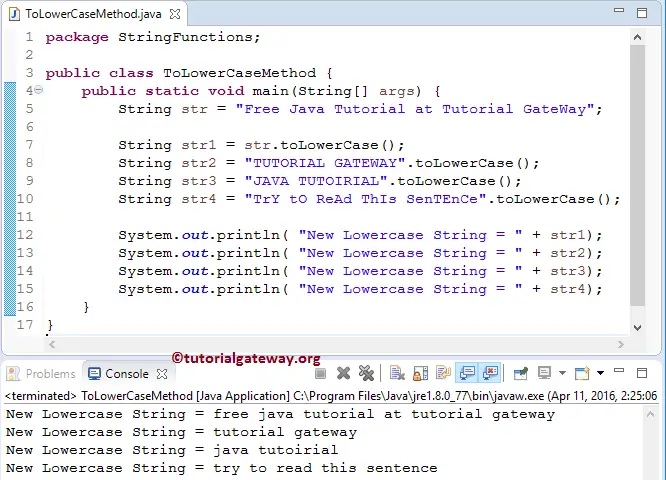
The toLowerCase method converts all the characters in a string to lowercase and this program will help to understand the function.
The first four statements will convert the previously declared text data to lowercase characters and assign them to Str1. Next, we used the toLowerCase String Method directly on string data. And the following Java System.out.println statements will print the output. Refer to the string format in Java and the substring in Java functions.
package StringFunctions;

public class ToLowerCaseMethod {
	public static void main(String[] args) {
		String str = "Free Java Tutorial at Tutorial GateWay";

		String str1 = str.toLowerCase();
		String str2 = "TUTORIAL GATEWAY".toLowerCase();
		String str3 = "JAVA TUTOIRIAL".toLowerCase();
		String str4 = "TrY tO ReAd ThIs SenTEnCe".toLowerCase();

		System.out.println( "New Lowercase String = " + str1);
		System.out.println( "New Lowercase String = " + str2);
		System.out.println( "New Lowercase String = " + str3);
		System.out.println( "New Lowercase String = " + str4);
	}
}
TIP: I suggest you refer to the Java toUpperCase and Java equals functions from the Java String Methods.
Using toLowerCase on an empty string
If we use the toLowerCase() method on an empty string, it returns an empty string as the output. Don’t expect any error.
public class example {
	public static void main(String[] args)
	{
		System.out.println("".toLowerCase());
	}
}
Java toLowerCase on numbers and special characters
By default, the built-in String toLowerCase function ignores numbers (digits) and special characters and converts uppercase letters to lowercase. Therefore, if there are any special characters or digits in a string, the toLowerCase method still works.
NOTE: If we use the toLowerCase method on a string that contains only numbers or special characters, it returns the string unchanged.
public class example {
	public static void main(String[] args)
	{
		System.out.println("1234ABCD".toLowerCase());
		System.out.println("Welcome@12345*".toLowerCase());
		System.out.println("12345".toLowerCase());
		System.out.println("@$%^**".toLowerCase());
	}
}
1234abcd
welcome@12345*
12345
@$%^**
How to fix a NullPointerException with toLowerCase in Java?
The toLowerCase method does not allow null values, and if we pass a null value, it throws a NullPointerException.
public class example {
	public static void main(String[] args)
	{
		String st = null;
		System.out.println(st.toLowerCase());
	}
}
NullPointerExceptionTo deal with this, we must use either a Java if statement or the Java ternary operator. In the example below, we use an if statement to check whether the string is null or not. If it is not null, use the toLowerCase function.
public class example {
	public static void main(String[] args)
	{
		String st = null;
		if(st != null)
		{
			st = st.toLowerCase();
		}
		System.out.println(st);
	}
}
nullUse Java toLowerCase for case-insensitive string comparison
When we perform the string search or comparison, the built-in string methods are case-sensitive. So, we must use toLowerCase to transform the original strings to lowercase letters and then use the equals() method for string comparison.
In the example below, the toLowerCase() method converts the mixed-case “Chicken Sandwich” to the lowercase “chicken sandwich”. Next, the equals method compares it with the existing text.
public class example {
	public static void main(String[] args)
	{
		String food = "Chicken Sandwich";

		if(food.toLowerCase().equals("chicken sandwich"))
		{
			System.out.println("Place the Order");
		}

	}
}
Place the OrderJava toLowerCase locale example
As mentioned in the syntax section, we can use the toLowerCase() method’s Locale argument to perform language-specific character conversion.
import java.util.Locale;
public class example {
	public static void main(String[] args) {
		String food = "Chicken";
		String order = food.toLowerCase(Locale.CANADA_FRENCH);
		System.out.println(order);
	}
}
chikenWhy does toLowerCase behave weirdly in Turkish?
Some letters in Turkish are different compared to normal English. The lowercase I in Turkish returns a dotless I (something like 1). SO, if we see them, people often get confused.
import java.util.Locale;

public class example {
	public static void main(String[] args)
	{
		String ch = "I";
		System.out.println(ch.toLowerCase(Locale.ENGLISH));
		System.out.println(ch.toLowerCase(Locale.forLanguageTag("tr-TR")));

		String food = "CHIKEN";
		System.out.println(food.toLowerCase(Locale.ENGLISH));
		System.out.println(food.toLowerCase(Locale.forLanguageTag("tr-TR")));
	}
}
i
ı
chiken
chıken
To resolve this issue, always prefer the Locale.ROOT as the argument value. By this, the local system language setting does not affect the result. Instead, it returns the same value across all regions.