How to use Input Parameters in SQL Stored Procedure or use Input Parameters in Select, Insert, and Update Stored Procedures with an example.
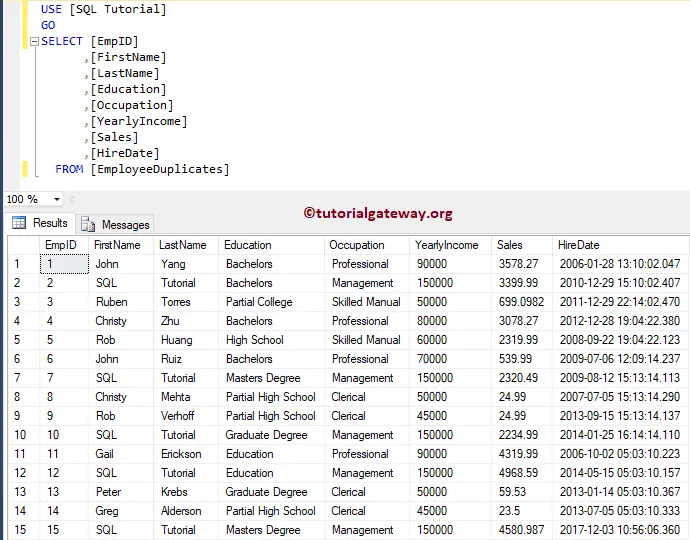
I suggest you refer to the Introduction to Stored Procedure article to understand the basics of the stored procedure. For this input parameters demonstration, we are going to use the below-shown SQL table.
Input Parameters in SQL Stored Procedure Select Statement
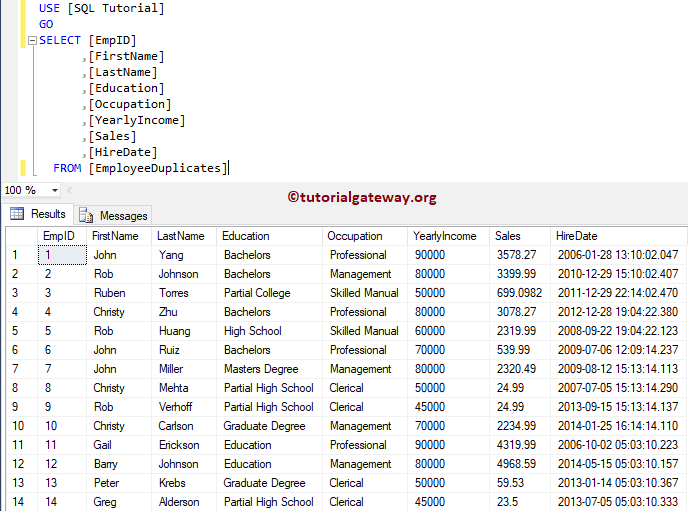
In this example, we will show you how to use the Input Parameters in Select Stored procedures. Please refer to the Select Stored Procedure article to understand how to write a Select statement inside a stored procedure.
CREATE PROCEDURE spGetEmployeeDetails
	@Occupation VARCHAR(50)
AS
BEGIN
  SET NOCOUNT ON;
    SELECT [FirstName] + ' ' + [LastName] AS [Full Name]
          ,[Education]
          ,[Occupation]
          ,[YearlyIncome]
          ,[Sales]
          ,[HireDate]
    FROM [EmployeeDuplicates]
    WHERE [Occupation] = @Occupation
END
Messages
--------
Command(s) completed successfully.
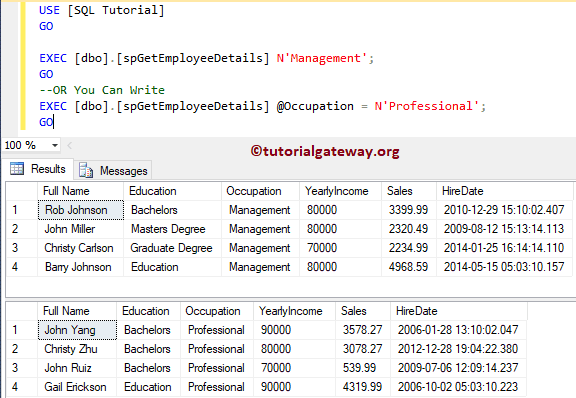
Let me execute the stored procedure. Here, we have to pass the value for the @Occupation parameter. So, let me pass the parameter value using any of the following ways.
EXEC [dbo].[spGetEmployeeDetails] N'Management';
GO
--OR You Can Write
EXEC [dbo].[spGetEmployeeDetails] @Occupation = N'Professional';
GO
Input Parameters in Select Stored Procedure Example 2
In this example, we will use the Multiple Input parameters along with the Select statement inside a stored procedure.
CREATE PROCEDURE spSelectEmployeeDetails
	@Education VARCHAR(50),
	@Occupation VARCHAR(50)
AS
BEGIN
	SET NOCOUNT ON;
	SELECT [FirstName] + ' ' + [LastName] AS [Full Name]
          ,[Education]
          ,[Occupation]
          ,[YearlyIncome]
          ,[Sales]
          ,[HireDate]
	FROM [EmployeeDuplicates]
	WHERE [Education] = @Education OR [Occupation] = @Occupation
END
Messages
--------
Command(s) completed successfully.
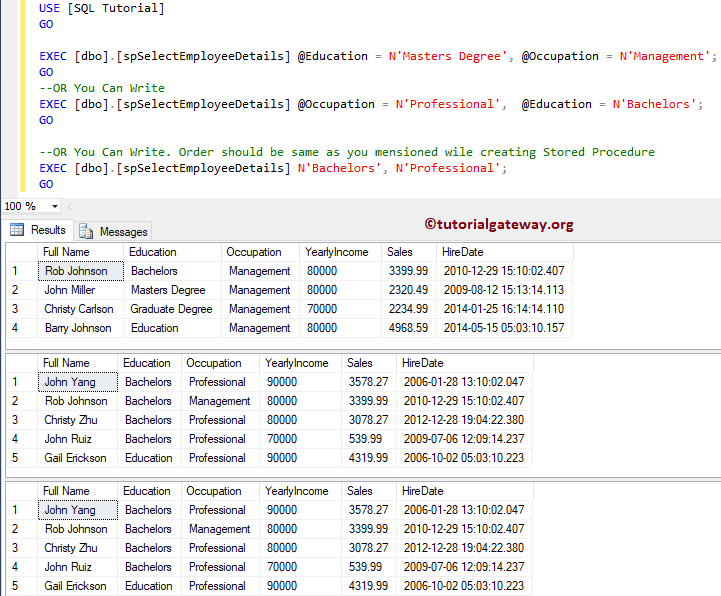
The following are the number of ways you can execute the stored procedure. Let me execute the sp.
EXEC [dbo].[spSelectEmployeeDetails] @Education = N'Masters Degree', @Occupation = N'Management';
GO
-- OR You Can Write
EXEC [dbo].[spSelectEmployeeDetails] @Occupation = N'Professional',  @Education = N'Bachelors';
GO

-- OR You Can Write. Order should be same as you mentioned while creating Stored Procedure
EXEC [dbo].[spSelectEmployeeDetails] N'Bachelors', N'Professional';
GO
Input Parameters in SQL Stored Procedure Insert Statement
In this example, we show how to use the Input Parameters in Insert Stored procedures. Please refer to Insert Stored Procedure article to understand, How to write Insert Statement inside a stored procedure.
CREATE PROCEDURE [dbo].[spInsertEmployeeDetails]
	@FirstName varchar(100),
	@LastName nvarchar(100),
	@Education nvarchar(200),
	@Occupation nvarchar(200),
	@YearlyIncome float,
	@Sales float
AS
BEGIN
  BEGIN TRY
    BEGIN TRANSACTION;
	INSERT INTO [EmployeeDuplicates]
	   ([FirstName], [LastName], [Education], [Occupation], [YearlyIncome], [Sales], [HireDate])
	VALUES (@FirstName, @LastName, @Education, @Occupation, @YearlyIncome, @Sales, GETDATE())
	COMMIT TRANSACTION;
  END TRY
  BEGIN CATCH
	IF @@TRANCOUNT > 0
	   ROLLBACK TRANSACTION;
	   THROW;
  END CATCH
END
Run Stored procedure input parameters query
Messages
--------
Command(s) completed successfully.
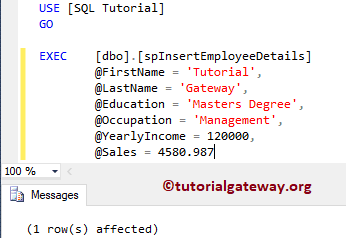
Let me execute the stored procedure. Here you can avoid the parameter names. Still, you have to provide parameter values in the same order that you specified while creating a procedure.
EXEC  [dbo].[spInsertEmployeeDetails]
	@FirstName = 'Tutorial',
	@LastName = 'Gateway',
	@Education = 'Masters Degree',
	@Occupation = 'Management',
	@YearlyIncome = 120000,
	@Sales = 4580.987
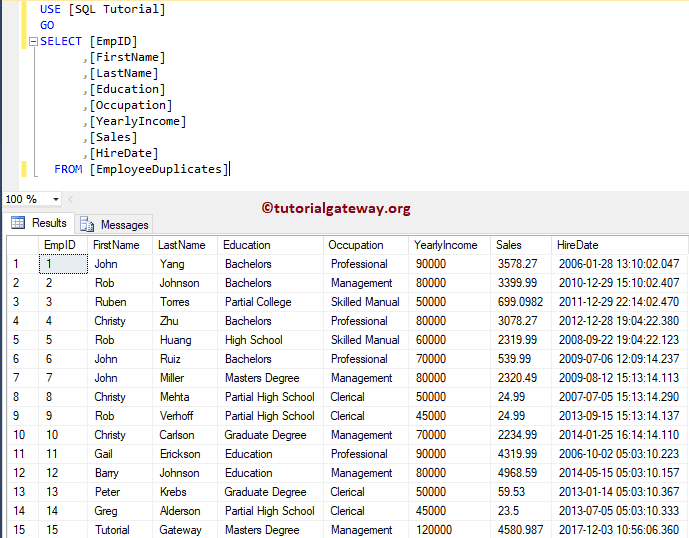
Let me show you the table.
Input Parameters in Stored Procedure Update Statement
This example shows how to use the Input Parameters in Update Stored procedures. Please refer to the Update Stored Procedure article to understand, How to write an Update Statement inside a stored procedure.
CREATE PROCEDURE spUpdateEmployeeDetails
        @Occupation VARCHAR(50),
		@Sales FLOAT
AS
BEGIN
  BEGIN TRY
    BEGIN TRANSACTION;
	SET NOCOUNT ON;
	UPDATE [EmployeeDuplicates]
	    SET [FirstName] = N'SQL',
		[LastName] = N'Tutorial',
		[YearlyIncome] = 150000
	    WHERE [Occupation] = @Occupation OR
		  [Sales] >= @Sales
	COMMIT TRANSACTION;
  END TRY
  BEGIN CATCH
    IF @@TRANCOUNT > 0
    ROLLBACK TRANSACTION;
	   THROW;
  END CATCH
END
Run input parameters in stored procedure query
Messages
--------
Command(s) completed successfully.
The following are the number of ways you can execute the stored procedure. Let me execute the sp with input parameters.
EXEC [dbo].[spUpdateEmployeeDetails] @Sales = 4580.987, @Occupation = N'Management';
GO
-- OR You Can Write
EXEC [dbo].[spUpdateEmployeeDetails] @Occupation = N'Management',  @Sales = 4580.987;
GO

-- OR You Can Write. Order should be same as you mentioned while creating Stored Procedure
EXEC [dbo].[spUpdateEmployeeDetails] 4580.987, N'Management';
GO
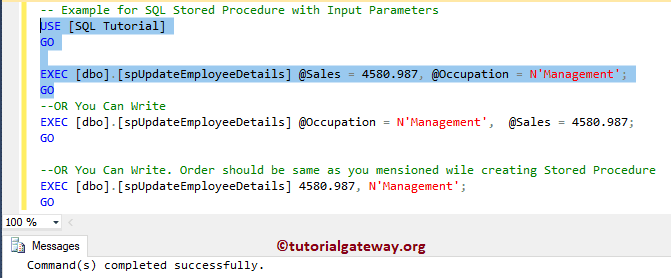
Let me show you the table.