
How to write a query to remove or delete Duplicate Rows in SQL Server is one of the common interview questions you might face.
For this delete duplicate rows or records example, we are going to use the below-shown data (a few columns from Fact Internet Sales in Adventure Works DW to remove)
USE [AdventureWorksDW2014]
GO
SELECT [ProductKey]
      ,[OrderQuantity]
      ,[UnitPrice]
      ,[ExtendedAmount]
      ,[DiscountAmount]
      ,[ProductStandardCost]
      ,[TotalProductCost]
      ,[SalesAmount]
      ,[TaxAmt]
FROM [FactInternetSales]
ORDER BY [ProductKey]
In order to keep this example as simple as possible, we created a new table and then inserted the above data into the new table.
CREATE TABLE [dbo].[DupFactInternetSales](
	[FactID] [int] IDENTITY(1,1) NOT NULL,
	[ProductKey] [int] NOT NULL,
	[OrderQuantity] [smallint] NOT NULL,
	[UnitPrice] [money] NOT NULL,
	[ExtendedAmount] [money] NOT NULL,
	[DiscountAmount] [float] NOT NULL,
	[ProductStandardCost] [money] NOT NULL,
	[TotalProductCost] [money] NOT NULL,
	[SalesAmount] [money] NOT NULL,
	[TaxAmt] [money] NOT NULL
) ON [PRIMARY]

GO
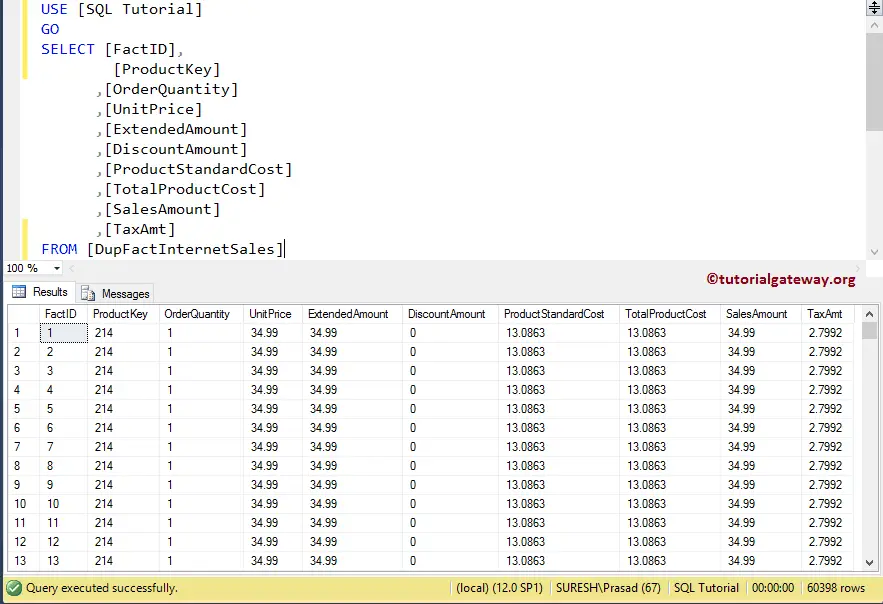
The screenshot below will show you the data that we inserted into the DupFactInternetSales table in the database.
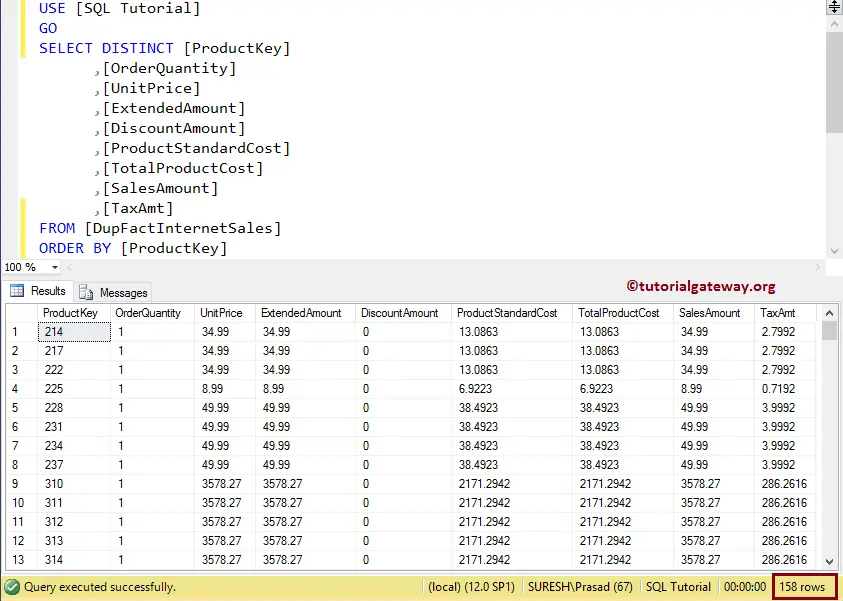
Let me show you the unique records present in the SQL Server table. As you can see, we used the SELECT DISTINCT keyword.
Delete Duplicate Rows in SQL Server using ROW_NUMER and CTE
In this example, we show you how to remove duplicate rows using the ROW_NUMBER function and the Common Table Expression.
WITH RemoveDuplicate
AS (
     SELECT ROW_NUMBER()
      OVER (
	    PARTITION BY [ProductKey]
			,[OrderQuantity]
			,[UnitPrice]
			,[ExtendedAmount]
			,[DiscountAmount]
			,[ProductStandardCost]
			,[TotalProductCost]
			,[SalesAmount]
			,[TaxAmt]
	   ORDER BY [ProductKey]
          ) UniqueRowNumber
    FROM [DupFactInternetSales])

DELETE FROM RemoveDuplicate
WHERE  UniqueRowNumber > 1;
Within the CTE, we are using the Rank function called ROW_NUMBER. It will assign a unique rank number from 1 to n. Next, we delete all the records whose rank number is greater than 1.
OUTPUT: Let me show you the output of the statement
Messages
--------
(60240 row(s) affected)
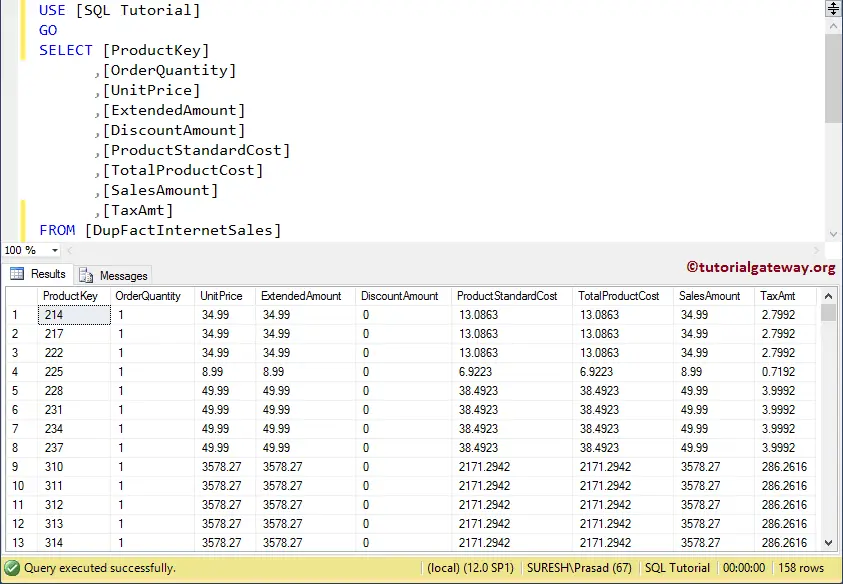
Let us see the data present in the DupFactInternetsales, after the Delete Operation
Delete duplicate rows in SQL Server using self Join
In this Frequently Asked Question, we show how to remove duplicate rows using the SELF JOIN.
DELETE InternetSales
FROM   [DupFactInternetSales] InternetSales,
       [DupFactInternetSales] FactInternetSales
WHERE   InternetSales.[ProductKey] = FactInternetSales.[ProductKey] AND
	InternetSales.[OrderQuantity] = FactInternetSales.[OrderQuantity] AND
	InternetSales.[UnitPrice] = FactInternetSales.[UnitPrice] AND
	InternetSales.[ExtendedAmount] = FactInternetSales.[ExtendedAmount] AND
	InternetSales.[DiscountAmount] = FactInternetSales.[DiscountAmount] AND
	InternetSales.[ProductStandardCost]= FactInternetSales.[ProductStandardCost] AND
	InternetSales.[SalesAmount] = FactInternetSales.[SalesAmount] AND
	InternetSales.[TaxAmt] = FactInternetSales.[TaxAmt] AND
	InternetSales.FactID > FactInternetSales.FactID
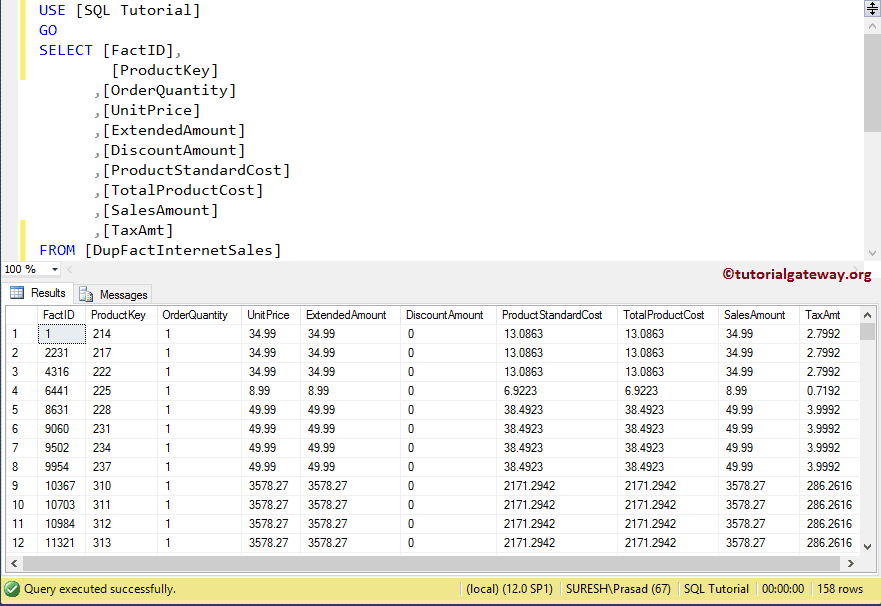
Let me show you the output of the statement
Messages
--------
(60240 row(s) affected)
OUTPUT
Delete duplicate rows using Group By Having Clause
This example shows how to delete Duplicate rows using the LEFT JOIN, MIN Function, GROUP BY, and HAVING.
DELETE DupFactInternetSales
 FROM DupFactInternetSales
      LEFT JOIN (
               SELECT MIN([FactID]) AS [FactID]
                    ,[ProductKey]
		    ,[OrderQuantity]
                    ,[UnitPrice]
                    ,[ExtendedAmount]
                    ,[DiscountAmount]
                    ,[ProductStandardCost]
                    ,[TotalProductCost]
                    ,[SalesAmount]
                    ,[TaxAmt]
               FROM [DupFactInternetSales]
               GROUP BY [ProductKey],
		        [OrderQuantity]
                       ,[UnitPrice]
                       ,[ExtendedAmount]
                       ,[DiscountAmount]
                       ,[ProductStandardCost]
                       ,[TotalProductCost]
                       ,[SalesAmount]
                       ,[TaxAmt]
        ) AS InternetSales ON
        [DupFactInternetSales].[FactID] = InternetSales.[FactID]
        WHERE InternetSales.[FactID] IS NULL
Let me show you the output of the statement.
Messages
--------
(60240 row(s) affected)