
The C strcat() function is one of the built-in string functions used to concatenate the user-specified string to the end of an existing one. Next, it adds a null terminator (\0) to the end.
The starcat() function appends a copy of a source string at the end of the destination string. Here, the resultant is stored in the first string (argument) we specified. In short, we can say that the C strcat() function performs string concatenation or appends a string.
TIP: The strcat() function is a part of the string.h header file. So, we must include it (#include<string.h>) before the main program.
How does the C strcat() function work?
The strcat() function appends or adds the second string to the end of the first string. Here, the strcat() method scans for the null terminator inside the destination string. Next, the first character in the source string replaces or overwrites the null terminator in the destination.
Next, it processes and appends all characters in the source to the destination. Once the source characters are finished, the null terminator is added at the end of the destination string.
The following steps help understand the C strcat() function visually.
Destination = “Hi”
Source = “all”
Destination Memory = “H i \0 _ _ _ _”
Using strcat(Destination, Source): “H i a l l \0 “
C strcat syntax
The basic syntax of the built-in strcat() string function is as shown below.
char *strcat(char *destination, const char *source);
Or in simple terms, we can write it as
strcat(destination, source);
Parameters: As shown in the above syntax, the C strcat() function accepts two parameters to perform the string concatenation.
- destination: It is a pointer to the destination string. It is where the strcat() function appends the source string at the end. It should be large enough to hold the final result after the string concatenation.
- source: It is a pointer to the source character sequence. This string will be appended to the end of the destination characters. It should not overlap the destination.
In short, we can say the C strcat() function accepts the character array as parameters 1 & 2. Next, it will concatenate or join the second string after the first. Remember, it will not alter the source string.
Return Value: The strcat function joins two strings and stores the data in the first argument (destination) and returns its pointer.
NOTE: Both the source and destination must be string data types. Please refer to the C String and C String methods articles on the Learn C Programming page to understand them.
C strcat() function basic example
In the following example, we declared two string variables with default text. Next, the strcat() function will concatenate those two strings and store the result inside the destination variable.
#include <stdio.h>
#include <string.h>
int main()
{
    char destination[50] = "tutorial ";
    char source[15] = "gateway";

    strcat(destination, source);
    puts(destination);
    puts(source);
    return 0;
}
Result
tutorial gateway

gateway
If you observe the above result, the text inside the source string hasn’t changed. It is only the destination text that changed by appending the source to the end of the destination.
Code Analysis
As it is our first example of C strcat() function, we will explain it step-by-step.
- We declared a character array, destination of size 50, and initialized it to “tutorial “.
- Declared another string, source, and initialized it to “gateway”.
- strcat(destination, source) line used the strcat() to concatenate the source and destination. It basically appends the source at the end of the destination string.
- A null terminator (\0) is automatically placed at the end of the destination string.
NOTE: In strcat() methods, the order of the arguments matters the most. The first argument stores the final result of appending the second argument to the end of the first one. If you change the argument positions, the result becomes reversed.
Appending a string literal using C strcat
Apart from concatenating the already declared string (character array) variables, we can also use the string literal. The following example appends the word ” Fruit ” to the end of “Apple”.
NOTE: We must not use the string literal as the first argument; it will throw an error because there is no memory for the string literal.
#include <stdio.h>
#include <string.h>
int main()
{
    char s[100] = "Apple";
    strcat(s, " Fruit");
    printf("%s\n", s);
    return 0;
}
Apple FruitC strcat function to append text to a string
The strcat function is used to join two strings. This program will help you to understand the strcat (concatenation of two strings) with examples.
// concatenate strings
#include <stdio.h>
#include<string.h>
int main()
{
   char str1[] = "Learn";
   char str2[] = " C Programming Language";
   char str3[] = " at tutorialgateway.org";

   strcat(str1, str2);
   puts(str1);
   puts(str2);

   strcat(str2, str3);
   puts(str2);
   puts(str3);

   strcat(str3, " we provide free tutorials");
   puts(str3);
}
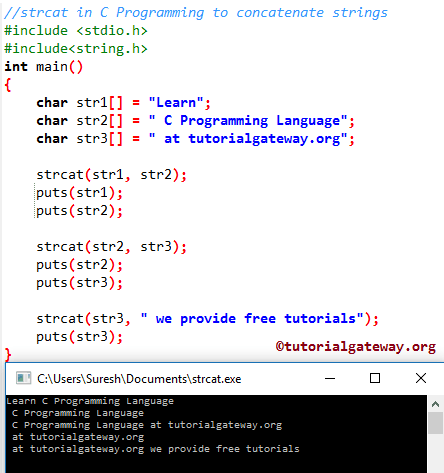
Within this C program, First, we declared three character arrays, str1, str2, and str3, and by using the first three statements. Next, we assigned the text data (a group of characters) to each character array.
The following statement will join str2 to the end of str1, and the result will store in str1.
strcat(str1, str2);
The following C programming statement will join str3 to the end of str2, and the result will store in str2.
strcat(str2, str3);
Next, we used the text directly inside the C strcat() function.
strcat(str3, " we provide free tutorials");
Using strcpy() and strcat() functions
In the following example, we used the combination of the strcpy() and strcat() functions. First, we have declared a character array to store the string information. Next, the C strcpy() function copies/inserts “Banana” text into the “s” string. Then the C strcat() function concatenates “Banana” and ” Fruit” (string literal).
#include <stdio.h>
#include <string.h>
int main()
{
    char s[100];

    strcpy(s, "Banana");
    strcat(s, " Fruit");
    puts(s);
    return 0;
}
Banana FruitIf we have two strings, we can use strcpy() to assign text information to both strings and then apply strcat() to perform the string concatenation.
C strcat() function to concatenate integers
As we mentioned earlier, the strcat() function concatenates only two strings. If we pass any data type other than strings, the strcat() function throws an error. To demonstrate it, we declared two integer variables and used the strcat() function on them.
#include <stdio.h>
#include <string.h>
int main()
{
    int a = 10, b = 20;
    strcat(a, b);
    printf("%d", a);
    return 0;
}
Solution 1: Appending Numbers to a string
The only solution to append integer or other data types to a string is to convert them to a string. There is no standard conversion method to convert an integer value to a string. However, we can use the snprintf() or sprintf() methods.
Here, we used the snprintf() method to assign the integer value to a string. Next, the C strcat() function is applied to two strings to append an integer value to the end of the string.
#include <stdio.h>
#include<string.h>
int main() {
    char s1[100] = "Age is ";
    int num = 25;
    char s2[20];

    snprintf(s2, sizeof(s2), "%d", num);
    strcat(s1, s2);
    puts(s1);
    return 0;
}
Age is 25Solution 2: Declare integers as String
Instead of converting integers to a string. Declare the numeric values as a string (Character array). So that we can apply the C strcat() function to them to append an integer at the end of the string.
In the following example, we used a combination of numeric and text information. However, replace “1000 Words ” with “1000” and “in 2 Days” with “2”, and the program will work.
#include <stdio.h>
#include<string.h>
int main() {
    char s1[100] = "1000 Words ";
    char s2[20] = "in 2 Days";

    strcat(s1, s2);
    puts(s1);
    return 0;
}
1000 Words in 2 DaysC strcat() function to perform multiple string concatenations
The following set of examples shows why we need to use the strcat() function multiple times in a single program.
Example 1: How to Build a Full Name?
If we have two strings or three initialized to FirstName and LastName (may be another with Middle Name). In such a case, we must use the strcat() method multiple times to join one at a time.
In the example below, the first C strcat() method joins a space after the FirstName. The second statement joins LastName after the blank space.
#include <stdio.h>
#include <string.h>
int main()
{
    char FirstName[100] = "John";
    char LastName[50] = "Smith";

    strcat(FirstName, " ");
    strcat(FirstName, LastName);
    puts(FirstName);
    return 0;
}
John SmithExample 2: Build a File path using C strcat
In the following example, we use the strcat() function to construct a file path from multiple strings.
#include <stdio.h>
#include<string.h>
int main() {
    char filepath[100] = "c:\\users\\userName\\";
    char foldername[20] = "StringFunctions";
    char fileName[50] = "example.txt";

    strcat(filepath, foldername);
    strcat(filepath, "\\");
    strcat(filepath, fileName);
    puts(filepath);
    return 0;
}
c:\users\userName\StringFunctions\example.txtIn the above example, instead of using a single slash (\), we used \\ because the extra one escaped the slash.
- strcat(filepath, foldername): It appends the folder name at the end of the file path. Result: c:\users\userName\StringFunctions
- strcat(filepath, “\\”): It adds an extra backslash at the end of the folder name. So, the result is: c:\users\userName\StringFunctions\
- strcat(filepath, fileName): It concatenates the file name to the end of the file path. The final path is File path + folder name + file name.
Example 3: Use C strcat for Constructing a URL
The following example constructs a URL from the website domain name and the topic or article name. Here, we can also add categories or any other topics, and concat them to build the complex URLs.
#include <stdio.h>
#include<string.h>
int main() {
    char domain[100] = "https://www.tutorialgateway.org/";
    char topic[50] = "c-string-functions";

    strcat(domain, topic);
    strcat(domain, "/");
    puts(domain);
    return 0;
}
https://www.tutorialgateway.org/c-string-functions/Example 4: Build a Sentence or CSV line
Building a CSV file is useful for data processing. We can use the strcat() function to write data in a CSV format or build a long sentence.
In the following example, we used string literals to specify the first name, last name, age, profession, and salary. However, in real-time, declare a separate string for each one of them and assign an appropriate value to it.
#include <stdio.h>
#include<string.h>
int main() {
    char employee[500] = "";

    strcat(employee, "Tracy,");
    strcat(employee, "Woods,");
    strcat(employee, "27,");
    strcat(employee, "Developer,");
    strcat(employee, "100000");
    puts(employee);
    return 0;
}
Tracy,Woods,27,Developer,100000Common Errors of the strcat Function in C
The following are some of the most common errors that occur when working with the strcat()function.
C strcat() function Buffer Overflow Error
When working with the strcat() method, buffer overflow is the most common error that we may face. When concatenating two strings, it is important to keep enough space in the destination (first argument) to store the incoming bytes from the source (second string)/ Otherwise, a buffer overflow error occurs, and some strange result may appear.
In the example below, the s1 variable is declared with 10 bytes of storage. Among those 10 bytes, “tutorial” needs 8 bytes and an extra byte (+1) for a null terminator. When we perform string concatenation using the strcat() function, the s1 variable requires at least another 7 bytes. However, it does not have a buffer overflow error.
#include <stdio.h>
#include <string.h>
int main()
{
    char s1[10] = "tutorial";
    char s2[] = "gateway";

    strcat(s1, s2);
    puts(s1);
    return 0;
}
Solution 1: Increase the s1 size
char s1[50] = "tutorial";
Solution 2: Checking the space
We can use the strlen() and sizeof() methods to check whether there is enough space inside the destination. If it is there, implement the strcat() function. Please refer to the C if statement, C sizeof(), and the C strlen() function articles.
if(stlen(s1) + strlen(s2) < sizeOf(s1) {
	strcat(s1, s2);
}
Solution 3: Use snprintf()
Instead of using the strcat() function, use the snprintf() method to concatenate two strings.
snprintf(s1, sizeof(s1), "%s%s", s1, s2)
Using an uninitialized string
When working with the C strcat() function, we must not use an uninitialized string as the destination. We must declare it before using it inside the function. Otherwise, use strcpy() to assign some text to it.
In the following example, we declared the s1 variable. However, we haven’t initialized anything for it. Here, the strcat() looks for the null terminator inside the s1 string; because we haven’t initialized it, it does not find any.
#include <stdio.h>
#include <string.h>
int main()
{
    char s1[50];
    char s2[] = "gateway";

    strcat(s1, s2);
    printf("%s", s1);
    return 0;
}
Solution: char s1[50] = “”;
Memory overlap in the C strcat function
If the source string and the destination string overlap in memory, this error will occur, and the result is unpredictable. In the following example, we are appending the same string or part of the same buffer to itself.
#include <stdio.h>
#include <string.h>
int main()
{
    char s1[50] ="Hello";

    strcat(s1, s1 + 2);
    printf("%s", s1);
    return 0;
}
HellollollolloNULL values
When working with strcat(), we must be careful with NULL values because it won’t accept any NULL as a source or destination.
#include <stdio.h>
#include <string.h>
int main()
{
    char s1[50] ="Hello";

    strcat(s1, NULL);
    printf("%s", s1);
    return 0;
}
Segmentation faultMissing Null terminator
In the following example, the destination s1 variable has no null terminator (\0). So, the C stcat() won’t find any \0 to load the source data, it will throw an error.
#include <stdio.h>
#include <string.h>

int main() {
    char s1[50] = {'H','i'};
    char s2[] = "all";

    strcat(s1, s2);
    printf("%s", s1);
    return 0;
}
C strcat() function FAQs
The following are some of the frequently asked questions about the strcat() method.
What is the difference between strcat() and strcpy()?
Both of them are part of the built-in string functions. However, each has its own functionality.
- The strcpy() function copies data from source to destination. It basically replaces the existing text with the new string.
- The strcat() function appends the source string to the end of the destination string.
So, use the strcpy() for string replacement and strcmp() for string joining.
What is the difference between strcat()and strncat()?
Both the strcat() and strncat() functions perform string concatenation. However, the C strncat() function allows you to control the total number of characters to append.
Use the C strcat() method to join the whole string. On the other hand, use strncat() to append a specific number of characters.
How to concatenate multiple strings?
The strcat() function allows performing concatenation on two strings. However, we can call the strcat() function multiple times to join multiple strings.
What is the difference between strcat() and snprintf()
We can call snprintf() as an alternative to the strcat() and strncat() functions to perform string concatenation.
The snprintf() stored the possible number of bytes from source to destination to eliminate buffer overflow. The following example appends only three characters from source to destination because the destination has a maximum capacity of 12 bytes.
#include <stdio.h>
#include <string.h>
int main()
{
    char s1[12] ="tutorial";
    char s2[] = "gateway";

    snprintf(s1, sizeof(s1), "%s%s",  s1, s2);
    printf("%s", s1);
    return 0;
}
tutorialgatWhat is the difference between stcat() and memcpy()?
Both strcat() and memcpy() perform string concatenation, but they both serve different purposes and work differently. The strcat() exclusively works for string concatenation. On the other hand, the append string is just one part of using memcpy(). Since memcpy() operates on memory, it is faster compared to strcat().