
The built-in C strcpy function is useful to copy a user-specified string or content (a group of characters) from one string to another. When copying the data from the source string to the destination, the strcpy() will also copy the null terminator (\0) from the source.
The strcpy() function in C programming language is included within the string.h header file. It copies all the information from the source string character-by-character until it reaches the null terminator in the source. After copying the (\0) null terminator, the compiler exits from the strcpy() function.
The C strcpy() is very useful for updating old content with new and updated information. The strcpy() function does not check whether the source information can fit in the destination; we must make sure there is enough space in the destination string.
TIP: As it is a part of the standard string library function, we must use #include<string.h> before the main program.
C strcpy syntax
The syntax of the strcpy() function to copy a string is.
char *strcpy(char *destination, const char *source);
In a simple structure
strcpy(destination, source);
Parameters: As you can see from the above syntax, the C strcpy() function accepts two character arrays as its parameters.
- Destination: It is a pointer to the destination where the source string is to be copied.
- Source: It’s a pointer to the source string. This text should be copied into the destination.
In short, the strcpy() function copies string data from the source (including the null terminator) to the destination.
Return Value: The C strcpy() function returns a pointer to the destination character array.
NOTE: The destination string must contain enough space to store the text coming from the source, including the null terminator(\0).
C strcpy() function Example
The following example shows how to use the strcpy() function to copy text information from one string to another. To demonstrate it, we declare two string variables (s1 and s2).
Here, s1 is the destination where the source string will be copied. Next, s2 is the source data that should be copied into s1. Remember, the information inside the s1 won’t be affected by the strcpy() function.
#include <stdio.h>
#include<string.h>
int main()
{
   char s1[50];
   char s2[20] = "tutorialgateway";

   strcpy(s1, s2);
   printf("%s", s1);
}
tutorialgatewayCopy String literal
Apart from the above approach, we can use the C strcpy() function to copy a string literal into the destination character array. It is like assigning a default value to the already declared string variable.
In the following example, we will hardcode the text inside the strcpy () function’s second argument. So, the code below copies the hard-coded text into the destination s1.
#include <stdio.h>
#include<string.h>
int main()
{
   char s1[50];
   strcpy(s1, "Welcome");
   printf("%s", s1);
}
WelcomeUsing a string literal inside the strcpy() as a source is perfectly alright. However, we must not use it as the destination. The strcpy() needs a memory to store the information. If you use a string literal (hard-coded text) as the first argument, it will lead to segmentation failure.
strcpy("Welcome", s1); // Wrong.How to Copy a User Input String in C Programming?
The C strcpy function is used to copy the content from the source to the destination string. This program will help you understand how to read the user input and perform a string copy on it.
TIP: You must include the #include<string.h> header before using this strcpy() function.
#include <stdio.h>
#include<string.h>
int main()
{
   char str1[50];
   char str2[50];
   char str3[] =  " C Programming Language";
   char str4[50], str5[50];

   printf("\n Please enter the String you want to Copy: \n");
   gets(str1);

   strcpy(str2, str1);
   //puts(str1);
   puts(str2);

   strcpy(str4, str3);
   puts(str4);
   //puts(str3);

   strcpy(str5, " we provide free tutorials");
   puts(str5);
}
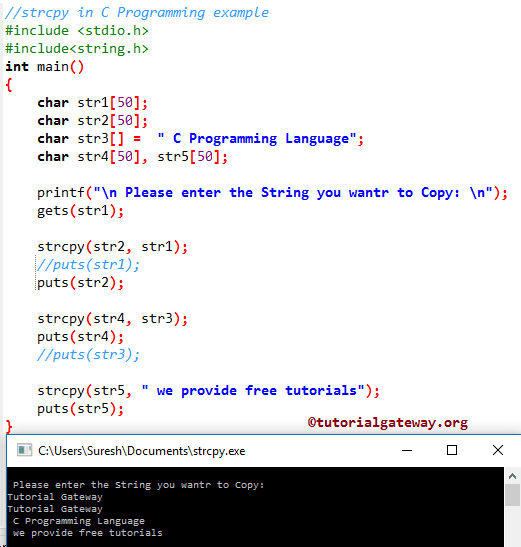
Within this program, First, we declared three character arrays str1, str2, str3, str4, and str5, and we assigned text data to str3. The first two statements will ask the user to enter the text they want to copy. Next, we assign the value to str1 using the C GETS Function.
The following statement will copy the C string data from str1 to str2. Please refer to the C string functions article from the C tutorial page for more functions.
strcpy(str2, str1);
The following C Programming statement will copy the character array from str3 to str4.
strcpy(str4, str3);
Next, we used the text directly inside the function.
strcpy(str5, " we provide free tutorials");
C strcpy() function Overwrites Data
In our previous examples, we copied the text information from one string to another empty string, so there is no problem. However, what happens when we try to copy data into an existing string?
In the following example, the s1 variable contains “USA”, and s2 is initialized with “United States”. When we use the strcpy() to copy “United States” into the s1 variable (Destination), it simply replaces “USA” with this information. In short, the strcpy() overwrites the text inside the destination string.
#include <stdio.h>
#include<string.h>
int main()
{
   char s1[50] = "USA";
   char s2[20] = "United States";

   printf("Before = %s\n", s1);
   strcpy(s1, s2);
   printf("After = %s", s1);
}
Result
Before = USA

After = United States
C strcpy() function to copy an empty string
We can use the strcpy() method to copy an empty string, and the function works without causing errors. When the source string is empty, the strcpy() function copies the null terminator (\0) from source to destination.
#include <stdio.h>
#include<string.h>
int main()
{
   char s1[50] = "Hi";
   char s2[20] = "";

   strcpy(s1, s2);
   printf("%s", s1);
}
C strcpy() function inside a for loop
When working with an array of strings, there are situations where we must use the strcpy() function inside a for loop to copy the text information inside an array.
To demonstrate it, we declared a 2D array of strings and utilized the strcpy() function to copy the string whose length is greater than three. Here, the C strlen() function finds the length of each string inside an array, and the if statement checks whether the length is greater than three. If true, copy that string.
#include <stdio.h>
#include <string.h>

int main() {
    char s2[5][20] = {"USA", "UK", "INDIA", "CHINA", "UAE"};
    char s1[5][20];
    int i, j = 0;

    for (i = 0; i < 5; i++) {
        if (strlen(s2[i]) > 3) {
            strcpy(s1[j], s2[i]);
            j++;
        }
    }

    printf("Result strings:\n");
    for (i = 0; i < j; i++) {
        printf("%s\n", s1[i]);
    }

    return 0;
}
OUTPUT
Result strings:
INDIA
CHINA
C strcpy() function common Errors
The following is the list of possible errors that we encounter when working with the strcpy() function. Although they seem simple, these programming errors lead to program crashes or unpredictable results.
Risk of Buffer Overflow in the C strcpy() function
When working with strcpy(), we must be very careful of buffer overflow errors. The strcat() function does not check whether the destination string has enough space to copy the information from the source. It simply copies data from source to destination. It leads to a buffer overflow and affects the other data besides it.
In the following program, the destination s1 string allows only 10 bytes of characters (including the null terminator). However, the source (s2) string size is 20 bytes and initialized to 14 characters (13 + null terminator).
The strcpy() function copies those 14 characters into the size-10 variable (s1), which is called a buffer overflow, leading to unpredictable results.
#include <stdio.h>
#include<string.h>
int main()
{
   char s1[10];
   char s2[20] = "United States";

   strcpy(s1, s2);
   printf("%s", s1);
}
Solution 1: strncpy()
To avoid the buffer overflow caused by the strcpy() method, we can use the strncpy() function.
strncpy(s1, s2, sizeof(s2) – 1);
Solution 2: snprintf()
Use the snprintf() function to copy text from one string to another. Please check the sizeof operator.
snprintf(s1, sizeof(s1), "%s", s2);
Solution 3: Manual Check
We can use the If statement with strcpy() to manually check whether the destination string has enough space to copy the source information.
If strlen(s2) < sizeof(s1) {
         strcpy(s1, s2);
}
Uninitialized Destination Pointer
In the following program, we have declared a pointer variable. So, it does not allocate any memory to this variable. Next, we call the C strcpy() function to copy the dynamic content “Hello” into the s1 pointer. However, s1 is not pointing to valid memory, and the result becomes unpredictable.
#include <stdio.h>
#include<string.h>
int main()
{
   char *s1;
   strcpy(s1, "Hello");
   printf("%s", s1);
}
Solution: Always use the initialized string variable. For example, the following line creates a string variable and a dedicated memory allocated to store 20 bytes.
char s1[50];Missing Null terminator in the Source String
In the following example, there is no null terminator (\0) on the source string (s2 variable). When we try to copy a string without the null terminator using the C strcpy() function, it leads undefined behaviour and wrong results.
#include <stdio.h>
#include<string.h>
int main()
{
   char s2[] = {'A', 'f', 'r', 'i', 'c', 'a'};
   char s1[20];

   strcpy(s1, s2);
   printf("%s", s1);
}
AfricaHp,2�Memory Overlap issues with the C strcpy() function
When working with the strcpy() method, we must be cautious of memory overlap issues. In the following example, we declare a string variable and assign the value “Africa” to it. Next, the strcpy() performs the string copy on the same buffer. Let me show you the execution in the step-by-step process.
- s1 = “Africa”
- s1 + 3 = Pointing to the fourth character (i).
- So, the strcpy(s1 + 3, s1) means A copies at i place, followed by the remaining characters. So, the data is overwritten and unpredictable.
#include <stdio.h>
#include<string.h>
int main()
{
   char s1[] = "Africa";
   strcpy(s1 + 3, s1);
   printf("%s", s1);
}
The result mentioned below is subject to the compiler/system that you are using.
AfAfAfAfAfApcC strcpy() function with NULL values
The built-in strcpy() string function won’t allow any NULL values as arguments. If either the source or the destination is a NULL value, the strcpy() function throws a segmentation fault error.
#include <stdio.h>
#include<string.h>
int main()
{
   char s1[20];
   strcpy(s1, NULL);
   printf("%s\n", s1);
}
Segmentation faultWhat is the difference between the C strcpy() and strncpy() functions?
Both the strcpy() and strncpy() functions copy data from one string (destination) to another (source string). However, the strcpy() copies the whole string into the destination. On the other hand, the strncpy() method copies a limited number of characters (Specified by the third argument) to the destination.
Use the strcpy() to copy a complete string, and for a limited number of characters, use the strncpy() function. In the following example, the first strcpy() statement copies “Africa” into the destination string variable (s1). On the other hand, the strncpy() function copies the first three characters from “Africa”, that is, “Afr”, into the destination.
#include <stdio.h>
#include<string.h>
int main()
{
   char s2[] = "Africa";
   char s1[20], n1[20];

   strcpy(s1, s2);
   printf("%s\n", s1);

   strncpy(n1, s2, 3);
   printf("%s", n1);
}
Result
Africa
Afr
What is the difference between C strcpy() and memcpy()
Although both strcpy() and memcpy() functions copy data from one location to another, they are different in functionality and serve completely different purposes.
- strcpy(): It is a standard string function that copies a null-terminated string from start to end until it reaches the (\0). It stops after copying the null terminator. The strcpy() function works only on string data.
- memcpy(): It is a general-purpose function that works on any data type. It copies the specified number of bytes from one memory to another.
As memcpy() works at the memory level, its performance is faster than the strcpy() function. To explain the difference, we use the first strcpy() example information, and this time we use the memcpy() function to copy the string data.
#include <stdio.h>
#include<string.h>
int main()
{
   char s1[50];
   char s2[20] = "tutorialgateway";
   memcpy(s1, s2, strlen(s2) + 1);
   printf("%s", s1);
}
tutorialgateway