
The C strncat function is a String Function used to append n number of characters from a user-specified string to the end of the existing one. The syntax of the strncat in this language is
char *strncat(char *destination, char *source, size_t n);
or we can simply write it as:
strncat(str1, str2, string_size);
- source: A valid string that you want to append to the destination
- Destination: This is where the function will append the characters from Source.
- n: The number of characters that you want to append from the Source.
strncat in C language Example
The strncat function appends the user-specified text to the existing string. This program will help you to understand the strncat with multiple examples.
TIP: You must include the #include<string.h> header before using this strncat String Function. Please refer to the C string and C String functions articles available on the C tutorial page.
#include <stdio.h>
#include<string.h>

int main()
{
   	char str1[] = "Learn";
   	char str2[] = "Learn";

   	char str3[] = " C Programming Language";
   	char str4[] = " at tutorialgateway.org";

   	strncat(str1, str3, 40);
   	printf("\n The Final after the Concatenation = %s", str1);

   	strncat(str2, str3, 10);
   	printf("\n The Final after the Concatenation = %s", str2);

   	strncat(str3, str4, 19);
   	printf("\n The Final after the Concatenation = %s", str3);

	getch();
	return 0;
}

This statement will append all the characters in str3 to str1 because the length of C Programming Language is less than the given size of 40. I suggest you check the C strcat() function.
strncat(str1, str3, 40);
This function will append the first 10 characters present in str3 to str1 because we are restricting the size to 10.
strncat(str2, str3, 10);
Using strncat function on user inputs
This C example allows the user to enter the source and destination strings. Next, it is going to contact them using the strncat function in C programming language.
#include <stdio.h>
#include<string.h>

int main()
{
	char str1[100], str2[100];

	printf("\n Please Enter First String  : ");
	gets(str1);

	printf("\n Please Enter the String that you want to concat : ");
	gets(str2);

	strncat(str1, str2, 8);

 	printf("\n The Final String after the Concatenation = %s", str1);

}
Although the given string is valid, the strncat function is only appended up to Tutorial. It is because we restricted the concatenation function to the first 8 characters.
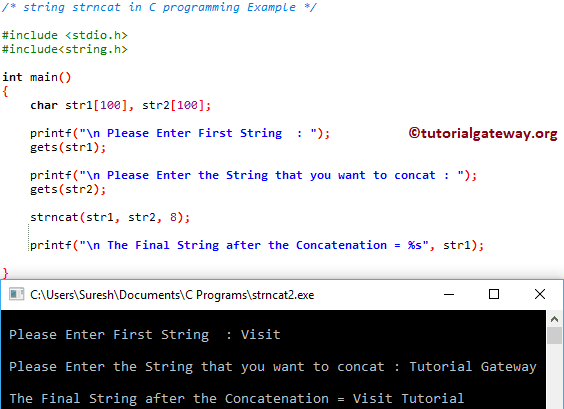
Let me change the Size value to 16 and see
 Please Enter First String  : Visit

 Please Enter the String that you want to concat : Tutorial Gateway

 The Final String after the Concatenation = Visit Tutorial Gateway
Does C strncat automatically add a null terminator?
Yes. The strncat() always adds a null terminator to mark the string’s end position. BY default, the strncat() method searches for the null terminator (\0) in the destination. Next, it copies the given number (n) of characters from a source to the destination and appends the null terminator (\0).
#include <stdio.h>
#include<string.h>
int main()
{
    char dest[10] = "Hi";
    strncat(dest, "Hello", 5);

    printf("%s\n", dest);
}
HiHelloDoes strncat copy exactly n characters or up to n characters?
While copying a string, n is the maximum number of characters the strncat() will copy, but not the exact number.
If the source string is greater than n characters, the strncat() copies up to n characters and appends a null terminator.
#include <stdio.h>
#include<string.h>
int main()
{
    char dest[20] = "Hi";
    strncat(dest, "Hello", 2);
    printf("%s\n", dest);
}
HiHeIf the source string is less than n characters, the strncat() copies till the end of the source and appends a null terminator.
#include <stdio.h>
#include<string.h>
int main()
{
    char dest[20] = "Hi";
    strncat(dest, "Hello", 10);
    printf("%s\n", dest);
}
HiHelloC strncat buffer overflow vulnerability
The strncat() function does not know the destination size, so if the source string is larger than the destination buffer size, it can lead to a buffer overflow.
#include <stdio.h>
#include<string.h>
int main()
{
    char dest[10] = "Hi";
    strncat(dest, "Hello Guys!", 11);
    printf("%s\n", dest);
}
In some situations, we may use the C sizeof() operator, but it won’t work! (Refer to the above question and answer). The following program shows the correct way to calculate the num parameter in strncat to avoid buffer overflow.
#include <stdio.h>
#include<string.h>
int main()
{
    char dest[10] = "Hi";
    size_t rem = sizeof(dest) - strlen(dest) - 1;
    strncat(dest, "Hello Guys!", rem);
    printf("%s\n", dest);
}
HiHello GTIP: It is safer to use the strlcat() method or the snprintf() function.
C strncat append character
Appending a single character using a strncat() may lead to undefined behaviour because it expects the null-terminated string as the second argument. The best option is to use the index position.
The program below uses C strlen() to find the string length and adds the character at the end position. Next, manually append \0 (Null terminator) to the last position of a destination string.
#include <stdio.h>
#include<string.h>
int main()
{
    char dest[20] = "Hi";
    char ch = '!';

    size_t len = strlen(dest);
    dest[len] = '!';
    dest[len + 1] = '\0';

    printf("%s\n", dest);
}
Hi!Why does strncat cause a segmentation fault in C?
There are many reasons for a segmentation fault. It includes,
- If the destination string is not null-terminated. For example, char dest[2] = {H’, ‘i’};
- If the destination is pointing to read-only memory. If we use the strncat() on a pointer, char *dest = “Hi”;
- When you use the strncat() method to append a character to a string.
- If you try to insert a long string that does not fit in the destination.