
The SQL Server FLOOR function returns the closest numeric value, which is less than or equal to the specified expression or column value. It is mainly used to round the positive and negative floating-point, decimal, or currency values by truncating the fraction part. The FLOOR function is commonly useful when rounding the fraction points is important, such as performing financial data analysis, mathematical operations, and statistical analysis.
For instance, if we have the numbers like 10.30 and 10.90, the SQL Server FLOOR function returns 10 as the output for both values. It is because 10 is the nearest value, and it is less than 10.30 and 10.90. One of the most common examples is calculating the age from a birthdate by rounding 25 years 6 months to 25.
SQL FLOOR Syntax
The basic syntax of the FLOOR function for a rounded value is as shown below.
SELECT FLOOR (Numeric_Expression)
FROM [Source]
This function accepts any numeric value, column, or numeric expression that results in a numeric data type as an argument. The SQL FLOOR function returns the output in the same data type or super type, depending on the input argument. For instance, for
- float and real input, it returns float as the output. Whereas the decimal returns decimal.
- tinyint, smallint, and int -> return int, and for bigint, it returns bigint.
TIP: If the parameter value is NULL, the FLOOR function will return NULL as the output.
SQL FLOOR Function Example
The FLOOR Function returns the closest integer value, which is less than or equal to the given numeric value. The following series of examples shows multiple ways to use the FLOOR function on different data types, including numbers, decimals, floats, money, etc.
Integer Values
If you use the SQL FLOOR function on positive or negative integer values, it returns the same output as the input. Since there are no decimals to round, it simply returns what you passed to it.
In the two lines of statement below, the first statement will return 10, and the second one will return -20 as the output.
SELECT FLOOR(10)AS p1

SELECT FLOOR(-20)AS n1
p1
---
10

n1
---
-20
Positive and Negative Decimal Values and Zeros
The real power of the SQL FLOOR function comes into play when we work with decimal or floating-point numbers. To trim those decimal values and find the nearest whole number, use this FOOR function.
If we provide 20.78 as the argument, the FLOOR function will return 20.0 because it is the nearest whole number that is less than or equal to 20.78.
SELECT FLOOR(20.78)AS d1
20It does not matter how many decimal positions the number has; the FLOOR function simply returns the nearest number.
SELECT FLOOR(30.37978)AS d2
30Similarly, if you work with the negative decimal values, the value will move away from zero. For example,-45.40 becomes -46 because it is less than -45.40 and the nearest one.
SELECT FLOOR(-45.40)AS d3,
 FLOOR(-88.46291)AS d4
d3	d4
-46	-89
While working with zeros, you can understand how the SQL FLOOR function is moving towards zero for the positive values and going away for negative numeric fields. Here, 0 is less than 0.10 and -1 is less than -0.55.
SELECT FLOOR(0.10)AS z1
  ,FLOOR(-0.55)AS z2
z1	z2
0	-1
Floating-point numbers
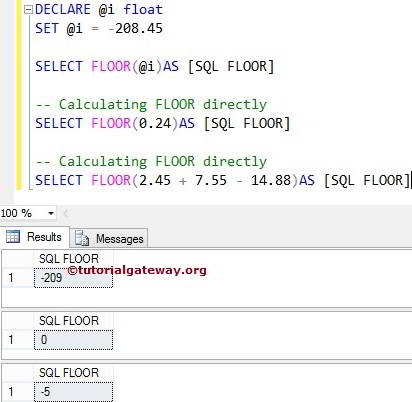
The lines of code below are used to declare the SQL Server float variable and assign the value. In the following Mathematical Function statement, we used the function to find the closest integer value of the variable @i (It means FLOOR(-208.45)). We also assigned a new name using the ALIAS Column name.
DECLARE @i float

SET @i = -234.873451

SELECT FLOOR(@i)AS f1;
-235Mathematical Formula
In this example query, we used the SQL FLOOR Function directly on multiple values. Here, we added the math formula with addition and subtraction on decimal values. It means FLOOR (2.45 + 7.55 – 14.88) => -4.88 = – 5.
SELECT FLOOR(2.45 + 7.55 - 14.88)AS m1;
-5Numeric Data type
This query declares a numeric data type variable and uses it as the FLOOR function argument to display the nearest numeric value.
DECLARE @n NUMERIC(10, 5)

SET @n = 1144.73645

SELECT FLOOR(@n)AS n1;
1144Money
The FLOOR function will work seamlessly on the money data type as well. If your columns have a money data type with symbols, use the FLOOR function as shown below to get the nearest value as the result.
SELECT FLOOR($5000.789)AS m1,

 FLOOR($2500.23762) AS m2;
m1	m2
5000.00	2500.00
String argument
If you pass the string value as the FLOOR function argument, SQL Server will convert it to a numeric value and apply the function. So, this approach will work as long as the server can implicitly convert the string to a numeric field. Otherwise, it will raise an error.
SELECT FLOOR('132.789')AS s1

SELECT FLOOR('A240') AS s2;
Within the statements above, the first one will return 132.00 as the output, whereas the second one will throw the following error.
Msg 8114, Level 16, State 5, Line 2

Error converting data type varchar to float.
Scientific Notations
Along with other numerical data types, the FLOOR function also allows the use of scientific notations as arguments to return the nearest small whole number. Here, 7.0E-2 means 0.07, and its nearest value is 0. Similarly, -10.1E-2 means −0.101 and the result is -1.
SELECT FLOOR(7.0E-2)AS s1 -- 0.07

SELECT FLOOR(-10.1E-2) AS s2 --−0.101
s1
---
0

s2
---
-1
SQL Server FLOOR Function on Tables
In real-time, we use the FLOOR function on table columns to round the decimal values to the nearest whole number that is less than or equal to each row value. To demonstrate the working functionality of the FLOOR function, we use the SalesTerritory table from the AdventureWorks2022 database.
In the query below, the FLOOR function will round the SalesYTD and SalesLastYear values to the nearest whole number.
SELECT [TerritoryID],[CountryRegionCode],[Group]
      ,[SalesYTD], FLOOR(SalesYTD) as YTD
      ,[SalesLastYear], FLOOR(SalesLastYear) AS LastYear
FROM [Sales].[SalesTerritory]
If you take the first SalesYTD output, the FLOOR function accepts 7887186.7882 as the argument. It returns 7887186.00 as the output because it is the nearest whole number that is less than 7887186.7882.
The FLOOR function is not limited to the above scenario; you can combine it with other functions to create more complex calculations. Here, we used the GROUP BY to combine similar items. Next, calculate the sum and average of this year’s and last year’s sales using aggregate functions.
SELECT [Group]
      ,SUM(SalesYTD) TotalYTD, FLOOR(AVG(SalesYTD)) AvgYTD
      ,SUM(SalesLastYear) LastTotal, FLOOR(AVG(SalesLastYear)) AvgLastYear
FROM [Sales].[SalesTerritory]
GROUP BY [Group]
The SQL Server also allows you to use the FLOOR function inside a WHERE clause. For instance, add this line to the above WHERE FLOOR(SalesYTD) > 6000000 to filter the records.
Working with DATE and TIME
When performing the data analysis, working with date and time fields needs more attention. Suppose you are calculating the date difference, the result may be 3.5 days, 4.30 hours, etc. In some situations, we may have to round them according to the requirement.
For instance, one company maintains a server that changes on an hourly and daily basis, but it won’t charge extra minutes. In such a case, 3.5 days should be reduced to 3 days, and 4.30 hours should be reduced to 4 hours. To accomplish this, we must use the SQL FLOOR function with DATE and TIME fields.
SELECT  [ID],[Location],[StartDate],[EndDate]
    ,DATEDIFF(MINUTE, StartDate, EndDate) AS MinutesUsed
    ,FLOOR(DATEDIFF(MINUTE, StartDate, EndDate) / 60.0) AS BillHours
    ,FLOOR(DATEDIFF(HOUR, StartDate, EndDate) / 24.0) AS BillDays
FROM [Servers]
Difference between SQL FLOOR and CEILING
Both the CEILING and FLOOR functions help to return the nearest whole number. However, there is a difference in the output. The CEILING function returns the closest value that is greater than the given value. On the other hand, the FLOOR function returns the smallest nearby value.
SELECT CEILING(29.7654) AS r1

SELECT FLOOR(29.7654) AS r2
r1
---
30

r2
---
29
From the above, CEILING returns 30 as output because 30 is greater than 29.7654. Next, the FLOOR function returns 29 because it is the nearest number and 29 is less than 29.7654.
TIP: Please refer to the CEILING and ROUND functions.