
The Python exp math function is used to calculate the power of exponential E, Where E is Euler’s number approximately equal to 2.71828. In this section, we discuss how to use exponential in Python Programming language with examples.
The syntax of the Python math exp function is shown below. The argument can be a number or a valid numerical expression that represents the exponential value. If the number argument is a positive or negative number, the exp function returns the output. If it is not a number, it returns TypeError.
math.exp(number);
Python exp Function Example
The exp Function calculates the power of Euler’s number E. In this exp example, We are going to find the exponential check values of different data types and display the output. Please refer to the Python Math functions article from our Python basics page.
import math

Tup = (1.98, 20.26, 13.05, -40.95 , 0.45) # Tuple Declaration
Lis = [-10.98, 3.65, -9.59, -4.15 , 5.97] # List Declaration

print('EXP() Function on Positive Number = %.2f' %math.exp(1))
print('EXP() Function on Negative Number = %.2f' %math.exp(-1))

print('EXP() Function on Tuple Item = %.2f' %math.exp(Tup[2]))
print('EXP() Function on List Item = %.4f' %math.exp(Lis[2]))

print('EXP() Function on Multiple Number = %.4f' %math.exp(10 + 20 - 15.65))

print('EXP() Function on String Number = ', math.exp('Python'))
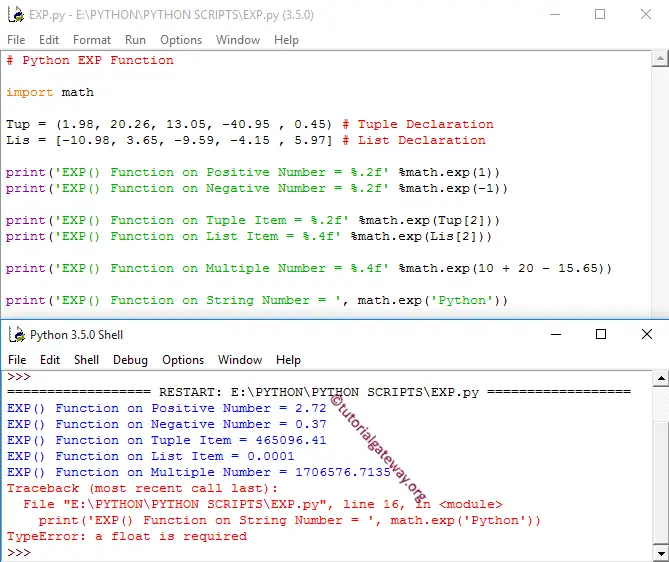
- Within the first two statements, we used it with both the Positive integer and negative integer values as arguments.
- Next two statements, we used the exp Function on Tuple and List items. If you observe the above Python screenshot, this Math function is working perfectly on Python Tuples and Python Lists.
- We tried directly on multiple values.
- In the last statement, we used on the String value, and it returns TypeError.
Python exp of negative numbers
When it comes to negative numbers, the built-in math.exp() function handles well. However, if we use the exponent operator, the behavior depends on whether the negative value is a base or an exponent.
In the following example, we use the exp() function to find the exponent value of -1, -2, and -7.
- exp(-1) = e-1 = 1/e.
- exp(-2) = e-2 = 1/e2.
- exp(-7) = e-7 = 1/e7.
import math

print(math.exp(-1))
print(math.exp(-2))
print(math.exp(-7))
0.36787944117144233
0.1353352832366127
0.0009118819655545162
How do you calculate e to the power of x in Python?
There are two options to calculate e raised to the power of x: they are using the built-in exp() function and the exponent operator (**). One of the fastest ways to calculate e raised to the power of x is by using the built-in math exp() function. Refer to the Python exponent operator.
import math
x = 5
result = math.exp(x)
print(result)
148.4131591025766The second option is using the exponent operator. Here, we can use the math.e property to get the e value and then utilize the exponent operator (double asterisk **) to find e raised to the power of x.
import math
x = 5
result = math.e ** x
print(result)
148.41315910257657TIP: Please refer to the Python expm1.
Why does Python math.exp() function throw an overflow error?
As we all know, the math.exp() function calculates e to the power of x, and if the result is too large and does not fit in a floating-point number range, it will throw an overflow error. For example, if we pass 1000 as the exp() function parameter, it will throw an overflow error. Refer to the Python log and Python pow functions.
import math
print(math.exp(1000))
OverflowError: math range errorThe OverflowError happens because the maximum finite float value is approximately 1.7976931348623157e+308. It means if you pass any value greater than 709.78 to the exp() function, overflowError happens because it is out of the float maximum range.
import math
print(math.exp(700))
1.0142320547350045e+304