
Every integer is stored in binary form (0 and 1), which means a combination of bits. The Bitwise operators in C are used to perform bit operations directly on binary numbers. All decimal values will convert to binary values (sequence of bits, i.e., 0100, 1100, 1000, 1001, etc.). Next, the bitwise operators will work on these bits, such as shifting them left to right or converting bit values from 0 to 1.
The Bitwise operators in the C Programming language allow performing low- level bit data manipulations. We can use these operators to set, clear, mask, or toggle bits at the required position.
TIP: Please refer to the Introduction to Operators article to see the list of available operators.
Types of Bitwise Operators in C
The table below shows the six different Bitwise operators in C Programming with bit operation examples and their meanings.
For example, consider x = 6 and y = 8, and their binary representation values are: x = 0110 and y = 1000. Here, we show you the bit operands to help you understand the basics.
| Bitwise Operators in C | Meaning | Examples |
|---|---|---|
| & | Bitwise AND | X & Y = 0000 (Sets 1 only if two bits are 1). |
| | | Bitwise OR | X | Y = 1110 (Sets 1 at least one of the bits is 1). |
| ^ | Bitwise exclusive OR | X ^ Y = 1110 (Sets 1 only if one of the bits is 1). |
| ~ | complement | ~X = 00001001 (The NOT operator converts all 0s to 1s.) |
| << | Left Shift | X << 1 = 00001100 (Bits move 1 step left. If we use 2 or 3, then they shift accordingly). |
| >> | Right Shift | Y >> 1 = 00000100 |
Bitwise AND (&) in Operator in C Programming
The truth table of the bitwise AND operator in C Programming for performing bit operations on given values is shown below. Remember, it compares each bit of a number.
| a | b | a & b |
|---|---|---|
| 0 | 0 | 0 |
| 0 | 1 | 0 |
| 1 | 0 | 0 |
| 1 | 1 | 1 |
AND Syntax
The syntax of the bitwise AND operator in C language is shown below. It accepts only integer values and returns an integer as an output.
operand1 & operand2
The Bitwise AND operator performs logical operations on each bit of two operands in every position of a given number. As mentioned in the truth table, if the corresponding bits of two variables or operands are 1, it returns 1. If any bits are 0, the Bitwise AND operator returns 0.
For example, there are two integer variables a and b with values 6 (0110) and 3 (0011).
0110 &
0011
—-
0010 means 2.
Here, there is only one position where both bits contain 1 (2nd position), and the remaining are 0 and 1s.
C Programming Bitwise AND (&) Operator Example
In the following example, we have declared two integer variables with values 6 and 3. Within the printf() statement, we used the bitwise AND operator to perform bit operations and return the result.
#include <stdio.h>
int main()
{
    int a = 6, b = 3;
    printf("AND Result = %d", a & b);
    return 0;
}
AND Result = 2TIP: Use it to find whether the flags are mandatory or optional.
Bitwise OR (|) Operator in C Programming
The Bitwise OR operator is programmatically represented by the | symbol, which performs bitwise operators on two operands. It performs the logical operations on bits from two operands by comparing bits at each position. The result of the bitwise OR operator is 1 if at least one of the bits from the two operands is 1. It means if both are 0, it returns zero; otherwise, it returns 1.
OR Syntax
The syntax of the Bitwise OR operator is
operand1 | operand2
The truth table of the C Programming bitwise OR operator for performing bit operations on user-provided values is shown below.
| a | b | a | b |
|---|---|---|
| 0 | 0 | 0 |
| 0 | 1 | 1 |
| 1 | 0 | 1 |
| 1 | 1 | 1 |
Bitwise OR (|) Operator Example
In the following example, we declare two integer variables, one holding the value 12 and the other 25. Inside the printf statement, we used the bitwise OR operator on those two variables.
#include <stdio.h>
int main()
{
    int a = 12, b = 25;
    printf("The Result of an OR = %d", a | b);
    return 0;
}
The Result of an OR = 29The binary representations of 12 and 25 are 01100 and 11001, respectively. When you observe the binary representation. There is only one position where both bits are 0, the second position from the right side. So, the result of that position is 0, and the remaining are set to 1.
01100 |
11001
—–
11101 = (16 + 8 + 4 + 1) = 29
C Bitwise XOR(^) operator
The ^ symbol represents the Bitwise XOR operator in C programming, and we can also call it the Exclusive OR. It is useful to toggle bits and perform simple encryptions.
The Bitwise XOR (^) operator returns 1 if either one of the corresponding bits of the given operands is opposite. Or we can, if one of the bits is 1, it returns 1. If both bits are 0’s and 1’s, it returns 0.
The following Bitwise XOR operator truth table helps you understand the return value.
| a | b | a ^ b |
|---|---|---|
| 0 | 0 | 0 |
| 0 | 1 | 1 |
| 1 | 0 | 1 |
| 1 | 1 | 0 |
XOR Syntax
The syntax of the bitwise XOR operator is as shown below.
operand1 ^ operand2
Bitwise XOR(^) Operator in C Programming Example
Users may confuse it with the OR operator. However, the OR operator returns 1 if both bits are 1, which is not true with the XOR operator. To make it clear, we use the same values of 12 and 25 in this example.
#include <stdio.h>
int main()
{
    int a = 12, b = 25;
    printf("The XOR Example Result = %d", a ^ b);
    return 0;
}
The XOR Example Result = 21Let me perform the bit comparisons
12 = 00001101 ^
25 = 00011001
———-
21 = 00010101
Bitwise NOT (~) Operator in C Programming
The Bitwise NOT operator, also called the complement operator, is represented by the ~ symbol. It works on a single operand and returns either negative or large numbers based on 1’s and 2’s complement.
It simply converts 1s to 0s and 0s to 1s, and the following truth table shows the same.
| a | ~a |
|---|---|
| 0 | 1 |
| 1 | 0 |
Syntax
The syntax of the C Programming Bitwise NOT operator for bit operations is as shown below.
~a
By default, the C programming language stores the signed numbers using 2’s complement representation. Before going into the actual examples, let us understand the 1’s and 2’s complement.
Bitwise NOT 1’s and 2’s complement
To understand 1’s and 2’s complement, we must know how the C language stores the values. To demonstrate the same, we use 5 as the integer value.
Positive Numbers
The binary representation of 5 (8-bit) is 0000 0101. Here, the leftmost bit represents the sign bit.
- 0 means a positive value.
- 1 means a negative number.
Here, the leftmost bit of 0000 0101 is 0, so the given number is positive.
Negative Numbers
The C programming language does not directly store negative values. Instead, it uses the 2’s complement to store them.
For example, the user-entered value is +5, and its binary representation is 0000 0101.
1’s complement
The bitwise NOT operator converts 0 to 1 and 1 to 0. So,
0000 0101 becomes 1111 1010
2’s complement
If we add 1 to the above result, it becomes the 2’s complement.
1111 1010
1
——-
1111 1011 = -5
C Bitwise NOT (~) Operator 1’s and 2’s complement Example
From the above-mentioned steps, you might have understood the C language’s working process with positive and negative numbers.
The following example demonstrates how to use the Bitwise NOT operator and the role of 1’s and 2’s complement in the result.
#include <stdio.h>
int main()
{
    int a = 5;
    printf("~a = %d", ~a);
    return 0;
}
~a = -6Here, a = 5 = 0000 0101. The NOT operator flips 0 and 1s. So, ~a = 1111 1010. The first number in the ~a result is 1, so it is a negative.
Since it is negative, we must find the 2’s complement.
1’s complement= 1111 1010 becomes 0000 0101
2’s complement:
If we add 1 to the above result, it becomes the 2’s complement.
0000 0101 +
1
——-
0000 0110 = -6
TIP: We can use a simple formula ~ = -(a + 1), which works in most cases.
C Programming Bitwise NOT Operator on Unsigned Numbers
For signed numbers, the NOT operator produces negative numbers, and for unsigned numbers, it produces large numbers. So please be careful while working with the Bitwise NOT operators.
For example, if you observe the program below, it returns the result 4294967290 value for the unsigned result of ~a. Here, 5 is represented by 32-bit (instead of 8), and when you flip the 0s and 1s: 11111111 11111111 11111111 11111010 = 4294967290.
#include <stdio.h>
int main()
{
    int a = 5;
    unsigned int b = 5;
    printf("~a = %d", ~a);
    printf("\n~a = %u", ~b);
    return 0;
}
~a = -6
~a = 4294967290
Left Shift (<<) Operator in C Programming
Two bitwise shift operators in the C programming language perform a logical shift on operands, and they are
- Left Shift Operator (<<)
- Right Shift Operators (>>)
We start the section by explaining the Left shift operator, and the next section explains the Right shift.
The left shift operator is represented by << (two less than symbols) in programming logic. It uses two numbers and shifts the first operand bits to the left side by a specified number of positions. The left shift operator uses the second operand to decide the total number of positions it shifts.
As mentioned earlier, the Left shift operator performs logical shifts, so each shifted bit (blank space) is replaced by 0.
Syntax
The syntax of the Left Shift operator in C programming is as shown below.
operand1 << operand2
For example,
- 1111 << 1 means move all bits to one position to the left and fill that vacant position with 0. The result is 11110.
- 1111 << 3 means move all bits three positions to the left and fill that vacant position with 0. The result is 1111000.
Left Shift (<<) Example
To demonstrate the left shift operator in real programming, we use a simple example that shifts bits 1 and 2 positions.
Here, a = 3 = 0011
- a << 1 = 0110 = 4 + 2 = 6
- a << 2 = 1100 = 8 + 4= 12
#include <stdio.h>
int main()
{
    int a = 3;
    printf("Left Shift = %d\n", a << 1);
    printf("Left Shift = %d", a << 2);
    return 0;
}
Left Shift = 6
Left Shift = 12
NOTE: Please refer to the Bitwise Vs Arithmetic Operators section below for more examples of Left and Right Shift Operators.
Right Shift (>>) Operator in C Programming
The >> (two consecutive greater than symbols) symbol represents the right shift operator, and accepts two numbers. The right shift operator shifts bits in the first operand to the right side by a given number of positions. Here, the second operand (integer value) informs how many right positions it must shift.
After shifting the bits, the right operator fills the empty bits (blank spaces) with zeros for unsigned integers and the sign bit for signed integers.
Syntax
The syntax of the Bitwise Right Shift operator in C programming is as shown below.
operand1 >> operand2
Before going into the example, let me explain the working functionality. Here, a = 1111.
- a >> 1 = It moves every bit to one position right and fills the blank space with 0. Otherwise, drop the right-most bit and add 0 to the left-most position. The result is 0111.
- 2 >> 2 = It moves every bit two positions right and fills the two blank spaces with 0. Otherwise, drop the two right-most bits and add two 0’s to the left-most position. The result is 0011.
- Shift 1 = 0111
- Shift 2 = 0011
Right Shift (>>) Operator Example
The following example demonstrates the right shift operator with simple right shifting bits to 1 and 3 positions.
Here, a = 9 = 1001,
- a >> 1 = 0100 = 4 = a divide by 2.
- a >> 3 = 0001 = 1 = a divide by 8.
#include <stdio.h>
int main()
{
    int a = 9;
    printf("a >> 1 = %d\n", a >> 1);
    printf("a >> 3 = %d", a >> 3);
    return 0;
}
a >> 1 = 4
a >> 3 = 1
Important Shift Operators points
The following is a list of points we must remember when working with the bitwise left and right shift operators in C Programming language.
- The left shift operator can perform multiplication, and the right shift can perform division.
- We must not use negative numbers in the left and right shift operators. If we use them, the result is unknown and depends on the work environment. Sometimes, the left shift operator (a << 1) returns -2147483648, and the right shift (a >> 1) returns 0.
- The right side (second) operand must be less than the bit size (length) of the first operand. If you try to shift more than the bit size or the size of an integer, it may return NULL or zero.
Bitwise Operators in C Programming Example
Let us see an example to understand bitwise operators better. In this Program, we are using two variables, a and b, with values 9 and 65, respectively. Next, we will use these two variables to show you various operations.
We declared 2 integers in this C bitwise operators program, a and b, and assigned the values 9 and 65. The binary form of 9 = 0001001 and 65 = 1000001. The below printf statements will perform the bitwise operations on a and b, then they will display the Program output.
#include <stdio.h>

int main()
{
 int a = 9, b = 65;

 printf(" AND a&b = %d \n", a & b);
 printf(" OR a|b = %d \n", a | b);
 printf(" EXCLUSIVE OR a^b = %d \n", a ^ b);
 printf(" NOT ~a = %d \n", a = ~a);

 printf(" LEFT SHIFT a<<1 = %d \n", a << 1);
 printf(" RIGHT SHIFT b>>1 = %d \n", b >> 1);

 return 0;
}
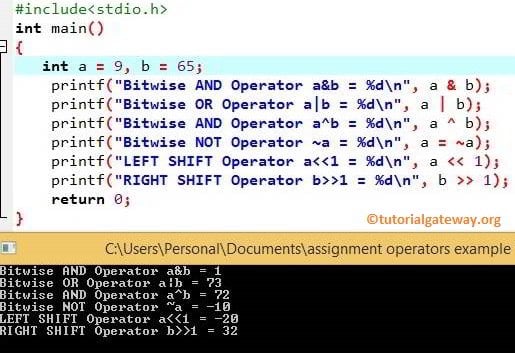
Let’s see the calculations behind these Operators in this Programming.
AND Operation = a & b
0001001 & 1000001 = 0000001 = 1
OR Operation = a || b
0001001 || 1000001 = 1001001 = 73
Next, Exclusive OR Operation = a ^ b
0001001 ^ 1000001 = 1001000 = 72
Left Shift Operation = a << 1
1001 << 1 = 10010 = 18
Right Shift Operation = b >> 1
1000001 >> 1 = 0100000 = 32
Arithmetic vs Shift Operators in C Programming
As we know, the arithmetic operators such as * and / perform multiplication and division. However, if your goal is to perform basic operations like multiply by 2 and divide by 2, we can use the shift operators.
The left shift operator is very much equivalent to multiplication by 2. The right operator returns the same result as the division by 2.
Multiplication
- a << 1 = Multiplication by 2
- a << 2 = Multiplication by 4
- a << 3 = multiplication by 8
Division
- a >> 1 = Division by 2
- a >> 2 = Division by 4
- a >> 3 = Division by 8
The following example shows you the comparison between the bitwise shift and arithmetic operators in C language.
#include <stdio.h>
int main()
{
    int a = 5;
    printf("Left Shift     = %d\n", a << 1);
    printf("Multiplication = %d\n", a * 2);

    printf("Right Shift    = %d\n", a >> 1);
    printf("Division       = %d", a / 2);
    return 0;
}
Left Shift     = 10
Multiplication = 10

Right Shift    = 2
Division       = 2
Check Even or Odd
Normally, we use the arithmetic division operator to divide the given number by 2. If the result is zero (completely divisible by 2), it is an even number. Otherwise, it is an odd number. However, we can use the C bitwise AND (&) operator to check whether the given number is odd or even.
The following example uses the bitwise AND operator inside the If Else statement. We can also use the conditional operator (instead of If Else).
Here, a & 1 = If the given number is odd, it returns 1 as the output. If it is an even number, the result will become 0.
#include <stdio.h>
int main()
{
    int a = 10;

    if(a & 1){
        printf("Odd");
    }
    else{
        printf("Even");
    }
    return 0;
}
EvenLogical Vs Bitwise Operators in C Programming
Although they look the same, the logical and bitwise operators are very different and used for completely different purposes.
The bitwise operators perform logical operations on individual bits of two operands. The following table lists the differences between the bitwise and logical operators in C programming language.
| Logical Operators | Bitwise Operators |
|---|---|
| The logical operators perform operations on the given numbers. | On the other hand, bitwise operators work on individual bits of each number. |
| It is useful in control flow statements and logical operations. | It is used for low-level bit manipulation tasks. |
| Logical operators include AND (&&), OR (||), and NOT (!). | Bitwise operators include AND (&), OR (|), XOR (^), NOT (~), Left Shift (<<), and Right Shift (>>). |
| The logical operators return either Boolean 0 or 1 based on the condition. | The bitwise operators return an integer value. |
| It returns 0 (False) if the condition fails, and it returns True (1) for any non- zero integer value. | Here, 0 is False, and 1 is True. |
The following C program uses the bitwise (&) and logical AND (&&) operators on two numbers to see the difference. Here, we used the conditional operator to print True or False.
#include <stdio.h>
int main()
{
    int a = 8, b = 20;
    printf("The Bitwise AND Result = %d\n", a & b);
    (a & b)? printf("True"):printf("False");

    printf("\nThe Logical AND Result = %d\n", a && b);
    (a && b)? printf("True"):printf("False");
    return 0;
}
The Bitwise AND Result = 0
False

The Logical AND Result = 1
True
Bitwise Operator Analysis
By default, the C bitwise AND operator returns 1 when both bits are 1; otherwise, it returns 0. Here, a = 8 and b = 20.
- 8 = 00001000
- 20 = 00010100
- ————-
- 0 = 00000000 = False
Logical Operator Analysis
By default, the logical operators return true for any non-zero number and false for 0. Here, a = 8 and b = 20.
- a = 8 = non-zero = True
- b = 20 = non-zero = True
- ———————-
- true && true = 1 = True
Practical Bit Manipulation Examples in C
To demonstrate this series of bitwise operators in C examples, we use a small number so that you can easily understand the bit or binary changes. Before we go into the example, let me show you the bit positions for an 8-bit number of 0.
7 6 5 4 3 2 1 0
0 0 0 0 0 0 0 0
Setting the nth bit
Here, our goal is to make the nth bit 1. Remember, it must not change the other bits. To demonstrate this, we have declared a variable with 5. Next, the C language bitwise OR (|) and left shift (<<) operators will set the nth bit value to 1.
TIP: To set the bit at other positions, please change the n value.
#include <stdio.h>
int main()
{
    unsigned int num = 5;
    int n = 1;
    num = num | (1 << n);
    printf("num = %d", num);
    return 0;
}
num = 7The binary representation of 5 is 00000101. Here, our goal is to set the second bit position value to 1 (currently it is 0).
The formula we used is num = num | (1 << n), and n = 1.
1 = 0000 0001
1 << 1 = 0000 0010
num | (1 << n) means 5 | (1 << 1)
0000 0101 |
0000 0010
———
0000 0111 = 7
The table representation of setting the nth bit for better understanding.
| Bit Positions | 7 | 6 | 5 | 4 | 3 | 2 | 1 | 0 |
| 5 | 0 | 0 | 0 | 0 | 0 | 1 | 0 | 1 |
| 1 << 1 | 0 | 0 | 0 | 0 | 0 | 0 | 1 | 0 |
| 5 | (1 << 1) | 0 | 0 | 0 | 0 | 0 | 1 | 1 | 1 |
Marking or Clearing the nth bit
Here, our goal is to make the nth bit 0 (clearing). To demonstrate this, we have declared a variable with 7. Next, the C Programming bitwise AND (&), NOT (~), and left shift (<<) operators will clear the nth bit value to 1.
#include <stdio.h>
int main()
{
    unsigned int num = 7;
    int n = 1;
    num = num & ~(1 << n);
    printf("num = %d", num);
    return 0;
}
num = 5The binary representation of 7 is 00000111. Here, our goal is to clean or mark the second bit position to 0 (currently it is 1).
The formula we used is num = num & ~(1 << n), and n = 1.
1 = 0000 0001
1 << 1 = 0000 0010
~(1 << 1) = 1111 1101
7 & ~ (1 << 1)
0000 0111 &
1111 1101
———
0000 0101 = 5
The table representation of clearing the nth bit for better understanding.
| Bit Positions | 7 | 6 | 5 | 4 | 3 | 2 | 1 | 0 |
| 7 | 0 | 0 | 0 | 0 | 0 | 1 | 1 | 1 |
| 1 << 1 | 0 | 0 | 0 | 0 | 0 | 0 | 1 | 0 |
| ~(1 << 1) | 1 | 1 | 1 | 1 | 1 | 1 | 0 | 1 |
| 7 & ~(1 << 1) | 0 | 0 | 0 | 0 | 0 | 1 | 0 | 1 |
Toggling the nth bit
Here, our goal is to toggle the nth bit (0 becomes 1 and 1 becomes 0). The following program declares a variable with 5. Next, the C Programming bitwise XOR (^) and left shift operators will toggle the nth bit.
#include <stdio.h>
int main()
{
    unsigned int num = 5;
    int n = 0;
    num = num ^ (1 << n);
    printf("num = %d", num);
    return 0;
}
num = 4The binary representation of 5 is 00000101. Here, our goal is to toggle the first bit position. Currently 1, so toggle it to 0.
The formula we used is num = num ^ (1 << n), and n = 1.
1 = 0000 0001
1 << 0 = 0000 0001 (Same).
TIP: If you want to toggle the first bit, num = num ^ 1 also works (without left shifting). However, if you want 2nd, 3rd, and so on, we must use the above formula.
5 ^ (1 << 1)
0000 0101 ^
0000 0001
———
0000 0100 = 4
The table representation of toggling the nth bit for better understanding.
| Bit Positions | 7 | 6 | 5 | 4 | 3 | 2 | 1 | 0 |
| 5 | 0 | 0 | 0 | 0 | 0 | 1 | 0 | 1 |
| 1 << 0 | 0 | 0 | 0 | 0 | 0 | 0 | 0 | 1 |
| 5 ^ (1 << 1) | 0 | 0 | 0 | 0 | 0 | 1 | 0 | 0 |
Testing a bit
Here, our goal is to test whether a certain (nth) bit is set or not. The following program uses the C Programming bitwise AND (&) and left shift operators on 5 to test the bit at the nth bit.
#include <stdio.h>
int main()
{
    unsigned char num = 5;
    int n = 1;
    if (num & (1 << n))
        printf("Bit %d is SET", n);
    else
        printf("Bit %d is NOT set", n);
    return 0;
}
Bit 1 is NOT setThe table representation of testing the nth bit for better understanding.
| Bit Positions | 7 | 6 | 5 | 4 | 3 | 2 | 1 | 0 |
| 5 | 0 | 0 | 0 | 0 | 0 | 1 | 0 | 1 |
| 1 << 1 | 0 | 0 | 0 | 0 | 0 | 0 | 1 | 0 |
| 5 & (1 << 1) | 0 | 0 | 0 | 0 | 0 | 0 | 0 | 0 |
TIP: If you change the n value to 2, the program above will return Bit 2 is SET.
How to Check if a number is a power of 2?
The first condition must be a number greater than 0. Next, we can use the C programming bitwise AND (&) operator to check whether a number is a power of 2.
Formula: if n & (n – 1) == 0
The following program uses the above formula on 16. However, please change the n value and test on a different number.
- 16 = 0001 0000 &
- 15 = 0000 1111
- ————-
- 0 = 0000 0000
- ————-
#include <stdio.h>
int main()
{
    unsigned int n = 16;
    if (n > 0 && (n & (n - 1)) == 0)
        printf("%u is a power of 2", n);
    else
        printf("%u is NOT a power of 2", n);

    return 0;
}
16 is a power of 2