
The Assignment operators in C are useful to assign values to declared variables. The equals (=) operator is the most commonly used assignment operator. For example: int i = 10; Here, i is the variable, and 10 is the value assigned to the variable i.
Assignment operators in C can also be combined with arithmetic and bitwise operators to perform arithmetic and bitwise operations.
List of all assignment operators in C
The table below displays all the assignment operators in this programming language with a simple example.
| Operator | Assignment Operator Name | Example | Explanation |
|---|---|---|---|
| = | Simple Assignment | x = 25 | Value 25 is assigned to x |
| += | Addition Assignment | x += 25 | Same as x = x + 25 |
| -= | Subtraction Assignment | x -= 25 | Same as x = x – 25 |
| *= | Multiplication Assignment | x *= 25 | Same as x = x * 25 |
| /= | Division Assignment | x /= 25 | Same as x = x / 25 |
| %= | Modulus Assignment | x%= 25 | Same as x = x % 25 |
| &= | Bitwise AND Assignment | x &= 25 | x = x & 25 |
| |= | Bitwise OR Assignment | x |= 25 | x = x | 25 |
| ^= | Bitwise XOR Assignment | x ^= 25 | x = x ^ 25 |
| >>= | Bitwise Right Shift Assignment | x >>= 25 | x = x >> 25 |
| <<= | Bitwise Left Shift Assignment | x <<= 25 | x = x << 25 |
Simple Assignment Operator (=)
The = operator is one of the most common assignment operators in C programming language. It is used to assign values to the variables. Refer to the C Programming tutorial page.
a = 10 means assigning the value 10 to the variable ‘a’.
#include <stdio.h>
int main()
{
    int amount;

    amount = 10000;
    printf("Amount = %d\n", amount);
    return 0;
}
10000Computed Assignment Operators in C
In addition to the common = operator, we can combine the = operator with arithmetic and bitwise operators to form an augmented or computed assignment operator.
Combining the = symbol with arithmetic operators (+, -, *, /, and %) and Bitwise operators (&, |, ^, <<, and >>) makes the code shorter and more efficient. For example, a += b instead of a = a + b. This section covers all the computed assignment operators in C programming language, along with examples.
Addition Assignment (+=)
The += operator performs the addition and stores the result back in the left variable.
a += b is equivalent to
a = a + b.
It means += performs the addition of a and b and stores the result back to the variable ‘a’.
#include <stdio.h>
int main()
{
    int amount = 10000;
    int bonus = 2500;

    amount += bonus;
    printf("Total = %d", amount);
    return 0;
}
Total = 12500Subtraction Assignment (-=)
The -= assignment operators in C subtracts the right operand from the left variable and stores the result in the left variable.
a -= b is equivalent to
a = a – b.
It means -= subtract b from a and stores the result back to the variable ‘a’.
#include <stdio.h>
int main()
{
    int amount = 50000;
    int withdraw = 10000;

    amount -= withdraw;
    printf("Balance Amount = %d", amount);
    return 0;
}
40000Multiplication Assignment Operators in C (+=)
The *= operator performs the multiplication (left operand multiplied by right value) and stores the result back in the left variable.
a *= b is equivalent to
a = a * b.
It means *= multiplies a by b and stores the result back to the variable ‘a’. In the example below, amount *= interest means amount = 100000 * 1.75.
#include <stdio.h>
int main()
{
    float amount = 100000;
    float interest = 1.75;

    amount *= interest;
    printf("Total Amount = %.2f", amount);
    return 0;
}
Total Amount = 175000.00Division Assignment (/=)
The /= operator performs the division (dividing the left operand by the right value) and stores the result back in the left variable.
a /= b is equivalent to
a = a / b.
It means /= performs division (dividing a by b) and stores the result back to the variable ‘a’. In the example below, marks /= subjects means marks = 560 / 6 = 93.33.
#include <stdio.h>
int main()
{
    float marks = 560;
    int subjects = 6;

    marks /= subjects;
    printf("Marks Percentage = %.2f", marks);
    return 0;
}
Marks Percentage = 93.33Modulus Assignment (%=)
The /= assignment operators in C divides the left operand by the right operand and stores the remainder back in the left variable.
a %= b is equivalent to
a = a % b.
It means %= performs division (dividing a by b) and stores the remainder in the variable ‘a’. Here, 20 divided by 3 yields a remainder of 2 and a quotient of 6. (3 * 6 = 18, and 2 is the remainder).
#include <stdio.h>
int main()
{
    int a = 20;
    int b = 3;

    a %= b;
    printf("Remainder = %d", a);
    return 0;
}
2Bitwise Assignment Operators in C
Bitwise AND Assignment (&=)
The &= operator performs the bitwise AND operation on two operands and stores the result in the first (left) variable.
a &= b is equivalent to
a = a & b.
In the example below, 12 = 1100 and 8 = 1000. There is only one place where 1 & 1 exists (True), so the result is 1000 = 8.
#include <stdio.h>
int main()
{
    int a = 12;
    int b = 8;

    a &= b;
    printf("Result = %d", a);
    return 0;
}
8Bitwise OR Assignment (|=)
The |= operator performs the bitwise OR operation and stores the result in the first (left) variable.
a |= b is equivalent to
a = a | b.
In the example below, 1100 | 1000 returns 1100 = 12.
#include <stdio.h>
int main()
{
    int a = 12;
    int b = 8;

    a |= b;
    printf("Result = %d", a);
    return 0;
}
12Bitwise XOR Assignment Operators in C (^=)
The ^= operator performs the bitwise XOR operation and stores the result in the first (left) variable.
a ^= b is equivalent to
a = a ^ b.
#include <stdio.h>
In the example below, 1100 | 1000 = 0100 = 4.
int main()
{
    int a = 12;
    int b = 8;

    a ^= b;
    printf("Result = %d", a);
    return 0;
}
4Bitwise Left Shift Assignment (<<=)
The <<= assignment operators in C shifts the left operand bits to the left side by the positions mentioned in the right operand and stores the result in a left variable.
a <<= b is equivalent to
a = a << b.
In the example below, 00001100 << 2 = 00110000 = 48 (32 + 16).
#include <stdio.h>
int main()
{
    int a = 12;
    int b = 2;

    a <<= b;
    printf("Result = %d", a);
    return 0;
}
48Bitwise Right Shift Assignment (>>=)
The >>= operator shifts the left operand bits to the right side by the positions mentioned in the right operand and stores the result in a left variable.
a >>= b is equivalent to
a = a >> b.
In the example below, 1100 >> 2 = 0011 = 3 (2 + 1).
#include <stdio.h>
int main()
{
    int a = 12;
    int b = 2;

    a >>= b;
    printf("Result = %d", a);
    return 0;
}
3Example of 6 Assignment Operators in C
In this assignment operators Program, We are using two integer variables a, and Total, and their values are 7 and 21. Next, we are going to use these two variables to show you the working functionality of all the Assignment Operators in this Programming Language
/* Program for Assignment Operators */

#include <stdio.h>

int main()
{
 int a = 7;
 int Total = 21;

 printf(" Value of the Total = %d \n", Total += a );
 printf(" Value of the Total = %d \n", Total -= a );
 printf(" Value of the Total = %d \n", Total *= a );
 printf(" Value of the Total = %d \n", Total /= a );
 printf(" Value of the Total = %d \n", Total %= a );

 return 0;
}
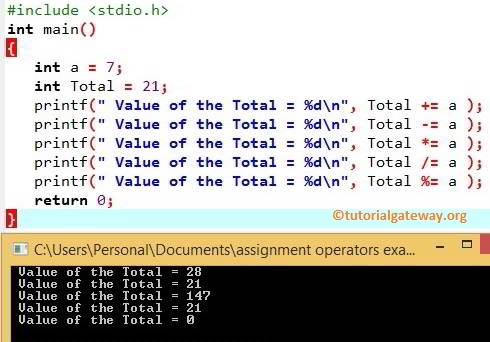
The below printf statements will perform C Programming Assignment operations on a and Total and then the output of the result will be displayed. Let us see the C Programming Operators functionality in this C Program
printf(" Value of the Total = %d \n ", Total += a );
Total += a means
Total = Total + a = 21 + 7 = 28
printf(" Value of the Total = %d \n", Total -= a );
Next, Total -= a means
Total = Total – a = 28 – 7 = 21
printf(" Value of the Total = %d \n", Total *= a );
Total *= a means
Total = Total * a = 21 * 7 = 147
printf(" Value of the Total = %d \n", Total /= a );
Next, Total /= a means
Total = Total / a = 147 / 7 = 21.
printf(" Value of the Total = %d \n", Total %= a );
Total %= a means
Total = Total + a = 21 % 7 = 0 (Remainder of 21/7 is = 0).
Chaining Assignments in C
Chaining assignments is nothing but linking multiple assignment operators in C language together. For instance, a = b = c = 10.
Here, the evaluation happens from right to left. So, the above expression is equivalent to
c = 10;
b = c;
a = b;
In the example below, 10 is assigned to variable c, then it is assigned to b, and finally, 10 is assigned to a.
#include <stdio.h>

int main()
{
    int a, b, c;
    a = b = c = 10;

    printf("a = %d\n", a);
    printf("b = %d\n", b);
    printf("c = %d\n", c);
    return 0;
}
a = 10
b = 10
c = 10
Chaining with Computed assignment
In the following example, the evaluation starts from the right.
- b *= 5 => b = 20 * 5 = 100.
- a += b => a = 10 + 100 = 110.
#include <stdio.h>
int main()
{
    int a = 10, b = 20;

    a += b *= 5;
    printf("a = %d\n", a);
    printf("b = %d", b);
    return 0;
}
a = 110
b = 100
Using C Assignment Operators in Loops
We can use assignment operators in loops such as the for loop, a while loop, and a do while loop. Read more about
#include <stdio.h>
int main()
{
    int sum = 0;
    for (int i = 1; i <= 10; i++)
    {
        sum += i;
    }
    printf("Total = %d\n", sum);
    return 0;
}
Total = 55What is the difference between = and == in C?
- = operator: It assigns a value to the variable. For instance, a = 10.
- == Operator: It is a comparison operator that compares one value against the other. For instance, if(a == 10) { //code}.