
The built-in C strcmp() function helps lexicographically compare two strings and check whether those two strings (a group of characters) are equal or not. Based on the comparison, the strcmp() function returns 0 (equal), (>0) greater than, and (<0) smaller string.
C strcmp function syntax
The basic syntax of the strcmp in this language is as shown below.
int strcmp(const char *str1, const char *str2);
Or we can write it as:
int strcmp(str1, str2);
From the above syntax, the C strcmp() function accepts two character arrays as the parameters.
- str1: This argument is required. Please specify the valid string to perform a comparison. It is the first argument for the string comparison, and it points to the first character.
- str2: This argument is required. Please specify the valid text for comparison. This argument compares against the str1.
Return Value: It compares the string data in both arrays and returns the integer output. The return value of the C strcmp() function can be any of the following three values:
- It will return 0 if str1 and str2 are identical.
- It will return <0 (negative value) if str1 is lexicographically less than the data inside str2.
- Returns >0 (positive value), if str1 is lexicographically greater than data inside the str2.
NOTE: Both string arguments must be null-terminated, meaning they should end with \0 (null terminator). Please refer to the string and string functions articles.
How C strcmp() function work?
Before going into the example, let me explain what lexicographically equal, greater, equal, or less than strings. The strcmp() function accepts two null-terminated (\0) string variables and compares those two strings to find the relationship.
When we pass two strings to the C strcmp() function, it compares each character in the first argument against the second. It will perform this comparison until it reaches a distinction between the two characters (from s1 and s2) or until it reaches the null terminator (\0).
Zero (0):
If both compared strings are equal, it means no distinct character from the first position to the null terminator (\0) in both strings; the C strcmp() function returns 0. For example, comparing “apple” vs “apple” returns 0.
Positive (>0) and Negative (<0):
Both the positive and negative values depend upon the alphabetical order of the characters or the ASCII codes. If the strcmp() function identifies a difference between the characters in the first and second arguments. We can say in two ways,
In simple terms, if both strings are in the same case, the strcmp() checks which character comes first in alphabetical order. For example, comparing “apple” vs “banana” returns -1 (negative value) because “a” comes before “b”, so the character in the first argument is lexicographically smaller than the second.
In real-time, the C strcmp() function uses the ASCII codes of the two characters for the string comparison. The above mentioned strcmp() logic works only with similar case characters, and a simple explanation helps understanding the basics. However, in real-time, the strcmp() function uses the ASCII codes of the two characters.
For example, comparing “hi” vs “ai” returns 1 (positive value). When the strcmp() function performs the string comparison, it finds the different character at the starting position (“h” and “a”). The ASCII code of “h” is 104, and the ASCII code of “a” is 97. So, the first string is lexicographically greater than the second string.
C strcmp() function Example
We start the series of examples with a simple strcmp() example. In the following example, we declared two string variables with the same text. Next, we used the strcmp() function to check whether two strings are equal. As we all know, the function returns an integer 0 for two equal strings; the result is 0.
#include <stdio.h>
#include<string.h>
int main()
{
   char s1[] = "USA";
   char s2[] = "USA";
   printf("%d", strcmp(s1, s2));
}
0NOTE: We must use the strcmp() function on the initialized strings (with some text in them); otherwise, it leads to undefined behaviour. The following declaration is incorrect when working with strcmp because strings are uninitialized.
char s1[10];

char s2[20];

printf("%d", strcmp(s1, s2));
C strcmp() function with If Else statement
The above example returns an integer value of 0. However, we must provide meaningful information to the end-user because they may not understand the 0 and 1.
The following example uses the strcmp() function with If Else statement to display a message based on string equality. Here, the strcmp() compares the two strings and returns equal (if they are). Otherwise, print the else block message.
NOTE: You have to include the #include<string.h> header before using this strcmp() string method.
#include <stdio.h>
#include <string.h>
int main()
{
   char s1[] = "Europe";
   char s2[] = "Europe";

   int res = strcmp(s1, s2);
   if (res == 0)
   {
      printf("S1 and S2 Strings are Equal");
   }
   else
   {
      printf("They are not equal");
   }
}
S1 and S2 Strings are EqualC strcmp() function returns values 0, -1, and 1
The strcmp function is used to compare two strings (character arrays) and returns an integer output. This program will help you to understand the string comparison) With all possible outputs, it returns an example.
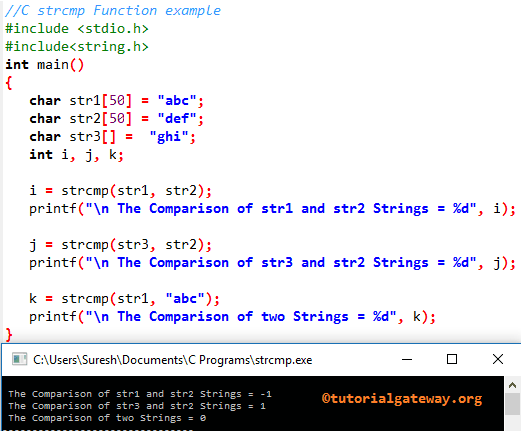
Within the strcmp function in C Programming language example, we declared three character arrays str1, str2, and str3, and assigned some random string data (a group of characters).
The following Programming statement, i uses a strcmp function to compare the character array in str1 with str2 and returns an integer value. We are assigning the return value to a previously declared i variable. As we all know, ‘abc’ will come before the ‘def’, that’s why it is returning -1 (Negative one)
The next C strcmp statement will compare the character array in str2 with str3. As we all know, ‘ghi’ will come after the ‘def’, that’s why it is returning 1 (Positive one).
In the last line, we used the sample text directly inside the strcmp function. It means (“abc”, “abc”). Both are equal, and the result set is 0.
#include <stdio.h>
#include<string.h>

int main()
{
   char str1[50] = "abc";
   char str2[50] = "def";
   char str3[] =  "ghi";
   int i, j, k;

   i = strcmp(str1, str2);
   printf("\n The Comparison of str1 and str2 Strings = %d", i);

   j = strcmp(str3, str2);
   printf("\n The Comparison of str3 and str2 Strings = %d", j);

   k = strcmp(str1, "abc");
   printf("\n The Comparison of two Strings = %d", k);
}
C strcmp() function with Else If statement
As we mentioned earlier, the end users may not understand the meaning of 0, -1, and 1 results. We must use an Else If statement to print different messages based on the result or perform some kind of operation.
The following example returns the information based on the result. If the strcmp() function returns 0, both strings are equal. -1 means S1 is lexicographically Smaller than S2. Next, 1 means S1 is lexicographically greater than S2.
#include <stdio.h>
#include <string.h>
int main()
{
   char s1[] = "European";
   char s2[] = "European Union";
   int res = strcmp(s1, s2);

   if (res == 0)
   {
      printf("S1 and S2 Strings are Equal");
   }
   else if (res > 0)
   {
      printf("S1 is lexicographically Greater than S2");
   }
   else
   {
      printf("S1 is lexicographically Smaller than S2");
   }

}
S1 is lexicographically Smaller than S2C strcmp() function compares lexicographically greater string (>0)
In the following example, we will show how to use the strcmp() function to compare lexicographically greater strings. It means the strcmp() return value is a positive integer (greater than 0).
Here, the strcmp() starts the string comparison from the first character. As both “n” and “e” characters are the same in both strings, the compiler moves to the last character. Here, the first string has “w” and the second has “e”. The ASCII code of “w” (109) is greater than “e” (101). So, the result is positive 1, which means s1 is lexicographically greater than s2.
#include <stdio.h>
#include <string.h>
int main()
{
   char s1[] = "new";
   char s2[] = "nee";
   int res = strcmp(s1, s2);

   printf("%d", res);
}
1C strcmp() function lexicographically compares smaller string (<0)
When the strcmp() function finds the first unmatched character and the ASCII value of the left side string (first argument) is smaller than the right side string (second argument), it returns a negative value.
In the following example, we show how to use the strcmp() function to compare lexicographically small strings. It means the strcmp() return value is a negative integer (less than 0).
Here, the ASCII value of the first unmatched character “a” (97) is smaller than “m” (109). The result is negative 1, which means s1 is lexicographically smaller than s2.
#include <stdio.h>
#include <string.h>
int main()
{
   char s1[] = "ai";
   char s2[] = "mi";
   int res = strcmp(s1, s2);

   printf("%d", res);
}
-1C strcmp() function working with numbers
When the numerical values are declared as a string data type, we can use the strcmp() function to compare two numbers. In the following example, we compare “34568” against the “34567” number. As we all know, “34568” comes after the “34567”, so s1 is lexicographically greater than s2.
#include <stdio.h>
#include <string.h>
int main()
{
   char s1[] = "34568";
   char s2[] = "34567";
   int res = strcmp(s1, s2);

   if (res == 0)
   {
      printf("S1 and S2 Strings are Equal");
   }
   else if (res > 0)
   {
      printf("S1 is lexicographically Greater than S2");
   }
   else
   {
      printf("S1 is lexicographically Smaller than S2");
   }

}
S1 is lexicographically Greater than S2It’s not only numbers, but we can use a combination of string text and numbers as the C strcmp() function arguments to perform comparison. For instance, replace the string declaration part in the above example
char s1[] = "34568";

char s2[] = "34567";
with the following code
char s1[] = "London 345";

char s2[] = "London 567";
and the result becomes
S1 is lexicographically Smaller than S2NOTE: As we have mentioned, the use of the If else and Else If statements to display the proper message based on the strcmp() function return value (0, -1, and 1). For simple and short coding, in the following sections, we use the direct integer result as the output.
C strcmp() function to compare strings with different lengths
In our previous strcmp() method examples, we used strings of the same length to perform the string comparison. However, we can use the strcmp() function for comparison with strings of different lengths.
In the following example, the first string has an extra two characters, “an”, so it is greater than s1.
#include <stdio.h>
#include <string.h>
int main()
{
   char s1[] = "european";
   char s2[] = "europe";
   int res = strcmp(s1, s2);

   printf("%d", res);
}
1However, if we change the declared strings as shown below, the result becomes -1. Although the total number of characters in the first string is larger than the second, the first unmatched sixth character of the first argument is smaller than the second. So, the strcmp() stops comparing the remaining and returns -1 as the output.
char s1[] = "europan";

char s2[] = "europe";
C strcmp() method comparison of s1 and s2
- e = e
- u = u
- r = r
- o = o
- p = p
- a != e. So, compare the ASCII codes. As we know, the ASCII value of e is greater than a. So, the result is -1.
Use C strcmp() function for password validation
When performing the password validation, it is important to check each character against the correct password characters (including cases). In this situation, we can use the strcmp() function to compare the user-entered password against the existing password. If they match perfectly (Character by character), allow them to log in and perform tasks. Otherwise, throw an error stating: “Enter the correct password”.
#include <stdio.h>
#include <string.h>
int main()
{
   char correctpass[] = "Password123";
   char password[50];

   printf("Enter Password = ");
   scanf("%s", password);

   if(strcmp(correctpass, password) == 0)
   {
      printf("Login Success");
   }
   else
   {
      printf("Wrong Password");
   }
}
Result
Enter Password = hihellow
Wrong Password

Enter Password = Password123
Login Success
C strcmp() function to lexicographically sort strings
We can use the built-in strcmp() function to sort the given strings in alphabetical order. To demonstrate it, we can use simple two-string examples and compare them with each other, and print them in alphabetical order. However, the following example uses an array of strings and uses the for loop to lexicographically sorts them alphabetically.
#include <stdio.h>
#include <string.h>

int main()
{
   char *str[] = {"USA", "INDIA", "RUSSIA", "CHINA", "GERMANY"};
   char *temp;

   for (int i = 0; i < 4; i++)
   {
      for (int j = i + 1; j < 5; j++)
      {
         if (strcmp(str[i], str[j]) > 0)
         {
            temp = str[i];
            str[i] = str[j];
            str[j] = temp;
         }
      }
   }
   printf("Strings in lexicographical order:\n");
   for (int i = 0; i < 5; i++)
   {
      printf("%s\n", str[i]);
   }
}
Result
Strings in lexicographical order:
CHINA
GERMANY
INDIA
RUSSIA
USA
Is the C strcmp() function case-sensitive?
The built-in strcmp() function is case-sensitive because, while comparing strings, it uses the ASCII values of each character. As we all know, the ASCII values of uppercase and lowercase letters are different, so the comparison fails.
Here, the ASCII value of lowercase h is 104, which is greater than that of uppercase H, which is 74. So, s1 is lexicographically larger than s2.
#include <stdio.h>
#include <string.h>
int main()
{
   char s1[] = "hi";
   char s2[] = "Hi";
   int res = strcmp(s1, s2);

   printf("%d", res);
}
1TIP: We can use strlwr() and strupr() functions to normalize the cases before the string comparison.
Always use the strings with a null terminator
When working with the C strcmp() function, we must use null-terminating strings (with \0 at the end) as two parameters. Otherwise, the returns are undefined. In the program below, there is no null termination for the s1 variable.
#include <stdio.h>
#include <string.h>
int main()
{
   char s1[10] = {'h', 'i'};
   char s2[10] = "hi";;
   int res = strcmp(s1, s2);

   printf("%d", res);
}
Use the C strcmp() function on NULL values
The strcmp() function won’t allow NULL values as parameter values. If it finds a null value as either the first or the second argument, the strcmp() function returns a segmentation fault error.
#include <stdio.h>
#include <string.h>
int main()
{
   char *s1 = "Hi";
   char *s2 = NULL;
   int res = strcmp(s1, s2);

   printf("%d", res);
}
Segmentation fault
What is the difference between C strcmp() and the == operator?
When performing string comparisons, people confuse the strcmp() string function with the == operator.
- The strcmp() function compares each character in the given two strings against each other to check whether they are equal.
- The == operator compares the memory address of the given two strings. If the address is the same, it returns true. As we all know, each variable has its own memory address, so comparing two variables’ memory addresses will always result in not equal.
In the following example, we initialized both strings with the same text and used the strcmp() function and the == operator to check whether they are equal. As you can see from the result below, the strcmp() returns that they are both equal. On the other hand, the == operator returns that they are not equal.
#include <stdio.h>
#include<string.h>
int main()
{
   char s1[] = "USA";
   char s2[] = "USA";
   printf("%d", strcmp(s1, s2));

   if(s1 == s2)
   {
      printf("\nStrings are Equal");
   }
   else
   {
      printf("\nNot Equal");
   }
}
Result
0

Not Equal
strcmp() vs strncmp()
The built-in C strcmp() function and the strncmp() function perform the string comparison and return the same result. However, the comparison process is different.
- strcmp() compares the whole string from the first character to the last (upto null terminator).
- strncmp() compares only the first N characters specified by the third argument. If you want to compare a limited number of characters, use the strncmp() method.
In the following example, the strcmp() returns -1 because the second string has more characters than the first one. However, the strncmp with 3 as the third argument value returns 0 because the first three characters in the two strings are the same.
#include <stdio.h>
#include<string.h>
int main()
{
   char s1[] = "Cat";
   char s2[] = "Category";
   printf("%d\n", strcmp(s1, s2));
   printf("%d\n", strncmp(s1, s2, 3));
   printf("%d", strncmp(s1, s2, 8));
}
Result
-1

0

-1
TIP: We can use the strcoll() to perform string comparison based on locale settings.