
This article explains how to write a sample C program to print Hello World. The Hello World program is the basic and traditional example to start any programming language. Before you start writing your first program, please set up the environment, which includes the GCC compiler and a popular IDE for writing code.
This sample Hello World program also helps you to understand the basic programming structure of C Programming. It generally consists of a single printf() statement to print the Hello World message as output.
TIP: We can replace the printf() statement with the puts() statement, and the result will be the same. However, the puts() function adds an extra new line after the message.
C Program to Print Hello World
The first step is to open your favourite IDE and save it as hello.c or any name followed by the .c extension. The next step is to write the code mentioned below into IDE. Once you have completed writing the program, please use a compiler like GCC to check for any errors in the code. Next, run the program to see the output.
NOTE: Every statement must end with a semicolon symbol (;). In the above example, we used semicolons after the printf() and the return statements. If you fail to add a semicolon, the compiler will throw an error.
#include <stdio.h>
int main()
{
  printf("Hello World");
  return 0;
}
Hello WorldStep-wise Code Analysis
- #include<stdio.h>: In this Sample C Program to print Hello World, first, we included the stdio.h, which is a standard input-output header file. This file allows you to use standard functions such as printf and scanf. Here, #include instructs the compiler to include the standard input/output library (stdio) header file in the following program.
- Int main(): It is the entry to the main program from where the compiler starts executing the code. So every program begins with the main() function. The main() function does not take any parameters, and the int keyword specifies that the function returns an integer (success or failure) as an output.
- {} Curly Brackets: We must write the complete code within these curly brackets (also known as the function body).
- printf(“Hello World”);: This C language printf statement from the stdio.h library prints the Hello World message onto the screen. Since it is a simple string text, we enclose it in double quotes to instruct the compiler to display everything inside the quote on the screen.
- return 0;: This return statement indicates to the compiler to end executing the code and exit from the current program. It is basically the end of the program. Here, 0 means successful execution of the program.
TIP: Use \n before or after the Hello World message to display an empty (blank line) before or after the message. However, if you use the \n in-between the message (printf(“Hello \nWorld”);), it breaks the Hello World and prints Hello on the first line and World on the second line.
C Program to print Hello World a specific number of times
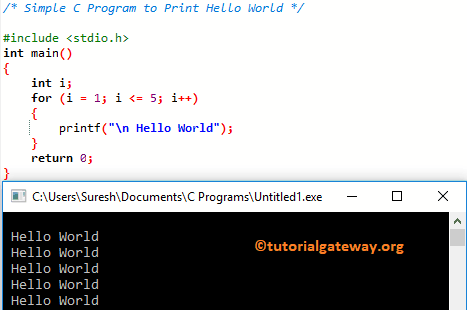
A possible solution to print the same message multiple times is using loop to iterate.
In this program, we are using the For Loop to print the same statement multiple times. The for loop starts the iteration at 1 and repeats until it reaches five. It means the compiler performs five iterations, and on each iteration, the print() statement prints the Hello World message (a total of five times). You can also use a while Loop, or do while to get the same result.
#include <stdio.h>
int main()
{
	int i;
	for (i = 1; i <= 5; i++)
	{
		printf("\n Hello World");
	}
	return 0;
}
C program to print Hello World using functions
In this example, we have created a separate function (PrintMessage) to place the printf() statement. We declared the PrintMessage() function with the void keyword because it does not return any value.
Next, call this function from the main() program. By this, we can use the PrintMessage() function multiple times from multiple programs (code reusability).
Remember, the code execution starts from the main() program. When the compiler reaches the PrintMessage() line, it will jump to that function and print the Hello World message.
#include <stdio.h>
void PrintMessage()
{
	printf("\n Hello World");
}
int main()
{
	PrintMessage();
	return 0;
}
Hello WorldUsing a character array
In our previous C program examples, we directly inserted Hello World! Message inside the printf() statement. However, we can use the char data type to create a variable with a custom message and call it from the printf() statement. To call the char data type, we must use the %c format specifier.
NOTE: If you want to print each character separately, we must use the for loop to access each character using the index position. Next, use the printf() to print that individual character.
#include <stdio.h>

int main()
{
    char msg[] = "Hello World!";
    printf("%s", msg);
    return 0;
}
Hello World!If you want to use a char (without an array), you must define each character in the Hello World message as an individual variable. Next, use %c to display those characters on the screen.
Using pointer
The following C program uses the pointer concept to print Hello World as output.
#include <stdio.h>

int main()
{
    char *msg = "Hello World!";
    printf("%s", msg);
    return 0;
}
Hello World!
Comments are closed.